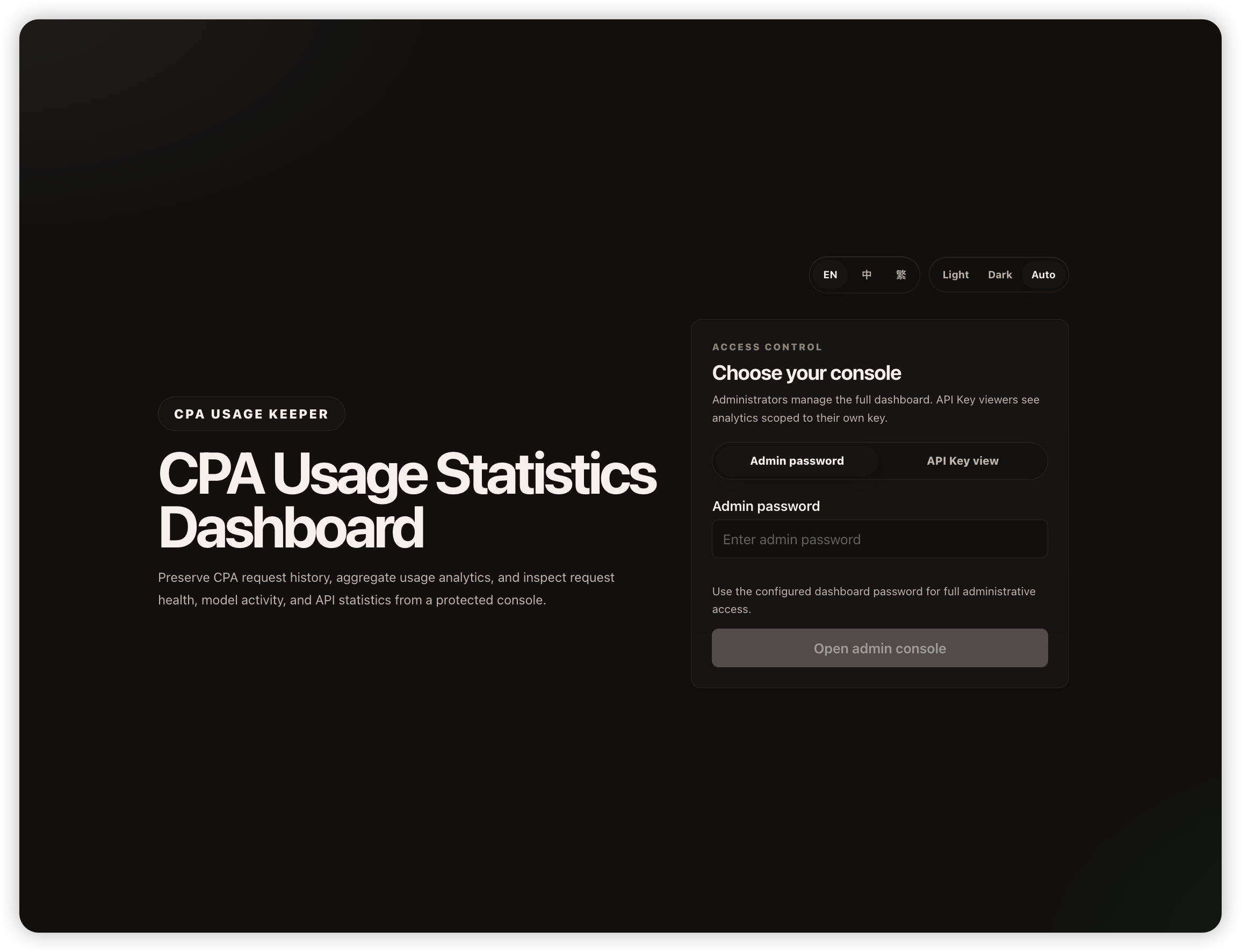
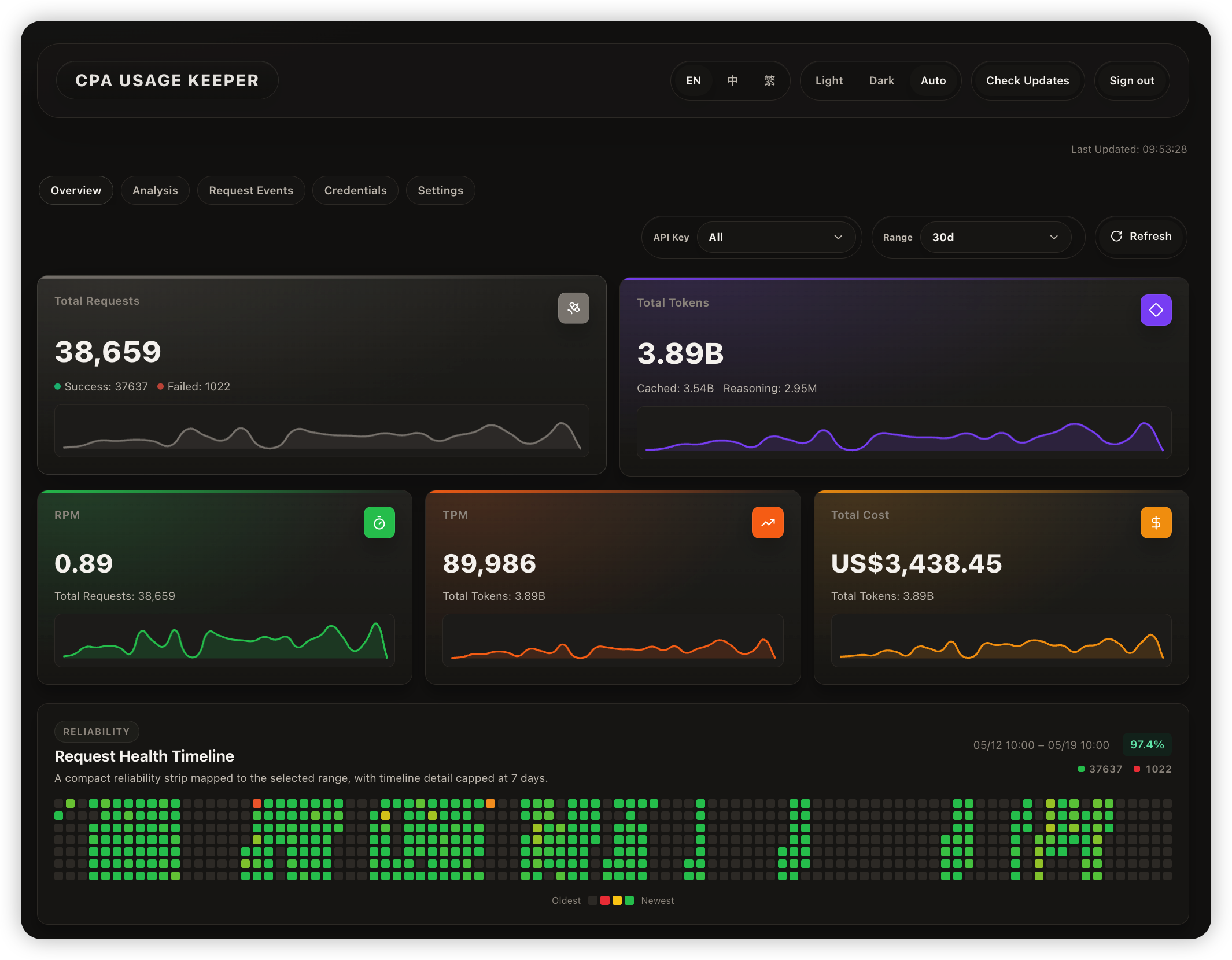
CPA Usage Keeper is a standalone CPA usage persistence and dashboard service.
It relies on CLIProxyAPI (CPA) as the backend CPA data source and adds persistent storage and statistical analysis capabilities on top of CPA. The service consumes events from the CPA Redis usage queue into SQLite, periodically pulls CPA metadata, exposes aggregation APIs, and serves a built-in web dashboard for usage, pricing, request health, and model/API statistics.
- Persist CPA usage data to SQLite
- Dashboard for request volume, tokens, cost, cache hit rate, success rate, and latency
- Filter usage details by time range, model, API Key, and source
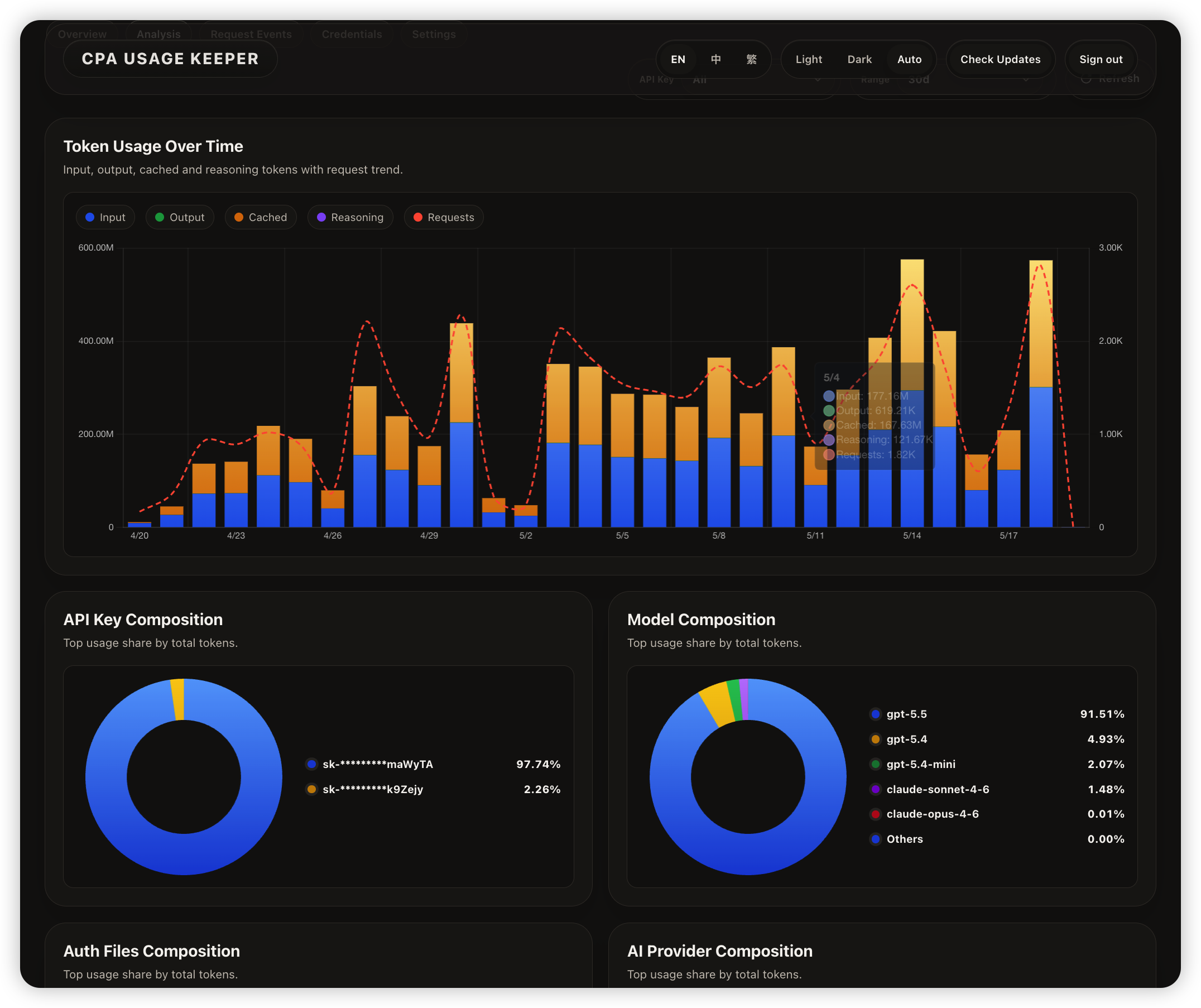
- Analysis page for token trends, model/API Key/AI Provider composition, and hourly heatmaps
- Standalone API Key usage page for querying usage by CPA API Key
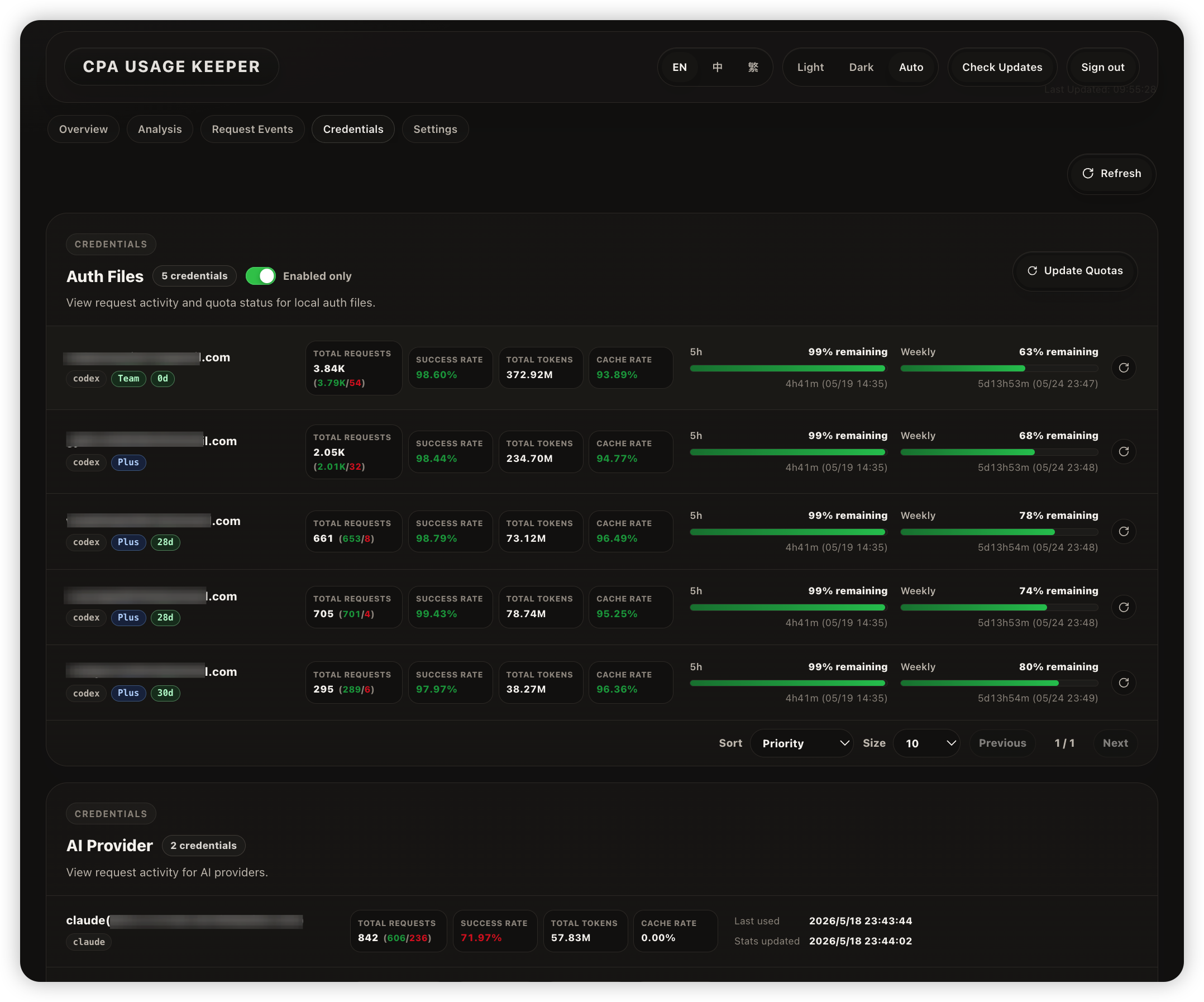
- Credentials page for Auth File and AI Provider usage, with credential quota lookup and refresh
- Maintain model prices for cost estimation and reporting
- Optional password login protection, SQLite backups, Docker/Docker Compose, and systemd deployment
Before using CPA Usage Keeper, make sure CPA usage statistics are enabled:
usage-statistics-enabled: true.
Recommended deployment path:
- First-time CPA + Keeper deployment: use Docker Compose.
- CPA already runs on the host: use Docker.
- No containers: use the Linux binary.
For public deployments, enable AUTH_ENABLED=true and configure LOGIN_PASSWORD to protect your data.
The example below is a minimal reference for running CPA and CPA Usage Keeper together.
The repository's docker-compose.example.yml is intentionally a Keeper-only template. Use it when CPA is already deployed, or merge its cpa-usage-keeper service into your own Compose project.
services:
  cli-proxy-api:
    image: eceasy/cli-proxy-api:latest
    container_name: cli-proxy-api
    restart: unless-stopped
    ports:
      - "8317:8317"
      - "1455:1455"
    volumes:
      - ./cpa/config.yaml:/CLIProxyAPI/config.yaml
      - ./cpa/auths:/root/.cli-proxy-api
      - ./cpa/logs:/CLIProxyAPI/logs
    networks:
      - cpa-network

  cpa-usage-keeper:
    image: ghcr.io/willxup/cpa-usage-keeper:latest
    container_name: cpa-usage-keeper
    restart: unless-stopped
    depends_on:
      - cli-proxy-api
    ports:
      - "8080:8080"
    environment:
      TZ: Asia/Shanghai # Sets the container timezone; log timestamps use this timezone.
      CPA_BASE_URL: http://cli-proxy-api:8317
      CPA_MANAGEMENT_KEY: replace-with-your-management-key
      REDIS_QUEUE_ADDR: cli-proxy-api:8317
      AUTH_ENABLED: true
      LOGIN_PASSWORD: replace-with-your-login-password
    volumes:
      - ./keeper:/data
    networks:
      - cpa-network

networks:
  cpa-network:
    driver: bridge
To manage Keeper settings with a .env file, remove the environment block from the cpa-usage-keeper service and add env_file:
    env_file:
      - .env
    volumes:
      - ./keeper:/data
Create .env on the host in the same directory as docker-compose.yml, for example:
TZ=Asia/Shanghai
CPA_BASE_URL=http://cli-proxy-api:8317
CPA_MANAGEMENT_KEY=replace-with-your-management-key
AUTH_ENABLED=true
LOGIN_PASSWORD=replace-with-your-login-password
Docker Compose injects the .env values into the Keeper container as environment variables. If CPA uses a non-default Redis/RESP address, also set REDIS_QUEUE_ADDR in .env.
Start:
docker compose up -dStop:
docker compose downCPA files are stored under ./cpa, and CPA Usage Keeper data is stored under ./keeper.
Copy and edit the example config. At minimum, set CPA_BASE_URL and CPA_MANAGEMENT_KEY. For public deployments, also set AUTH_ENABLED=true and LOGIN_PASSWORD. If CPA uses a non-default Redis/RESP address, also set REDIS_QUEUE_ADDR:
cp .env.example .env
vim .env
When CPA runs on the host, .env usually needs these values:
CPA_BASE_URL=http://host.docker.internal:8317
CPA_MANAGEMENT_KEY=replace-with-your-management-key
AUTH_ENABLED=true
LOGIN_PASSWORD=replace-with-your-login-password
docker run -d \
--name cpa-usage-keeper \
--add-host=host.docker.internal:host-gateway \
-p 8080:8080 \
-v "$(pwd)/keeper:/data" \
--env-file .env \
ghcr.io/willxup/cpa-usage-keeper:latestDownload the Linux binary package for your architecture from Releases, or use the command line:
curl -L -o cpa-usage-keeper.tar.gz "<replace-with-linux-binary-download-url>"
mkdir -p cpa-usage-keeper
tar -xzf cpa-usage-keeper.tar.gz -C cpa-usage-keeper --strip-components=1
cd cpa-usage-keeper
Copy the linux_amd64 or linux_arm64 package URL from Releases, then replace the placeholder in the command above.
Copy and edit the example config. See Configuration for the available options:
cp .env.example .env
vim .env
./cpa-usage-keeperThe Linux binary package includes cpa-usage-keeper.service, which can be registered directly as a systemd service. After it starts, systemd keeps the process running after SSH or terminal sessions close.
systemd requires an absolute WorkingDirectory. The sed command below writes the current directory into the service file automatically:
sudo cp cpa-usage-keeper.service /etc/systemd/system/cpa-usage-keeper.service # Copy the service file into the systemd unit directory.
sudo sed -i "s|__CPA_USAGE_KEEPER_DIR__|$(pwd)|g" /etc/systemd/system/cpa-usage-keeper.service # Write the current directory as WorkingDirectory.
sudo systemctl daemon-reload # Reload systemd unit files.
sudo systemctl enable --now cpa-usage-keeper # Enable startup on boot and start the service now.
Useful commands:
sudo systemctl status cpa-usage-keeper # Show service status.
sudo journalctl -u cpa-usage-keeper -f # Follow service logs.
sudo systemctl restart cpa-usage-keeper # Restart the service.Copy the example config:
cp .env.example .envFor first-time deployments, start with "Minimum required" and "Web access and reverse proxy". Most other settings can keep their defaults.
| Variable | Required | Default | Description |
|---|---|---|---|
CPA_BASE_URL |
Yes | - | URL used by the Keeper server to call CPA. In Docker Compose this is usually http://cli-proxy-api:8317, and it can be a private address or container service name |
CPA_MANAGEMENT_KEY |
Yes | - | CPA management key used to read CPA management APIs |
| Variable | Required | Default | Description |
|---|---|---|---|
APP_PORT |
No | 8080 |
Keeper HTTP listen port |
APP_BASE_PATH |
No | root path | Keeper subpath prefix, such as /keeper; empty means / |
CPA_PUBLIC_URL |
No | current browser origin root | Public CPA URL for the "Back to CPA" link |
APP_BASE_PATH must be empty or start with /; for example /cpa. /cpa/ is normalized to /cpa.
CPA_PUBLIC_URL may be a domain, a full URL with scheme, or a relative path, such as https://cpa.example.com, https://cpa.example.com/cpa/, or /cpa/. The frontend appends management.html automatically and handles trailing / or values that already end in management.html. When unset, the "Back to CPA" link points to /management.html on the current browser origin. If CPA and Keeper use different public domains, ports, or paths, set CPA_PUBLIC_URL explicitly.
CPA_BASE_URL is only used by the server to call CPA, so it can be a Docker service name or private network address. Do not use it as the browser navigation URL.
| Variable | Required | Default | Description |
|---|---|---|---|
AUTH_ENABLED |
No | false |
Enable login protection |
LOGIN_PASSWORD |
When auth is enabled | - | Login password |
AUTH_SESSION_TTL |
No | 168h |
Login session lifetime |
| Variable | Required | Default | Description |
|---|---|---|---|
TZ |
No | Asia/Shanghai |
Timezone used for statistics and display; Today, daily totals, page timestamps, log timestamps, and daily cleanup are calculated in this timezone |
REQUEST_TIMEOUT |
No | 30s |
Timeout for CPA HTTP requests and Redis queue operations |
TLS_SKIP_VERIFY |
No | false |
Skip TLS certificate verification for CPA HTTPS and Redis queue TLS; enable only with self-signed certificates |
| Variable | Required | Default | Description |
|---|---|---|---|
QUOTA_AUTO_REFRESH_ENABLED |
No | false |
Enable Auth Files quota auto-refresh; it runs only while a backend page is visible and sending heartbeats |
QUOTA_AUTO_REFRESH_INTERVAL |
No | 5m |
Auth Files quota auto-refresh interval, minimum 60s, active only while a backend page is active |
QUOTA_REFRESH_WORKER_LIMIT |
No | 10 |
Maximum Auth Files quota refresh concurrency, capped at 100 |
| Variable | Required | Default | Description |
|---|---|---|---|
REDIS_QUEUE_ADDR |
No | CPA_BASE_URL hostname + 8317 |
CPA Redis/RESP TCP address; normally leave empty. Set host:port for non-default ports or separately exposed Redis streams |
REDIS_QUEUE_TLS |
No | false |
Use TLS for Redis queue connection; set true when REDIS_QUEUE_ADDR is explicit and requires TLS |
REDIS_QUEUE_BATCH_SIZE |
No | 10000 |
Maximum queue records per pull |
REDIS_QUEUE_IDLE_INTERVAL |
No | 1s |
Empty queue check interval |
| Variable | Required | Default | Description |
|---|---|---|---|
WORK_DIR |
No | ./data |
Application work directory; database, logs, and backups default to app.db, logs/, and backups/ under it |
LOG_LEVEL |
No | info |
Log level |
LOG_FILE_ENABLED |
No | true |
Write persistent log files |
LOG_RETENTION_DAYS |
No | 7 |
Log retention days; 0 disables cleanup |
BACKUP_ENABLED |
No | true |
Enable SQLite database backups |
BACKUP_INTERVAL |
No | 24h |
Database backup interval |
BACKUP_RETENTION_DAYS |
No | 7 |
Backup retention days |
| Variable | Required | Default | Description |
|---|---|---|---|
TLS_ENABLED |
No | false |
Let Keeper serve HTTPS/TLS directly |
TLS_CERT_FILE |
Required when TLS is enabled | - | HTTPS certificate file path |
TLS_KEY_FILE |
Required when TLS is enabled | - | HTTPS private key file path |
Usually, HTTPS should be terminated at nginx, Caddy, or another reverse proxy. Set TLS_ENABLED=true only when the Keeper process must serve HTTPS directly, and provide TLS_CERT_FILE and TLS_KEY_FILE; relative paths are resolved against the .env file directory.
Security and data notes:
- SQLite database backups store original data from the application database, and backup files are not encrypted.
- Browser-facing APIs redact key-like source/lookup fields or map them to stable public identifiers, but raw database values are unchanged.
- For public deployments, enable
AUTH_ENABLED=trueand terminate HTTPS at your reverse proxy. - Login sessions are stored in process memory and become invalid after restart.
- Redis inbox raw messages are cleaned up automatically: successful rows are kept until the end of the current day, and failed rows are kept for 7 days.
When serving under /cpa, set APP_BASE_PATH=/cpa and keep the prefix in your reverse proxy:
location /cpa/ {
    proxy_pass http://127.0.0.1:8080;
    proxy_set_header Host $host;
    proxy_set_header X-Forwarded-Proto $scheme;
    proxy_set_header X-Forwarded-For $proxy_add_x_forwarded_for;
}
If the CPA management page and Keeper share the same browser domain, and CPA's management page is available at /management.html on that domain root, CPA_PUBLIC_URL can be omitted. For example, when Keeper is served from https://cpa.example.com/keeper/, "Back to CPA" defaults to https://cpa.example.com/management.html.
If the CPA management page is on another domain, port, or path, set CPA_PUBLIC_URL, for example:
CPA_PUBLIC_URL=https://cpa.example.comcmd/server/ Application entrypoint
internal/api/ HTTP routes and handlers
internal/app/ App wiring and startup
internal/auth/ In-memory session auth
internal/backup/ SQLite database backup management
internal/benchmark/ Aggregation benchmark helpers
internal/config/ Environment config loading
internal/cpa/ CPA client and types
internal/entities/ GORM data models
internal/helper/ Shared backend helpers and browser-facing redaction
internal/logging/ Logging setup and retention
internal/poller/ Background queue consumption and metadata sync
internal/quota/ Quota cache, refresh, and query services
internal/repository/ SQLite access and aggregations
internal/service/ Usage, pricing, and identity services
internal/timeutil/ Project timezone and time helpers
internal/updatecheck/ GitHub Release update checks
internal/version/ Build version metadata
deploy/linux/ Linux systemd service file
web/ React + TypeScript frontend
- Go 1.22+
- Node.js 22+
- npm
- A running CLIProxyAPI (CPA) instance
- Create and edit your local config. At minimum, set
CPA_BASE_URLandCPA_MANAGEMENT_KEY. If the CPA Redis/RESP port is not the default8317, also setREDIS_QUEUE_ADDR:
cp .env.example .env
vim .env- Start the backend:
go run ./cmd/server/main.go- In another terminal, install frontend dependencies and start the dev server:
npm --prefix ./web ci
npm --prefix ./web run dev -- --host 127.0.0.1
The frontend dev server proxies /api to http://127.0.0.1:8080 by default. Open http://127.0.0.1:5173 for local development. If the backend uses another port:
VITE_API_PROXY_TARGET=http://127.0.0.1:9090 npm --prefix ./web run dev -- --host 127.0.0.1Run the full local verification baseline:
make verifyOr run checks individually:
go test ./cmd/... ./internal/...
npm --prefix ./web run test
npm --prefix ./web run lint
npm --prefix ./web run typecheck
npm --prefix ./web run build
This project is open source under the MIT License.