






Global lightweight logger for Node, browser, and modern JavaScript/TypeScript frameworks (Vue, React, Angular, etc), featuring emojis, theme detection, timestamps, caller tracing, and automatic mute mode in production. Supports multiple arguments and complex data types.
- Multiple arguments support: Log several values in one call.
- Complex data types: Full support for objects, arrays, functions, dates, errors, Map, Set, BigInt, Symbol, and circular references.
- Improved formatting: Each argument appears on a separate line for clarity.
- Features
- Installation
- Quick Start
- Log Levels and Priorities
- Visual Output Examples
- Usage
- Advanced Usage
- Error Handling
- Testing
- Changelog
- License
- Show your support
- Thank You so much
- Links
- Author
- Universal - Works in Node.js and all modern browsers
- Framework-ready: Vue, React, Angular, etc.
- Multiple arguments support: Log several values in one call.
- Complex data types: Full support for objects, arrays, functions, dates, errors, Map, Set, BigInt, Symbol, and circular references.
- One-time import - Import once, use everywhere globally
- Global availability - No need for imports in every file
- Configurable Log Levels - debug, info, warn, error, mute
- Beautiful Output - Emojis, colorful and well-formatted logs
- Theme detection - Colorful adaptable to theme light/dark
- Timestamps and source tracing included
- Improved formatting: Each argument appears on a separate line for clarity.
- Environment Aware - Different behaviors for development/production
- Production control: Easily enable/disable logs in production.
- Zero Dependencies - Ultra-lightweight and fast
- Well Tested - Comprehensive test suite
npm install logger-global
# or
yarn add logger-global
# or
pnpm add logger-globalnpm install logger-global// Import once in your main file
import logger from 'logger-global'
// Use anywhere in your app without additional imports
logger.debug('What is happening?')
logger.info('Hello, world!')
logger.warn('This is a warning')
logger.error('Something went wrong')That's it! The logger is now available globally throughout your entire application.
Based on the log priority, you can define which log messages should be shown by setting the appropriate log level.
Control what gets logged with configurable levels.
By default, the level is set to debug (display all logs), but you can change it with:
| Level | Emoji | Priority | Displays Logs For |
|---|---|---|---|
debug |
⚙️ | 1 | debug, info, warn, error |
info |
ℹ️ | 2 | info, warn, error |
warn |
3 | warn, error |
|
error |
❌ | 4 | error |
mute |
∞ | Nothing |
You can change the log level dynamically in your code depending on the environment, preferences, or verbosity you need.
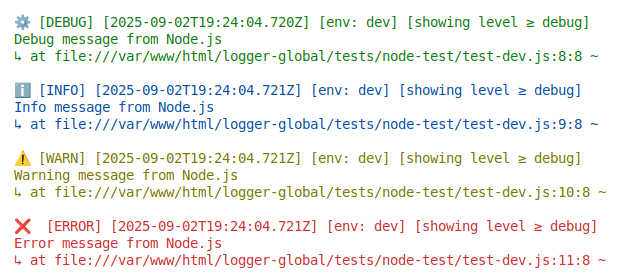
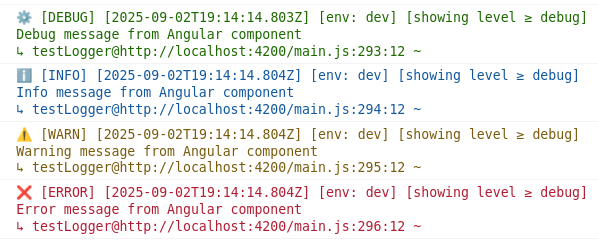
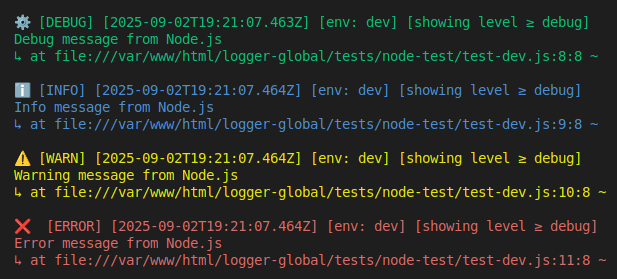
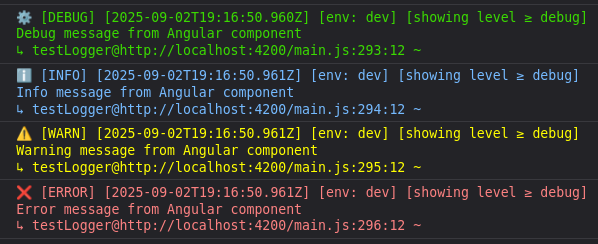
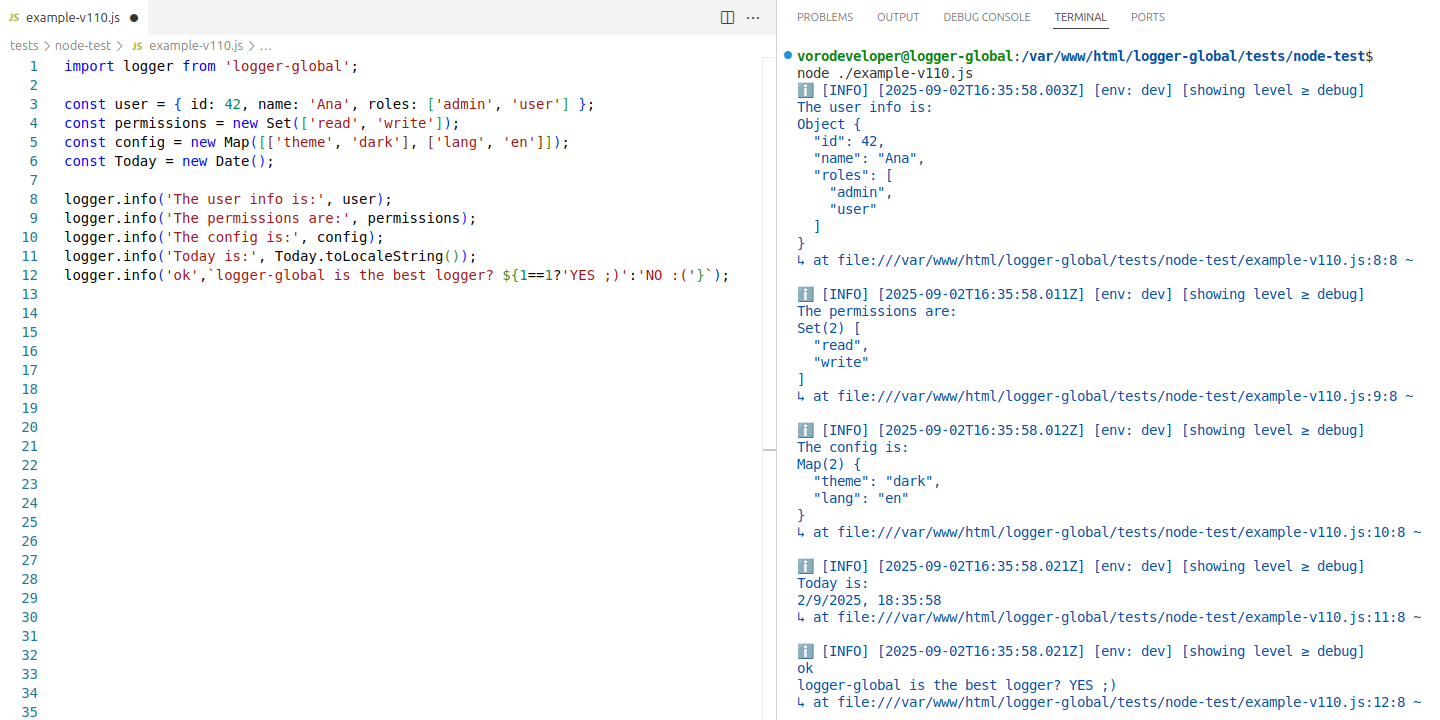
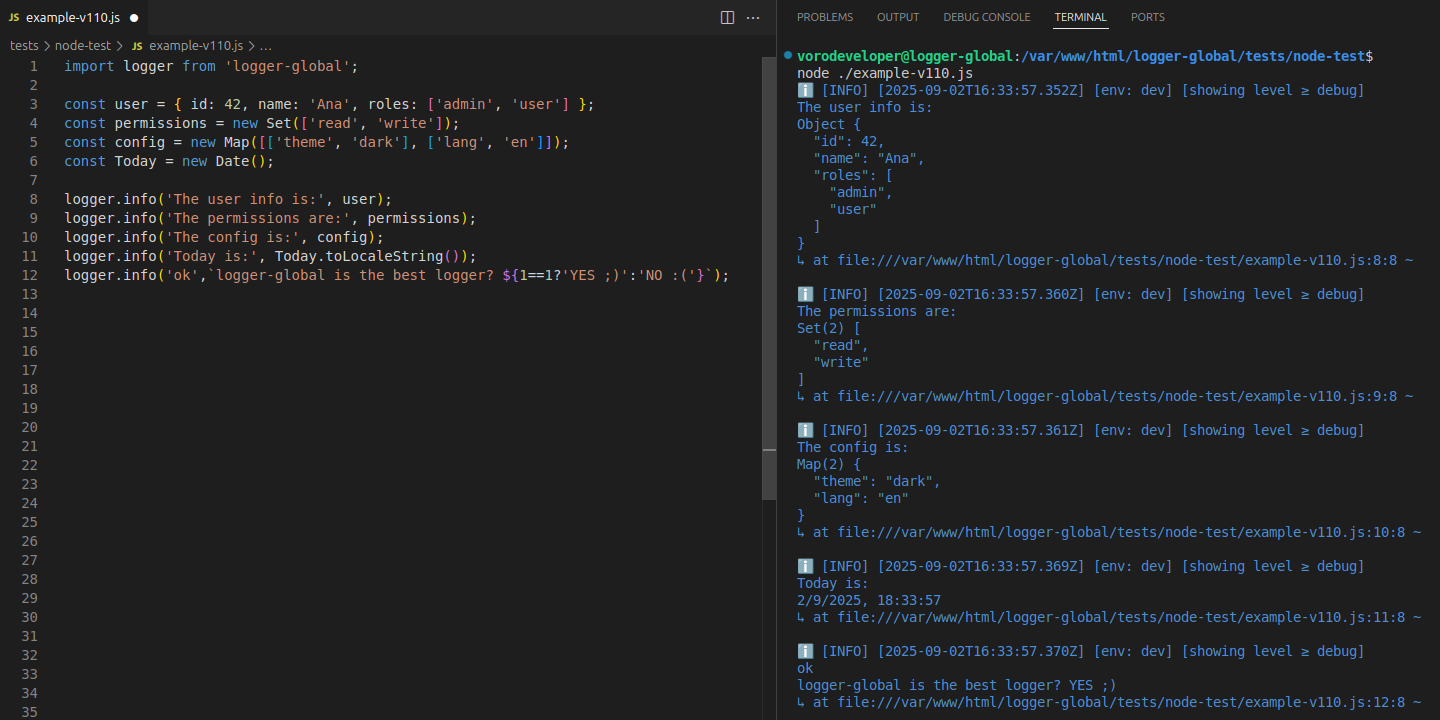
We import logger-global once and we can use the logger globally in the entire application without declaring the import again
// main.ts (Vue/React/Angular) or app.js (Node)
import logger from 'logger-global' //Import onceYou can establish or change the configuration anywhere in your application
GET the current level established to permit showing the log info
SET the current level permitted to show the log info
-
logger.allowInProduction(false)(default, mutes logs in production) -
logger.allowInProduction(true)(allows logs in production)// main.ts (Vue/React/Angular) or app.js (Node) import logger from 'logger-global' //Import once logger.setCurrentLevel('warn') logger.allowInProduction(false) // Development => currentLevel = 'warn' // Production => currentLevel = 'mute'
// main.ts (Vue/React/Angular) or app.js (Node)
import logger from 'logger-global'  //Import once

logger.setCurrentLevel('warn')
logger.allowInProduction(true)

// Development => currentLevel = 'warn'
// Production => currentLevel = 'debug'
// main.ts (Vue/React/Angular) or app.js (Node)
import logger from 'logger-global'  //Import once

logger.setCurrentLevel('warn')
logger.allowInProduction(false)
logger.setCurrentLevel('info')

// Development => currentLevel = 'info'
// Production => currentLevel = 'mute'
// main.ts (Vue/React/Angular) or app.js (Node)
import logger from 'logger-global'  //Import once

logger.setCurrentLevel('warn')
logger.allowInProduction(true)
logger.setCurrentLevel('info')

// Development => currentLevel = 'info'
// Production => currentLevel = 'info'
// Any component/module - NO IMPORTS NEEDED!
logger.debug('Debug message')
logger.info('Info message')
logger.warn('Warning message')
logger.error('Error message')Log multiple values of any type in a single call:
// Basic types
logger.info('Status:', 200, 'Success', true);
// Output: Status: 200 Success true

// Complex objects
const user = { id: 1, name: 'Alice', roles: ['admin', 'user'] };
const metadata = { timestamp: new Date(), requestId: 'abc123' };
logger.debug('User login:', user, metadata);

// Mixed types
logger.warn('Processing:', 'file.txt', 1024, 'bytes', new Error('Warning'));

// Functions (shows signature, doesn't execute)
logger.info('Callback:', () => 'result', function named() { return 42; });
// Output: Callback: [Function (anonymous)] [Function (named)]| Type | Example | Output |
|---|---|---|
| String | 'hello' |
hello |
| Number | 42, 3.14 |
42, 3.14 |
| Boolean | true, false |
true, false |
| Object | { key: 'value' } |
{ "key": "value" } |
| Array | [1, 2, 3] |
[ 1, 2, 3 ] |
| Function | () => {} |
[Function (anonymous)] |
| AsyncFunction | async () => {} |
[AsyncFunction (anonymous)] |
| Date | new Date() |
2025-08-19T10:30:00.000Z |
| Error | new Error('msg') |
msg + Stack trace |
| Map | new Map([['a', 1]]) |
Map(1) { "a": 1 } |
| Set | new Set([1, 2]) |
Set(2) [ 1, 2 ] |
| RegExp | /test/i |
/test/i |
| BigInt | 123n |
123n |
| Symbol | Symbol('id') |
Symbol(id) |
| Null/Undefined | null, undefined |
null, undefined |
Safely handles circular object references:
const obj = { name: 'test' };
obj.self = obj; // Circular reference

logger.info('Circular:', obj);
// Output: Circular: { "name": "test", "self": "[Circular]" }The logger includes built-in validation to ensure robustness and prevent silent failures.
If the provided log level is invalid, the logger will ignore the change and keep the previously set level.
logger.setCurrentLevel('info')           // Valid → level changes to 'info'
logger.setCurrentLevel('invalidLevel') // Invalid → level remains unchanged to 'info' level// Typos in level names
logger.setCurrentLevel('INFO') // Invalid: case-sensitive
logger.setCurrentLevel('infoo') // Invalid: typo
logger.setCurrentLevel('Info') // Invalid: must be lowercase
logger.setCurrentLevel('logger-global') // Invalid: not a log level
// Invalid data types
logger.setCurrentLevel('') // Invalid: empty string → no change
logger.setCurrentLevel(null) // TypeScript error
logger.setCurrentLevel(info) // TypeScript error
logger.setCurrentLevel(123) // TypeScript errorThis validation ensures your application will never unexpectedly lose its logging configuration due to incorrect values.
logger-global has been thoroughly tested across major environments:
| Environment | Status | Location | Run Command |
|---|---|---|---|
| Node | ✅ Passed | /tests/node-test/ |
./tests/node-test.sh |
| Angular | ✅ Passed | /tests/angular-test/ |
./tests/angular-test.sh |
| React | ✅ Passed | /tests/react-test/ |
./tests/react-test.sh |
| Vue | ✅ Passed | /tests/vue-test/ |
./tests/vue-test.sh |
You can see the README.md in /tests/README.md for more detailed information about how to review or repeat the testing process.
# Run all tests
cd logger-global/tests

# Test Node
./node-test.sh

# Test Angular
./angular-test.sh

# Test React
./react-test.sh

# Test Vue
./vue-test.sh- Cross-platform compatibility (Node + Browser)
- Theme detection in light/dark browser modes
- Environment detection development/production
- Global injection - one declaration and use throughout the entire app
- Framework integration with Angular, React & Vue
- Production mode automatic muting
- Enhanced logging capabilities:
- Multiple arguments support - Log several values in one call
- Complex data types - Full support for objects, arrays, functions, dates, errors, Map, Set, BigInt, Symbol, circular references
- AsyncFunction detection - Distinguishes between sync and async functions
- Better formatting - Improved display of Maps, Sets, circular objects, BigInt, Symbol
- Initial release
- Basic logging functionality (only messages)
- Universal Node and browser frameworks support
- Beautiful console output with themes
- Production-aware logging
MIT © 2025 VoroDeveloper
This project is licensed under the MIT License - see the LICENSE file for details.
This logger is free and open source.
I hope you find this logger useful!
Contributions, issues and feature requests are welcome!
If you end up using it in your project, a mention would be appreciated — and suggestions or improvements are always welcome.
Feel free to open an issue or submit a pull request if you have ideas, bugs, or feature requests.
Please use the GitHub Issues page to report bugs or request features.
Your support helps:
- Maintain the project actively and keep it updated
- Add new features based on your suggestions
- Fix bugs quickly and efficiently
- Improve documentation to make it easier to use
- Keep it free for everyone
- ⭐ Star this repository - Increases its visibility and helps others find it
- 🐛 Report bugs - Contributes to improving the quality of the project for everyone
- 💡 Suggest features - Your input can shape the future of the logger
- 📢 Share with colleagues - Helps grow our community
- 📝 Write a review - Share your experience


Every contribution, no matter the size, makes a meaningful difference. I'm truly grateful for your generosity and belief in what I do
Your support allows me to continue developing free and open-source tools.
- Repository: https://github.com/vorodeveloper/logger-global
- NPM Package: https://www.npmjs.com/package/logger-global
VoroDeveloper
Full-Stack Developer - Development of Web and Cross-Platform Applications



Last updated: September 2025