Find the light in your darkness. A highly configurable, networked tally system.
Caution
This version is actively being tested but is still an early release and may contain bugs. If you need a battle-tested version, please use v2.0.0 for now. It's a step back in features, but it's stable. If you do find a bug, let us know! We'll do our best to fix it quickly.
- Decentralised tally management
- Multi-switcher configuration
- Source combination
- Hardware tally output
- Expansive web UI configuration
- Tally and device web view
- Easy network device discovery
- Companion module (WIP)
- Stagetimer.io connection (WIP)
- Device alerting
- Open source, with support for DIY devices
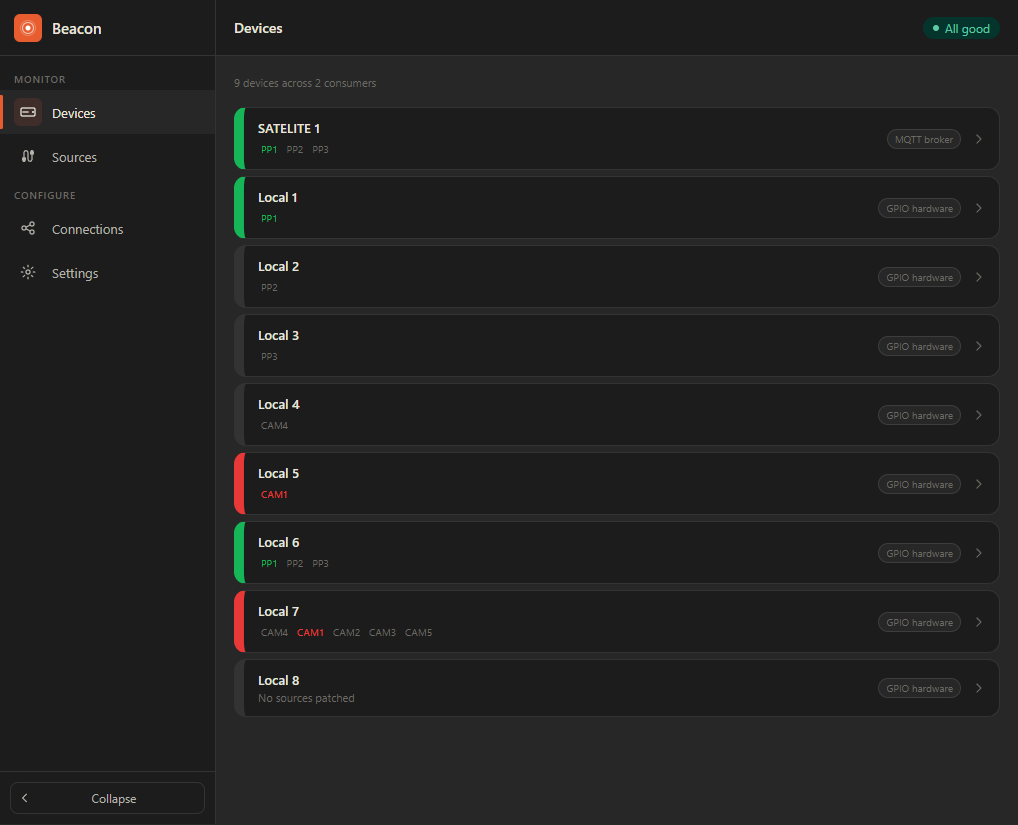
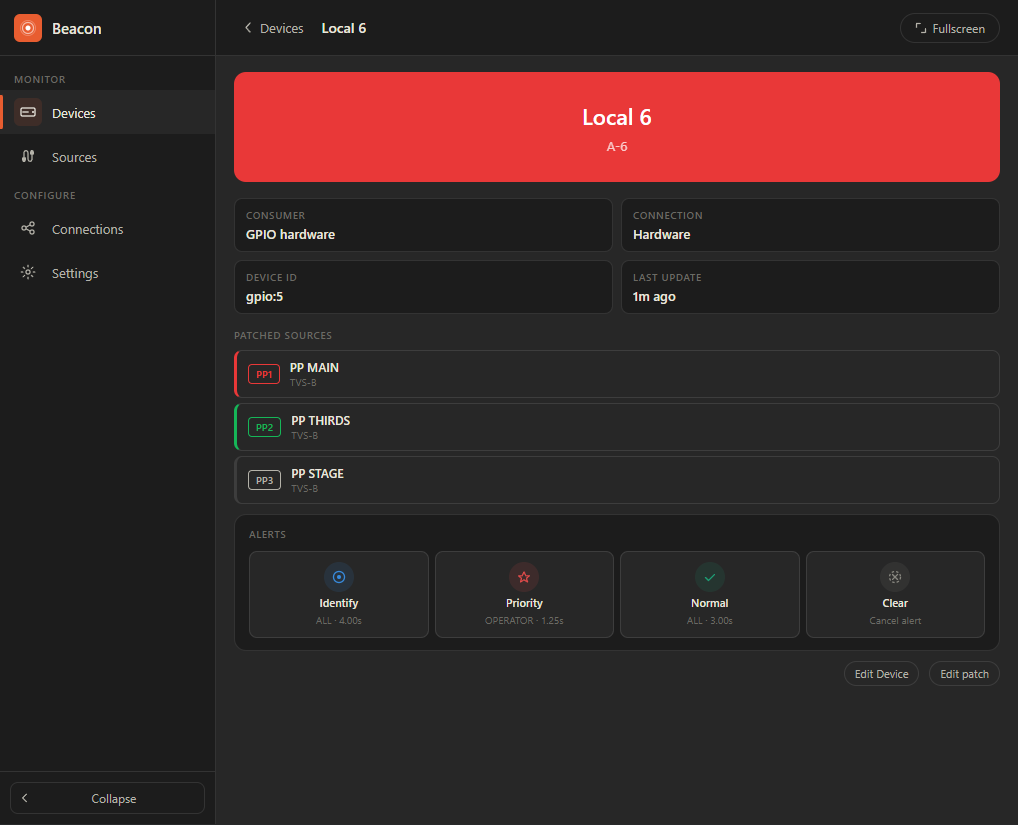

Beacon is a modular system. This repository contains the main server, the Beacon Base. It runs on Windows, Docker, Raspberry Pi and our custom hardware.
The Base connects to one or more producers. We currently support Blackmagic ATEM switchers, with VMIX, OBS, Stagetimer, Hyperdeck, and Web Presenter support in progress. Producers supply sources and their tally states to consumers. There are two consumer types: the network consumer, which provides tally access over the network, and the hardware consumer, which enables physical outputs on supported platforms (see Hardware). Need a connection we don't have? Reach out to us!
Each consumer provides devices that are configured through the web interface. Users assign sources to each device, and those sources are combined to determine the device's tally state. A more advanced state builder for complex logic is in the works.
The network consumer allows networked devices to connect over MQTT. Firmware for our devices and common ESP-32 boards is open source, and can be found in the Beacon Device repository.
We offer several networked devices on synapt.nl, including extenders with additional hardware outputs and wireless tally devices running on a mesh network.
Beacon runs on Node.js, which means it can run almost anywhere. You can set up the Beacon Base by following the Installation instructions, or use our pre-built images for Docker and Raspberry Pi.
Raspberry Pi images support the Pi 3 and Pi 4. When running on a Pi, Beacon exposes GPIO pins as hardware output devices. We're working on a newer hardware revision for improved output control. The default pin mapping follows the Beacon Base V2 GPIO configuration:
| Tally | Program | Preview |
|---|---|---|
| 1 | 3 | 15 |
| 2 | 5 | 16 |
| 3 | 7 | 18 |
| 4 | 8 | 19 |
| 5 | 10 | 21 |
| 6 | 11 | 22 |
| 7 | 12 | 23 |
| 8 | 13 | 24 |
We provide firmware for ESP32-based devices, which connect over Wi-Fi or ethernet. We are working on a dedicated mesh network, which will offer better range. Pre-built binaries are available for the following devices:
- Cheap Yellow Display (CYD)
- Huidu HD-WF2
We have developed first-party hardware for this system and are currently transitioning from V2 to V3. The V3 lineup will be available on synapt.nl soon. We will offer multiple devices, ranging from the Beacon Base with hardware outputs, to network Nodes with more hardware outputs, to network matrix displays with stagetimer support.
Beacon can be installed on any platform that supports Node.js. Pre-built Raspberry Pi and Docker images are also available.
The images support the Pi 3 and Pi 4. We recommend using the Pi 4. Download the latest image from the releases page and flash it to an SD card using the Raspberry Pi Imager or any other flashing tool.
The web interface will then be available on the IP of your Raspberry Pi
http://<ip-of-the-pi>/
SSH is disabled by default. To enable it, create an empty file named ssh in the root of the boot partition on the SD card.
SSH will start on every boot as long as the file is present. To disable SSH again, delete the file and reboot. The default credentials are beacon as username with Welcome@Beacon3 as password. You will be prompted to change the password on first login.
Running Beacon in docker can be done with the following command:
docker run -p 80:80 -p 1883:1883 -p 9001:9001 ghcr.io/synapt-technologies/beacon:latestOr with docker compose:
services:
  beacon:
    image: ghcr.io/synapt-technologies/beacon:latest
    ports:
      - "80:80"
      - "1883:1883"
      - "9001:9001"
    volumes:
      - beacon_db:/app/db
      - beacon_logs:/app/logs
    restart: unless-stopped
    environment:
      NODE_ENV: production

volumes:
  beacon_db:
  beacon_logs:
The web interface will then be available on the IP of your computer, and on http://localhost/
To contribute to Beacon, you should run it locally in Node.js. To start off follow these steps:
- Clone the repository with
git clone https://github.com/Synapt-Technologies/Beacon.git - Enter the
Beacon/appdirectory. (cd Beacon/app) - Run
yarnto download all dependencies.
There are multiple commands usable for development:
yarn dev: Runs in development mode. This will hot reload the ui, and doesn't compile the Typescript.yarn typecheck: Runs the typecheck, first for the backend, then the UI.yarn lint: Runs ESLint.yarn build: Builds vite and then the backend.yarn serve: Starts the project in production mode.yarn buildmust have been run before this.yarn start: Runsbuild, thenserve.