


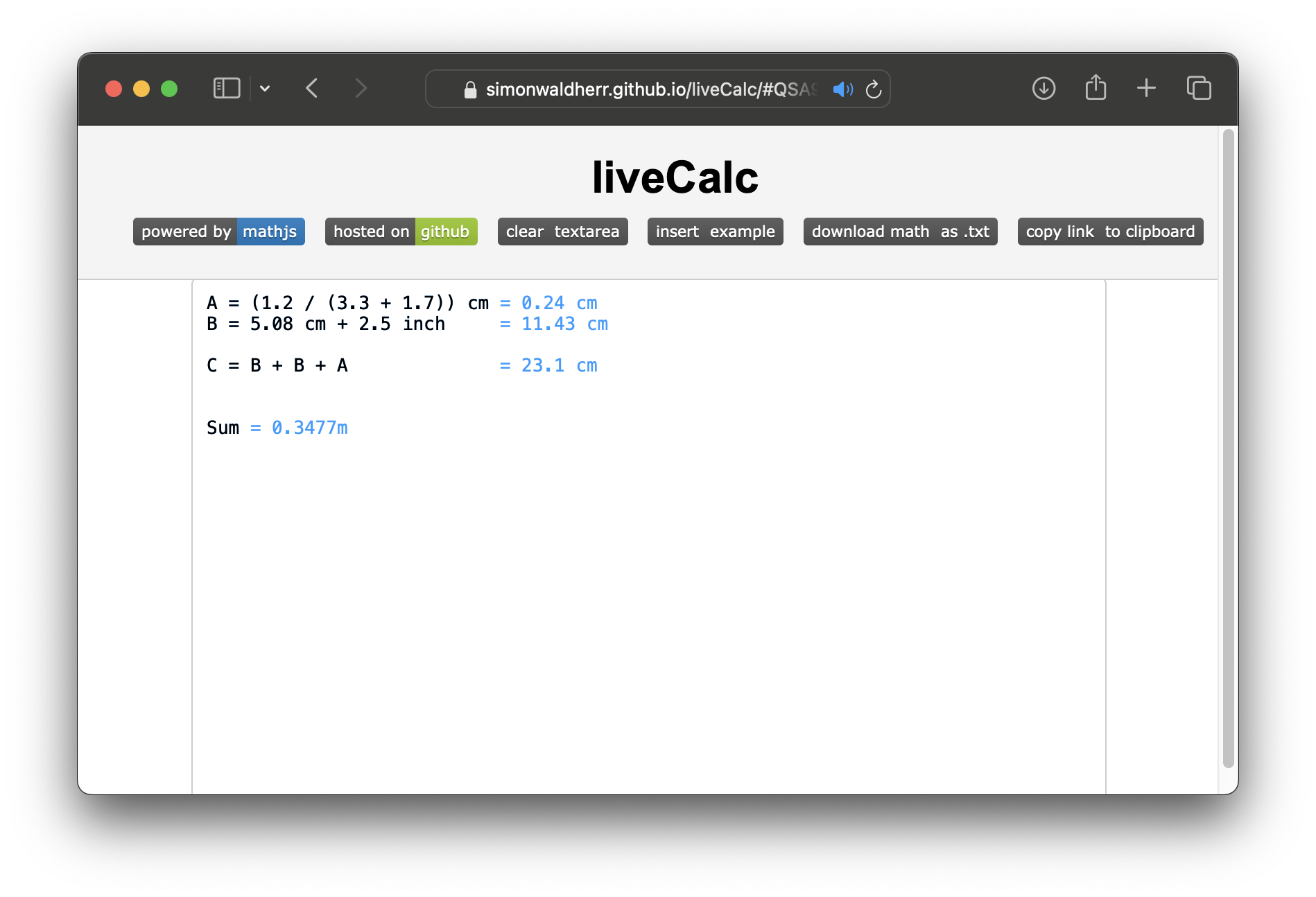


LiveCalc Pro is a browser-based interactive math notebook.
Formulas are evaluated in real time — the result updates with every keystroke.
The deterministic calculator needs no account or server. The optional AI assistant uses a small same-origin backend so provider credentials never enter the browser.
LiveCalc is evolving from an interactive calculator into a medium for inspectable, editable, and shareable calculation models: AI can propose a calculation, but LiveCalc owns every formula and every value.
The editor is the sole source of truth. The visible editor uses a transparent <textarea> over a styled backdrop: the textarea owns the notebook source, while the backdrop is a derived rendering of that same source plus the current deterministic results. No result, control, table, or chart owns a second calculation value.
Every edit follows one reactive pipeline:
Notebook source → Parsed model / AST references → Deterministic evaluation
                → Evaluation state (revisioned) → Inspector, controls, tables, visualizations
livecalc-model.js keeps the product state deliberately separated:
| State | Responsibility |
|---|---|
| NotebookState | Editable notebook source and revision |
| ParsedModel | Definitions, parsed expressions, symbol references, dependency graph, diagnostics |
| EvaluationState | Current values, line outputs, functions, errors, warnings, and the originating revision |
| VisualizationState | Structural visualization specifications only — never plotted numeric series |
| ControlState | Control specifications and UI selection only — never an independent input value |
| ShareState | Versioned, serializable source, control/visualization specs, layout, locale, and metadata |
Revisions protect the app from stale work: an evaluator result can only commit when it belongs to the current notebook revision. A syntax error marks the current model invalid instead of silently reusing a previous result.
The dependency graph is derived from parsed expressions and symbol references, never generated by an LLM. The Inspector uses that graph to show direct dependencies, downstream usages, and line locations. Numeric slider controls are source-backed: moving one rewrites its referenced assignment in the editor, then runs the normal parse → evaluate → render pipeline. Editing the assignment directly updates the slider in return.
AI is an optional model-design and explanation assistant. It may suggest a notebook, names, assumptions, units, controls, or visualization specifications. It must not provide cached chart points, final table values, or hidden calculation results. Those are always derived by the deterministic evaluator from the current notebook.
AI requests follow a separate, deliberately narrow path: browser → LiveCalc backend → named AI provider. The backend accepts only an allow-listed provider ID, model, and request shape; it reads upstream URLs and credentials from server environment variables. It never accepts a browser-supplied API key or upstream URL, so it cannot become an open proxy.
The repository includes equivalent Node.js and Go backends in backend/. Each serves the app and exposes the same compact same-origin API:
| Route | Purpose |
|---|---|
GET /api/health |
Safe provider configuration status; never includes credentials |
GET /api/ai/:provider/models |
Lists models for one configured named provider |
POST /api/ai/:provider/responses |
Validated OpenAI Responses API request, including SSE relay |
POST /api/ai/:provider/chat/completions |
Validated OpenAI-compatible Chat Completions request, including SSE relay |
provider is limited to openai, local, or custom. Each is configured from server environment variables, rather than from browser input.
Small and medium models use a versioned #lc1. URL payload. It includes editable notebook source, control specifications, visualization specifications, selected layout/locale preferences, and metadata; the recipient evaluates the notebook afresh. API keys, chat history, and evaluation caches are intentionally excluded.
Track: Work & Productivity Tagline: Build it. Verify it. Share it.
LiveCalc turns an everyday question—such as “When does a solar installation pay back?”—into an editable, deterministic model rather than an opaque AI answer. The Solar Payback — Interactive Model example is the fastest complete demo: adjust an assumption in the inspector, watch the notebook and net-position graph update, inspect the dependency chain, then copy the link. The whole model, including controls, is encoded in the share URL and re-evaluated by the recipient.
The product uses GPT-5.6 as a bounded model-design assistant: it proposes formulas, assumptions, and snippets; LiveCalc parses, evaluates, and visualizes the values locally. The OpenAI provider uses the Responses API with explicit reasoning effort, response verbosity, and an opt-in Pro mode, mediated by a credential-safe backend.
For the Node.js backend, use Node.js 18 or newer:
cd path/to/liveCalc
cp .env.example .env
# OPENAI_API_KEY enables the optional OpenAI assistant; without it, calculator-only mode remains available.
npm start
Then open: http://127.0.0.1:3000
The Go backend uses the same .env configuration and API contract:
cd backend/golang
go run .
See backend/README.md for the available implementations and commands.
The calculator and examples still work without any provider configured. For a static-only preview, any HTTP server can serve the files, but AI actions will correctly report that the backend is unavailable.
liveCalc is designed to be friendly for international users:
- Multilingual UI — English and German are bundled. The language is auto-detected from your browser on first visit and can be changed any time in Settings → Appearance → Language. Switching language is instant; no reload required.
- Decimal separator — pick
.(1.23) or,(1,23) for results. Defaults follow your locale (German →,). - Thousands separator — choose between none, space (1 234 567), comma (1,234,567), dot (1.234.567), or apostrophe (1'234'567). Defaults follow your locale.
- Unit system — choose between Metric / SI (m, kg, l, °C — default), Imperial / US (ft, lb, gal, °F), or Both. The setting also tells the AI assistant which units to prefer when suggesting expressions.
- CSV delimiter — for imported tables, pick auto-detect, comma, semicolon, tab, or pipe — useful in regions where
;is the default CSV separator.
The math engine itself always uses . internally (math.js requirement); only the displayed output and AI suggestions are localized.
liveCalc ships with an optional AI assistant panel and a server-side provider gateway. It is fully integrated with the localization settings:
- The system prompt automatically tells the model which language to reply in, which unit system to prefer, and which decimal separator the user reads — so SI units and the user's language are used naturally.
- Connection / network errors and panel UI are localized.
- Choose the provider and model under Settings → AI / LLM. The visible route is always the same-origin LiveCalc backend; there is no API-key field in the browser.
- Configure providers in
.envor your deployment secret store:OPENAI_API_KEYfor OpenAI, or explicitLOCAL_LLM_*/CUSTOM_LLM_*values for named OpenAI-compatible services. The backend does not accept browser-supplied upstream URLs or credentials. - Snippets emitted by the AI between
LIVECALC_INSERT_START/LIVECALC_INSERT_ENDmarkers can be inserted into the editor with a single click.
liveCalc ist von Grund auf für die internationale Nutzung konzipiert:
- Mehrsprachige Oberfläche – Englisch und Deutsch sind integriert. Die Sprache wird beim ersten Aufruf automatisch aus dem Browser erkannt und lässt sich jederzeit unter Einstellungen → Darstellung → Sprache umschalten – ohne Neuladen der Seite.
- Dezimaltrennzeichen – Punkt oder Komma frei wählbar (Voreinstellung folgt der Sprache, z. B. Deutsch → Komma).
- Tausendertrennzeichen – keins, Leerzeichen, Komma, Punkt oder Apostroph.
- Einheitensystem – metrisch / SI (Vorgabe), imperial / US oder beide. Diese Auswahl wirkt sich auch auf Vorschläge der KI aus.
- CSV-Trennzeichen – beim Datenimport wählbar (Auto, Komma, Semikolon, Tabulator, Pipe).
- KI-Integration – die KI antwortet in der gewählten UI-Sprache und bevorzugt das gewählte Einheitensystem. Fehlermeldungen sind lokalisiert.
Intern rechnet liveCalc immer mit . als Dezimaltrennzeichen (math.js-Vorgabe); nur die Anzeige und die KI-Vorschläge folgen den persönlichen Einstellungen.
Every line is evaluated as you type using math.js.
Results appear inline next to each expression.
Assign values to named variables and reuse them across lines:
radius = 5 cm
area = pi * radius^2 in cm^2
Convert between a wide range of units in a single expression:
a = 3 cm
b = 4 inch
a + b in mm
Supported unit families include:
| Category | Examples |
|---|---|
| Length | mm, cm, m, km, in, ft, yd, mi |
| Mass | mg, g, kg, t, oz, lb, slug |
| Volume | ml, l, L, gal, gallon, ft3, in3 |
| Area | cm2, m2, in2, ft2 (also ^2 notation) |
| Time | s, sec, min, h |
| Pressure | Pa, bar, atm, psi |
| Force | N, lbf |
| Currency | USD, EUR, GBP, JPY, CHF, AUD, CAD |
| Misc | percent |
Define a function of x to get an interactive graph in the sidebar:
f(x) = x^2 - 2*x + 1
Multiple functions (f(x), g(x), …) are plotted simultaneously.
Upload a CSV, TSV, JSON, or XML file to load it as a named dataset.
Query the dataset directly from the notebook:
avg(sales[region == "North"])
Connect to an LLM to get help with calculations, explanations, or formula suggestions.
Supported named providers (selected in Settings, configured on the server):
| Provider | Notes |
|---|---|
| OpenAI | OPENAI_API_KEY; default model gpt-5.6-terra (balanced GPT-5.6 tier) |
| Local | An explicitly configured LOCAL_LLM_BASE_URL (e.g. Ollama or LM Studio) |
| Custom | One explicitly configured CUSTOM_LLM_BASE_URL |
The assistant is aware of the current notebook content and can suggest snippets that are inserted into the editor with one click.
For OpenAI's GPT-5.6 family, LiveCalc uses the Responses API by default. Settings expose the balanced gpt-5.6-terra default as well as the gpt-5.6/Sol and Luna tiers, explicit reasoning effort, answer detail, and an opt-in Pro mode. These request settings apply only to GPT-5.6 on OpenAI; compatible local providers keep their existing request shape. GPT produces explanations and editable formulas, while LiveCalc remains the deterministic source of every evaluated value.
Provider API keys, base URLs, and server tokens are never stored in browser settings. Existing browser-side key settings are removed during migration. See .env.example for the supported server configuration and limits.
The notebook content is encoded in the URL hash.
Copy the link and share it — recipients open the same calculation instantly.
Save the current notebook as a plain-text file with the Download button.
Toggle between light and dark themes using the moon icon in the toolbar.
The Examples menu provides ready-to-run snippets for common scenarios: geometry, finance (compound interest), mixed-unit sums, matrix operations, CSV table queries, and data plots.
| Link | Description |
|---|---|
| Open empty | Blank notebook |
| Distances | Add lengths in different units |
| Volume | Compute a box volume |
| Surface area | Box surface in cm² and in² |
| Weights | Convert between lb and kg |
| Matrix | Vector / matrix arithmetic |
| Binary / Octal / Hex | Number base conversions |
| Library | Purpose |
|---|---|
| math.js v15 | Expression parsing and evaluation |
| function-plot | Interactive function graphs |
| KaTeX | Math rendering in the AI chat |
| Tailwind CSS | UI styling |
| Node.js built-in HTTP server | One backend implementation for static app delivery and the credential-safe AI gateway |
| Go standard library | Equivalent backend implementation with the same browser API contract |
- LLM provider selection, model, and request preferences are stored in browser local storage; credentials and upstream URLs are server-side only.
- The backend exposes only named providers configured in
.envor the deployment environment, and applies request-size, timeout, and basic per-IP rate limits. - Shared links include encoded notebook content in the URL hash.