


A single Bash script that turns the data Claude Code passes to a statusline into two compact, colored lines: what's close to a limit on top, what it's costing underneath — no API key, no external server, nothing leaves your machine.*
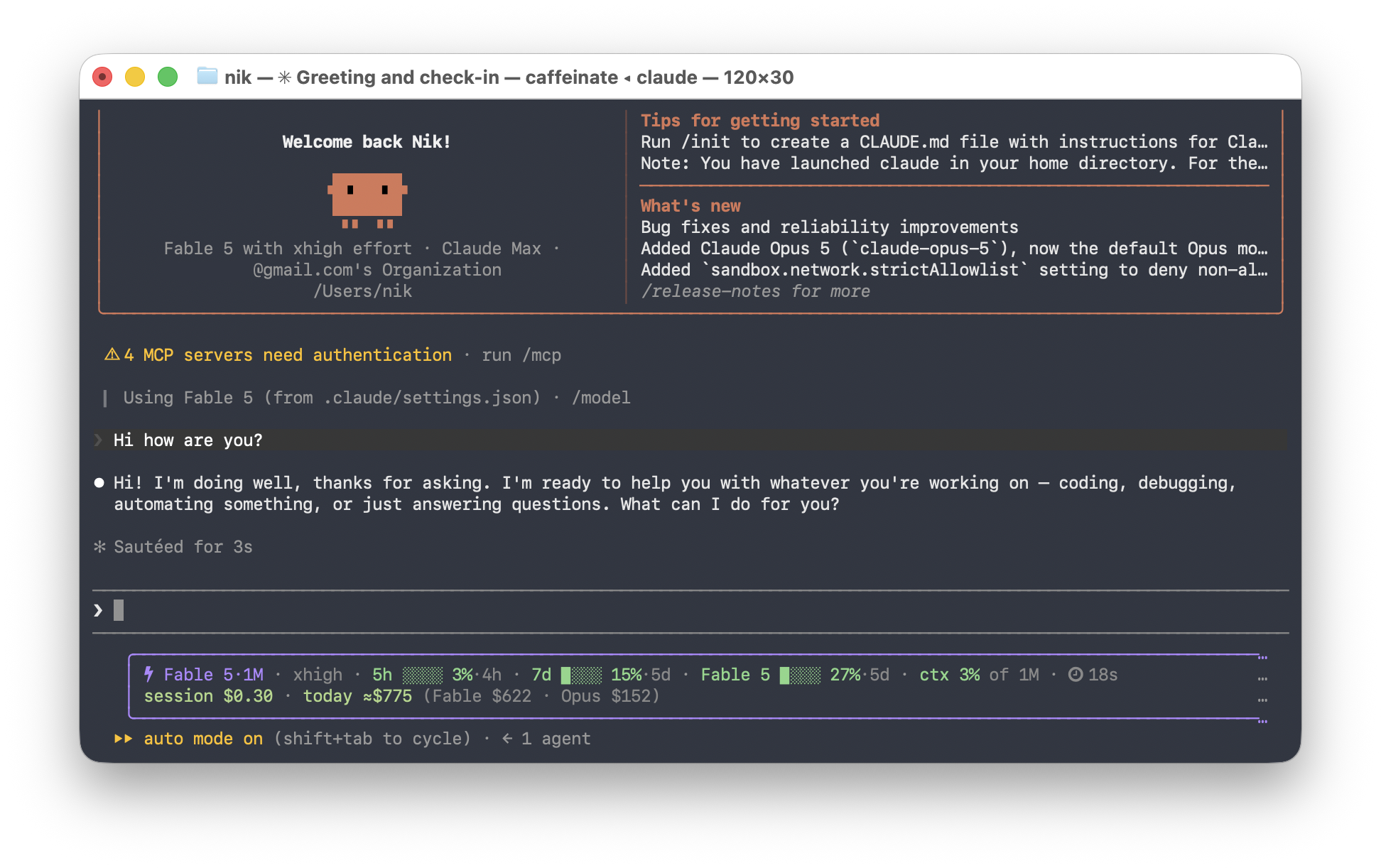
Quiet, because nothing needs your attention yet:
⚡ Opus 5·1M  high  7d 34%  ctx 12%  ⏱ 12m
session $2.10 · today ≈$72.19 (Opus $38.66 · Fable $33.52) · month ≈$1,284
Loud, because two windows will run out before they reset:
⚡ Opus 5·1M  ⚡fast  high  ⚠ 5h ▉▉▉▉▉▉▉▉ 91%·39m  ⚠ 7d ▉▉▉▉▉▉▉░ 83%·2d  Fable 5 61%  ctx 12%  ⏱ 12m
session $2.10 · today ≈$72.19 · month ≈$1,284 · credits $12.40 of unlimited · ⚠ 5h limit in ~25m · ⚠ 7d limit in ~23h
Thirteen themes, every segment optional, and a wizard that previews each choice with your real numbers before you commit to it:
bash ~/.claude/statusline-usage.sh --configure* Two exceptions, both under your control: the opt‑in remote meter
and a once‑a‑day version check (UPDATE=off disables it).
Requires python3 (the script uses it to parse and format the JSON).
npx claude-usage-statuslineThat's the whole install: it copies the script to ~/.claude/, registers it in
settings.json, and on first install opens the full-screen configurator (quitting
with q writes nothing — defaults apply). An existing config is kept as-is; a
different statusline you already use is never overwritten (and settings.json is
backed up before any change). With no terminal attached (piped install, CI) it
writes defaults instead of blocking. Then open a new Claude Code session.
Updating later:
npx claude-usage-statusline@latest --update # replaces the script, keeps your configThe statusline checks for new versions at most once a day (detached, never blocks a
render) and shows a dim update vX.Y hint on line 2 when one exists — UPDATE=off
turns the check off, UPDATE=auto lets it replace the installed copy by itself.
Other ways to install
Straight from GitHub, no npm registry involved (always the latest push):
npx github:Scorpio3310/claude-code-usage-statuslineFrom a clone:
git clone https://github.com/Scorpio3310/claude-code-usage-statusline && cd claude-code-usage-statusline
bash install.sh
Fully manual: copy statusline-usage.sh to ~/.claude/statusline-usage.sh, make it
executable (chmod +x), and add this to ~/.claude/settings.json:
{
  "statusLine": {
    "type": "command",
    "command": "~/.claude/statusline-usage.sh",
    "padding": 1
  }
}bash ~/.claude/statusline-usage.sh --configure # wizard, previews every choice
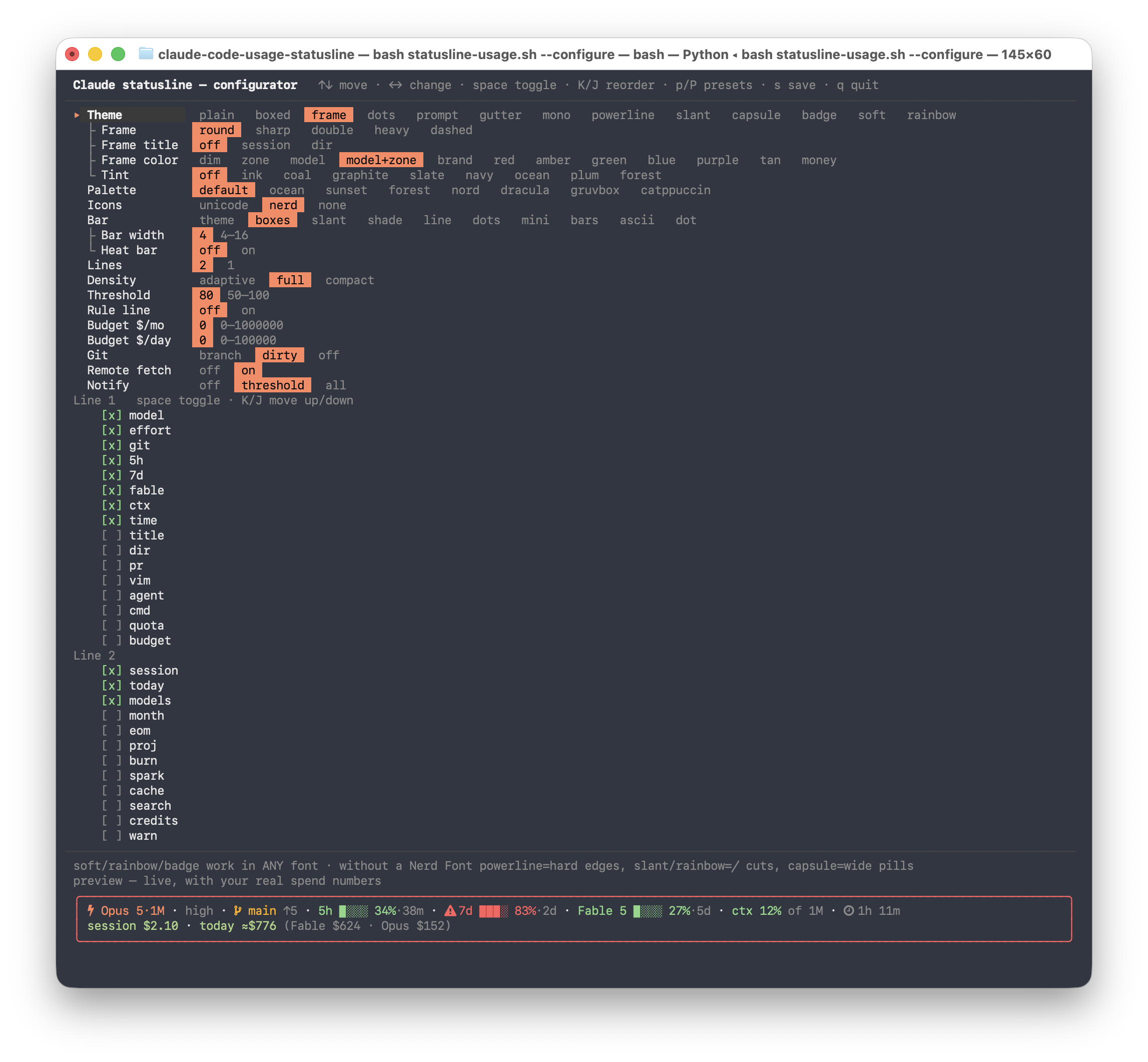
bash ~/.claude/statusline-usage.sh --preview # every theme, one block each--configure opens a full-screen live editor — no dependencies, no npm, just the
script itself. Arrow keys move (PgUp/PgDn/Home/End jump, Tab hops between
sections), ←/→ (or +/-) change a value, space toggles a segment, K/J
move it up or down its line, s saves and stays (the header shows · modified until
you do), q quits — asking once if you'd discard unsaved changes — and r resets to
defaults. Rows only appear when they can matter, drawn as a tree (├/└) under the
row that controls them: FRAME/FRAME_TITLE show up for the frame theme, TINT and
the heat bar for sep themes, NOTICE for the adaptive style, and so on. The preview
at the bottom is rendered by the real renderer with your real spend numbers, so
you see exactly what each toggle does before you commit to it:
It writes ~/.claude/statusline-usage.conf, which you can also edit by hand. Any key
can be overridden for a single session with the matching CLAUDE_USAGE_<KEY> env var
(env beats the file, the file beats the defaults):
| Key | Default | What it does |
|---|---|---|
THEME |
plain |
plain · boxed · dots · prompt · gutter · mono · badge · soft · rainbow · powerline · slant · capsule · frame — see below |
FRAME |
round |
frame theme only — border charset: round ╭─╮ · sharp ┌─┐ · double ╔═╗ · heavy ┏━┓ · dashed ╭╌╮ |
FRAME_TITLE |
off |
frame theme only — embeds a name in the top border, ╭─┤ name ├──╮: session (the /rename name) or dir (repo/directory name) |
FRAME_COLOR |
dim |
Color of the frame borders and the prompt connectors: dim · zone (the worst meter's green/amber/red — a one-glance health ring) · model (the current model's color, like the model segment) · model+zone (model color while every meter is green, zone color once one heats up) · or a palette hue: brand red amber green blue purple tan money |
PALETTE |
default |
default · ocean · sunset · forest · nord · dracula · gruvbox · catppuccin — recolors every theme; the green→amber→red meaning never changes |
TINT |
off |
Background band behind the lines, sep themes only (plain/boxed/frame/dots/prompt/gutter): named tones ink coal graphite slate navy ocean plum forest, or any raw 0–255 index in the conf file. Frame borders and prompt/gutter prefixes stay on the default background |
ICONS |
unicode |
unicode = ⚡ ⑂ ⏱ symbols that render in any font · nerd = native Nerd Font glyphs · none = text only. Also switches the powerline arrows/caps (see below) |
BAR |
theme |
Meter bar style: theme (each theme's own) · boxes ▉░ · slant ▰▱ · shade █▒ · line ━╌ · dots ●○ · mini ▪▫ · bars ▮▯ · ascii #- · dot (a single colored ●) (mono always uses ascii; block themes always draw dark ▰▱ on the colored segment) |
BARW |
8 |
Meter bar length in cells, 4–16 |
BAR_HEAT |
0 |
1 colors bar cells by the zone they sit in — green below NOTICE, amber below THRESHOLD, red above — so the bar itself shows where the danger band starts. Sep themes only (plain/boxed/dots/frame/prompt/gutter); block themes color by background and ignore it. |
BUDGET_MONTH / BUDGET_DAY |
0 |
Your own $ targets. Non‑zero adds a budget meter — budget ▉▉▉▉░░░░ 56%·4d $21,986 left — with the same threshold colors, warnings and a runs‑out‑before‑reset projection as every other meter. This is the "don't cross the line at work" feature. |
CMD / CMD_TTL |
— / 30 |
A command whose first stdout line becomes the cmd segment (e.g. kubectl config current-context). Runs detached in the background, cached for CMD_TTL seconds — a render never waits on it, a failing command simply doesn't render. It's your own command from your own config file, executed with your own shell privileges — same trust as .bashrc. |
RULE |
0 |
1 draws a dim ─ rule as the last line — a visual boundary between this usage block and Claude Code's own footer below it. The frame theme draws its own bottom border and ignores it |
MARGIN |
0 |
Columns shaved off the width Claude Code reports. Its UI draws the statusline in a slightly narrower area than COLUMNS, so full-width themes (frame/boxed) can get clipped with a trailing … by Claude Code itself — raise this (2–4 is typical) until the right edge survives. Ignored in --preview and the configurator |
LINES |
2 |
1 folds the money into the status line |
STYLE |
adaptive |
adaptive = show a meter only once it matters · full = always draw every bar · compact = numbers only |
THRESHOLD |
80 |
At or above this a meter turns red, gets a bar and a ⚠. Between NOTICE and THRESHOLD it is amber, below NOTICE green — the same zone rule drives heat bars, the gutter bar and FRAME_COLOR=zone |
NOTICE |
50 |
adaptive only: below this a meter is hidden |
RESET |
auto |
Reset display on the 5h/7d/quota/budget meters: auto = countdown (·39m, ·2d) on full bars only · always = countdown also on compact/numeric meters (7d 63%·2d) · time = the local clock of the reset instead of a countdown (·14:00 within a day, ·Mon 09:00 within a week) · off = never shown |
SEGMENTS |
model,effort,5h,7d,quota,budget,ctx,time |
Line 1 contents, in order. Also available: title, git, dir, pr, vim, agent, cmd, or a bucket by name (fable, opus, sonnet) |
LINE2 |
session,today,models,month,eom,credits,warn |
Line 2 contents, in order. Also available: burn, spark, search, cache, proj |
GIT |
branch |
off · branch (free) · dirty (also counts changed files) |
REMOTE |
0 |
Fetch per‑model quotas and the usage‑credit balance (see below) |
NOTIFY |
off |
off · threshold (desktop notification on a crossing) · all (also when a limit is projected to run out) |
UPDATE |
notify |
Once-a-day new-version check against GitHub, fully detached: notify shows a dim update vX.Y hint on line 2 · auto also replaces the installed copy by itself (opt-in trade-off: new code without confirmation) · off makes no network call at all |
statusline-usage.sh --configure                    # full-screen live editor
statusline-usage.sh --preview [theme] [palette]    # draw a sample line
statusline-usage.sh --doctor [--net]               # why isn't something showing up?
statusline-usage.sh --report [--days N] [--json|--csv]
statusline-usage.sh --report --projects            # the same window, split per project
statusline-usage.sh --save-preset work             # snapshot the current config
statusline-usage.sh --preset work                  # activate a snapshot
statusline-usage.sh --presets                      # list snapshots
statusline-usage.sh --help                         # all of the above
Presets are plain config files in ~/.claude/statusline-presets/ — switch between a
work setup, a home setup and a demo setup without re-clicking anything. Inside the
configurator, p cycles through them live and P saves the current state under a
new name.
--doctor checks the config (and the values actually in effect after env overrides),
whether statusLine is registered and points here, transcript and cache state, whether
an OAuth token can be found and never prints it, git detection, and finally draws
every glyph the themes use so you can see which ones your font renders — plus, on a
live terminal, a swatch line per palette. It makes no network call unless you pass
--net.
--report prints the spend history straight out of the cache — per day, per model, with
tokens, searches and cache hit rate; --report --projects splits the same window per
project instead. --json and --csv are there for when someone asks for a monthly
number:
day           Fable    Opus    total  searches  cache_pct      tokens
2026-07-20  2072.66    1.43  2074.09         0       99.1  1503802326
2026-07-27    38.48  116.95   155.43         0       98.8   195213874

month to date ≈$27,873 · last 7 days ≈$193/day · 5 active days in the last 8
Thirteen themes, all previewable with --preview and switchable live in the configurator:
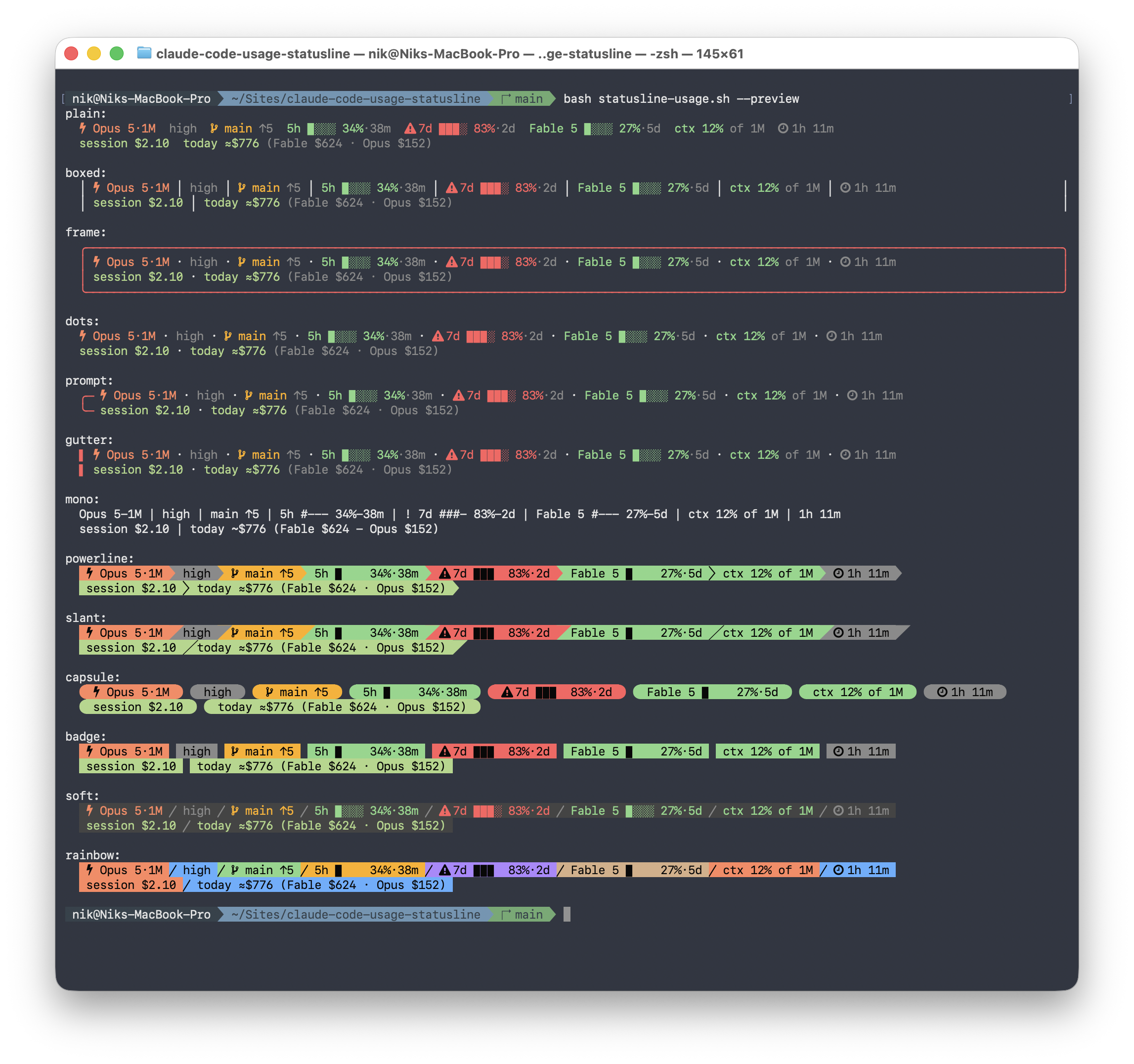
plain      ⚡ Opus 5·1M high  ⚠ 7d ▉▉▉▉▉▉▉░ 83%·2d  ctx 12% of 1M  ⏱ 1h 11m
boxed      │ ⚡ Opus 5·1M │ 7d 44% │ ⑂ main !3 │ 📁 statusline │ ctx 39% of 200k │
dots       ⚡ Opus 5·1M · 7d 44% · ctx 12% of 1M · ⏱ 1h 11m
prompt     ╭─ ⚡ Opus 5·1M · ⚠ 7d ▰▰▰▰▰▰▰▱ 83%·2d · ctx 12% of 1M
           ╰─ session $2.10 · today ≈$127 · month ≈$28,088
gutter     ▌ ⚡ Opus 5·1M · ⚠ 7d 83%·2d · ctx 12% of 1M   (▌ = worst meter's zone color)
mono       Opus 5-1M | ! 7d #######- 83%-2d | ctx 12% of 1M | 1h 11m
badge      colored blocks with inverse text — the boxed-screenshot look, in any font
soft       one dark band, segments as colored text with ╱ separators — starship's
           "classic" look, any font, immune to minimum-contrast terminal features
rainbow    a train of palette-cycling blocks — starship's "rainbow" look: hard
           color edges in any font,  arrows with a Nerd Font (backgrounds are
           decorative; meters keep their meaning through the ⚠ and the percentage)
powerline  block train: hard color edges in any font,  arrows with a Nerd Font
slant      block train with ╱ cuts in any font,  edges with a Nerd Font
capsule    each segment its own pill:  caps with a Nerd Font, wider pills without

frame      ╭──────────────────────────────────────────────╮
           │ ⚡ Opus 5·1M · ⚠ 7d ▰▰▰▰▰▰▰▱ 83%·2d · ctx 12% │
           │ session $2.10 · today ≈$127 · month ≈$28,088 │
           ╰──────────────────────────────────────────────╯
frame draws a real box around the whole block, stretched to the terminal width;
its bottom border doubles as the RULE separator, so RULE is ignored there. The
border charset is the FRAME key (round ╭─╮ · sharp ┌─┐ · double ╔═╗ · heavy
┏━┓ · dashed ╭╌╮), and FRAME_TITLE embeds the session or repo name in the top
border: ╭─┤ statusline ├──╮. prompt is the starship/powerlevel10k two-line
connector (╭─ / ╰─, no right wall), and gutter prefixes every line with a ▌
bar colored by the worst meter's zone — a one-glance health light. FRAME_COLOR
recolors the frame borders and prompt connectors (zone turns the whole frame into
that health light), and TINT lays a dark background band under any sep theme's
lines — the soft-theme look on top of plain, dots or a frame interior.
Nothing renders tofu by default. Icons are their own axis (ICONS), and the default
unicode set renders in any font — including the powerline family's separators, which
fall back to characters every font has:
| Theme | ICONS=nerd (native) |
ICONS=unicode (default) |
|---|---|---|
| powerline / rainbow | / arrows, pointed tail |
hard edges — the colored blocks butt directly against each other, │ thin separator, flat ends |
| slant | / edges |
╱ cuts drawn on the next block's background (box‑drawing — full‑cell in every monospace font), flat ends |
| capsule | … round caps |
no caps — just wider pills (double padding) |
| badge / soft | — | pure backgrounds/text, nothing font-dependent |
The fallbacks deliberately use only characters with cell metrics (box‑drawing and
backgrounds). Geometric shapes like ▶ ◣ ▐ ▌ render with symbol metrics in many
fonts — smaller than the cell, baseline‑aligned — which shows up as notches and
floating triangles; they are gone from the fallback path entirely. If you want the
pointed powerline look, install a Nerd Font and set ICONS=nerd.
Nerd Font per terminal, not per machine. Every terminal picks its own font, so
ICONS=nerd can look perfect in one and show tofu boxes in another. The classic
case is VS Code: its integrated terminal inherits editor.fontFamily (often Fira
Code or Menlo — no Nerd glyphs) unless you set
"terminal.integrated.fontFamily": "JetBrainsMono Nerd Font" // whichever Nerd Font you installedConfusingly, the powerline separators (, , capsule caps) still render there
even without the font — VS Code draws the U+E0B0–E0BF block and box‑drawing
characters itself — while the icons (, , ``) come from the font and turn
into boxes. --doctor's glyph sampler shows in two seconds which case you're in.
So capsule without a Nerd Font gives you square-edged pills instead of boxes of tofu,
and ICONS=nerd is the explicit opt-in once you've installed the font. Palettes are an
independent axis: PALETTE=ocean — or nord, dracula, gruvbox, catppuccin, all
ported to 256-color so they work in any terminal — recolors any theme (mono stays
colorless and iconless whatever ICONS says).
boxed stretches to the terminal edge, because Claude Code passes COLUMNS to the
statusline command. That also drives width‑aware fitting: when the line doesn't fit,
segments are dropped least‑important‑first (spark → title → dir → cmd → vim → agent → search → effort → proj → pr → cache → git → time → ctx → burn → …) and, in
the last resort, the line is clipped with …. The model,
the meters and the warnings are never dropped — they're the reason the line exists.
Nothing ever wraps onto a second row.
The point of adaptive is that a statusline you stop reading is worthless. A meter
gets more ink the closer it is to hurting you:
| Where the meter is | How it's drawn |
|---|---|
below NOTICE |
hidden |
NOTICE … THRESHOLD |
number only — 7d 63% |
at or above THRESHOLD |
full — ⚠ 7d ▉▉▉▉▉▉▉░ 83%·2d |
If nothing is above NOTICE, the highest meter is still shown as a bare number, so
the line is never completely blind about your quota.
The ·2d reset suffix follows the RESET option: auto keeps it on full bars only
(as above), always/time add it to the number-only form too, off removes it.
Line 1 — where you stand
| Segment | Source | Meaning |
|---|---|---|
refactor pricing |
session_name |
The session title you set with /rename. Truncated, and among the first things dropped on a narrow terminal. |
⚡ Opus 5·1M |
model.id |
Current model, colored per family (Opus / Sonnet / Haiku / Fable), with version and a ·1M tag when running with the 1M‑token context window. |
high |
effort.level |
Reasoning effort (low/medium/high/xhigh/max). Omitted when the model doesn't support it. |
⚡fast |
fast_mode |
Fast mode is on — worth noticing, it's double the per‑token price. |
5h … %·39m |
rate_limits.five_hour |
Your 5‑hour subscription usage and the countdown to reset (the ·39m part follows the RESET option — countdown, wall‑clock time, or hidden). |
7d … %·2d |
rate_limits.seven_day |
Your 7‑day (weekly) subscription usage and reset countdown (also governed by RESET). |
Fable 5 … %·6d |
/api/oauth/usage |
Opt‑in. Per‑model weekly windows. quota shows every bucket your account has (Fable 5, Opus, Sonnet…); naming one shows just that one. |
⑂ main !3 +1 ↑2↓1 |
.git/HEAD + git status |
Branch, changed files (!), staged files (+), and commits ahead/behind upstream (↑↓) — each part only when non‑zero. The branch is read straight from .git/HEAD — no subprocess, no cost. The counts need one git status --porcelain -b, so they refresh in the background keyed on the index mtime; GIT=branch skips them entirely. |
vim NORMAL |
vim.mode |
Vim editor mode — only present when vim mode is on. Amber outside INSERT. |
code-architect |
agent.name |
Agent name when Claude Code runs with --agent. |
k8s-prod |
your CMD |
First stdout line of your own command (CMD= in the conf) — runs detached, cached for CMD_TTL seconds, never blocks a render. |
budget ▉▉▉▉░░░░ 56%·4d |
BUDGET_MONTH/_DAY |
Your own $ target as a meter, with $ left and the same colors/warnings as every other meter. |
📁 statusline |
workspace.repo / project_dir |
Which project this window is in. |
#42 ✓ |
pr.{number,review_state} |
Open PR for the branch, same data as Claude Code's own footer badge. |
ctx 39% of 200k · compact in ~8k |
context_window |
How much of the context window is used, how big it is, and — once you're close — how many tokens are left before Claude Code compacts the conversation (see below). |
⏱ 1h 11m |
cost.total_duration_ms |
Wall‑clock time since this session started. |
Line 2 — what it costs
| Segment | Source | Meaning |
|---|---|---|
session $2.10 |
cost.total_cost_usd |
Cost of this session, as reported by Claude Code. |
today ≈$72.19 |
local transcripts | Estimated total across all local sessions today (see below). |
(Opus $38.66 · Fable $33.52) |
local transcripts | Today split by model family — Fable costs 2× Opus per token, so the split is usually the interesting part. |
month ≈$1,284 |
local transcripts | Month to date, same reconstruction. |
≈$88/h |
local transcripts | Burn rate from hourly buckets: the current hour extrapolated once it has ten minutes of signal, otherwise the last complete one. |
eom ≈$32,750 |
computed | Straight-line month-end forecast from the pace so far (hidden in the first two days of a month). Red — plus a projected over budget warning — when it beats BUDGET_MONTH, which tells you you're heading over before it happens. |
top …usage-statusline $336 |
local transcripts | The most expensive project today — transcripts already live in per-project folders, so this costs nothing extra. --report --projects gives the full table. |
█▃▁▁▁▂▂ |
local transcripts | Last seven days of spend, oldest first — one glance tells you whether today is normal. |
🔍 250 |
usage.server_tool_use |
Web searches today. They're billed per request (~$10/1k) on top of tokens, and are included in the totals above. |
cache 94% |
local transcripts | Share of input tokens served from the prompt cache. High is good, so the colors are inverted — a low number means you're paying full price for context that could have been cached. |
credits $12.40 of unlimited |
/api/oauth/usage |
Opt‑in. Usage credits burned this month — real money, beyond the subscription. |
⚠ 5h limit in ~25m |
computed | At the pace used so far, this window runs out before it resets (see below). |
That's the question the ⚠ … limit in ~25m warnings answer. For each window the
script knows the length (5 h, or 7 days) and when it resets, so it knows how much of
the window has elapsed and how much quota went with it:
elapsed   = window − time_to_reset
eta       = elapsed × (100 − used%) / used%
If eta lands before the reset, you're on track to hit the wall and the warning
appears. Nothing is drawn during the first 10 % of a window — right after a reset
every burst looks like an emergency.
Up to two warnings are shown, worst first: limit already reached → soonest projected
limit → credits over threshold → projected over budget (eom) → auto‑compact
approaching.
Claude Code compacts when input + cache_creation + cache_read reaches
context_window − min(max_output_tokens, 20 000) − 13 000
and every current model has a max output of at least 20k, so in practice the trigger is
context_window_size − 33 000 — 167k on a 200k window, 967k on a 1M one. (That second
number matches Claude Code's own internal table, which is how the formula was confirmed
rather than guessed.) The ctx segment starts showing compact in ~8k inside the last
20 000 tokens — the same band Claude Code uses for its own warning — and a matching line‑2
warning appears with it.
NOTIFY=threshold fires a desktop notification (macOS osascript, Linux notify-send)
when something crosses a threshold — a limit, the credit balance, or the context
nearing auto‑compact. It fires on the transition, not on the state: once the value drops
back below, the alert re‑arms, and while it stays above you get at most one per ten
minutes. Delivery is detached, so it can never hold up a render, and --preview,
--report and --doctor never notify. NOTIFY=all also warns when a window is
projected to run out before it resets.
Claude Code only gives the statusline the current session's cost. To show a real
daily and monthly total, the script reads every local transcript under
~/.claude/projects/ — including subagent and workflow transcripts, which on an
agent‑heavy day are a double‑digit share of the bill — and reconstructs per‑message
cost from token usage (input/output/cache × per‑model rates), grouped by local day
and model family.
Transcripts are append‑only, so the cache stores a byte offset per file and each render parses only what was appended since the last one. That matters: a long session's transcript reaches tens of megabytes, and re‑reading everything on every render would cost seconds — the warm incremental pass costs a few milliseconds. The first run after an upgrade (or a timezone change, which invalidates the local‑day grouping) re‑reads everything once.
Fast mode is priced correctly: messages carry usage.speed, and on the models that
support it fast mode bills at double the standard rate ($10/$50 per Mtok on Opus 5
instead of $5/$25). Web searches are counted too — they're billed per request on top of
tokens, so a search‑heavy day is more expensive than its token count suggests.
Important:
- It's an estimate at published API list prices (hence
≈). On Pro/Max plans you pay a flat subscription, so this is a notional API‑equivalent figure, not an actual bill — but it is exactly the figure that tells you what the same work would cost once usage spills onto credits. - It counts only local Claude Code sessions — it does not include claude.ai web usage or other machines.
Claude Code puts only five_hour and seven_day into the statusline payload. Per‑model
weekly windows — the ones /usage shows, e.g. Fable 5 — and the usage‑credit balance
are simply not in the data the statusline receives, at any version. The only way to show
them is to ask the same endpoint /usage reads, so this is opt‑in and off by default:
export CLAUDE_USAGE_REMOTE=1 # or REMOTE=1 in the config fileIt adds two things: the Fable 5 weekly meter on line 1, and usage credits on
line 2 — how much real money has been spent beyond the subscription this month
($12.40 of unlimited, or $12.40/$50 (25%) when your plan caps it, or credits off
when spillover isn't possible at all). If your plan denominates the weekly window in
dollars, $X left this week is shown too — Claude Code itself ignores those fields.
How it behaves when enabled:
- It never blocks a render. The statusline always draws the last cached reading (~0 ms). When that reading is older than 120 s, a detached background process refreshes it for the next render. The numbers therefore appear one render late on a cold start, and can be up to ~2 minutes behind — irrelevant for a weekly window.
- It reads your existing Claude Code OAuth token; it never refreshes it. The token is
read from
~/.claude/.credentials.json, or from the macOS Keychain (Claude Code-credentials) when that file doesn't exist — the first Keychain read prompts once. Running the refresh flow ourselves could rotate the token out from under the live Claude Code session, so the script deliberately doesn't. - The token is never written anywhere and never passed on a command line. It goes
straight into the request headers;
pscan't see it. The cache (~/.claude/.usage-remote-cache.json, mode0600) holds percentages, dollar amounts and reset times — nothing else. - The only host this meter contacts is
api.anthropic.com— the same one Claude Code already talks to. It's aGETwith no body: it reads your own usage and sends nothing about your code, prompts, or session. - Every failure is silent. No token, expired token, timeout, changed response shape
— the segments just don't render and the rest of the statusline is unaffected.
Failures back off (5 min; 15 min on
401/403), and a reading nobody has managed to refresh for 30 minutes stops being drawn rather than showing a stale number as current. - Set
CLAUDE_USAGE_REMOTE_DEBUG=1to dump the raw response to~/.claude/.usage-remote-debug.jsononce, if you want to see what the endpoint returns.
The trade‑off worth knowing: /api/oauth/usage is a private, undocumented endpoint. It
can change without notice, and if it does, these segments quietly disappear until the
parsing is updated. Everything else in the script keeps working.
The model segment is future‑proof — you rarely need to touch the script when Anthropic ships a new model:
- A new version of a known family (e.g.
claude-opus-5,claude-sonnet-6) works automatically: right family color, and the version is parsed from the id. - A brand‑new family (a new name) still renders automatically — the label comes from
Claude Code's
model.display_name, the version from the id, and it gets a neutral default color. To give it a dedicated color, add one line toMODEL_COLORS(and, optionally, oneeliffor the family key). - Pricing for the
today ≈$estimate falls back to a default rate for an unrecognized model until you add its rate tomodel_rates()— API prices aren't part of the statusline data, so they can't be detected automatically.
rate_limitsonly appear for Pro/Max subscribers and only after the first reply in a session. Until then the statusline shows the model plus a shortusage n/ahint.- The
5hand7dfigures are account‑wide (shared across claude.ai, Claude Desktop, and Claude Code) — not per‑session — and only range 0 → 100%. There is no "how far over the limit" value, and no "extra/overage tokens beyond your plan" value, because Claude Code does not send those to the statusline. - Per‑model quotas and credit balances are not in the statusline payload. Claude Code
builds it from
five_hourandseven_dayonly — there is noseven_day_opus,seven_day_sonnet, per‑model bucket orextra_usageto read, no matter how you parse it. The opt‑in remote meter works around this by asking the endpoint/usagereads. - The projection is a straight‑line estimate: it assumes the rest of the window looks like the part you've already used. A quiet afternoon or an overnight batch will move it.
- Symbol widths differ between terminals. Width fitting assumes the common case (emoji double‑width, box drawing single); an unusual font may leave a column of slack.
git statusfor the dirty count runs in the background and is keyed on the index mtime, so the number can lag by one render after you save a file.GIT=branchavoids running git at all.- Everything runs locally; no data is collected or transmitted anywhere, unless you explicitly enable the remote meter.
| File | Role |
|---|---|
statusline-usage.sh |
The statusline script (Bash wrapper around inline python3), plus --configure. |
install.sh |
One‑command installer; runs the configuration picker. |
README.md |
This file. |
screenshot.png |
Hero screenshot: the statusline in a live Claude Code session. |
configurator.png |
The full-screen --configure editor. |
themes.png |
--preview gallery of all thirteen themes. |
package.json |
npm packaging (npx claude-usage-statusline runs install.sh). |
.github/workflows/publish.yml |
Publishes to npm when a v* tag is pushed (checks tag = package.json = script version first). |
LICENSE |
MIT license. |
MIT — see LICENSE.