





Reading foreign scripts, made effortless.
yōmu! is a real-time linguistic augmentation layer for the web. It dynamically injects pronunciation guides (Furigana, Pinyin, or Transliteration) into any website, allowing you to read Japanese, Chinese, Arabic, Cyrillic, Devanagari, and Balinese (Aksara Bali) without breaking your flow.
Try the Web Demo | Install Extension | Contributing
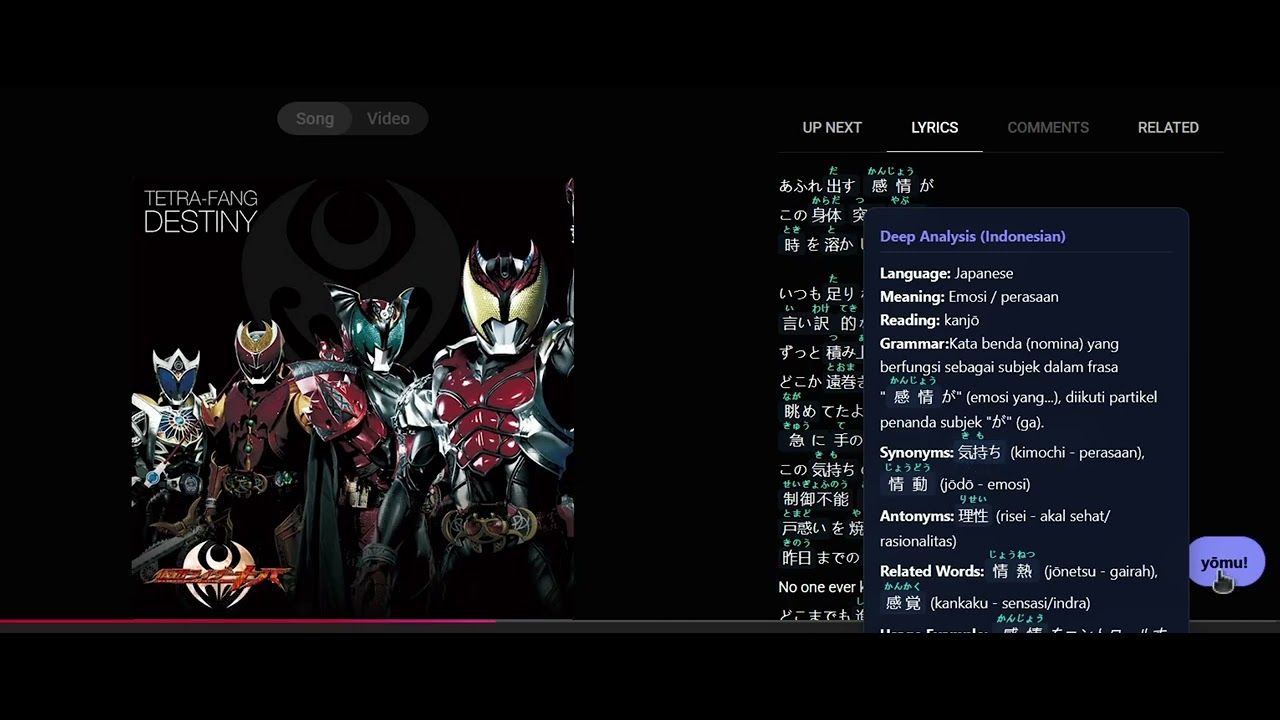
-
Japanese (Furigana): Automatically adds Hiragana reading aids above Kanji using
pykakasi. -
Chinese (Pinyin): Injects tonal Pinyin above Hanzi characters via
pypinyin. -
Arabic (Transliteration): Provides lightweight Latin transliteration for Arabic script.
-
Cyrillic (Transliteration): Adds phonetic Latin guides above Cyrillic text.
-
Devanagari (Transliteration): Provides phonetic guides for Devanagari script.
-
Balinese (Aksara Bali): Provides phonetic guides for Balinese script.
-
Deep Analysis in Native Language: Set your native language (English, Indonesian, Spanish, French, etc.) and get grammar/vocabulary breakdowns explained directly in your mother tongue using Gemini Flash.
-
Smart Detection: Automatically identifies the language of the page or specific text blocks.
-
Premium UI & Dynamic Contrast: A glassmorphic, non-intrusive floating widget that dynamically adapts to light/dark page themes for maximum visibility.
-
Opt-in & Secure: Toggle the extension on/off at will. Off by default on untrusted pages, with strict DOM sanitization ensuring zero XSS vulnerabilities.
-
Mobile Ready: Responsive landing page with PWA support and a strategy for mobile browser extensions.
-
High Performance: Powered by a Python FastAPI backend deployed on Google Cloud Run for low latency.
The Problem: Learning a language with a different script (like Japanese Kanji, Chinese Hanzi, or Arabic) is highly fragmented. Learners often have to switch tabs, copy-paste text into dictionaries, or use heavy translation apps just to figure out how to pronounce a word they see in an article or social media post. This constant context-switching breaks focus and slows down real-world learning.
Target Audience: Global language learners, students, and digital natives who consume foreign content online (news, Twitter, Instagram web, wikis) but struggle with reading the native script.
The Solution & Value Proposition: yōmu! acts as a "reality augmentation layer" for the web. Instead of translating the text away, it augments the original text with pronunciation guides in real-time, right inside the DOM.
- Measurable Value: Eliminates the "lookup friction" entirely. Learners can read articles natively and instantly reveal the phonetic guides (Furigana, Pinyin, Transliteration) and deep grammar analysis only when they get stuck.
- Inclusive Access: Helps remove the barrier of entry for reading complex scripts, making foreign web content accessible to beginners instantly.
- Navigate to the yōmu! Web Demo.
- Type or paste text in the input box (Japanese, Chinese, Arabic, Cyrillic, Devanagari, or Balinese Aksara Bali).
- The annotated text will appear instantly in the output box.
- Activate: Once installed, navigate to any webpage with foreign script.
- Detection: The yōmu! widget will appear in the bottom-right corner when target text is detected.
- Toggle: Click the widget to inject pronunciation guides (Furigana, Pinyin, etc.) into the page.
- Deep Analysis: Click on any annotated word to open a Gemini Flash-latest powered tooltip for grammar and meaning breakdown.
- Safari (iOS): Use our Safari Web Extension to annotate pages directly in your mobile browser.
- PWA: Add the Web Demo to your Home Screen to use it as a standalone reading aid app.
We take data security seriously:
- Strict DOM Sanitization: All incoming HTML from the linguistic AI is rigorously stripped of malicious tags and attributes (
onerror,onload, etc.) before entering your browser to prevent Prompt Injection & XSS. - Explicit Opt-in: The extension can be toggled on/off. When disabled, no text is sent to the backend.
- Protected API: The backend enforces payload size limits and custom headers to prevent API abuse and token draining.
yōmu! is built with a decoupled architecture for maximum flexibility:
- Frontend (Extension): A Manifest V3 browser extension that parses the DOM safely, handles UI state, and communicates with the backend.
- Backend (API): A FastAPI service that performs the linguistic heavy lifting (tokenization, transliteration) using specialized local engines.
- Landing Page: A modern, mobile-optimized website that serves as both a demo and a distribution hub.
You can install yōmu! directly from the official extension stores:
Alternatively, for manual developer installation: Chrome / Edge / Brave:
- Clone this repository.
- Go to
chrome://extensions/. - Enable Developer mode.
- Click Load unpacked and select the
extension/directory.
Firefox:
- Go to
about:debugging. - Click This Firefox -> Load Temporary Add-on.
- Select
extension/manifest.json.
cd backend
python -m venv venv
.\venv\Scripts\Activate
pip install -r requirements.txt
python -m uvicorn main:app --reloadWe provide a test.html in the root directory to verify the extension's behavior on a controlled set of Japanese and Chinese text samples.
We welcome contributions! Whether it's adding support for new languages, improving the UI, or optimizing the backend, please see our Contributing Guide for details on our code of conduct and the process for submitting pull requests.
This project is licensed under the GNU Affero General Public License v3 (AGPL-3.0). See the LICENSE file for details.
Analysis Powered by Gemini Flash-latest
Built with ❤️ by Schryzon & contributors for language learners everywhere.
#JuaraVibeCoding