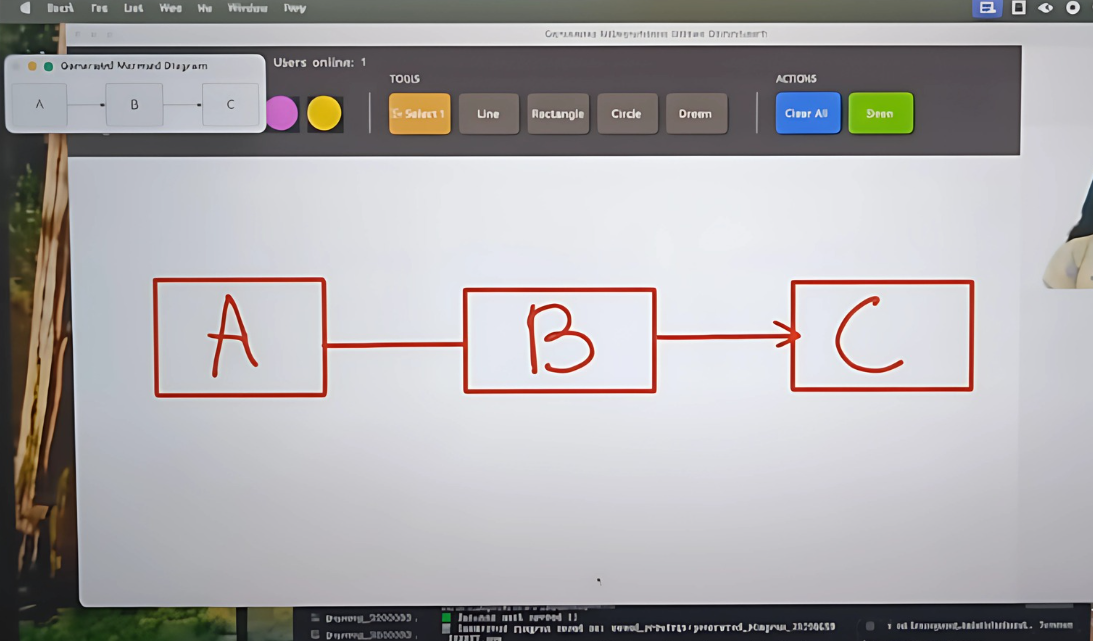
A real-time collaborative air drawing application that allows multiple users to draw together in the air using hand gestures. The application uses computer vision to track hand movements and integrates with Google's Gemini AI to convert sketches into professional diagrams.
- Air Drawing: Draw in the air using hand gestures detected by your webcam
- Real-time Collaboration: Multiple users can draw together simultaneously
- AI-Powered Diagram Generation: Convert sketches to Mermaid/PlantUML diagrams using Gemini AI
- Professional Tools: Freehand, Line, Rectangle, Circle, and Eraser tools
- Color Palette: Multiple colors for different users and drawing needs
- Live Preview: See shapes as you draw them before finalizing
- Multi-user Support: Connect multiple users to the same drawing session
- Real-time Synchronization: All drawing actions are synchronized instantly
- User Identification: Each user gets a unique color and name
- Shared Canvas: Everyone works on the same canvas
- Collaborative AI: Generated diagrams are shared with all users
- Python 3.8 or higher
- Webcam
- Internet connection (for Gemini AI features)
# Install dependencies
pip install -r requirements.txt- Get a Gemini API key from Google AI Studio
- Replace the API key in both
collaborative_airCanvas.pyandwebsocket_server.py:
GEMINI_API_KEY = 'YOUR_API_KEY_HERE'python websocket_server.pyYou should see: Starting collaborative canvas server on ws://localhost:8765
In separate terminal windows (or on different computers):
python collaborative_airCanvas_optimized.pyEach client will connect to the server and be assigned a unique username and color.
- Position your hand in front of the webcam
- Point with your index finger - this is your drawing cursor
- Keep your middle finger down while drawing to activate drawing mode
- Select tools and colors from the toolbar by pointing at them
- Draw in the air - your movements will appear on the canvas in real-time
| Gesture | Action |
|---|---|
| Index finger up, middle down | Drawing mode |
| Point at toolbar items | Select colors/tools |
| Release gesture | Stop drawing/finalize shapes |
- Freehand: Draw freely with smooth lines
- Line: Draw straight lines
- Rectangle: Draw rectangles
- Circle: Draw circles
- Eraser: Erase parts of the drawing
- Multiple Users: Each user appears with their own color
- Real-time Updates: See other users' drawings instantly
- Shared Actions: Clear and save actions affect all users
- AI Sharing: Generated diagrams are shared with everyone
When you click "Save", the application:
- Saves your drawing locally
- Sends it to Gemini AI for analysis
- Generates structured diagram code (Mermaid/PlantUML)
- Displays the generated diagram
- Shares the result with all connected users
- Flowcharts
- UML diagrams
- System architecture diagrams
- Mind maps
- Process flows
- WebSocket Server (
websocket_server.py): Handles real-time communication - Collaborative Client (
collaborative_airCanvas_optimized.py): Main application with collaboration - Original Client (
airCanvas.py): Single-user version