Releases: NookieAI/kura
Release list
Kura v1.6.25


Kura is a free application that scans your drives, identifies every PlayStation game you own, and helps you organise, transfer, and install them — across PS1, PS2, PSP, PS3, PS4, PS5, and PS Vita, in a single library. It reads inside each file for the real title, cover art, and metadata (not the filename), finds duplicates, organises for any console layout, and installs straight to your console.
No installer. No login. No account. Native builds for Windows, macOS (Apple Silicon + Intel), and Linux — plus the kura-loader.elf PS5 payload.
What's new in 1.6.25 — Stability & bulletproofing
A maintenance release from a full audit of the loader, the PC servers, and the app. No new features — just real fixes that make the whole thing tougher. Re-connect the Kura Loader after updating so the new payload (revision 20r131) installs.
- Updaters can't hang or stall boot. The kstuff and homebrew installers used to fetch from GitHub straight over the console's link, which can black-hole and hang — and kstuff's runs at boot, so it could stall the loader starting. They now download through your PC over the LAN (like ShadowMountPlus already does), with a direct fallback.
- Backups are never silently corrupt. Zipping a console folder larger than ~1 MB used to serve a truncated archive as if it succeeded — now it builds correctly or fails clearly.
- The game browser can't freeze on a slow cover. A cover image that timed out used to hang every other request to the PC; fixed — along with duplicate transcode jobs and a stalled bulk-install.
- Security hardening. The PC's package-fetch endpoints no longer follow loopback / link-local URLs (SSRF), plus a stack of smaller correctness and housekeeping fixes.
Which file do I download?
- Windows →
kura.exe· macOS (Apple Silicon) →Kura-…-arm64.dmg· macOS (Intel) →Kura-…-x64.dmg· Linux →Kura-….AppImage· PS5 payload →kura-loader.elf
What's new in 1.6.24 — Console Internet, a games & media hub, and a hardened loader
The big one. Since 1.6.2 the bundled PS5 payload jumped from revision 20r68 to 20r130, and a whole platform grew around it. Re-connect the Kura Loader after updating so the new payload installs.
Browse the web on your PS5 — safely
- Console Internet. Your PC becomes a private, filtered gateway just for the console. The PS5 gets real web access — browser, YouTube, the lot — while Sony and every PS5 update server are hard-blocked at the DNS layer, so the console can never phone home or update itself. One toggle in the app; your PC's own connection is untouched. Ads are blocked automatically.
- Dead-man switch. If the Kura app closes, the console's route drops — no app, no internet. Air-gapped is the resting state, by design.
- A built-in PS5 browser with a URL bar, bookmarks, and fullscreen, plus a "send this link from your PC" remote.
A games & media hub
- Game catalog + one-tap install. Browse a large PS4 library right on the console and install straight to it.
- Movie & music server. Stream your movies and music from your PC/NAS to the console's browser — with the container/faststart handling the PS5 actually needs to play them (including a proper fix for
.mp3). - ShadowMountPlus, kept working. The bundled SMP mount engine now updates reliably — it resolves the newest real release and downloads through your PC over the LAN, so a flaky console-to-internet link can't stall the update.
Loader — safer, tougher, firmware 10.01+
- Security. The loader's on-console LAN API is now an allowlist — newly added endpoints are protected by default, closing a class of holes where a mutating route could be reached without a credential.
- etaHEN coexistence. The loader no longer breaks etaHEN's toolbox: it defers to any running kstuff instead of stacking duplicate kernel patchers, and gives you a one-click "clear duplicates" control.
- Installs work on every firmware, including 10.01+ where etaHEN isn't available — and a successful fallback install no longer reports failure (which used to trigger pointless multi-GB retries).
- Self-healing Console Internet that recovers from stale-route and false "no internet" states on its own.
Which file do I download?
- Windows →
kura.exe· macOS (Apple Silicon) →Kura-…-arm64.dmg· macOS (Intel) →Kura-…-x64.dmg· Linux →Kura-….AppImage· PS5 payload →kura-loader.elf
What's new in 1.6.2 — One-click connect
- Click the status pill to connect. The topbar console indicator now finds and connects your PlayStation for you — it uses the console IP already in your transfer destination (checking it answers first), then mDNS, then an active network scan, connects the Kura Loader, installs the loader payload if needed, and turns green. No IP typing.
- It reflects a live connection automatically. If your console IP is already set for transfers, the pill connects and turns green on its own instead of showing No console while the dashboard is open.
- You get notified when a console is found and when the Kura Loader connects.
Desktop-app fix only — the bundled PS5 payload is unchanged (revision 20r68).
What's new in 1.6.1 — Always-visible console status
- You can now always see whether a console is connected. The Kura Loader status indicator lives permanently in the topbar, next to Menu. It reads at a glance — No console (grey) when nothing is connected, Connecting… (amber) while it checks, Console OK (green) when the loader is healthy, and Degraded / Down / Boot loop when something needs attention. Click it to open the dashboard, or to set a console IP when none is set. Previously this indicator stayed hidden until an IP was already known, so a fresh install showed nothing at all.
The bundled PS5 payload is unchanged (revision 20r68) — 1.6.1 is a desktop-app fix only and does not touch your console.
What's new in 1.6.0 — Total metadata, a whole new look
- Complete metadata extraction. Kura now keeps everything it reads from each game file, not a handful of fields. Required firmware (with the Vita/PSP fallback fixed), SDK version, master/disc version, build date, parental level, supported languages, and the download / install / uncompressed sizes — all surfaced in the info panel. The full SFO/param.json is retained so nothing is ever dropped. Re-scan your library to populate the new fields.
- Completion Constellations. A new Stats view that draws each numbered series as a constellation — owned entries bright, the games you're missing as dim stars, with a per-series completion ring. No external database; it finds the gaps from what you own.
- Golden Fingerprint & Sector-Surgeon. A container-agnostic identity (the same game as ISO and as BIN/CUE now matches), plus a CD ECC/EDC repair engine that can rebuild near-miss disc dumps — with honest "unrecoverable" reporting when the payload itself is damaged.
- PS4 saves in the Save Manager. PS4 backward-compat saves (sealed) are no longer skipped by the bulk backup — they back up and restore to the same console.
- A "paint splash" theme switch. Switching themes now flings a burst of paint in the new accent colour from where you clicked — and the colour crossfade is smooth again (it was silently snapping).
- Design-studio UI pass. Every dull, hard-to-read label lightened (WCAG-verified), all modals kept on-theme across every palette, the splash/scan bars got a luminous sweep, and a stack of dead/broken controls (settings panels, Escape handling, close buttons) fixed.
- Transactional, reversible operations. Renames now journal through an undo ledger that survives restarts.
Loader (kura-loader.elf)
The bundled PS5 payload is now at revision 20r68 with these additions since 1.3.0:
- PS5 temperature monitoring.
/api/vitalsreads live CPU and SoC temperatures directly from the kernel sensor — no external tools needed. - Registry browser.
/api/registryexposes a curated set of read-only PS5 system keys — console nickname, HDR mode, boot count, and more. - Boot-profile waterfall.
/api/boot-profilereturns startup timing data so the dashboard can render a boot waterfall chart. - Self-test health verdict.
/api/selftestruns a quick diagnostic and returns a pass/fail health status in one call. - Offline library cache. The loader caches your game list locally on the PS5, so the desktop app can read it even when the console is waking up.
- Media Gallery support.
/api/mediaendpoint for the new screenshot and video clip browser on the dashboard. - Full Kura branding. Zero legacy name leaks — every popup, toast, and FTP banner says Kura.
Includes everything from 1.4.0 (Media Gallery + dashboard accuracy), 1.3.0 (automatic loader updates + full Kura branding), 1.2.0 (Transfer Queue panel + Console Cleanup), 1.1.1 (fast console-health gate), and the seven tools from 1.1.0.
Which file do I download?
- Windows →
kura.exe - macOS · Apple Silicon →
Kura-…-arm64.dmg - macOS · Intel →
Kura-…-x64.dmg - Linux →
Kura-….AppImage - PS5 payload →
kura-loader.elf
macOS first launch: if you see "Kura is damaged and can't be opened", open Terminal and run
xattr -cr /Applications/Kura.apponce — that's just Gatekeeper blocking an unsigned app, not real damage.
Free · portable · no account. Built and maintained by Nookie. If you like it, tell a friend.
Kura v1.6.24
Kura is a free application that scans your drives, identifies every PlayStation game you own, and helps you organise, transfer, and install them — across PS1, PS2, PSP, PS3, PS4, PS5, and PS Vita, in a single library. It reads inside each file for the real title, cover art, and metadata (not the filename), finds duplicates, organises for any console layout, and installs straight to your console.
No installer. No login. No account. Native builds for Windows, macOS (Apple Silicon + Intel), and Linux — plus the kura-loader.elf PS5 payload.
What's new in 1.6.24 — Console Internet, a games & media hub, and a hardened loader
The big one. Since 1.6.2 the bundled PS5 payload jumped from revision 20r68 to 20r130, and a whole platform grew around it. Re-connect the Kura Loader after updating so the new payload installs.
Browse the web on your PS5 — safely
- Console Internet. Your PC becomes a private, filtered gateway just for the console. The PS5 gets real web access — browser, YouTube, the lot — while Sony and every PS5 update server are hard-blocked at the DNS layer, so the console can never phone home or update itself. One toggle in the app; your PC's own connection is untouched. Ads are blocked automatically.
- Dead-man switch. If the Kura app closes, the console's route drops — no app, no internet. Air-gapped is the resting state, by design.
- A built-in PS5 browser with a URL bar, bookmarks, and fullscreen, plus a "send this link from your PC" remote.
A games & media hub
- Game catalog + one-tap install. Browse a large PS4 library right on the console and install straight to it.
- Movie & music server. Stream your movies and music from your PC/NAS to the console's browser — with the container/faststart handling the PS5 actually needs to play them (including a proper fix for
.mp3). - ShadowMountPlus, kept working. The bundled SMP mount engine now updates reliably — it resolves the newest real release and downloads through your PC over the LAN, so a flaky console-to-internet link can't stall the update.
Loader — safer, tougher, firmware 10.01+
- Security. The loader's on-console LAN API is now an allowlist — newly added endpoints are protected by default, closing a class of holes where a mutating route could be reached without a credential.
- etaHEN coexistence. The loader no longer breaks etaHEN's toolbox: it defers to any running kstuff instead of stacking duplicate kernel patchers, and gives you a one-click "clear duplicates" control.
- Installs work on every firmware, including 10.01+ where etaHEN isn't available — and a successful fallback install no longer reports failure (which used to trigger pointless multi-GB retries).
- Self-healing Console Internet that recovers from stale-route and false "no internet" states on its own.
Which file do I download?
- Windows →
kura.exe· macOS (Apple Silicon) →Kura-…-arm64.dmg· macOS (Intel) →Kura-…-x64.dmg· Linux →Kura-….AppImage· PS5 payload →kura-loader.elf
What's new in 1.6.2 — One-click connect
- Click the status pill to connect. The topbar console indicator now finds and connects your PlayStation for you — it uses the console IP already in your transfer destination (checking it answers first), then mDNS, then an active network scan, connects the Kura Loader, installs the loader payload if needed, and turns green. No IP typing.
- It reflects a live connection automatically. If your console IP is already set for transfers, the pill connects and turns green on its own instead of showing No console while the dashboard is open.
- You get notified when a console is found and when the Kura Loader connects.
Desktop-app fix only — the bundled PS5 payload is unchanged (revision 20r68).
What's new in 1.6.1 — Always-visible console status
- You can now always see whether a console is connected. The Kura Loader status indicator lives permanently in the topbar, next to Menu. It reads at a glance — No console (grey) when nothing is connected, Connecting… (amber) while it checks, Console OK (green) when the loader is healthy, and Degraded / Down / Boot loop when something needs attention. Click it to open the dashboard, or to set a console IP when none is set. Previously this indicator stayed hidden until an IP was already known, so a fresh install showed nothing at all.
The bundled PS5 payload is unchanged (revision 20r68) — 1.6.1 is a desktop-app fix only and does not touch your console.
What's new in 1.6.0 — Total metadata, a whole new look
- Complete metadata extraction. Kura now keeps everything it reads from each game file, not a handful of fields. Required firmware (with the Vita/PSP fallback fixed), SDK version, master/disc version, build date, parental level, supported languages, and the download / install / uncompressed sizes — all surfaced in the info panel. The full SFO/param.json is retained so nothing is ever dropped. Re-scan your library to populate the new fields.
- Completion Constellations. A new Stats view that draws each numbered series as a constellation — owned entries bright, the games you're missing as dim stars, with a per-series completion ring. No external database; it finds the gaps from what you own.
- Golden Fingerprint & Sector-Surgeon. A container-agnostic identity (the same game as ISO and as BIN/CUE now matches), plus a CD ECC/EDC repair engine that can rebuild near-miss disc dumps — with honest "unrecoverable" reporting when the payload itself is damaged.
- PS4 saves in the Save Manager. PS4 backward-compat saves (sealed) are no longer skipped by the bulk backup — they back up and restore to the same console.
- A "paint splash" theme switch. Switching themes now flings a burst of paint in the new accent colour from where you clicked — and the colour crossfade is smooth again (it was silently snapping).
- Design-studio UI pass. Every dull, hard-to-read label lightened (WCAG-verified), all modals kept on-theme across every palette, the splash/scan bars got a luminous sweep, and a stack of dead/broken controls (settings panels, Escape handling, close buttons) fixed.
- Transactional, reversible operations. Renames now journal through an undo ledger that survives restarts.
Loader (kura-loader.elf)
The bundled PS5 payload is now at revision 20r68 with these additions since 1.3.0:
- PS5 temperature monitoring.
/api/vitalsreads live CPU and SoC temperatures directly from the kernel sensor — no external tools needed. - Registry browser.
/api/registryexposes a curated set of read-only PS5 system keys — console nickname, HDR mode, boot count, and more. - Boot-profile waterfall.
/api/boot-profilereturns startup timing data so the dashboard can render a boot waterfall chart. - Self-test health verdict.
/api/selftestruns a quick diagnostic and returns a pass/fail health status in one call. - Offline library cache. The loader caches your game list locally on the PS5, so the desktop app can read it even when the console is waking up.
- Media Gallery support.
/api/mediaendpoint for the new screenshot and video clip browser on the dashboard. - Full Kura branding. Zero legacy name leaks — every popup, toast, and FTP banner says Kura.
Includes everything from 1.4.0 (Media Gallery + dashboard accuracy), 1.3.0 (automatic loader updates + full Kura branding), 1.2.0 (Transfer Queue panel + Console Cleanup), 1.1.1 (fast console-health gate), and the seven tools from 1.1.0.
Which file do I download?
- Windows →
kura.exe - macOS · Apple Silicon →
Kura-…-arm64.dmg - macOS · Intel →
Kura-…-x64.dmg - Linux →
Kura-….AppImage - PS5 payload →
kura-loader.elf
macOS first launch: if you see "Kura is damaged and can't be opened", open Terminal and run
xattr -cr /Applications/Kura.apponce — that's just Gatekeeper blocking an unsigned app, not real damage.
Free · portable · no account. Built and maintained by Nookie. If you like it, tell a friend.
Kura v1.6.2

Kura is a free application that scans your drives, identifies every PlayStation game you own, and helps you organise, transfer, and install them — across PS1, PS2, PSP, PS3, PS4, PS5, and PS Vita, in a single library. It reads inside each file for the real title, cover art, and metadata (not the filename), finds duplicates, organises for any console layout, and installs straight to your console.
No installer. No login. No account. Native builds for Windows, macOS (Apple Silicon + Intel), and Linux — plus the kura-loader.elf PS5 payload.
What's new in 1.6.2 — One-click connect
- Click the status pill to connect. The topbar console indicator now finds and connects your PlayStation for you — it uses the console IP already in your transfer destination (checking it answers first), then mDNS, then an active network scan, connects the Kura Loader, installs the loader payload if needed, and turns green. No IP typing.
- It reflects a live connection automatically. If your console IP is already set for transfers, the pill connects and turns green on its own instead of showing No console while the dashboard is open.
- You get notified when a console is found and when the Kura Loader connects.
Desktop-app fix only — the bundled PS5 payload is unchanged (revision 20r68).
What's new in 1.6.1 — Always-visible console status
- You can now always see whether a console is connected. The Kura Loader status indicator lives permanently in the topbar, next to Menu. It reads at a glance — No console (grey) when nothing is connected, Connecting… (amber) while it checks, Console OK (green) when the loader is healthy, and Degraded / Down / Boot loop when something needs attention. Click it to open the dashboard, or to set a console IP when none is set. Previously this indicator stayed hidden until an IP was already known, so a fresh install showed nothing at all.
The bundled PS5 payload is unchanged (revision 20r68) — 1.6.1 is a desktop-app fix only and does not touch your console.
What's new in 1.6.0 — Total metadata, a whole new look
- Complete metadata extraction. Kura now keeps everything it reads from each game file, not a handful of fields. Required firmware (with the Vita/PSP fallback fixed), SDK version, master/disc version, build date, parental level, supported languages, and the download / install / uncompressed sizes — all surfaced in the info panel. The full SFO/param.json is retained so nothing is ever dropped. Re-scan your library to populate the new fields.
- Completion Constellations. A new Stats view that draws each numbered series as a constellation — owned entries bright, the games you're missing as dim stars, with a per-series completion ring. No external database; it finds the gaps from what you own.
- Golden Fingerprint & Sector-Surgeon. A container-agnostic identity (the same game as ISO and as BIN/CUE now matches), plus a CD ECC/EDC repair engine that can rebuild near-miss disc dumps — with honest "unrecoverable" reporting when the payload itself is damaged.
- PS4 saves in the Save Manager. PS4 backward-compat saves (sealed) are no longer skipped by the bulk backup — they back up and restore to the same console.
- A "paint splash" theme switch. Switching themes now flings a burst of paint in the new accent colour from where you clicked — and the colour crossfade is smooth again (it was silently snapping).
- Design-studio UI pass. Every dull, hard-to-read label lightened (WCAG-verified), all modals kept on-theme across every palette, the splash/scan bars got a luminous sweep, and a stack of dead/broken controls (settings panels, Escape handling, close buttons) fixed.
- Transactional, reversible operations. Renames now journal through an undo ledger that survives restarts.
Loader (kura-loader.elf)
The bundled PS5 payload is now at revision 20r68 with these additions since 1.3.0:
- PS5 temperature monitoring.
/api/vitalsreads live CPU and SoC temperatures directly from the kernel sensor — no external tools needed. - Registry browser.
/api/registryexposes a curated set of read-only PS5 system keys — console nickname, HDR mode, boot count, and more. - Boot-profile waterfall.
/api/boot-profilereturns startup timing data so the dashboard can render a boot waterfall chart. - Self-test health verdict.
/api/selftestruns a quick diagnostic and returns a pass/fail health status in one call. - Offline library cache. The loader caches your game list locally on the PS5, so the desktop app can read it even when the console is waking up.
- Media Gallery support.
/api/mediaendpoint for the new screenshot and video clip browser on the dashboard. - Full Kura branding. Zero legacy name leaks — every popup, toast, and FTP banner says Kura.
Includes everything from 1.4.0 (Media Gallery + dashboard accuracy), 1.3.0 (automatic loader updates + full Kura branding), 1.2.0 (Transfer Queue panel + Console Cleanup), 1.1.1 (fast console-health gate), and the seven tools from 1.1.0.
Which file do I download?
- Windows →
kura.exe - macOS · Apple Silicon →
Kura-…-arm64.dmg - macOS · Intel →
Kura-…-x64.dmg - Linux →
Kura-….AppImage - PS5 payload →
kura-loader.elf
macOS first launch: if you see "Kura is damaged and can't be opened", open Terminal and run
xattr -cr /Applications/Kura.apponce — that's just Gatekeeper blocking an unsigned app, not real damage.
Free · portable · no account. Built and maintained by Nookie. If you like it, tell a friend.
Kura v1.6.1
Kura is a free application that scans your drives, identifies every PlayStation game you own, and helps you organise, transfer, and install them — across PS1, PS2, PSP, PS3, PS4, PS5, and PS Vita, in a single library. It reads inside each file for the real title, cover art, and metadata (not the filename), finds duplicates, organises for any console layout, and installs straight to your console.
No installer. No login. No account. Native builds for Windows, macOS (Apple Silicon + Intel), and Linux — plus the kura-loader.elf PS5 payload.
What's new in 1.6.1 — Always-visible console status
- You can now always see whether a console is connected. The Kura Loader status indicator lives permanently in the topbar, next to Menu. It reads at a glance — No console (grey) when nothing is connected, Connecting… (amber) while it checks, Console OK (green) when the loader is healthy, and Degraded / Down / Boot loop when something needs attention. Click it to open the dashboard, or to set a console IP when none is set. Previously this indicator stayed hidden until an IP was already known, so a fresh install showed nothing at all.
The bundled PS5 payload is unchanged (revision 20r68) — 1.6.1 is a desktop-app fix only and does not touch your console.
What's new in 1.6.0 — Total metadata, a whole new look
- Complete metadata extraction. Kura now keeps everything it reads from each game file, not a handful of fields. Required firmware (with the Vita/PSP fallback fixed), SDK version, master/disc version, build date, parental level, supported languages, and the download / install / uncompressed sizes — all surfaced in the info panel. The full SFO/param.json is retained so nothing is ever dropped. Re-scan your library to populate the new fields.
- Completion Constellations. A new Stats view that draws each numbered series as a constellation — owned entries bright, the games you're missing as dim stars, with a per-series completion ring. No external database; it finds the gaps from what you own.
- Golden Fingerprint & Sector-Surgeon. A container-agnostic identity (the same game as ISO and as BIN/CUE now matches), plus a CD ECC/EDC repair engine that can rebuild near-miss disc dumps — with honest "unrecoverable" reporting when the payload itself is damaged.
- PS4 saves in the Save Manager. PS4 backward-compat saves (sealed) are no longer skipped by the bulk backup — they back up and restore to the same console.
- A "paint splash" theme switch. Switching themes now flings a burst of paint in the new accent colour from where you clicked — and the colour crossfade is smooth again (it was silently snapping).
- Design-studio UI pass. Every dull, hard-to-read label lightened (WCAG-verified), all modals kept on-theme across every palette, the splash/scan bars got a luminous sweep, and a stack of dead/broken controls (settings panels, Escape handling, close buttons) fixed.
- Transactional, reversible operations. Renames now journal through an undo ledger that survives restarts.
Loader (kura-loader.elf)
The bundled PS5 payload is now at revision 20r68 with these additions since 1.3.0:
- PS5 temperature monitoring.
/api/vitalsreads live CPU and SoC temperatures directly from the kernel sensor — no external tools needed. - Registry browser.
/api/registryexposes a curated set of read-only PS5 system keys — console nickname, HDR mode, boot count, and more. - Boot-profile waterfall.
/api/boot-profilereturns startup timing data so the dashboard can render a boot waterfall chart. - Self-test health verdict.
/api/selftestruns a quick diagnostic and returns a pass/fail health status in one call. - Offline library cache. The loader caches your game list locally on the PS5, so the desktop app can read it even when the console is waking up.
- Media Gallery support.
/api/mediaendpoint for the new screenshot and video clip browser on the dashboard. - Full Kura branding. Zero legacy name leaks — every popup, toast, and FTP banner says Kura.
Includes everything from 1.4.0 (Media Gallery + dashboard accuracy), 1.3.0 (automatic loader updates + full Kura branding), 1.2.0 (Transfer Queue panel + Console Cleanup), 1.1.1 (fast console-health gate), and the seven tools from 1.1.0.
Which file do I download?
- Windows →
kura.exe - macOS · Apple Silicon →
Kura-…-arm64.dmg - macOS · Intel →
Kura-…-x64.dmg - Linux →
Kura-….AppImage - PS5 payload →
kura-loader.elf
macOS first launch: if you see "Kura is damaged and can't be opened", open Terminal and run
xattr -cr /Applications/Kura.apponce — that's just Gatekeeper blocking an unsigned app, not real damage.
Free · portable · no account. Built and maintained by Nookie. If you like it, tell a friend.
Kura v1.6.0
Kura is a free application that scans your drives, identifies every PlayStation game you own, and helps you organise, transfer, and install them — across PS1, PS2, PSP, PS3, PS4, PS5, and PS Vita, in a single library. It reads inside each file for the real title, cover art, and metadata (not the filename), finds duplicates, organises for any console layout, and installs straight to your console.
No installer. No login. No account. Native builds for Windows, macOS (Apple Silicon + Intel), and Linux — plus the kura-loader.elf PS5 payload.
What's new in 1.6.0 — Total metadata, a whole new look
- Complete metadata extraction. Kura now keeps everything it reads from each game file, not a handful of fields. Required firmware (with the Vita/PSP fallback fixed), SDK version, master/disc version, build date, parental level, supported languages, and the download / install / uncompressed sizes — all surfaced in the info panel. The full SFO/param.json is retained so nothing is ever dropped. Re-scan your library to populate the new fields.
- Completion Constellations. A new Stats view that draws each numbered series as a constellation — owned entries bright, the games you're missing as dim stars, with a per-series completion ring. No external database; it finds the gaps from what you own.
- Golden Fingerprint & Sector-Surgeon. A container-agnostic identity (the same game as ISO and as BIN/CUE now matches), plus a CD ECC/EDC repair engine that can rebuild near-miss disc dumps — with honest "unrecoverable" reporting when the payload itself is damaged.
- PS4 saves in the Save Manager. PS4 backward-compat saves (sealed) are no longer skipped by the bulk backup — they back up and restore to the same console.
- A "paint splash" theme switch. Switching themes now flings a burst of paint in the new accent colour from where you clicked — and the colour crossfade is smooth again (it was silently snapping).
- Design-studio UI pass. Every dull, hard-to-read label lightened (WCAG-verified), all modals kept on-theme across every palette, the splash/scan bars got a luminous sweep, and a stack of dead/broken controls (settings panels, Escape handling, close buttons) fixed.
- Transactional, reversible operations. Renames now journal through an undo ledger that survives restarts.
Loader (kura-loader.elf)
The bundled PS5 payload is now at revision 20r68 with these additions since 1.3.0:
- PS5 temperature monitoring.
/api/vitalsreads live CPU and SoC temperatures directly from the kernel sensor — no external tools needed. - Registry browser.
/api/registryexposes a curated set of read-only PS5 system keys — console nickname, HDR mode, boot count, and more. - Boot-profile waterfall.
/api/boot-profilereturns startup timing data so the dashboard can render a boot waterfall chart. - Self-test health verdict.
/api/selftestruns a quick diagnostic and returns a pass/fail health status in one call. - Offline library cache. The loader caches your game list locally on the PS5, so the desktop app can read it even when the console is waking up.
- Media Gallery support.
/api/mediaendpoint for the new screenshot and video clip browser on the dashboard. - Full Kura branding. Zero legacy name leaks — every popup, toast, and FTP banner says Kura.
Includes everything from 1.4.0 (Media Gallery + dashboard accuracy), 1.3.0 (automatic loader updates + full Kura branding), 1.2.0 (Transfer Queue panel + Console Cleanup), 1.1.1 (fast console-health gate), and the seven tools from 1.1.0.
Which file do I download?
- Windows →
kura.exe - macOS · Apple Silicon →
Kura-…-arm64.dmg - macOS · Intel →
Kura-…-x64.dmg - Linux →
Kura-….AppImage - PS5 payload →
kura-loader.elf
macOS first launch: if you see "Kura is damaged and can't be opened", open Terminal and run
xattr -cr /Applications/Kura.apponce — that's just Gatekeeper blocking an unsigned app, not real damage.
Free · portable · no account. Built and maintained by Nookie. If you like it, tell a friend.
Kura v1.5.2
Kura is a free application that scans your drives, identifies every PlayStation game you own, and helps you organise, transfer, and install them — across PS1, PS2, PSP, PS3, PS4, PS5, and PS Vita, in a single library. It reads inside each file for the real title, cover art, and metadata (not the filename), finds duplicates, organises for any console layout, and installs straight to your console.
No installer. No login. No account. Native builds for Windows, macOS (Apple Silicon + Intel), and Linux — plus the kura-loader.elf PS5 payload.
What's new in 1.5.2 — Curator + Genome Map polish
- Curator panel now scrollable. Stats and scan results no longer clip — the panel scrolls properly no matter how many items you have.
- Genome Map overhaul. Franchise-based grouping connects related games across platforms (Resident Evil 2 ↔ RE7, GTA V ↔ San Andreas, Uncharted 4 ↔ Lost Legacy). Bézier curve connections, glow halos, platform-coloured nodes, readable labels, and a colour legend. Edition suffixes and Roman numerals (I–XXXIX) are stripped so sequels connect to their franchise.
- Whitelist-only scan filter. Every item must prove it's PlayStation before it appears — confirmed platform header (PS1–PS5, PSP, Vita), valid PlayStation title ID, or homebrew category. No more PC apps in your game list.
- Backport-aware dupe detection. PS5 backports and firmware variants are no longer flagged as duplicates.
- Retro cover fill. PS1/PS2/PSP items in RAR/ISO archives get cover art automatically from the libretro CDN, with cross-region propagation.
- Hardened auto-updater. Retry loop capped at 30 attempts with error logging.
- 11 new title-ID prefixes. ULJM, UCKS, SLPM, NPXS, NPEA, NPUA, NPJA, NPHA, NPUH, NPEH, NPJH.
Loader (kura-loader.elf)
The bundled PS5 payload is now at revision 20r68 with these additions since 1.3.0:
- PS5 temperature monitoring.
/api/vitalsreads live CPU and SoC temperatures directly from the kernel sensor — no external tools needed. - Registry browser.
/api/registryexposes a curated set of read-only PS5 system keys — console nickname, HDR mode, boot count, and more. - Boot-profile waterfall.
/api/boot-profilereturns startup timing data so the dashboard can render a boot waterfall chart. - Self-test health verdict.
/api/selftestruns a quick diagnostic and returns a pass/fail health status in one call. - Offline library cache. The loader caches your game list locally on the PS5, so the desktop app can read it even when the console is waking up.
- Media Gallery support.
/api/mediaendpoint for the new screenshot and video clip browser on the dashboard. - Full Kura branding. Zero legacy name leaks — every popup, toast, and FTP banner says Kura.
Includes everything from 1.4.0 (Media Gallery + dashboard accuracy), 1.3.0 (automatic loader updates + full Kura branding), 1.2.0 (Transfer Queue panel + Console Cleanup), 1.1.1 (fast console-health gate), and the seven tools from 1.1.0.
Which file do I download?
- Windows →
kura.exe - macOS · Apple Silicon →
Kura-…-arm64.dmg - macOS · Intel →
Kura-…-x64.dmg - Linux →
Kura-….AppImage - PS5 payload →
kura-loader.elf
macOS first launch: if you see "Kura is damaged and can't be opened", open Terminal and run
xattr -cr /Applications/Kura.apponce — that's just Gatekeeper blocking an unsigned app, not real damage.
Free · portable · no account. Built and maintained by Nookie. If you like it, tell a friend.
Kura v1.5.1
Kura is a free application that scans your drives, identifies every PlayStation game you own, and helps you organise, transfer, and install them — across PS1, PS2, PSP, PS3, PS4, PS5, and PS Vita, in a single library. It reads inside each file for the real title, cover art, and metadata (not the filename), finds duplicates, organises for any console layout, and installs straight to your console.
No installer. No login. No account. Native builds for Windows, macOS (Apple Silicon + Intel), and Linux — plus the kura-loader.elf PS5 payload.
What's new in 1.5.1 — PlayStation-only library filter
Your library now shows only PlayStation content — zero PC apps, zero GOG games, zero misidentified disc images.
- Whitelist-only scan filter. Every item must prove it's PlayStation before it appears — confirmed platform header (PS1–PS5, PSP, Vita), valid PlayStation title ID, or homebrew category. Anything else is silently hidden. No more Adobe Acrobat in your game list.
- Backport-aware dupe detection. PS5 backports and firmware variants are no longer flagged as duplicates — the dupe key now includes firmware version and backport markers.
- Retro cover fill. PS1/PS2/PSP items in RAR/ISO archives get cover art automatically from the libretro CDN, with cross-region propagation (if Tenchu USA has art, Tenchu Europe gets it too).
- Hardened auto-updater. The update retry loop is capped at 30 attempts with error logging — no more infinite hangs.
- 11 new title-ID prefixes. ULJM, UCKS, SLPM, NPXS, NPEA, NPUA, NPJA, NPHA, NPUH, NPEH, NPJH — covers every PSP and PS3 digital variant.
Loader (kura-loader.elf)
The bundled PS5 payload is now at revision 20r68 with these additions since 1.3.0:
- PS5 temperature monitoring.
/api/vitalsreads live CPU and SoC temperatures directly from the kernel sensor — no external tools needed. - Registry browser.
/api/registryexposes a curated set of read-only PS5 system keys — console nickname, HDR mode, boot count, and more. - Boot-profile waterfall.
/api/boot-profilereturns startup timing data so the dashboard can render a boot waterfall chart. - Self-test health verdict.
/api/selftestruns a quick diagnostic and returns a pass/fail health status in one call. - Offline library cache. The loader caches your game list locally on the PS5, so the desktop app can read it even when the console is waking up.
- Media Gallery support.
/api/mediaendpoint for the new screenshot and video clip browser on the dashboard. - Full Kura branding. Zero legacy name leaks — every popup, toast, and FTP banner says Kura.
Includes everything from 1.4.0 (Media Gallery + dashboard accuracy), 1.3.0 (automatic loader updates + full Kura branding), 1.2.0 (Transfer Queue panel + Console Cleanup), 1.1.1 (fast console-health gate), and the seven tools from 1.1.0.
Which file do I download?
- Windows →
kura.exe - macOS · Apple Silicon →
Kura-…-arm64.dmg - macOS · Intel →
Kura-…-x64.dmg - Linux →
Kura-….AppImage - PS5 payload →
kura-loader.elf
macOS first launch: if you see "Kura is damaged and can't be opened", open Terminal and run
xattr -cr /Applications/Kura.apponce — that's just Gatekeeper blocking an unsigned app, not real damage.
Free · portable · no account. Built and maintained by Nookie. If you like it, tell a friend.
Kura v1.5.0
Kura is a free application that scans your drives, identifies every PlayStation game you own, and helps you organise, transfer, and install them — across PS1, PS2, PSP, PS3, PS4, PS5, and PS Vita, in a single library. It reads inside each file for the real title, cover art, and metadata (not the filename), finds duplicates, organises for any console layout, and installs straight to your console.
No installer. No login. No account. Native builds for Windows, macOS (Apple Silicon + Intel), and Linux — plus the kura-loader.elf PS5 payload.
What's new in 1.5.0 — UX consolidation
The toolbar and settings were getting busy. This release tidies everything up without removing any functionality.
- Grouped filter dropdowns. The 13 category buttons are now consolidated into clean PLATFORM and MORE dropdown menus — one click shows every platform with live counts, and the button label updates to show your active filter.

- Action overflow menu. The action bar is trimmed from 9 buttons to 6 visible, with the less-used Group, Resolve Dupes, and Rename tucked behind a clean ⋯ overflow button.

- Tabbed Settings. The single endless scroll is now split into 4 tabs — Library, Console, Alerts, and Preferences — with a pinned tab bar that stays visible while you scroll through long panels.

Loader (kura-loader.elf)
The bundled PS5 payload is now at revision 20r68 with these additions since 1.3.0:
- PS5 temperature monitoring.
/api/vitalsreads live CPU and SoC temperatures directly from the kernel sensor — no external tools needed. - Registry browser.
/api/registryexposes a curated set of read-only PS5 system keys — console nickname, HDR mode, boot count, and more. - Boot-profile waterfall.
/api/boot-profilereturns startup timing data so the dashboard can render a boot waterfall chart. - Self-test health verdict.
/api/selftestruns a quick diagnostic and returns a pass/fail health status in one call. - Offline library cache. The loader caches your game list locally on the PS5, so the desktop app can read it even when the console is waking up.
- Media Gallery support.
/api/mediaendpoint for the new screenshot and video clip browser on the dashboard. - Full Kura branding. Zero legacy name leaks — every popup, toast, and FTP banner says Kura.
Includes everything from 1.4.0 (Media Gallery + dashboard accuracy), 1.3.0 (automatic loader updates + full Kura branding), 1.2.0 (Transfer Queue panel + Console Cleanup), 1.1.1 (fast console-health gate), and the seven tools from 1.1.0.
Which file do I download?
- Windows →
kura.exe - macOS · Apple Silicon →
Kura-…-arm64.dmg - macOS · Intel →
Kura-…-x64.dmg - Linux →
Kura-….AppImage - PS5 payload →
kura-loader.elf
macOS first launch: if you see "Kura is damaged and can't be opened", open Terminal and run
xattr -cr /Applications/Kura.apponce — that's just Gatekeeper blocking an unsigned app, not real damage.
Free · portable · no account. Built and maintained by Nookie. If you like it, tell a friend.
Kura v1.4.0
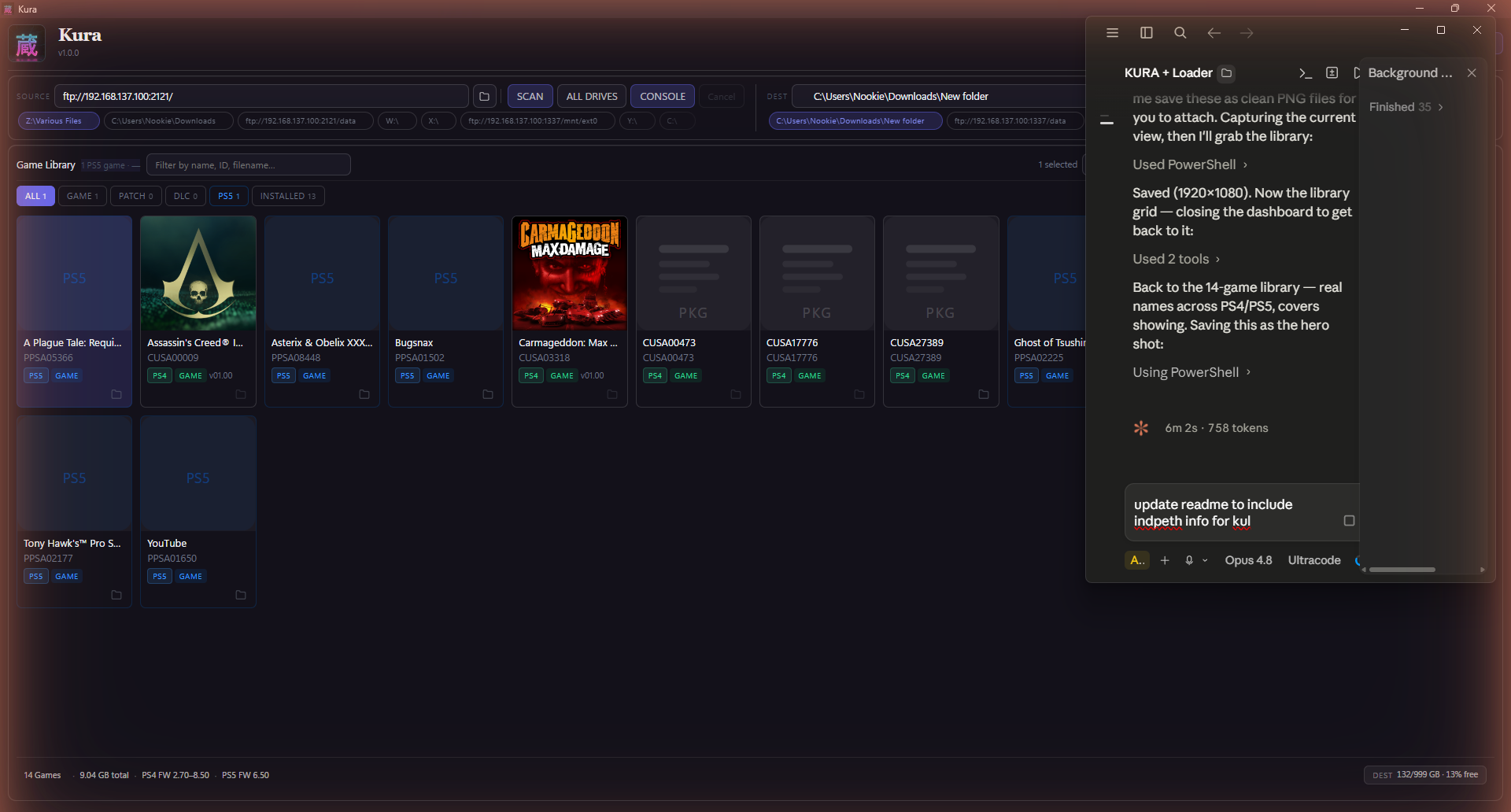
Kura is a free application that scans your drives, identifies every PlayStation game you own, and helps you organise, transfer, and install them — across PS1, PS2, PSP, PS3, PS4, PS5, and PS Vita, in a single library. It reads inside each file for the real title, cover art, and metadata (not the filename), finds duplicates, organises for any console layout, and installs straight to your console.
No installer. No login. No account. Native builds for Windows, macOS (Apple Silicon + Intel), and Linux — plus the kura-loader.elf PS5 payload.
What's new in 1.4.0 — Media Gallery + dashboard accuracy sweep
- Media Gallery (K698). A new tab on the PS5 dashboard that scans
/user/av_contents/for all your screenshots and video clips — PS5, PS4, and System. Browse by platform badge, filter photos vs clips, open a full-size lightbox preview, and download any file straight to your PC in one click. Two new command-palette actions let you scan or batch-download without leaving the keyboard. - Dashboard accuracy audit. Every stat badge, feature card, help panel, and command-palette description has been cross-checked against the live codebase. Stale claims fixed: endpoint count now says 200+ (was 150+), MHD response sites 500+ (was 40+), overview panels 12 (was 9), self-heal description updated for the current observe-only watchdog, Settings palette reflects the real sections, and all rescue/port references corrected.
- Capabilities endpoint.
/api/capabilitiesnow reportsmediaGallery: trueand includesK698in the rules array so the desktop app can gate UI features cleanly.
Includes everything from 1.3.0 (automatic loader updates + full Kura branding), 1.2.0 (Transfer Queue panel + Console Cleanup), 1.1.1 (fast console-health gate), and the seven tools from 1.1.0.
Which file do I download?
- Windows →
kura.exe - macOS · Apple Silicon →
Kura-…-arm64.dmg - macOS · Intel →
Kura-…-x64.dmg - Linux →
Kura-….AppImage - PS5 payload →
kura-loader.elf
macOS first launch: if you see "Kura is damaged and can't be opened", open Terminal and run
xattr -cr /Applications/Kura.apponce — that's just Gatekeeper blocking an unsigned app, not real damage.
Free · portable · no account. Built and maintained by Nookie. If you like it, tell a friend.
Kura v1.3.0
Kura is a free application that scans your drives, identifies every PlayStation game you own, and helps you organise, transfer, and install them — across PS1, PS2, PSP, PS3, PS4, PS5, and PS Vita, in a single library. It reads inside each file for the real title, cover art, and metadata (not the filename), finds duplicates, organises for any console layout, and installs straight to your console.
No installer. No login. No account. Native builds for Windows, macOS (Apple Silicon + Intel), and Linux — plus the kura-loader.elf PS5 payload.
What's new in 1.3.0 — the console loader keeps itself up to date
- Automatic loader updates. When your PS5 is running an older Kura Loader than the app ships, Kura now updates it for you — it steps the old loader aside, installs the newer one, and confirms the console came back on the new version before calling it done. It only runs when the console is idle (never mid-transfer), at most once per version, and there's a settings toggle if you'd rather do it yourself. No more manually re-pushing the loader after an app update.
- Full Kura branding on the console. Every screen the console shows now reads Kura — the freshly-built loader ships with the latest ShadowMountPlus and the last few legacy strings rebranded, so what you see on the PS5 matches the app.
Includes everything from 1.2.0 (Transfer Queue panel + Console Cleanup multi-select & sync report), 1.1.1 (fast console-health gate), and the seven tools from 1.1.0.
Which file do I download?
- Windows →
kura.exe - macOS · Apple Silicon →
Kura-…-arm64.dmg - macOS · Intel →
Kura-…-x64.dmg - Linux →
Kura-….AppImage - PS5 payload →
kura-loader.elf
macOS first launch: if you see "Kura is damaged and can't be opened", open Terminal and run
xattr -cr /Applications/Kura.apponce — that's just Gatekeeper blocking an unsigned app, not real damage.
Free · portable · no account. Built and maintained by Nookie. If you like it, tell a friend.