
Ash is an innovative bot with collaboration, multimedia, data visualization, and API integration features.
Language:
Python 3.11.5v
API:
OpenAI, DeepL, Discord.py
| Parameter | Type | Description |
|---|---|---|
DISCORD_TOKEN |
string |
Required. Your Discord Token |
API_GPT_KEY |
string |
Required. Your GPT API Key |
DEEPL_APIKEY |
string |
Required. Your DeepL API Key |
DB_PATH |
path |
Ineffective. Path to the database |
DB_PATH_VOICETRACK |
path |
Ineffective. Path to the database |
You can use the DB_PATH and DB_PATH_VOICETRACK as well as you can not need it to use if you can do it without for myself i prefer the version harcoded even if i know that not really good ^^
EDIT: After some reflexions i decided to not put an harcoded values in it, firstly because it made my code not worthy and secondly that was useless. I will not deleted the part that i talk about because i want to let people know the way i was going in.
I will also try to put it in a docker compose or images and also a file to install all dependencies at the right version so theres is less things to do manually, and make the bot taking less space and still be effective.
Firstly i want to prevent i did the project of Window cause for python i don't see any problem so if you encounter any issue or error don't hesitate to let me know
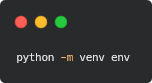
To activated your env you need first to use this command on Powershell(Window) in admin mode this will allow script
set-executionpolicy unrestrictedYou can desactivated again with this command :
Set-ExecutionPolicy RemoteSigned
Now use the Sample_env.txt in repository and rename it .env and for finish it you will just need to put your key instead of "[......]"
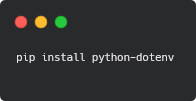
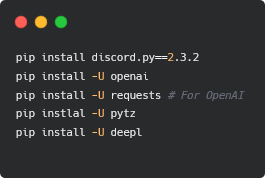
As you can see when I made the bot I used the latest version of discord that I downloaded that's why if you want the project to work on your machine the main thing is to be on the same version for the rest of the dependencies I think it should go but I'll give in case all the versions of dependencies I used, I'll put them just below
discord.py : Version: 2.3.2
openai : Version: 0.27.8
requests : Version: 2.31.0
pytz : Version: 2023.3
deepl : Version: 1.15.0
In the code you can see sqlite3 sometimes I decided to use it because for me I think it would be enough of course there are better and especially aiosqlite however I am not informed enough if this one was well developed but it was created for asynchronous programs exactly what does discord.py thus with you to see if you want to use it! :)
I'd like to specify one thing about the database you need to make a folder db at the root of the project ^^
What the folder should look like:

For user.db and voicetrack.db this will be automatically created when starting the bot
The bot adds a few functions, not an entire new setup, but it is still pleasant for certain functions such as :
- a translation command using the Deepl API.
- The time a user stays in a voice channel is calculated directly and put in a database.
- a birthday command which, after several updates, will allow you to receive a private message and a gif
- a command using ChaGPT's API to ask a question and receive a useful answer for the user.
- A log system for messages sent to the discord server deleted every 24 hours
- Information about the server / a ping / a command to stop it and finally a pagination for the help command!
- I know it's not the craziest or the best project you can create, but it was a way of improving myself and challenging myself to make a quality bot discord, and that's what I think I've achieved. Some people will say it's useless or even rubbish, but I'm proud of what I've produced and it gives me motivation, above all.
Don't hesitate to give some advice or to propose some features / fix i will be very happy !
- Add the private message for the birthday message
- ✅ Fix the time tracker (the issue was that other changing on the status would restart the time tracker)
- Adding data visualisation with a online dashboard build with Flask or Django