Use ./run.sh as the entrypoint for this deployment. Running ./run.sh with no arguments prints the help text.
- First run:
./run.sh startgenerates local credentials, writes.env, creates monitoring config, and starts Docker Compose. - Normal restart/re-up:
./run.sh startordocker compose up -dstarts the existing instance with the current.envand data. It does not rotate credentials. - Full local reset:
./run.sh resetstops the stack, deletes local data/config/credentials, generates fresh credentials, and starts a new instance. Use./run.sh reset --yesto skip the confirmation prompt.
After startup, open CTFd at http://<server>/ or http://<server>:8000/, and Grafana at http://<server>:3000/.




- Removed the admin reset feature and Danger Zone UI. Switching back to user mode now requires a full CTFd reset from the CLI.
- Added automatic exports every 20 minutes while the competition is running. Exports are saved in
.export, and the oldest exports are removed when the folder reaches 1 GB. - Added Prometheus, cAdvisor, node exporter, and Grafana monitoring. The admin top bar includes a
Monitorlink to Grafana, while Prometheus, cAdvisor, Redis, MariaDB, and node exporter stay on Docker-internal networking. - Added basic authentication for Prometheus and cAdvisor, plus Grafana datasource provisioning generated into ignored local files by
run.shormonitoring/generate-config.sh. - Added host and container monitoring panels for CPU, memory, RAM, disk, and network RX/TX using current/max-style values instead of percentages where requested.
- Added challenge submission metadata for
AI Sourcelinks and solver/script uploads. - Added
Customconfiguration for the accepted AI Source regex, solver file count limit, and solver total size limit. - Added per-challenge
Need AIandNeed Solversettings, including challenge creation/editing controls and admin challenge-table indicators. - Added AI Source and Solver links to the admin submissions table, plus a manual
Verifiedcheckbox for reviewer tracking. - Added anti-cheat event detection and review tooling for shared IPs, shared user agents, shared browser fingerprints, repeated wrong answers, rapid solves, challenge-file download timing, and churn-style signals.
- Added an
Assistantadmin role with configurable access control. Full admins can grant scoped access to admin sections, including separate read/write permissions for Users, Teams, and Submissions. - Added
run.shto initialize fresh deployments, reuse existing credentials/data on normal starts, and reset local infrastructure on request. - Added
reset.shfor full-instance reset with seven confirmations. It exports the current instance into.reset, archives.exportinto.resetwith a timestamp, and then starts a fresh stack. - Added
scripts/trigger_anti_cheat.pyto generate local demo events for validating the anti-cheat detectors.


CTFd is a Capture The Flag framework focusing on ease of use and customizability. It comes with everything you need to run a CTF and it's easy to customize with plugins and themes.
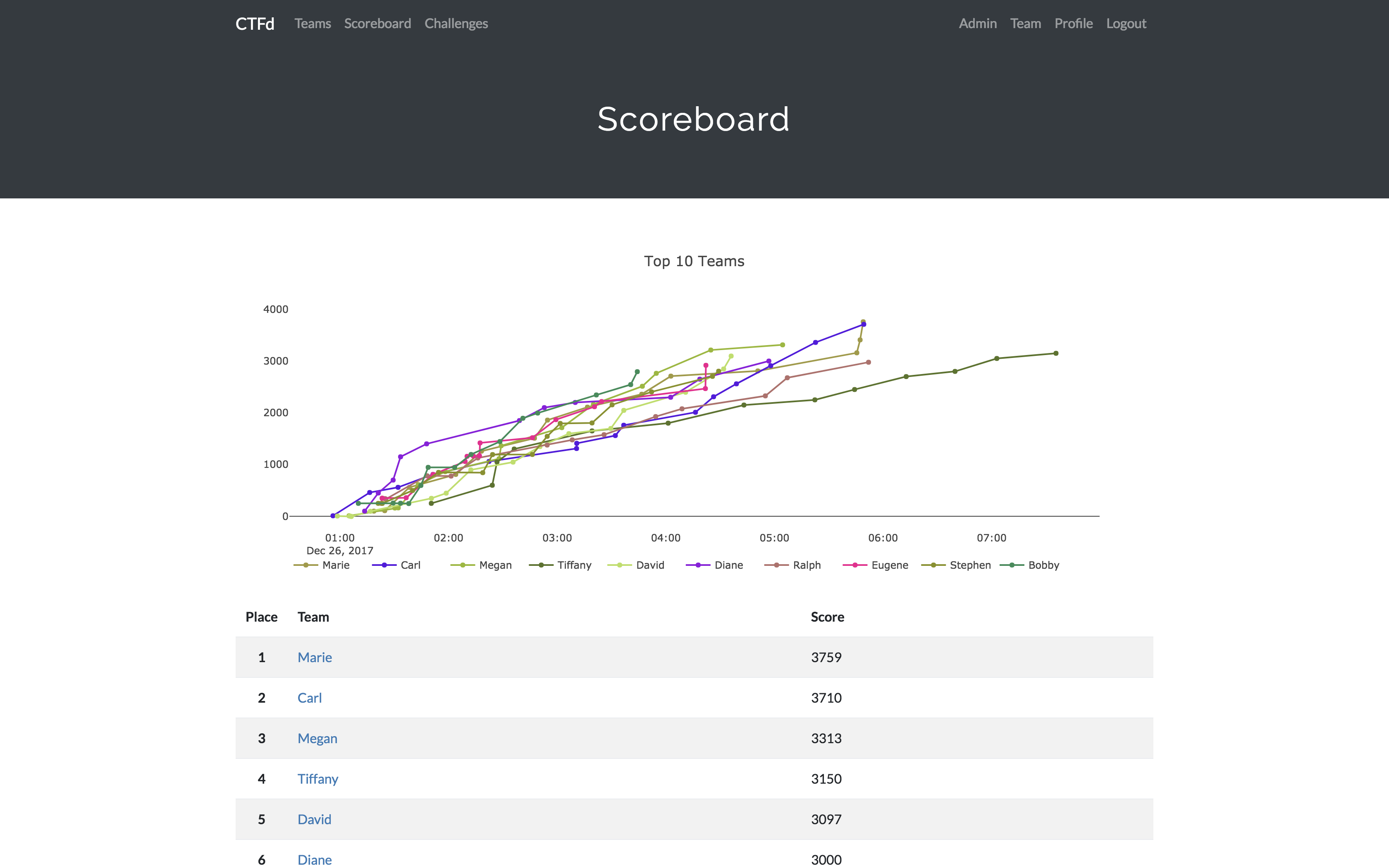
- Create your own challenges, categories, hints, and flags from the Admin Interface
- Dynamic Scoring Challenges
- Unlockable challenge support
- Challenge plugin architecture to create your own custom challenges
- Static & Regex based flags
- Custom flag plugins
- Unlockable hints
- File uploads to the server or an Amazon S3-compatible backend
- Limit challenge attempts & hide challenges
- Automatic bruteforce protection
- Individual and Team based competitions
- Have users play on their own or form teams to play together
- Scoreboard with automatic tie resolution
- Hide Scores from the public
- Freeze Scores at a specific time
- Scoregraphs comparing the top 10 teams and team progress graphs
- Markdown content management system
- SMTP + Mailgun email support
- Email confirmation support
- Forgot password support
- Automatic competition starting and ending
- Team management, hiding, and banning
- Customize everything using the plugin and theme interfaces
- Importing and Exporting of CTF data for archival
- And a lot more...
- Install dependencies:
pip install -r requirements.txt- You can also use the
prepare.shscript to install system dependencies using apt.
- You can also use the
- Modify CTFd/config.ini to your liking.
- Use
python serve.pyorflask runin a terminal to drop into debug mode.
You can use the auto-generated Docker images with the following command:
docker run -p 8000:8000 -it ctfd/ctfd
Or you can use Docker Compose with the following command from the source repository:
docker compose up
Check out the CTFd docs for deployment options and the Getting Started guide
To get basic support, you can join the MajorLeagueCyber Community:
If you prefer commercial support or have a special project, feel free to contact us.
Looking to use CTFd but don't want to deal with managing infrastructure? Check out the CTFd website for managed CTFd deployments.
CTFd is heavily integrated with MajorLeagueCyber. MajorLeagueCyber (MLC) is a CTF stats tracker that provides event scheduling, team tracking, and single sign on for events.
By registering your CTF event with MajorLeagueCyber users can automatically login, track their individual and team scores, submit writeups, and get notifications of important events.
To integrate with MajorLeagueCyber, simply register an account, create an event, and install the client ID and client secret in the relevant portion in CTFd/config.py or in the admin panel:
OAUTH_CLIENT_ID = None
OAUTH_CLIENT_SECRET = None- Logo by Laura Barbera
- Theme by Christopher Thompson
- Notification Sound by Terrence Martin