


A modern, GPU-accelerated fractal explorer built with C++ and OpenGL.
Note: This is a work in progress. New features are being added and existing ones may be refined.
FractaVista is a high-performance, interactive desktop application for exploring the mesmerizing beauty of fractals. It leverages modern C++ and the power of GPU compute shaders to deliver a smooth, real-time exploration experience with an intuitive user interface.
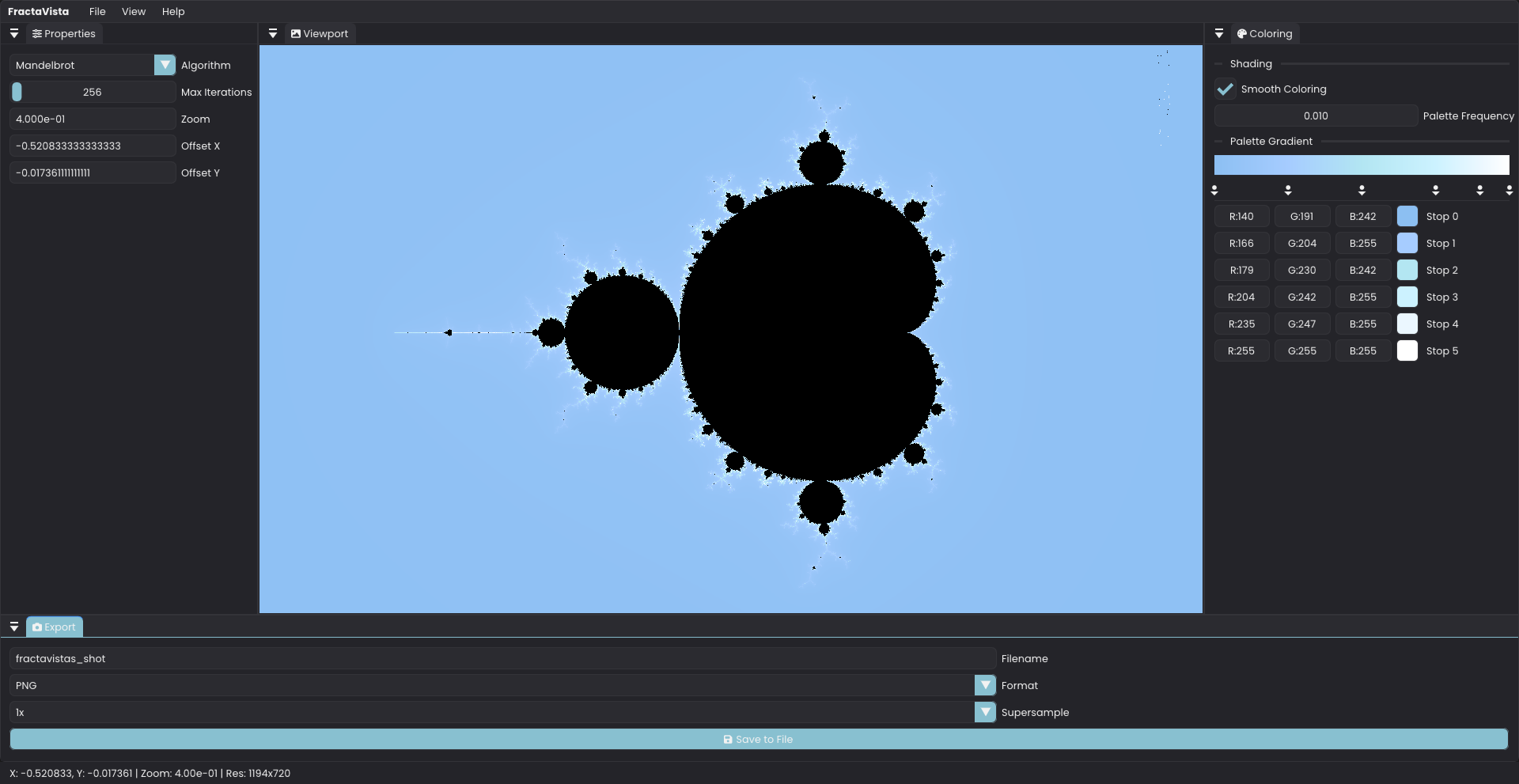
- GPU-Accelerated Rendering: Utilizes OpenGL compute shaders for blazingly fast fractal generation, allowing for deep, real-time exploration.
- Multiple Fractal Algorithms: Comes with several built-in fractal types:
- Mandelbrot
- Julia
- Burning Ship
- Cubic Mandelbrot
- Tricorn
- Newton
- Interactive Navigation: Smoothly pan and zoom into the intricate details of each fractal with simple mouse controls.
- Real-time Parameter Control: Tweak parameters like max iterations, zoom, position, and Julia set constants on the fly.
- High-Resolution Export: Save stunning, high-quality screenshots of your discoveries with built-in supersampling options (up to 8x).
- Modern & Modular Codebase: Written in clean, modern C++ with a strong emphasis on modularity.
- Language: C++ 17
- Graphics API: OpenGL 4.3+
- Dependency Management: vcpkg
- Windowing & Input: SDL3
- GUI: Dear ImGui (with Docking)
- OpenGL Loading: GLAD
- Image Loading/Saving: SDL3_image
- Math: GLM
- JSON Parsing: nlohmann/json
- File Dialogs: Native File Dialog Extended
- Logging: spdlog
This project uses CMake and vcpkg for dependency management to ensure a smooth build process.
- A C++ compiler that supports C++ 17 or newer (GCC, Clang, MSVC)
- CMake (version 3.27 or higher)
- Git
- vcpkg
If you don't have vcpkg, you can install it with the following commands:
git clone https://github.com/microsoft/vcpkg.git
cd vcpkg
# For Windows
./bootstrap-vcpkg.bat
# For Linux/macOS
./bootstrap-vcpkg.sh
# Integrate with your build environment
./vcpkg integrate installUse vcpkg to install all the required libraries. Be sure to specify the correct triplet for your target platform (e.g., x64-windows for 64-bit Windows).
vcpkg install sdl3 sdl3-image imgui[docking-experimental,opengl3-binding,sdl3-binding] glm nlohmann-json nativefiledialog-extended spdlog zlib libpng libjpeg-turbo --triplet x64-windows-
Clone the repository:
git clone https://github.com/Krish2882005/FractaVista.git cd FractaVista -
Create a build directory:
mkdir build cd build -
Configure the project with CMake: Make sure to point CMake to the vcpkg toolchain file.
# Replace [path-to-vcpkg] with the actual path to your vcpkg installation cmake .. -DCMAKE_TOOLCHAIN_FILE=[path-to-vcpkg]/scripts/buildsystems/vcpkg.cmake -
Build the project:
cmake --build . --config Release -
Run the application: The executable
FractaVistawill be located in thebuild/Releasedirectory.
The user interface is fully dockable, allowing you to customize the layout to your preference.
-
Viewport:
- Pan: Click and drag with the left mouse button to move around the fractal.
- Zoom: Use the mouse scroll wheel to zoom in and out. The zoom is centered on your mouse cursor.
-
Menu Bar:
- File: Save and load fractal parameter presets (
.fractafiles) or quit the application. - View: Toggle the visibility of the different control panels (Properties, Coloring, Export, Status Bar).
- Help: View application information in the "About" modal.
- File: Save and load fractal parameter presets (
-
Properties Panel:
- Algorithm: Switch between different fractal types (Mandelbrot, Julia, etc.).
- Controls: Adjust core parameters like
Max Iterations,Zoom, andOffsetcoordinates in real-time. - Julia Parameters: Appears when the Julia set is selected, allowing you to modify its unique constants.
-
Coloring Panel:
-
Shading: Toggle smooth coloring and adjust the palette frequency.
-
Palette Gradient: A fully interactive gradient editor.
- Left-click on the bar to add a new color stop.
- Drag existing stops to change their position.
- Right-click a stop to delete it.
- Use the color pickers below to change the color of each stop.
-
-
Export Panel:
- Configure the
Filename,Format(PNG, JPG, BMP), andSupersamplefactor for high-resolution screenshots. - Click Save to File to export the current view.
- Configure the
- Implement more fractal algorithms (e.g., Nova, Magnet).
- Implement keyframe animation to export videos of fractal zooms.
- Display performance metrics (render time, FPS) in the UI.
This project is licensed under the MIT License.