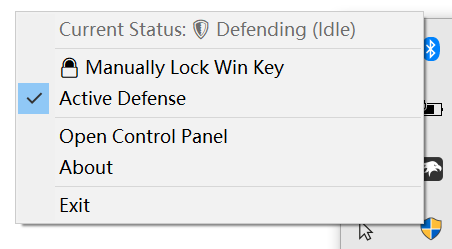
A lightweight background guard for ASUS laptops/PCs that detects accidental Fn + Win presses and instantly unlocks the Windows key, with zero performance overhead. It can also be configured to simply notify you when a Win button keypress is detected while the Win key is locked—providing a 100% reproduction of the original Armoury Crate feature and experience, without having to use Asus bloatware. It also supports manual lock/unlock directly via the system tray menu.
- Active Defense (Auto-Unlock): Automatically "fights back" against accidental
Fn + Winpresses by instantly unlocking the Windows key before it disrupts your workflow. - Passive Notification Mode: Only need to know when it's locked? Disable Active Defense to simply receive a native notification when a Windows key press is blocked, perfectly replicating the original manufacturer software experience without the heavy background services.
- Manual Control: Easily toggle the hardware Windows key lock state (Lock/Unlock) on the fly via a lightweight system tray menu.
- Zero-Overhead Monitoring: Hardware-level event-driven architecture that sleeps entirely when idle, consuming 0.00% CPU.
- Interactive Hardware Discovery: Built-in testing tool to easily isolate and identify the exact HID endpoint controlling your specific keyboard.
- Native Windows Integration: Fully DPI-aware, supports Windows Dark/Light mode dynamically, and utilizes smooth GPU-accelerated window transitions.
- Download the latest release from the Releases page.
- Run the executable. A shield icon will appear in your system tray, indicating that the guard is active. For the first launch, double-click the tray icon to bring up the control panel.
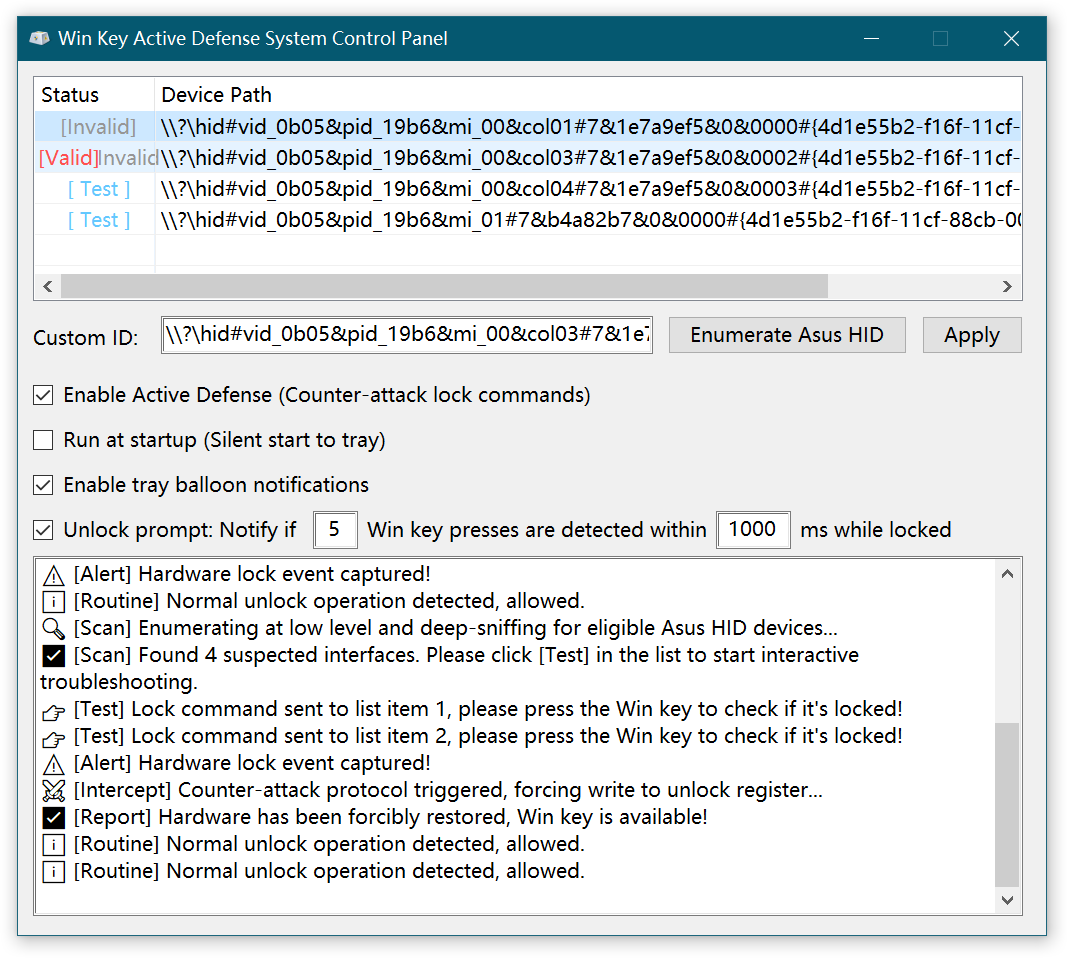
- In the control panel, click the Enumerate Asus HID button to list all ASUS HID devices found on your system.
- On the first column of the generated list, click the interactive
[Test]button for each row to safely test whether that specific device endpoint can toggle your Windows key lock state. - Once the correct device is identified, click
[Valid]to save the configuration. The guard will automatically start monitoring the hardware state and will instantly unlock the Windows key whenever it detects an accidentalFn + Winpress. - Check the Auto Start option to have the guard launch automatically minimized on system startup.
AsusWinKeyActiveGuard achieves its instant response time and zero performance penalty by interacting directly with the Windows Human Interface Device (HID) API, rather than relying on inefficient software-level workarounds.
Event-Driven, Not Polled:
Conventional keyboard-monitoring tools often rely on continuous polling loops (such as repeatedly checking GetAsyncKeyState) or setting up global software hooks (WH_KEYBOARD_LL). Both methods keep the CPU active and can introduce micro-stutters or input lag.
This application entirely avoids polling. Instead, it spawns a dedicated background thread that opens a handle to the specific ASUS keyboard HID endpoint and issues a synchronous, blocking ReadFile request.
Zero Overhead Idle:
Because the ReadFile operation is blocking, the Windows kernel effectively puts the monitoring thread to sleep. The application sits entirely dormant, consuming 0.00% CPU and requiring no scheduling priority while you type normally.
Instant Hardware Response:
When you accidentally press Fn + Win (or trigger the lock/unlock state), the keyboard's internal microcontroller generates a hardware interrupt and sends a specific input report. Only then does the operating system wake the background thread. The application reads the payload, verifies the proprietary lock signature (0x5D, 0xBF, 0x01), and depending on your settings, immediately dispatches an override Feature Report (HidD_SetFeature) directly back to the keyboard's firmware to reverse the lock.
Once the payload is handled, the thread immediately issues the next blocking read request and goes back to sleep. This strict event-driven architecture ensures your system resources are entirely preserved for your actual workloads.
Developed and verified on ASUS ROG Zephyrus M16, Windows 10. Should work on any ASUS laptop/desktop with a similar HID architecture.