
Local CS2 Premier CS Rating expiry timer using Steam Personal Game Data.


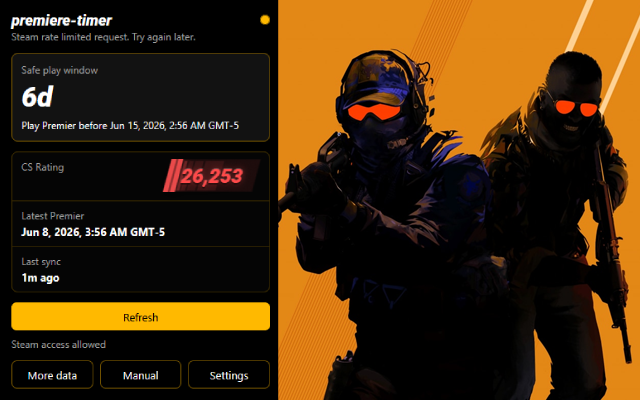
- Open
chrome://extensions - Enable Developer mode
- Click "Load unpacked"
- Select the
.output/chrome-mv3/folder
- Open
about:debugging#/runtime/this-firefox - Click "Load Temporary Add-on"
- Select the
manifest.jsonfile inside.output/firefox-mv3/
- Accept Steam access when prompted
- Click extension icon to open popup
- Click "Sync Steam data" to fetch latest data
- View safe play window timer and status
- Use sidebar for detailed information
- Configure shortcuts in browser settings
- Reads Premier match data from Steam Community profile
- Uses Skill Group value from matchmaking GCPD page
- Calculates expiry with 25-hour safety margin
- Parses explicit Steam GMT/UTC dates as absolute time
- Treats unmarked dates as local browser time
- Updates via background service with alarms
Run pnpm install to install dependencies and prepare WXT.
pnpm dev- Start Chrome dev mode with output in.output/chrome-mv3-dev/pnpm dev:firefox- Start Firefox dev mode with output in.output/firefox-mv3-dev/pnpm test- Run Node unit testspnpm build- Generate production builds in.output/chrome-mv3/and.output/firefox-mv3/pnpm zip- Generate browser zip packages from WXT
src/- WXT source code and entrypointspublic/- Static extension assets, icons, and locales.output/chrome-mv3/- Built Chrome production output.output/firefox-mv3/- Built Firefox production outputtests/- Unit tests
This extension runs entirely in your browser. No data is sent to any server. All Steam data remains local.