Terminal utility for local genomic assembly and variant analysis:
Open Genome helps users set up local genomics tooling, import sequencing files, prepare references, run native assembly and variant calling workflows, and generate evidence reports without uploading genome data.
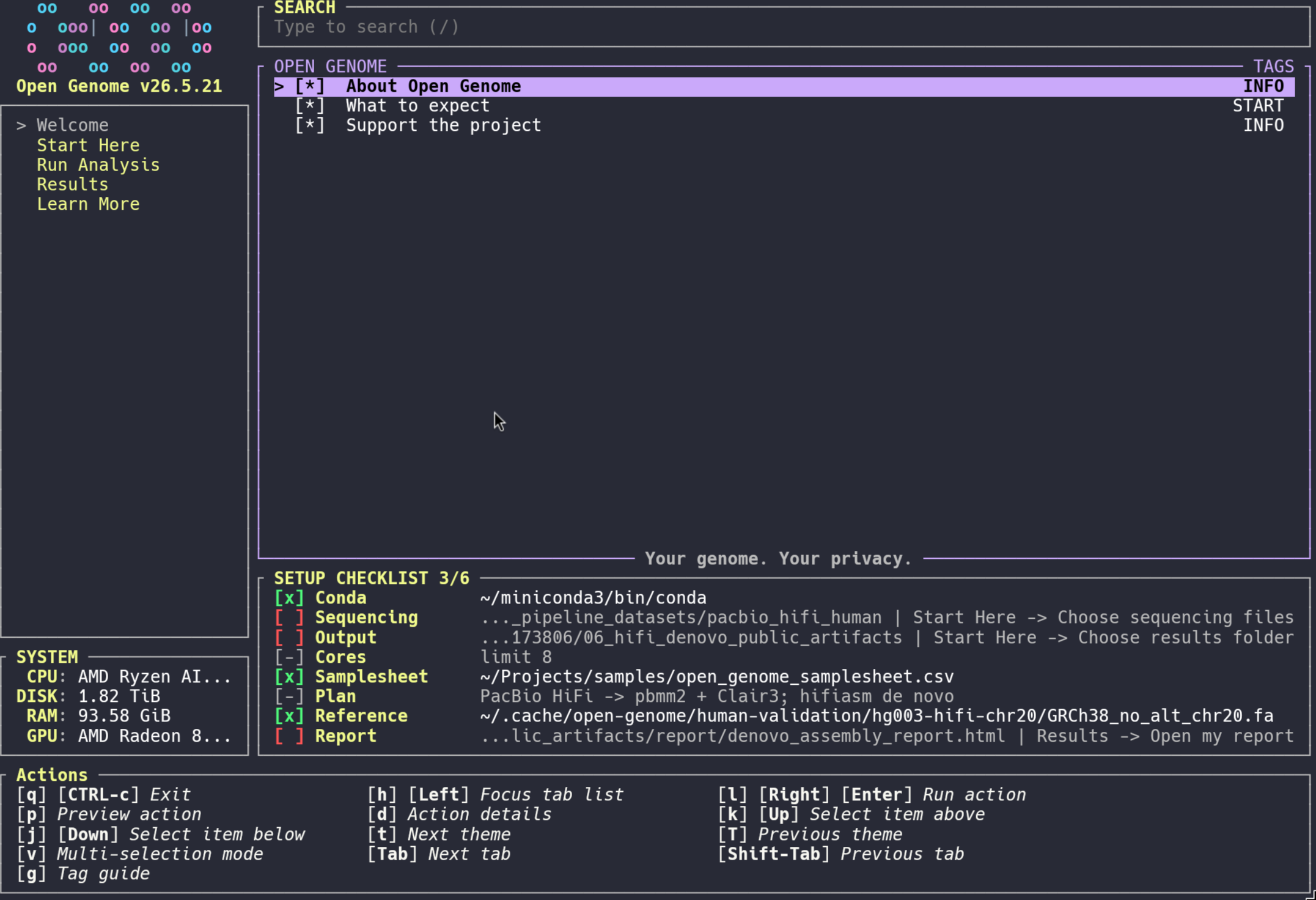
Run the latest GitHub release:
curl -fsSL https://raw.githubusercontent.com/Jakeelamb/opengenome/main/start.sh | shOr clone and run from source:
git clone https://github.com/Jakeelamb/opengenome.git
cd opengenome
cargo run -p opengenome_tuicargo run -p opengenome_tuiThe Nix package builds the same way: nix build .#default.
Release binary (workspace default):
cargo build --release -p opengenome_tui
# target/release/opengenomecargo run -p opengenome_tui -- --helpApp options include --config, --theme, --skip-confirmation, --override-validation, --size-bypass, --mouse, and --bypass-root.
Generate the bundled demo output bundle without launching the TUI:
cargo run -p opengenome_tui -- --demo-outputRun the public human validation dataset without launching the TUI:
cargo run -p opengenome_tui -- --human-validation-outputThis downloads public GIAB HG003 PacBio HiFi chr20 data, downsamples the bounded region to 10x by default, runs the reference germline, existing VCF, and de novo assembly pipeline entrypoints, then keeps outputs under the Open Genome work folder for reload. Set OPEN_GENOME_HUMAN_VALIDATION_TARGET_COVERAGE=5 or 10 to choose the target, and set OPEN_GENOME_RERUN_HUMAN_VALIDATION=1 only when you want to recompute instead of reloading existing outputs.
- Open
Welcome -> About Open Genomefor the local-first project summary and expectations. - Open
Start Here -> Start guided setup. - Choose where results stay and select sequencing files with the native picker.
- Watch the persistent setup checklist below the main action pane for saved conda, sequencing, output, CPU/core limit, samplesheet, recommended analysis plan, reference, and report paths.
- Use
Start Here -> Check what is readyanytime; it is read-only. - Run locally with
Run Analysis -> Run reference-based analysis,Run Analysis -> Run existing VCF report, orRun Analysis -> Run de novo assembly. - Review results with
Results -> Open my reportorResults -> Explain my results.
- User manifest:
$XDG_CONFIG_HOME/open-genome/manifest.toml(created on first Setup action from the bundled default). - Privacy: local-only user data by default. Public tools, references, and pipelines may be downloaded; reads/BAMs/VCFs/logs are not uploaded.
- Paths:
paths.reference,paths.dataset,paths.workdir,paths.threads. - Conda: Open Genome can reuse an existing
conda/mambaexecutable or install private Miniforge/Conda under$XDG_DATA_HOME/open-genome/miniforge. - Setup path selection: The TUI uses a native file picker for setup paths, including the automated setup path flow. Direct shell use still falls back to
fzfwhen available, or Bash/readline filesystem completion. Quoted or shell-escaped pasted paths are normalized. Selecting a sequencing file imports its containing folder so paired reads and related files are found together. - Persistent checklist: The TUI keeps a compact setup checklist below the main action pane. It reads the local manifest, samplesheet, and PATH to show conda, sequencing, output, CPU/core limit, samplesheet, recommended analysis plan, reference, and report status while you work.
- Setup readiness:
Start Here -> Check what is readyis read-only. It shows completed and missing setup items, with the next action to run for each missing requirement. - Samples: Setup can scan paired FASTQ/FASTQ.gz, long-read FASTQ/BAM, existing BAM/CRAM, existing VCF, or user-provided assembly files, including mixed folders. Run preparation selects one outcome: reference germline analysis, existing-VCF reporting, or de novo assembly. Long-read inputs are detected conservatively from file names containing markers such as
hifi,ccs,pacbio,revio,ont,nanopore, orultralong. - Sample dataset:
Start Here -> Try sample datagenerates tiny local demo files plus preview outputs for the reference germline, existing VCF, and de novo assembly workflows without using private data, downloads, or heavy workflow runs. The preview includes fastp/FastQC/MultiQC-style QC artifacts, read-density plots, de novo assembly FASTA/GFA, circularity review, graph preview, assembly summary TSV, and assembly manifest JSON. - Human validation dataset:
Start Here -> Run human validation datasetdownloads public GIAB HG003 PacBio HiFi chr20 data, downsamples the bounded region to the requested target coverage, runs the reference germline, existing VCF, and de novo assembly pipeline entrypoints, and records the output folders in the manifest. Reopening the action reloads existing outputs unlessOPEN_GENOME_RERUN_HUMAN_VALIDATION=1is set. - Reference/workflow:
Start Hereowns setup and readiness.Run Analysis -> Run reference-based analysisaligns reads or uses BAM/CRAM, runs QC, calls variants, and builds a report through theopengenomeconda environment.Run Analysis -> Run existing VCF reportnormalizes and summarizes a VCF without alignment or variant calling.Run Analysis -> Run de novo assemblyassembles PacBio HiFi/CCS or Oxford Nanopore reads into contigs and assembly review outputs. Manual reference and command steps live under advanced folders. - Variant calling: Illumina auto mode uses GATK. PacBio HiFi and ONT auto modes use Clair3 with platform-specific model directories. This is a data-type split, not a claim that Clair3 replaces GATK: GATK is the short-read default, while Clair3 is the long-read default. DeepVariant remains an explicit external executable integration for users who provide a compatible install or container wrapper.
- Recommended defaults: If you are not sure which tools to choose, keep the TUI defaults. Paired Illumina WGS uses BWA-MEM2 plus GATK. PacBio HiFi/CCS reference runs use pbmm2 plus Clair3, and ONT reference runs use minimap2 plus Clair3. Existing VCFs use the report-only workflow. HiFi de novo assembly uses hifiasm, and ONT-only de novo assembly uses Flye.
- De novo assembly:
Run Analysis -> Run de novo assemblyuses the separateopengenome-denovoenvironment and does not require a reference FASTA. The workflow supports hifiasm for HiFi, Flye for ONT-only reads, and Verkko for high-end T2T-style accurate-long-read plus ultra-long ONT assembly once separate read streams are available. Human-scale assembly can require substantial RAM, CPU, and scratch disk; setOPEN_GENOME_DENOVO_MEMORYbefore preparing the command to override the default memory request. - Reports: The native workflow emits
report_index.htmlplus compatibilityopen_genome_report.html, TSV findings, JSON evidence, and a run manifest. The report links FastQC/fastp/MultiQC files, shows mosdepth depth and breadth charts, separates SNP/indel/mtDNA variant counts, summarizes VEPCSQor SnpEffANNconsequence fields when present, lists local ClinVar/dbSNP/gnomAD evidence, keeps PharmCAT PGx status in its own section, and builds a reference-guided mitochondrial consensus FASTA when chrM/MT is available. UseStart Here -> Load existing resultswhen results already exist on disk, thenResults -> Open my reportorResults -> Explain my resultswithout rerunning. - Assembly reports: The de novo workflow emits
denovo_assembly_report.html,denovo_assembly_summary.tsv,denovo_assembly_manifest.json, primary contigs FASTA/GFA, read stats, assembler logs, and gfastats output. The bundled preview also shows circularity and read-density review artifacts so users can inspect the intended public report shape before running a heavy assembly. The report surfaces assembler, platform, contig count, total assembled bases, N50, and longest contig. - Optional public evidence: ClinVar, dbSNP, gnomAD, VEP/SnpEff, and PharmCAT are local-cache driven. Open Genome does not upload variants for annotation, and skipped report sections mean the matching local resource or VCF annotation field was not configured.
- Environment:
Start Here -> Advanced manual setup -> Install or update local toolsinstalls the mainopengenomeenvironment, the separateopengenome-denovoassembly environment, and a small IGV environment because current GATK packages require Java 17 while current IGV requires Java 21. - Learn More: The
Learn Moretab lists current human reference sources, workflow-compatible GRCh38 bundles, T2T-CHM13 resources, Conda/Bioconda links, and source/paper links for the tools Open Genome uses.
- GATK for Illumina: Open Genome keeps GATK HaplotypeCaller as the default short-read germline caller because it is the established Broad Best Practices path for Illumina SNP/indel discovery.
- Clair3 for PacBio/ONT: Open Genome uses Clair3 for long-read germline small variants because Clair3 is designed around long-read error profiles with pileup plus full-alignment models. The core paper is Zheng et al., Symphonizing pileup and full-alignment for deep learning-based long-read variant calling, Nature Computational Science 2022. A newer acceleration paper is Zheng et al., Accelerated long-read variant calling with Clair3 for whole-genome sequencing, Bioinformatics 2026.
Open Genome reports are evidence summaries, not diagnosis or treatment advice. Variant matches require review by classification, source date, review status, population frequency, phenotype, family history, and clinician judgment. Negative findings do not remove genetic risk.
Mitochondrial output is a technical mtDNA coverage/variant/consensus summary. It is not de novo mtDNA assembly, heteroplasmy validation, haplogroup assignment, or medical interpretation.
See docs/privacy-and-interpretation.md.
Full local release gate:
scripts/pipeline-quality-gate.shThis installs a project-local nf-test under .tools/ when needed, runs the genomics gate, runs the Rust workspace tests, checks whitespace, and verifies no local helper processes were left running.
The full gate also runs a tiny real-tool smoke when the local conda environments are available. That smoke executes the existing-VCF report workflow and the default Illumina reference workflow with actual Nextflow tasks, BWA-MEM2, GATK, bcftools, mosdepth, MultiQC, and the report compiler. With long-read tooling installed, it also runs bounded Clair3 PacBio/ONT calls, a direct Flye assembly-stage check, and a hifiasm Nextflow report-contract check.
Install only the local Nextflow test runner:
scripts/install-nf-test.shFocused genomics gate:
scripts/check-genomics.shThis runs the Python scanner/report tests, shell helper tests, shell syntax checks, Rust tab metadata test, pipeline contract validation, nf-test pipeline contract tests when installed, native/reference plus de novo Nextflow stub smoke tests, and tiny real-tool smoke tests when the local conda environments are installed.
Real-tool pipeline smoke only:
scripts/pipeline-real-smoke.shLegacy paths.env is imported once on bootstrap only if the manifest path fields are still empty. Example templates: examples/open-genome.manifest.toml, examples/open-genome.paths.env.
Requires Python 3.11+ on the machine that runs Setup scripts (tomllib). Conda installs need conda on PATH (or set conda.conda_exe).
Optional TOML for the TUI: auto-execute, confirmations, and size bypass. Example:
skip_confirmation = false
size_bypass = false
auto_execute matches command titles exactly as shown in the right-hand list.