This is an FMOD Wrapper for Pure Data using the Heavy Compiler Collection fork, which simplifies the creation of plugins for FMOD.
For ease of use, I recommend plugdata.org, an open-source program, based on pd-vanilla that implements the compilation with heavy.
First you have to design your plugin with Pure Data.
Not all pure data vanilla objects are available. Check here for a list of supported objects. Plugdata also displays a warning when trying to compile unsupported objects.
- Create a Pure Data patch as you like either as an instrument or effect. The presence of
adc~anddac~objects/channels determines the type.
1a. Featuring Multichannel-Expansion: All effects with one adc and one dac channel are expanded to the channel configuration inside the middleware. - (Optional) Add
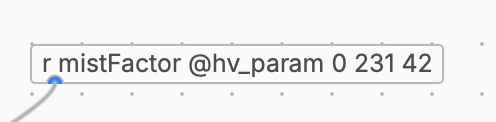
r(receive) objects for creating parameters. The syntax isr <name> @hv_param <min> <max> <default>name, min, max and default will be recognised by the middleware.
- (Optional) Add any or multiple
r's with following name, that will receive 3d-Attributes from the source as a list:
| Argument | Explanation |
|---|---|
| rel_pos | Relative Position |
| rel_vel | Relative Velocity |
| rel_forw | Relative Forward Vector |
| rel_up | Relative Up Vector |
| abs_pos | Absolute Position |
| abs_vel | Absolute Velocity |
| abs_forw | Absolute Forward Vector |
| abs_up | Absolute Up Vector |
For example to receive the absolute position (xyz) from the event to the listener:
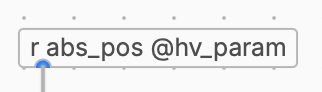
If any of those inports are present in the plugin, the event is automatically turned into a 3D event (even without a spatialiser), when it is an effect. For instrument plugins, you must add a spatialiser to preview the effect in FMOD Studio.
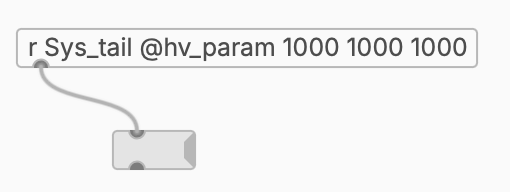
- (Optional, effect only) Add how long after the plugin became quiet, it should leave the event alive (for example if you have delays or reverb other any other tail). This is done over a receiver
r Sys_tail @hvparam <ms> <ms> <ms>. To be exported it has to be connected to some object. (This is all very ugly, and I'd like to change this...)
For example for keeping it 0.5 seconds alive after being quiet. If this isn't set, the event is stopped immediately. So insert at least 1ms to enable checking the output volume. - Export it as C++ code by clicking on "Compile..." in the menu and selecting C++. Enter a Project Name. This will determine the plugin name.
- Clone Repo and Download FMOD-API. Copy the FMOD api/core/inc folder into the CMake folder.
- cd to the CMake folder
cd /path/to/CMake cmake -B <SomeFolder>cmake --build <SomeFolder>
The plugin can be directly compiled online with my Game Audio Crowd Plugin Compiler Tool without the need of downloading cmake for various platforms.
If you find any bugs or something isn't working as expected, feel free to add a bug report or contact me.
If you're feeling generous, you can donate here.