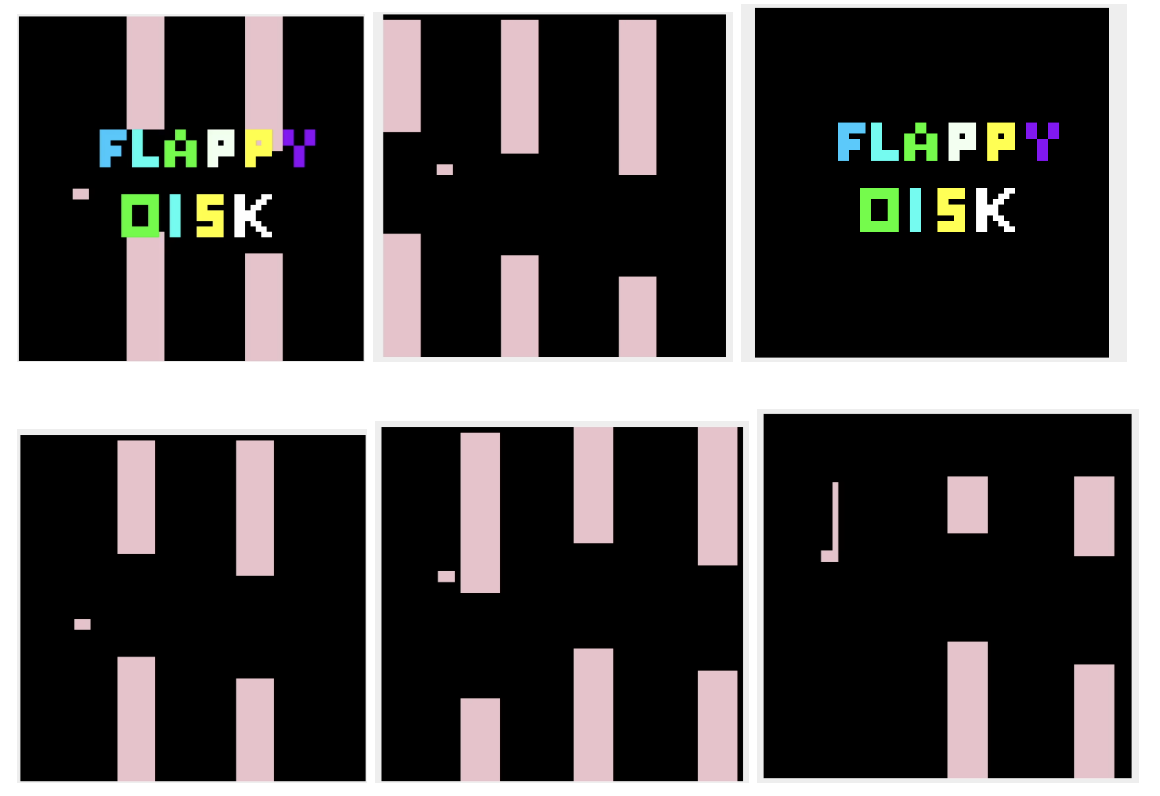
This is a application that used the MIPS to create an game simialr to the popular game, Flappy Bird.
a written overview of what the program does
The program starts out with an opening screen which consists of a background of columns, a disk object, and a logo. First the background and the disk is statically printed then a loop repeatedly displays the logo until there is an input from the user in the Keyboard simulator. When there is an input a animation is played which erases everything and the program falls into the loop that first erases the object disk and the background then the location pointers and the colors pointers are set after that the program draws the obj two points below and the background one point to the left. At this point the program looks for an input; if no input is found the program continues to drop the obj and draw the columns shifted one to the left. When an input is found. If the style function checks if the input is a space if so it is processed and the disk object is shifted for spaces up. After this the program jumps back to the loop. And continue the process of looking for input and interesting it again and again until either the disk colloids or the program is exited by clicking Q. All the functions of checking for collision, getting the right number of columns, making sure the addresses are not run off are done in the functions that draw the different objects. Lastly when existing, the goodbye function is called and which erases the board and displays a screen similar to the opening screen.
Steps to play the game.
- in order to run the code for this repositry you must have downlaod MARS through this link: https://courses.missouristate.edu/kenvollmar/mars/download.htm
- This application is an MARS MIPS simulator. When the porgram is dowloaded. click on the file and a application will open through Java.
- After that you are able to complie and run this program.
Instructions on how to run the program First assemble the code by clicking the assemble button on the toolbar. Then open the Bitmap Display and the Keyboard and Display MMIO simulator. For the Bitmap set the pixel width and height to 4. Also set the display height and width to 256. Lastly set the base address to 0X10008000 ($gp). Furthermore, place two windows in a way that both are accessible. Now, connect the Bitmap display to MIPS by clicking the Connect to MIPS button. Then,click the run button in the toolbar. At this point you should see two columns and a disk in the background and a logo that spells Flappy Disk. To start the game type any key in the Keyboard simulator expect Q. At this point the game will start and the disk will begin to fall, to keep the disk pressing the spacebar.