



A fully implemented mini RDBMS built from scratch in C++ — disk, buffer, cache, indexing, and an interactive command interface included.
NITCBase is a fully implemented mini Relational Database Management System (RDBMS) built from scratch in C++, developed as part of a laboratory course at NIT Calicut. It covers every internal layer of a real database engine — from disk simulation and buffer management to B+ Tree indexing and an interactive command-line interface.
This project is designed for educational purposes, providing hands-on experience with how a database works under the hood.
- 🖴 Simulated 16MB disk with block-level I/O
- ⚡ 32-block buffer pool for fast in-memory access
- 🗂️ Relation & attribute cache for up to 12 open relations
- 🌲 B+ Tree indexing for efficient attribute-based search
- 🔍 Relational algebra — select, project, insert, and join
- 💬 Custom command-line interface with SQL-like syntax and batch script support
- 📦 12 stages completed end-to-end
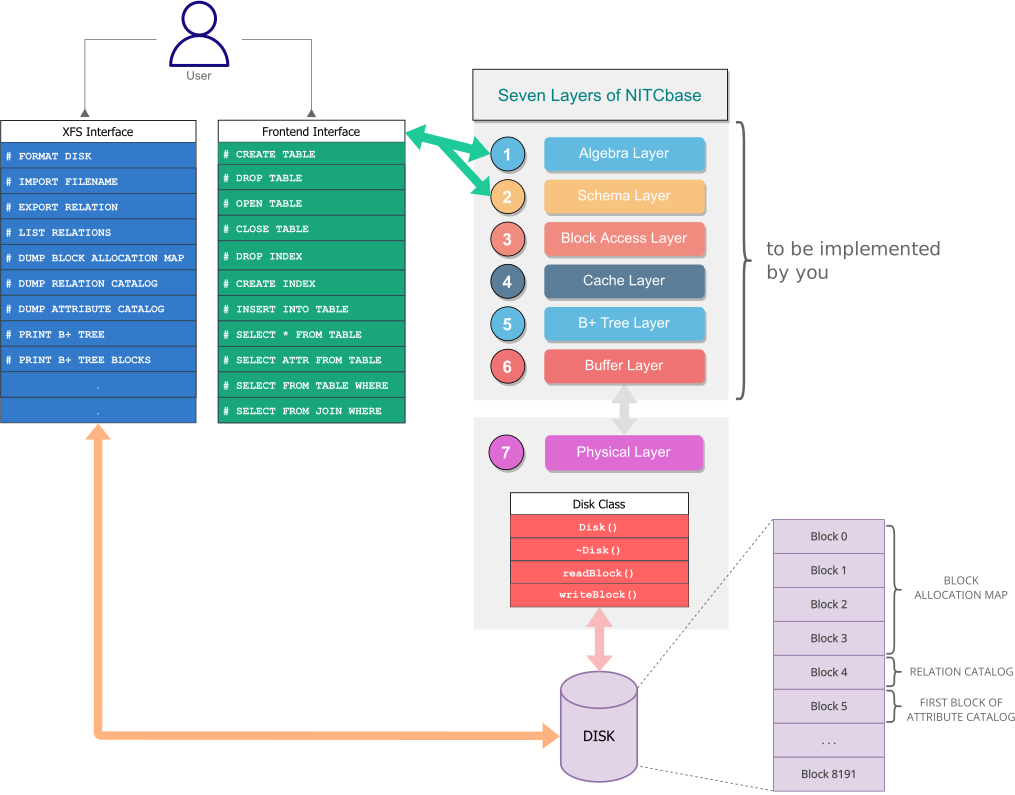
User Command → Frontend Interface → Schema / Algebra → Block Access → B+ Tree / Cache → Buffer → Disk
Each layer only talks to the one below it — a clean, real-world DBMS design.
Before running NITCBase, ensure you have the following installed:
- Linux-based OS (tested on Ubuntu 20.04)
- C/C++ compiler (
gcc/g++) makelibreadline-devgit
Install all required packages with:
sudo apt-get install build-essential libreadline-dev git-
Clone the repository:
git clone https://github.com/Gowtham0748/RDBMS
-
Navigate to the project directory:
cd NITCBase/mynitcbase -
Build the application:
make
If you run into build issues, make sure all prerequisites are properly installed.
./nitcbaseThis starts the interactive command-line interface where you can run NITCBase commands directly.
NITCBase provides a custom command-line interface with SQL-like syntax for performing database operations:
-- Create and manage tables
CREATE TABLE Students (RollNo NUM, Name STR, CGPA NUM);
OPEN TABLE Students;

-- Insert and query data
INSERT INTO Students VALUES (1, Alice, 9.5);
SELECT * FROM Students INTO Temp WHERE CGPA >= 9.0 INTO TopStudents;

-- Close table
CLOSE TABLE Students;

-- Indexing
CREATE INDEX ON Students.RollNo;

-- Join two relations
SELECT * FROM Students JOIN Courses INTO Temp WHERE Students.RollNo = Courses.RollNo;

-- Run a batch script
RUN myscript.txt;
Note: NITCBase uses its own command syntax. Commands may look similar to SQL but are not standard SQL — for example,
SELECTrequires anINTOtarget relation.
For the complete list of supported commands, refer to the NITCBase User Interface Documentation.
For detailed information on the architecture, design, and all supported features:
📚 NITCBase Official Documentation
Contributions are welcome! If you'd like to improve NITCBase:
- Fork the repository
- Create a new branch (
git checkout -b feature/your-feature) - Commit your changes (
git commit -m 'Add some feature') - Push to the branch (
git push origin feature/your-feature) - Open a Pull Request
Please follow clear naming conventions and include a short description of your changes.
Thank you for checking out NITCBase! If you run into any issues or have questions, feel free to open an issue.