
Console for Mobile Browsers.




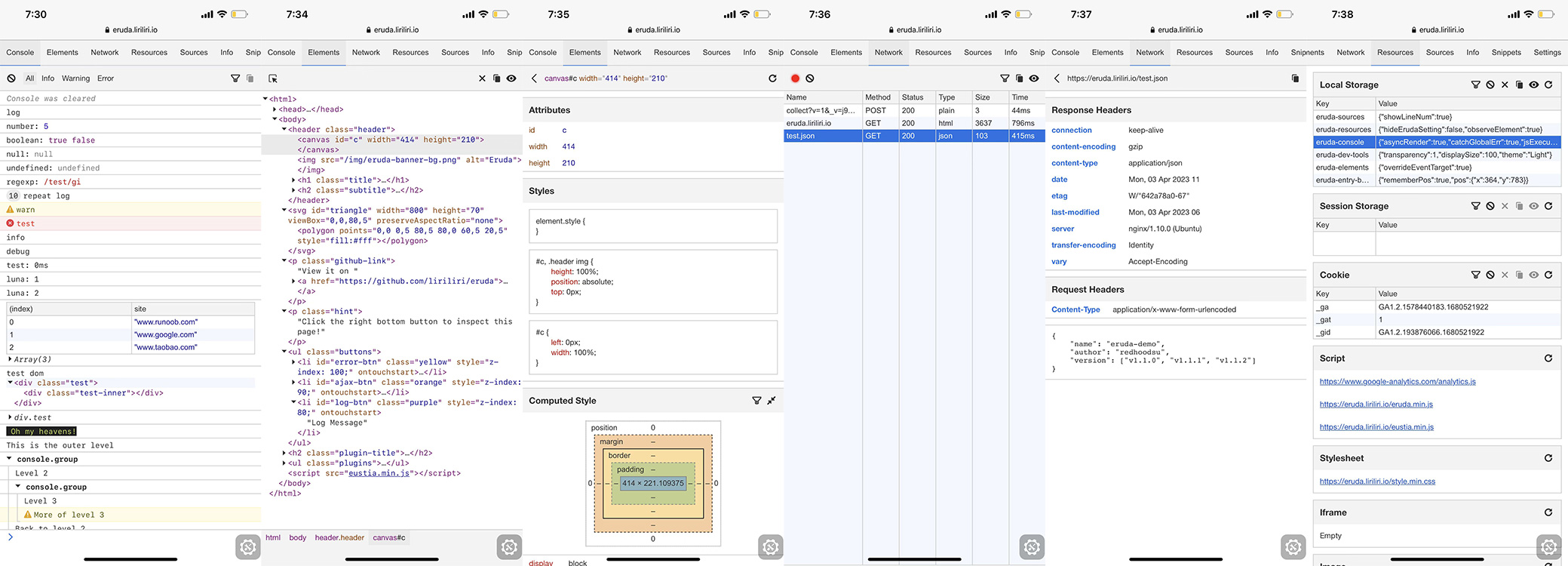

Browse it on your phone: eruda.liriliri.io
You can get it on npm.
npm install eruda --save-devAdd this script to your page.
<script src="node_modules/eruda/eruda.js"></script>
<script>eruda.init();</script>
It's also available on jsDelivr and cdnjs.
<script src="https://cdn.jsdelivr.net/npm/eruda"></script>
<script>eruda.init();</script>
For more detailed usage instructions, please read the documentation at eruda.liriliri.io!
Eruda supports exporting various types of development data directly as Markdown or text files:
- Console Logs: Export all history logs (including level, timestamp, and origin) as a formatted Markdown text file using the export button in the Console panel control bar.
- Network Traffic: Export all network traffic details (methods, URLs, status codes, request/response headers, body payloads, cURL equivalents) in the Network panel using site-specific dynamic filenames.
- Resources & Storage: Export local storage, session storage, cookies, scripts, stylesheets, iframes, and images dynamically in the Resources panel.
- System Info: Export all system, browser, OS, location, and device metrics from the Info panel.
- Unified Debug Report: Compile all System Info, active Console Logs, captured Network Requests, Local/Session Storage items, and Cookies into a single, comprehensive Markdown report file (
debug_report.md) with a single click from the Info panel control bar.
- eruda-android: Simple webview with eruda loaded automatically.
- chii: Remote debugging tool.
- chobitsu: Chrome devtools protocol JavaScript implementation.
- licia: Utility library used by eruda.
- luna: UI components used by eruda.
- vivy: Icon image generation.
- eruda-pixel: UI pixel restoration tool.
- eruda-webpack-plugin: Eruda webpack plugin.
- eruda-vue-devtools: Eruda Vue-devtools plugin.

Read Contributing Guide for development setup instructions.