Name: Oludemilade Aina
Student Number: C21725659
Name: Jared Leonard
Student Number: C21468162
Our group visualization project is based on the song Killing My Love, which is a song with a high tempo. Our goal was to make a visual experience that matched this high tempo vibe, that feels as though the user who is running the program, is taken on a journey. Unfortunately we were unable to get the program to run as a single entity, which we are really disappointed about, as we had high ambitions and large ideas for the assignment. It turnt out to be too big of a task to put everything together. We learnt a lesson that is is better to keep things simpler and move from there, instead of starting big and trying to make a super complicated visual from the start.
To run the program, unfortunately you have to edit the main file each time to display each visual.
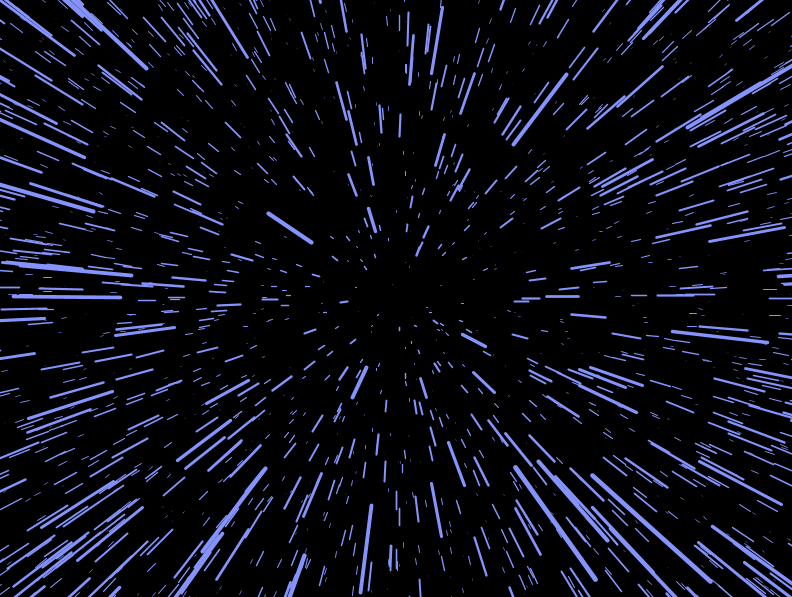
The WarpedSpace visual is a visual that is inspired by Star Wars, when they move through Hyperspace. My goal was to make this feels as dynamic and interactive as possible, as I am aware that a lot of people are inspired to make a visual similar to this. Therefore I wanted to make mine as unique and cool as possible. When they visual starts, the user can use the mousescroll wheel to achieve different things. The first is that when they scroll up, the star particles start moving much faster towards the screen, and the color of the particles randomly change. On the other hand, if the user decides to scroll down on the mousewheel, the particles start slowing down and appear to separate from each other, while also randomly changing colours. I am really happy with the overall functionality of this visual and how interactive it is.

The CelebrationStation visual was created to be another visual that is interact and constantly in motion, to match the theme of our song. To start off, I drew a wirefram box that has a gradient colors that slowly changes over time. Inside of this box there are a couple of cools things that take place. The first being the fireworks that randomly appear within the box. These fireworks vary a little bit in size and have a really cool looking color to it that contrats the background display of the visual. Inside of the wireframe box, the user can swap between spawning a triangle or circle, by using he right and left arrow keys. This wa another funcion I wanted to add as I wanted to make my visual as interactive as possible and fun for the user.
Another exciting adition was the camera movement I added. This allows the user to rotate the box and its contents in a 360 degree way. The box can also be rotated faster by using the up arrow, and slower using the down arrow. If the user wants to they can also use the mouse scroll button to zoom into the box, and even get inside of it! This gives this visual an even greater 360 feel which I find quite cool.
Jared: I am most proud of how ambitious we were as a collective in trying to get a visual that was super interactive for the user. I am really happy with how the Warped Space visual turned out and I think it has a really unique twist to it. I am incredibly disappointed that we could not get everything to work and match the music, which is something I regret, but I don't regret trying to make it as much of an enjoyable and interactive experience as possible, even though it turned out to be too complicated to put together in the end. My goal is to put at least my visuals together and get it to work with the music in my own time
For this assignment, I have made three audio visualizers, one that was basic changes and another one that was meant to be very dynamic in nature but didn't change too much, due to the challenges of trying to move things in a 3d space.
The global package holds the features that were intended to be used in both of our visualizers.
For the song, I used Whisper AI to transcribe the song into an SRT file. SRT format holds, information for when text is displayed on the screen and is the format that is generally used on YouTube videos to display closed captions on the video. The SRT file is made of 3 parts.
1 - > here part 00:01:00,000 --> 00:01:04,000 - > time code You give me love, and we dare to do this to my heart - > The text
The bulk of the code is done in the subtitle handler class which parses through the file getting the start and ending times of a part and using this will the audio player time code to check when it is displayed on the screen.
The prototype function was the main idea of the audio visualizer, where I want to make many changes. This was an idea to be iterated on. It has many functions. Such as a ball in the middle that changes and reacts based on the beat.
I have multiple sprite files, some of these files are not used, this is because they should have been used for my main audio visualizer DemiAudioVisualiser. The main idea was to make new items get added onto the screen based on the music, however, I was not able to get this done in time.
The note sprites is using some vectors and custom shapes to be added to the screen, the main idea was to get sprites to move around in the 3d object, however due to mistiming management. I was not able to implement this feature properly, there it doesn't work in my visualizer.
The note manager class has an array list of the instances of the Musical Note Sprite and holds the values of notes. This tracks the state of all the notes, and it uses the update function to check the lifetime of each note. Every time amplitude is above 0.1 in the music and a new note is added to the array list. The display method displays them.
The text sprite was an iteration of my idea using subtitles, it uses the DisplayCurrentSubtitle() method in the DemiAudioVisualiser, it uses the already existing text and splits them up into a word array and creates new sprites. However, again due to using 3d I was not able to implement the movement I was looking for potential because of the use of PVector and not just text I am not 100% sure.
The particle system is a system that is internalized through the DemiAudioVisualizer, it makes the size whatever the amplitude is and was meant to create random colour and lifespan, however, this didn't happen.
This was a visualizer I modified code online to use, however, it doesn't have the mouse movement functionality and the one-beat movement that mine has. This was achieved by creating a beat and update function that takes in amplitude now and creates random strokes.
Camera movement was also implemented into the visualizer it allows the user to move around the 3d space.
This package contains several classes for a music visualization project using Processing and the Minim library. The visualization includes various effects such as ripple echoes, particle systems, and 3D objects reacting to the music's amplitude and frequency bands.
This class manages a collection of MusicalNoteSprite objects, updating and displaying them based on the amplitude of the audio input.
- NoteManager(PApplet parent): Constructor that initializes the Note Manager with a reference to the parent PApplet.
- update(float amplitude): Updates the state of each note based on the amplitude and removes any expired notes.
- display(): Displays all active notes on the screen.
This class represents a single musical note sprite in the visualization.
- MusicalNoteSprite(PApplet parent, PVector position, float size, int noteType, float lifetime): Constructor that initializes the sprite with a position, size, type, and lifetime.
- update(float frameRate): Updates the state of the sprite, decreasing its lifetime and returning true if expired.
- display(PApplet parent): Displays the sprite on the screen.
This class represents a single point in a Ripple Echo visualization.
- part(int x, int y, float dist): Constructor that initializes the part with an x, y position and a distance value.
- update(PVector m, Boolean mode, float distortion, float beatValue, float width, PApplet p): Updates the part's position based on the mouse position, mode, distortion, beat value, and the PApplet's width.
This class represents a single particle in a particle system.
- Particle(PApplet p, PVector position, PVector velocity, float size, int colour, float lifespan): Constructor that initializes the particle with position, velocity, size, colour, and lifespan.
- update(): Updates the particle's position and decreases its lifespan.
- display(): Displays the particle on the screen.
- isDead(): Returns true if the particle's lifespan is zero or less.
This class is the main visualization sketch, combining various effects and displaying them on the screen.
This class is a visualization sketch that creates a ripple echo effect based on the amplitude and frequency of the audio input.
- RippleEcho(): Constructor that initializes the RippleEcho visualization.
- settings(): Sets the size of the PApplet window.
- setup() : Initializes the RippleEcho visualization, including loading audio and creating part objects.
- draw(): Renders the RippleEcho visualization, updating the part objects based on the audio input and mouse position.
- mousePressed(): Toggles the mode of the Ripple Echo visualization when the mouse is pressed.
This class represents a single text sprite in the visualization.
- textSprites(PVector position, PVector velocity, String text, int textSize, int colour): Constructor that initializes the text sprite with position, velocity, text, text size, and colour.
- update() : Updates the text sprite's position based on its velocity.
- display(PApplet p): Displays the text sprite on the screen.
Visualizer one:

Visualizer two:

Proud of the assignment: I was about to learn more about 3d space in games and how they are represented on the computer, It has made me want to pursue making 3d objects and present them in code. Creative coding as also thought the possibilities what I can make with simple shapes for loops, numbers, and math.