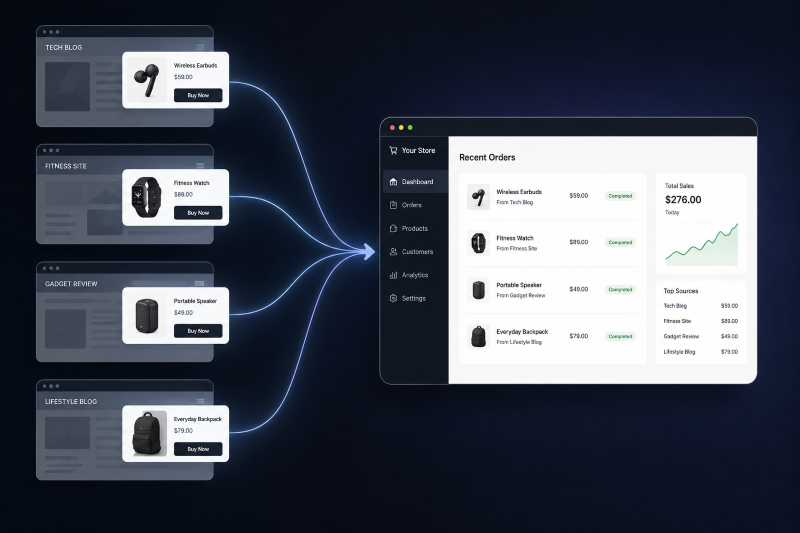
Product Anywhere allows products from a Phoenix Cart store to be displayed on virtually any website using a simple HTML element.
Unlike traditional ecommerce systems, products are no longer confined to category pages, product pages, or even the store itself. A product managed in Phoenix Cart can be rendered on third-party websites, affiliate sites, manufacturer pages, blogs, landing pages, CMS platforms, marketing campaigns, or any web page capable of loading JavaScript.
The external website:
- Does not need to run Phoenix Cart
- Does not need to share the same domain
- Does not need to share the same hosting
- Does not need to belong to the same business
- Only needs access to the embed script
Phoenix Cart remains the single source of truth for product data while external websites become display surfaces.
<product-preview data-id="123"></product-preview>
<script src="https://yourshop.com/shop/embed.js" defer></script>
Replace:
123with a valid Product IDhttps://yourshop.com/shop/with your Phoenix Cart store URL
When the page loads, Product Anywhere retrieves the product directly from Phoenix Cart and renders it automatically.
Any changes made within Phoenix Cart, including product details, pricing, imagery and availability, are reflected wherever the product is embedded.
- Third-party websites
- Affiliate websites
- Manufacturer websites
- Supplier websites
- Partner websites
- Review websites
- Community websites
- Customer websites
- Blogs
- CMS platforms
- Landing pages
- Marketing campaigns
- Documentation sites
- Static websites
- Any website capable of loading JavaScript
Product Anywhere decouples product placement from catalogue structure.
Instead of duplicating product information across multiple websites, a product can be managed once in Phoenix Cart and displayed anywhere it is needed.
This effectively turns Phoenix Cart into a product publishing endpoint rather than merely an ecommerce storefront.
- Download the latest release.
- Upload the files to your Phoenix Cart installation.
- Ensure
embed.jsis publicly accessible. - Turn on the Product Info Layout Module at Your Admin > Modules > Layout
Product Anywhere is now ready to serve products to any website capable of loading JavaScript.
- Product Anywhere only exposes product data that is already public on your store
- No customer data, pricing calculations, or sensitive information is exposed
- The embed script uses your store's existing product permissions
- https://phoenixcart.org/forum/index.php
- https://github.com/CE-PhoenixCart/Product-Anywhere/discussions
Pull requests are welcome. For major changes, please open a discussion first.