For this project, I designed a device that detects when someone or something passes it by. Using two lasers that point at light detecting devices (LDRs) and a speaker attachment, the device greets guests upon their entry to my apartment and bids them farewell upon their exit. There are no limitations to what the speaker will play (e.g., Seinfeld baseline upon entry). As a result, the device can be used for a variety of situations in which one may want to communicate with a passersbyer.
The device is split into two parts: the lasers and the detection and speaker system. For the lasers, I use a 9V wall adapter connected through a breadboard to power two generic laser diodes. To prevent the diodes from overheating, I use a small voltage regulator that cuts the power output from the wall adapter down to 5V. The detection part of the system is a bit more interesting. Two photoresistors (LDRs) aligned in series detect the light from the lasers and pass a value corresponding to the light intensity to an Arduino board. A time module keeps track of the current date and time. That is all the input. The MP3 music player module loaded with a micro SD card and connected to a speaker compose the sound system (the output). The module connects to the Arduino through the digital pins. Two 10k Ω resistors ensure that power, coming from a USB cable, flows appropriately to all the connected inputs.

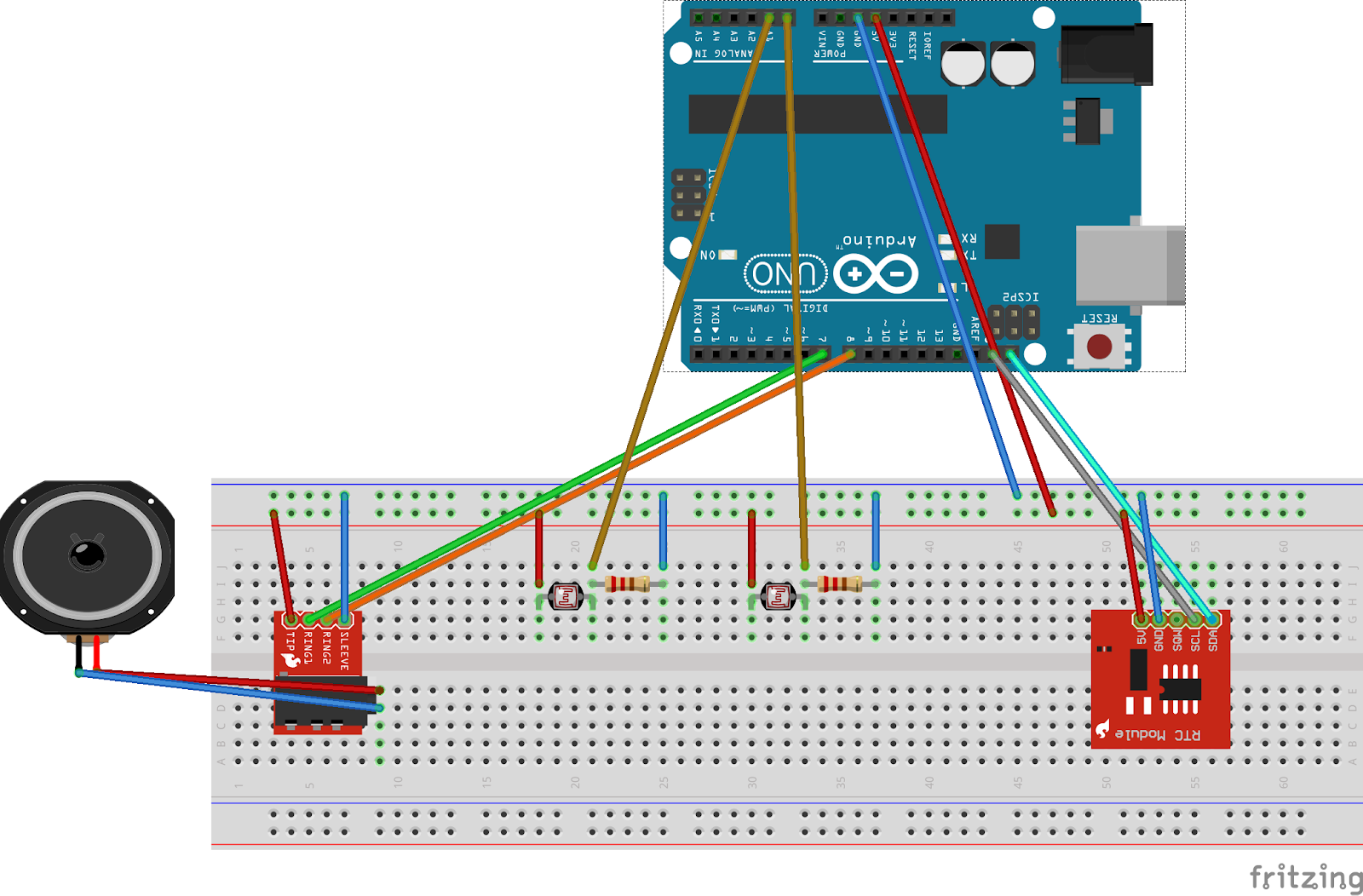
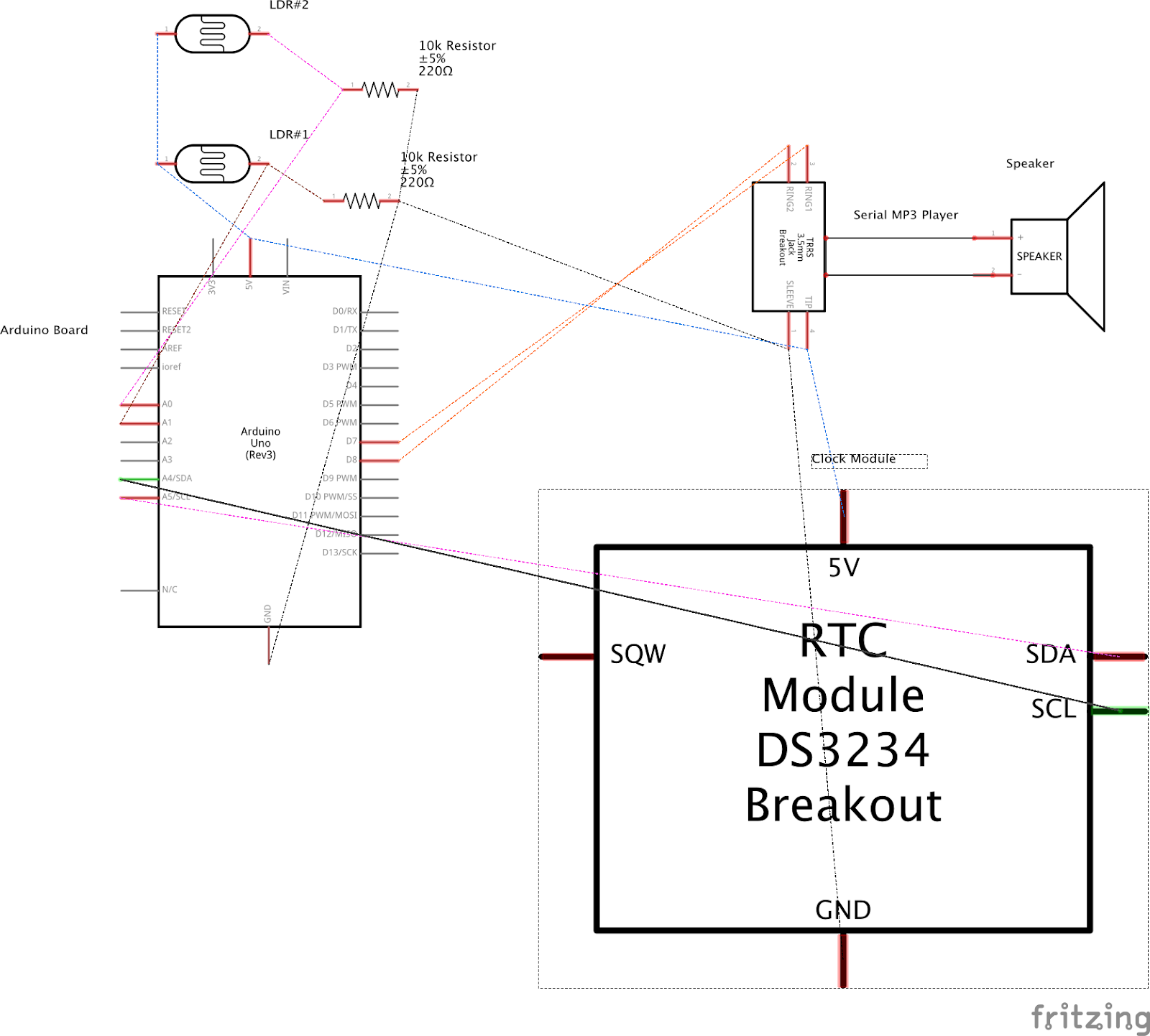
The device functions when both parts receive power and the lasers point directly at the LDR’s. The Arduino checks whether the LDR’s detect the laser (evidenced by high light readings, for my LDR’s, above 800). If the Arduino receives signal that both LDR’s detect lasers, nothing happens. Similarly, if the Arduino detects that something is blocking both LDR’s (evidenced by low readings (< 800) from both LDR’s), nothing happens. If one LDR records a low value and the second remains high, the Arduino knows that something “tripped” the laser (evidence of a person/thing). If the first laser (the laser closer to the door) trips before the second, the Arduino checks the reading from the time module and cues the speaker to play a greeting based on the time of day. If the second laser trips before the first, the Arduino cues the speaker to play our farewell music.
While under normal conditions the device will function well, certain accidents may cause the device to malfunction. I account for these situations. For instance, if one of the lasers turns off or gets bumped and no longer points at the LDR, the device will recognize the error. When a file plays more than 5 times in 10 seconds, evidence of an error, the device will enter into an infinite while loop thereby preventing the device from playing sound. Changes to light conditions may also cause the device to fail. On very sunny days, excess light causes the LDR’s to detect high light conditions even when something trips the laser. To account for this possible problem, a sturdy cardboard box encloses the system ensuring that the only significant light that reaches the LDR’s is that generated by the lasers. Robust error detection ensures that the device will operate for eternity.
The LDR’s provide the main source of data for the project. As mentioned earlier, the LDRs detect changes in light and report those changes numerically to the Arduino. No data is stored for this step. The clock module provides the other source of data. Receiving power from the Arduino, the module reports the current date and time. The Arduino checks the data from the clock to determine which greeting to play. For example, when the clock returns 16, representing 4pm, the arduino cues the speaker to play the afternoon greeting. When the clock returns 17, 5pm, the arduino cues the speaker to play “good evening”. How to Use It
To use the device, the Arduino board and the lasers must be plugged into some power source (I used my computer and a 9V wall adapter). Additionally, you will need the code listed below. One thing to note, I use a prebuilt library to play music files from the speaker. The library can be found at: https://drive.google.com/folderview?id=0B6uNNXJ2z4CxaFVzZEZZVTR5Snc&usp=sharing Once the device is set up, it should work well greeting and bidding farewell to all guests that enter your home.