
- Compress a folder containing many files & sub-folders into a set of chunks (zip files)
- Upload chunks to S3-compatible cloud storage
- Create a static, single-page web interface that allows "browsing" the archived folder & viewing which files are stored in which chunks
- Restore the entire archive
- You want to archive a folder to a cloud storage platform
- The folder contains millions of small files
- You want to:
- Compress the files before uploading
- Avoid storing the files individually, for both performance & cost see e.g., here
- Easily browse the files at any point after archiving them
- Easily access individual files without having to download everything
- Restore previously archived files easily without downloading the entire archive
pip3 install git+https://github.com/Bioxydyn/project-archiver.git@main
archiver --help
archiver --input-dir /path/to/myProject --output-dir /path/to/archive --verbose --upload
Will perform the following:
- Scan the input folder and all files in it. For each file will save the relative path, size and last modified date.
- Save out this initial listing to
/path/to/archive/FullListing.txt. - Make a decision to split which files into which chunks. This is based on the size of the files and the size of the chunks. The default chunk size is 1GB, but this can be changed with the
--target-chunk-size-mboption. - Go through each of the chunks and make a zip file, listing and SHA256 hash for each, producing the following files:
/path/to/archive/Chunks/Chunk00001Listing.txt/path/to/archive/Chunks/Chunk00001.zip/path/to/archive/Chunks/Chunk00001Hash.txt
- Read back the zip file and check it contains all expected files and their size is as expected from the full listing, producing the following file:
/path/to/archive/Chunks/Chunk00001Check.txt
- Save a list of all files and to which chunk they belong to
/path/to/archive/ChunkDictionary.txt. This file will allow a future reader to identify which of the files in the input are stored in which chunks, thus allowing them to access them without downloading the full archive. - Save a self-contained web interface to the archive in
/path/to/archive/WebInterface.html. This can be used to browse the archive and see which files are in which chunks. Alternatively it can easily be shared with a collaborator without providing them access to the full archive. - If
--uploadis set, upload the chunks to the configured S3-compatible storage bucket. For further details seearchiver --help.
You can download and extract all zip files for a project from an S3 bucket using the download_all.py script:
python archiver/download_all.py --help
python archiver/download_all.py --project-name "MyProject" --output-dir "./extracted"
This script will:
- Connect to the S3 bucket using the provided environment variables
- List all zip files with the specified project name prefix
- Download each zip file to the working directory (temporary storage)
- Extract the contents to the specified output directory
- Delete the temporary zip file after extraction
- Report progress as it processes each file
Required environment variables:
ARCHIVER_S3_ACCESS_KEY- S3 access keyARCHIVER_S3_SECRET_KEY- S3 secret keyARCHIVER_S3_ENDPOINT_URL- S3 endpoint URL
Command-line arguments:
--project-name(required) - Project name prefix for S3 objects to download--output-dir(required) - Directory where files will be extracted--working-dir(optional) - Working directory for temporary zip files (default: current directory)--bucket-name(optional) - S3 bucket name to download from (default: project-archive)
Example usage:
# Download all zip files for "ProjectX" from the default bucket
python archiver/download_all.py --project-name "ProjectX" --output-dir "./ProjectX_restored"

# Download from a custom bucket with a specific working directory
python archiver/download_all.py --project-name "ProjectY" --output-dir "./ProjectY_restored" --bucket-name "custom-bucket" --working-dir "/tmp"
Notes: Project Archiver will attempt to split the files into sensible chunks based on the size of the files and the size of the chunks. It will prefer to split folders into standalone chunks, and prefer to split at a higher level in the directory tree if possible. It will try to avoid splitting files that existing within the same directory into different chunks.
It will try to split the files into chunks of the target size, but will not split an individual file, therefore if you have files that are larger than the target chunk size, the target size will be exceed. It will also allow some variation in chunk size to meet the objectives described above.
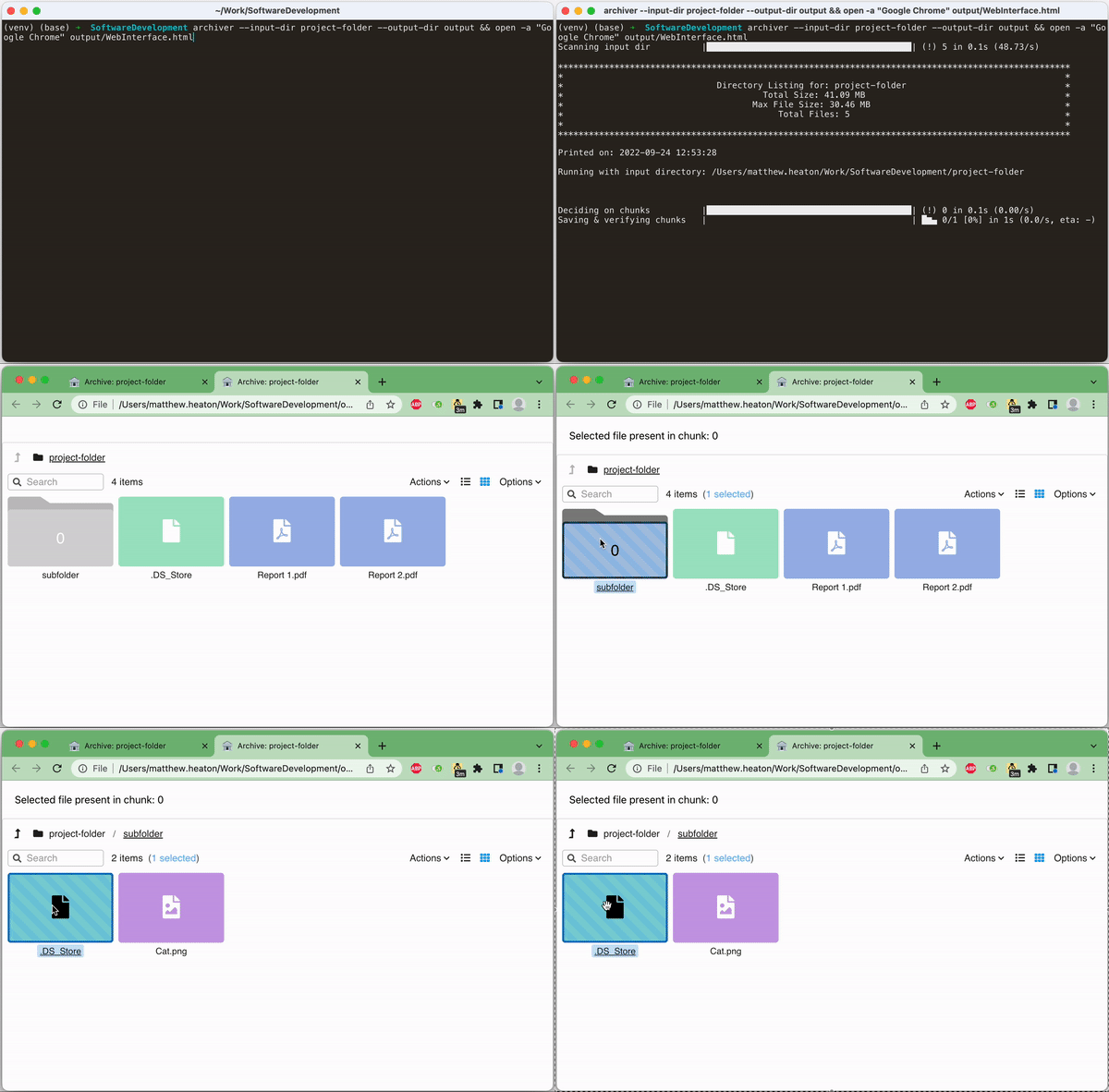
The below screen recording shows both the command executing and the resultant WebInterface.html which allows you to browse the files in the archive and see which chunk each file is stored in.
Project Archiver is a tool to archive folders, compressing them into chunks which can then be uploaded into the cloud. It has been designed to safely archive the data for the various IMI-TRISTAN deliverables, making it easy to transmit data to collaborators or archive. It is particularly useful when you have a large (> 1TB) folder containing many (> 1e7) files which you want to archive to an S3 compatible cloud storage system.