The csv_loader function efficiently loads a partial portion of a large CSV file containing time-series data into a pandas DataFrame.
The function allows:
- Loading the last N lines from the end of the file.
- Loading the last N lines from a specific date.
It can load any type of time-series (both timezone aware and Naive) and daily or intraday data.
It is useful for loading large datasets that may not fit entirely into memory. It also improves program execution time, when iterating or loading a large number of CSV files.
Supports Python >= 3.8
Note (v2.2.0): This release introduces
cached_csv_loader, an optional drop-in caching layer forcsv_loaderthat significantly improves performance for repeated file reads. Existing behavior remains unchanged. Users are encouraged to review the updated documentation for details on cache behavior, invalidation, and configuration options.This feature was contributed by GitHub user sai2311-eng.
pip install fast-csv-loader
https://bennythadikaran.github.io/fast_csv_loader/
For workloads where the same files are read repeatedly — scanners looping
over symbol CSVs, dashboards re-rendering, rolling backtests — use
cached_csv_loader. It wraps csv_loader with an in-memory cache that
automatically invalidates when the file's modification time changes.
from fast_csv_loader import cached_csv_loader, cache_stats, invalidate_all
from pathlib import Path

# First call: reads from disk
df = cached_csv_loader(Path("AAPL.csv"), period=200)

# Subsequent calls on same file: served from cache (O(1))
df = cached_csv_loader(Path("AAPL.csv"), period=200)

# After your EOD job writes new data, the next call auto-invalidates
# (mtime changed on disk). For explicit control:
from fast_csv_loader import invalidate
invalidate("AAPL.csv")     # drop one file
invalidate_all()           # drop everything

# Observability
print(cache_stats())
# {'hits': 49, 'misses': 1, 'evictions': 0, 'size': 1, 'hit_rate': 98.0, 'max_size': 500}
Benchmark on 133 small daily CSVs (~12 KB each), 5 repeat passes:
csv_loader (no cache):         ~555 ms
cached_csv_loader (warm):       ~13 ms    (~43x faster)
The cache is process-local and thread-safe. Entries are evicted in
insertion order when the cache exceeds max_size (default 500). Adjust
with set_max_cache_size(n).
Loading a portion of a large file is significantly faster than loading the entire file in memory. Files used in the test were not particularly large. You may need to tweak the chunk_size parameter for your use case.
It is slower for smaller files or if you're loading nearly the entire portion of the file.
I chose a 6Kb chunk size based on testing with my specific requirements. Your requirements may differ.
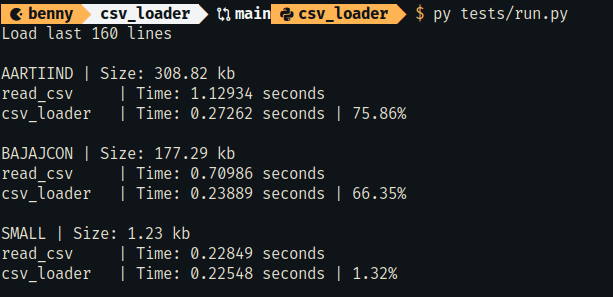
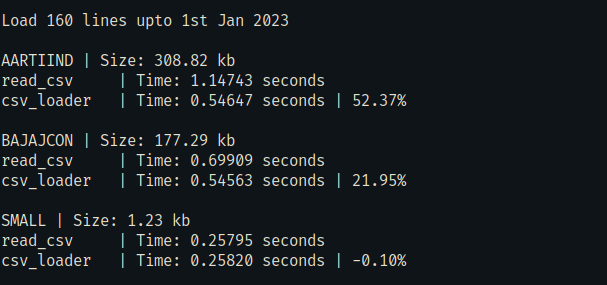
To run this performance test.
py tests/run.pyAt the minimum, the CSV file must contain a Date and another column with newline chars at the end to correctly parse and load.
Date,Price\n
2023-12-01,200\n
To run the test:
py tests/test_csv_loader.py