Sugiyama-style graph drawing: https://en.wikipedia.org/wiki/Layered_graph_drawing
An Efficient Implementation of Sugiyama’s Algorithm for Layered Graph Drawing
Starting with
- A directed graph without cycles
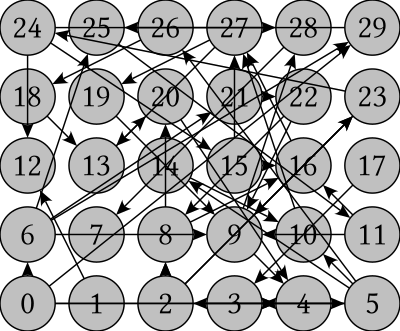
- Find the longest path and add connection vertices
Find the nodes that have no children and walk backwards, putting all parent nodes in layers. If a connection line passes over several layers, a node has to be added in every layer.
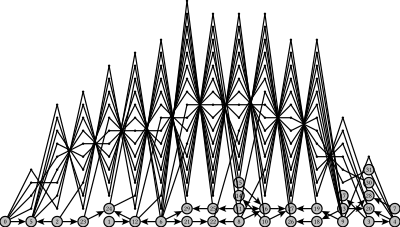
- Crossing Reduction
Using: Simple and Efficient Bilayer Cross Counting
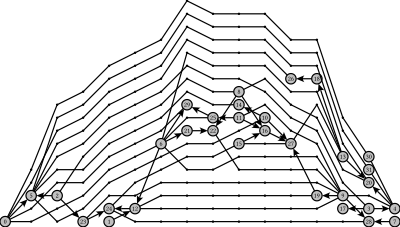
- Y-placement (works, but is not an average of alignments)
Using: Fast and Simple Horizontal Coordinate Assignment
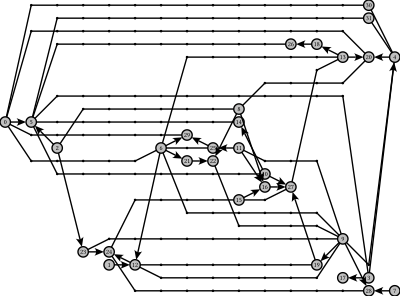
-
Sometimes nodes have to to drawn vertically below each other. To force the algorithm to do this, you have to connect them with vertical edges. The edges are not drawn, but guide the algorithm, which unfortunelty made the algorithms (especially longest path) more complex.
-
Virtual edges are also not drawn but are used when several unconnected graphs have to be displayed in a a row. I don't know if this was the best decision.
-
A node can have sub fields, which is important when these sub fields are connected separately to other nodes. The number of this subfield (channel) is used in Crossing reduction.
The module Graph/SubgraphWindows contains an algorithm that calculates boxes around graphs and subgraphs by using a nesting attribute of the node, adding border and nesting attributes to every cell of the html table.
This algorithm was implemented to develop a visual programming environment, which is work in progress: www.autocompletion.io
You can test this library by
- Uncommenting the
diagrams-code in app/Main.hs and uncommenting thediagrams-dependencies in layerd-graph-drawing.cabal cabal buildorstack build- generate the upper image by executing
graph-drawing-exe -w 400 -o g3.svg
- Make graphs inside graphs look better by embedding a layouted graph inside a graph.