Releases: Aslain/modssettingsapi
Release list
1.6.3

Fixed
- Large
aslainmenu.datfiles load instantly again (no more startup hang): the API re-scanned its own state file through a comment-stripping pass whose escaped-quote check was O(quotes × file size). A.datthat had grown large - e.g. from a mod registering a big template (a wall of options) - took 17s to load at 217 KB and never finished at 1 MB, so the game froze on the first API-using mod at startup with no error in the log. The.datis written by the API and never contains comments, but the pass still walked every quote quadratically. The escaped-quote check now counts backslashes locally instead of rescanning the whole prefix, making the pass linear: a 1 MB state file that used to hang now parses in ~0.05s. Comments are still stripped identically wherever they occur (verified bit-for-bit on tricky inputs) - only the quadratic scan is gone. On top of that, the.datitself now skips the comment pass entirely (it is machine-written and never contains comments; a hand-edited file simply regenerates clean), so the state file loads through plainjson.loadsin milliseconds regardless of size. The user settings file keeps full comment support. Inherited from the original izeberg API; it affected any user whose.dathad grown past a few hundred KB.
1.6.2
Fixed
- Auto-wrap now spreads a label-less mod across all columns: a plain 2-column mod (no
multiColumnTemplate, nocolumn3/column4) that is one long wall of options with its section labels only near the top - think a mod with ~50 checkboxes and no separators past the header - filled only two crowded columns in 3/4-column mode and left the rest empty. The auto-wrap now redoes the split evenly whenever its label-aware pass would leave a column empty, so the mod uses the full width. Mods with their own wide layout (amultiColumnTemplate, orcolumn3/column4) are untouched - only the pure 2-column fallback got smarter. - Tooltips refresh on an in-place
reloadModTemplate: the reload reuses a control when its type, name, text and value match (the anti-flicker reconcile), but a tooltip was bound only when the control was first created - so a reload that changed only the tooltip kept showing the old one. A control whose tooltip changed is now recreated in place (fresh tooltip, same frame, same spot), while an unchanged one is still reused, so the anti-flicker path for ordinary reloads is unaffected. A mod that rebuilds its template with live tooltip content (a running status or a current value inside the tooltip) now sees it update on every reload.
1.6.1
New for mod authors
- Inline radio group:
templates.createRadioButtonGroup(..., inline=True)renders the group's options in a single horizontal row ([x] One [ ] Two [ ] Three) instead of stacking them vertically - a short option list takes one row instead of three. Vertical stays the default. Older API builds lack the argument (TypeError), so gate it:try/except TypeError, org_modsSettingsApi.getVersionTuple() >= (1, 6, 1).
Fixed
- Live preview images survive the multi-column switch: an image pushed at runtime via
updateImage/updateImageAtlas(a live preview following a dropdown, say) was dropped whenever the window rebuilt the layout - the column-mode toggle or a resize across a column boundary. The API now remembers the last image pushed to each control and restores it after the rebuild; no mod-side change needed. - The Apply button greys out again when nothing is left to apply: reverting every changed option back to its saved value correctly dropped the pending counter to 0, but the button stayed clickable (inherited from the original API - the 1.5.0 counter made it visible). The button now follows the counter, so it also stays grey when a mod reset changes nothing.
- The per-mod reset button notices hotkeys: the mod reset restores hotkeys too, but the button's dim/bright state ignored them - a mod whose only change was a reassigned hotkey looked like it had nothing to reset. A hotkey away from its default now lights the button the moment it is assigned, and resetting dims it again.
- Right-click > Default on a color swatch no longer registers a phantom change: the default color was pushed into the control reformatted (lowercased, leading
#stripped), so even resetting an already-default color lit the Apply counter with a "change" that was just a different spelling of the same color. The default is now applied in the exact format the mod's template stored, and the value a mod receives keeps its own formatting.
1.6.0
New in the settings window
-
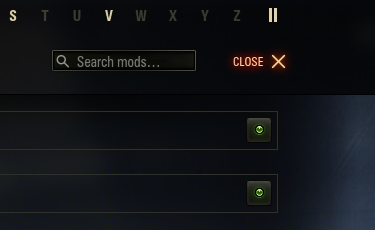
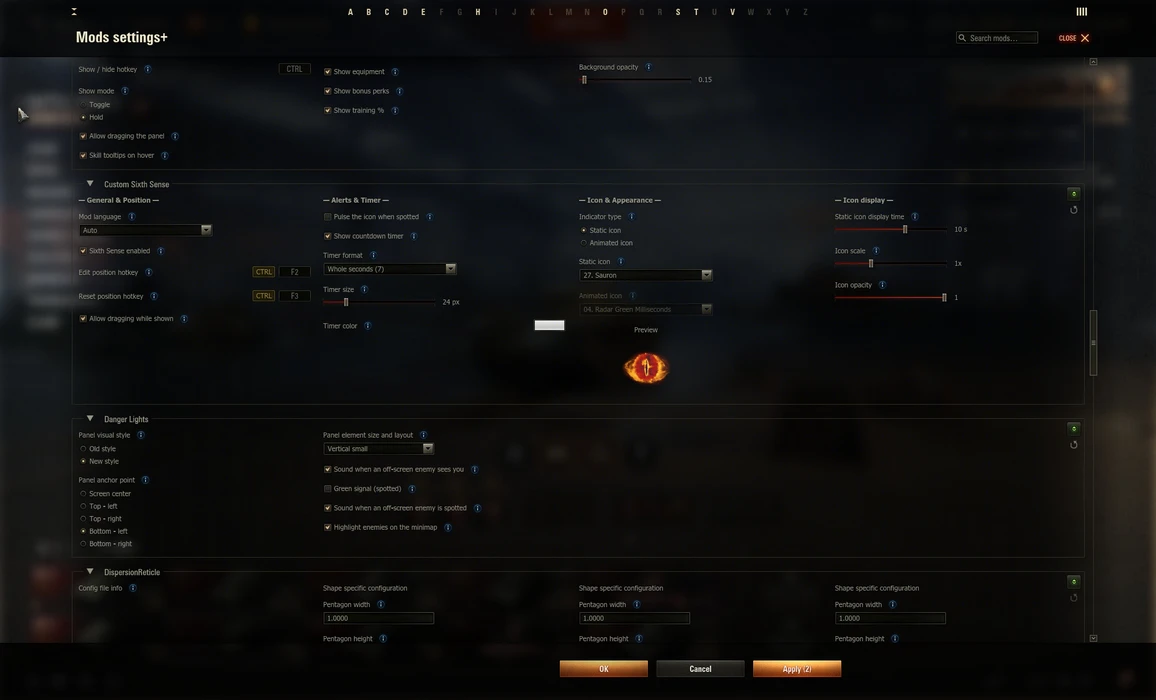
Multi-column layout: a toolbar switch (pinned to the far right of the toolbar) spreads the mods across 2, 3 or 4 columns depending on the window width, so a wide screen uses the space instead of one tall 2-column list. The default is 2 columns (the original look); flip the switch and the layout re-flows live, no reopen needed. Your choice is remembered across menu reopens and game restarts.
-
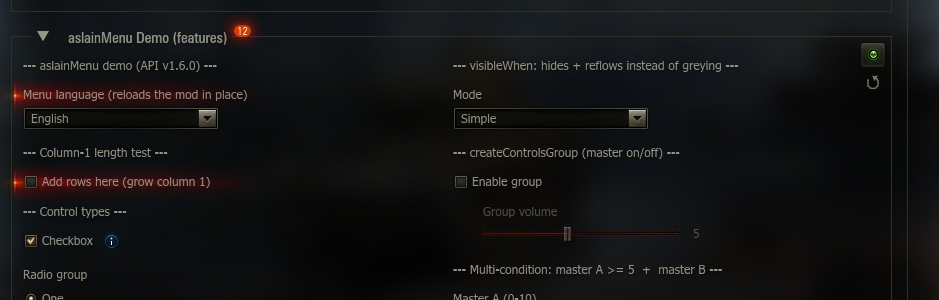
"New option" highlights: a mod can flag an option it just added, and the window marks it the way the game's own Settings window marks new options - a red flare on the option's row and a red counter on the mod's title showing how many new options that mod has. The counter shows even while the mod is collapsed, so a new option is noticeable without expanding every mod. The highlight is remembered per user across game restarts, and a freshly installed mod never lights up: only options added by a later update of an already-installed mod are highlighted.
-
Right-click the "new options" counter on a mod's title for a Mark all as read menu item that clears every one of that mod's highlights at once (persisted, like clearing them one by one).
New for mod authors
- Multi-column mods: define
column3and/orcolumn4in your template (alongsidecolumn1/column2) and the window lays them out as extra columns in multi-column mode, folding them back undercolumn1/column2when narrow or in 2-column mode. For full control over the wide look, register a dedicated wide layout withsetModTemplate(linkage, template, callback, multiColumnTemplate=wideTemplate): the main (2-column) template shows in 2-column mode, themultiColumnTemplate(3 or 4 columns) shows in multi-column mode - the same controls arranged differently.reloadModTemplate(linkage, template, multiColumnTemplate=wideTemplate)refreshes both layouts together (e.g. on a language switch). A mod with nomultiColumnTemplatestill spreads out: it uses its owncolumn3/column4if it has them (folded back when narrow), or, if it is plain 2-column, itscolumn1/column2are auto-wrapped across the columns. Feature-detect by wrapping the call intry/except TypeError(older builds lack the argument). templates.markNew(control): flag a control as newly added so the window highlights it (a red row flare and a count on the mod's title). Wrap a control inline -templates.markNew(templates.createCheckbox('New option', 'opt', True))- it is returned unchanged apart from the flag, so it drops into a column,createControlsGroup, orenableWhen/visibleWhenlike any other control. The control needs avarName. The "seen" state is stored per user inaslainmenu.dat, and the flag is not part of the settings structure, so adding it never resets saved values. A mod's first install marks all its flagged options as already seen (a new user sees nothing lit); only a later update lights up what it adds. Feature-detect withhasattr(templates, 'markNew')- older API builds ignore the flag.templates.markNew(control, token='...'): pass a token (any string) to re-highlight a control whose content changed rather than one that is brand new - a language dropdown that gained an entry, say - even for users who already dismissed it. Bump the token to any new string and the option lights up again, then clears once they interact with it and stays clear until the token changes. A count or version works well as the token, e.g.markNew(dropdown, token=str(len(LANGS)))re-lights each time you add a language. Bumping the token never resets saved values either; older builds ignore it.
1.5.0
New in the color picker
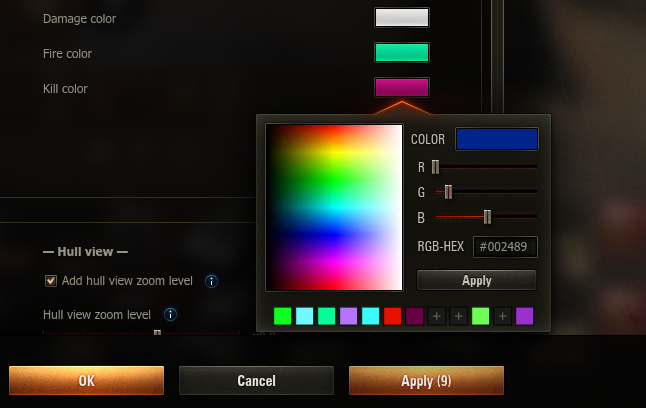
- A personal color palette: up to 48 editable preset slots (rows of 12, revealed progressively — a fresh palette starts as a single row and grows as you fill it). Left-click a slot to pick its color, left-click an empty slot (+) to start defining it, right-click a filled slot for a context menu (Edit preset / Copy hex code / Clear preset), and DEL clears the slot being edited. While editing (gold frame) the slot follows every picked color live, and Apply stores it without closing the picker, so several presets can be defined in one go. The palette is shared by all mods, ships completely empty (the API hardcodes no colors) and is saved in
aslainmenu.dat, so it survives game restarts and modpack reinstalls. The swatch matching the current color is always framed. - Live preview: while the cursor moves over the spectrum, the COLOR box previews the color under it — before any click; rolling out restores the selected color.
New in the settings window
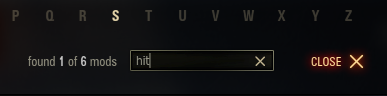
- Search upgrades: a refreshed search field (magnifier inside, modern style) and a hit counter showing
found X of Y modsas you type. - Right-click menu on color controls: right-click the color swatch next to any option to reset it to the mod's default or copy its hex code to the clipboard (bare value, e.g.
FF0000). - The Apply button counts pending changes —
Apply (3)means three options currently differ from their saved state; reverting a value drops it back out of the count. - Jump highlight: after clicking a letter on the A–Z bar (or when a search narrows to a single mod), the target mod's frame and title briefly pulse brighter, so the eye lands on it instantly.
- The window remembers its scroll position within the current game session; a fresh game start begins at the top.
New for mod authors
createColorChoice(..., presets=[...])andcreateCheckboxColor(..., presets=[...]): give the picker your mod's own palette (up to 24 hex codes, shown as one or two pick-only rows). When a mod supplies presets, only those colors are offered as presets — the user's editable palette is hidden in that picker.None(default) shows the user's palette; an empty list shows no preset rows at all.presetsOnly=True(together withpresets): reduce the picker to just your preset swatches and the Apply button — the spectrum, RGB sliders and hex input are hidden, so the user can only choose one of your colors (e.g. "pick 1 of these 8"). The popup width auto-fits the number of presets; the full picker's size is untouched.- Both are plain keyword arguments — on older API builds gate them on the version:
g_modsSettingsApi.getVersionTuple() >= (1, 5).
Fixed
- Clicking the spectrum on a color whose code starts with zero bytes (e.g. pure blue
0000FF) produced a shortened hex code (ff), which was then stored as the option's value. The spectrum now always yields a full 6-digit code. Present in every earlier version (inherited from the original picker).

1.4.1
1.4.1
Fixed
- A button attached to a
CheckBox/RadioButtonGrouprow (viacomponentConfig.button) can now be lined up by the row's configuredwidthusing an opt-inbutton.fixedPositioningflag, with an optionalbutton.align: 'right', instead of always sitting right after the label text. This lets a column of buttons align even when the labels have different lengths. The flag is opt-in, so existing mods are unchanged. Contributed by CH4MPi.
1.4.0
1.4.0
New for mod authors
templates.createCheckboxColor(text, varName, value, color, tooltip=None, tooltipIcon=None, button=None, useHTML=True): a checkbox paired with a colour picker on one row, the tick box and its label on the left and the colour swatch on the right. The stored value is a dict{'enabled': <bool>, 'color': <hex str>}, so readsettings[varName]['enabled']andsettings[varName]['color']in your callback. A long label wraps onto extra lines under the checkbox without ever running under the swatch. It works withenableWhen/visibleWhen(both as a gated control and as a master, where it gates on itsenabledflag) and insidecreateControlsGroup, supportstooltipanduseHTMLlike the other controls, and the per-mod reset button responds to its changes. Feature-detect withhasattr(templates, 'createCheckboxColor').
1.3.3
Improved
- A template change that doesn't alter the structure now keeps the user's saved values for every mod — including mods with no
settingsVersion(which previously reset on any edit) and a mod adoptingsettingsVersionfor the first time. The new template is still applied so labels and tooltips refresh; only asettingsVersionbump, a first install, or a structural change resets values. Reordering controls counts as cosmetic (values are keyed by control name), so it no longer needs a bump. - "Structural" now also covers changes that can invalidate a saved value: a dropdown / radio / step-slider's set of options, and a slider / numeric-stepper's min / max / interval. Changing those without a
settingsVersionbump is no longer mistaken for cosmetic, so a stale or out-of-range saved value is never silently kept.
Fixed
- The per-mod "reset to defaults" button now targets the current template's defaults. Previously, after a control was added on an unversioned update or a shipped default value was changed, the reset button could restore an outdated default.
1.3.2
Improved
setModTemplatenow tells cosmetic template changes apart from structural ones. A cosmetic-only change — an edited label or tooltip, or a label that embeds the live API version — refreshes in place with the user's saved values preserved, with nosettingsVersionbump and no warning. Only structural changes (controls added/removed or retyped, changed dropdown options) still need a bump.
Fixed
- Opening the settings window could bug out (
AttributeErroron_modTranslations) when a mod-label translation had been registered viaregisterModTranslationbut the active API instance had no translation table. The translation lookups are now defensive, so the window opens regardless of how the instance was resolved.
1.3.1
New for mod authors
g_modsSettingsApi.registerModTranslation(linkage, mapping)— register a display-only label translation for another mod's settings page.mappingis a dict of{original string: replacement string}; the API applies it to the copy of the template shown in the settings window, so the target mod's stored template and saved values are never touched (no settings reset) and the mod's own code is not modified. Keys may bestr(UTF-8) orunicode, and repeated calls for the samelinkagemerge. The API ships no translations of its own — it is the hook an optional, separate localization mod uses to translate a mod whose menu is only offered in one language. Feature-detect withhasattr(g_modsSettingsApi, 'registerModTranslation').
Improved
- The mod list now sorts by the shown name. When a translation is registered for a mod (see
registerModTranslation), the list orders it under its translated name instead of its original one. Mod names not written in the Latin alphabet (e.g. Cyrillic) now sort after the Latin-named mods, keeping their own order, instead of falling back to the mod's internal id.
Fixed
- Mod frames could overlap when the settings window was reopened with a saved mix of collapsed and expanded mods: the list positioned each mod by its momentary rendered height — unreliable while the window is still off-screen — instead of its laid-out height. It now uses the laid-out height, so mods stack correctly the first time the window opens. (Long-standing, present since per-mod collapse was added.)