This project involves detecting and counting vehicles (cars, trucks, buses, and motorbikes) crossing a defined line in a video. The counting is done using a YOLO (You Only Look Once) model for object detection, and the results are tracked using the SORT (Simple Online and Realtime Tracking) algorithm. Each time a vehicle crosses the line, the count is incremented and stored in a MySQL database.
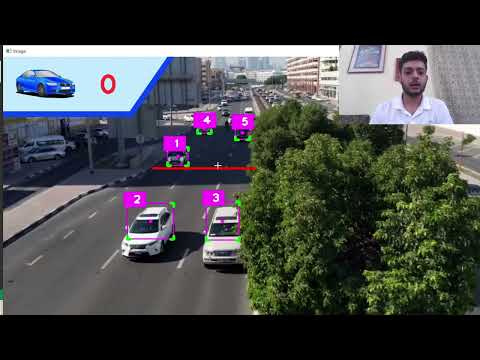
- Vehicle detection using YOLOv8
- Vehicle tracking using SORT
- Counting vehicles crossing a line
- Storing counts in a MySQL database
- Python 3.x
- MySQL server
-
Clone the repository:
git clone https://github.com/yourusername/car_counting_project.git cd car_counting_project -
Install the required Python packages:
pip install -r requirements.txt
-
Set up the MySQL database:
- Create a database named
car_counting:CREATE DATABASE car_counting;
- Create the
car_countstable:USE car_counting; CREATE TABLE car_counts ( id INT AUTO_INCREMENT PRIMARY KEY, timestamp TIMESTAMP DEFAULT CURRENT_TIMESTAMP, count INT );
- Create a database named
-
Ensure the MySQL server is running and you have created the database and table as described above.
-
Edit the
database.pyfile to include your MySQL username and password:conn = mysql.connector.connect( host="localhost", user="your_username", # replace with your MySQL username password="your_password", # replace with your MySQL password database="car_counting" # replace with your database name )
-
Run the main script:
python main.py
main.py: Main script for detecting and tracking vehicles, and updating the count in the database.database.py: Script for connecting to the MySQL database and inserting count records.mask.png: Mask image used to define the region of interest in the video.graphics.png: Graphics overlay for the video.requirements.txt: List of required Python packages.Videos/: Directory containing the input video file (cars.mp4).Yolo-Weights/: Directory containing the YOLOv8 weights file (yolov8l.pt).
- Fork the repository.
- Create a new branch (
git checkout -b feature-branch). - Make your changes.
- Commit your changes (
git commit -am 'Add new feature'). - Push to the branch (
git push origin feature-branch). - Create a new Pull Request.
This project is licensed under the MIT License.