
A Modern 3D Graphics Engine for Model Visualization and Rendering


- Modern OpenGL 3.3 pipeline with programmable shaders
- PBR (Physically Based Rendering) material system
- Real-time lighting with multiple light types (Directional, Point, Spot)
- Normal mapping and height mapping support
- Multi-texture support with automatic texture detection
- Real-time grid rendering with infinite appearance
- Native OBJ loader with MTL material support
- Assimp integration for 20+ formats (FBX, GLTF, 3DS, DAE, etc.)
- Progress tracking for large model loading
- Automatic model centering and scaling
- UV coordinate manipulation
- 6DOF camera system with smooth movement
- Real-time transform controls (Position, Rotation, Scale)
- Mouse and keyboard navigation
- Screenshot capture (F12 or UI button)
- Multiple lighting presets
- ImGui-based interface with dark theme
- Real-time performance monitoring
- Debug console with timestamped messages
- Texture management with folder loading
- Material property editor
- System information display
- Optimized model loading with memory management
- Efficient texture caching
- Frame rate monitoring and statistics
- Memory usage tracking
- GPU information display
| Component | Technology | Purpose |
|---|---|---|
| Graphics API | OpenGL 3.3+ | Core rendering |
| Window Management | GLFW 3.x | Window creation and input |
| Math Library | GLM | 3D mathematics |
| Model Loading | Assimp + Custom OBJ | 3D file format support |
| Texture Loading | STB Image | Image file handling |
| User Interface | Dear ImGui | Real-time GUI |
| File Dialogs | ImGuiFileDialog | Native file browser |
- Visual Studio 2022 (Windows) or compatible C++17 compiler
- CMake 3.15+ (if building with CMake)
- Git for cloning repositories
All required libraries are included in the project:
- GLFW 3.x
- GLAD (OpenGL loader)
- GLM (Mathematics)
- Assimp (Model loading)
- STB Image (Texture loading)
- Dear ImGui (User interface)
- ImGuiFileDialog (File browser)
- Clone the repository
- Open
OpenGL-Modular-Engine.slnin Visual Studio 2022 - Set build configuration to Release for optimal performance
- Build the solution (Ctrl+Shift+B)
- Run the executable from
bin/Release/

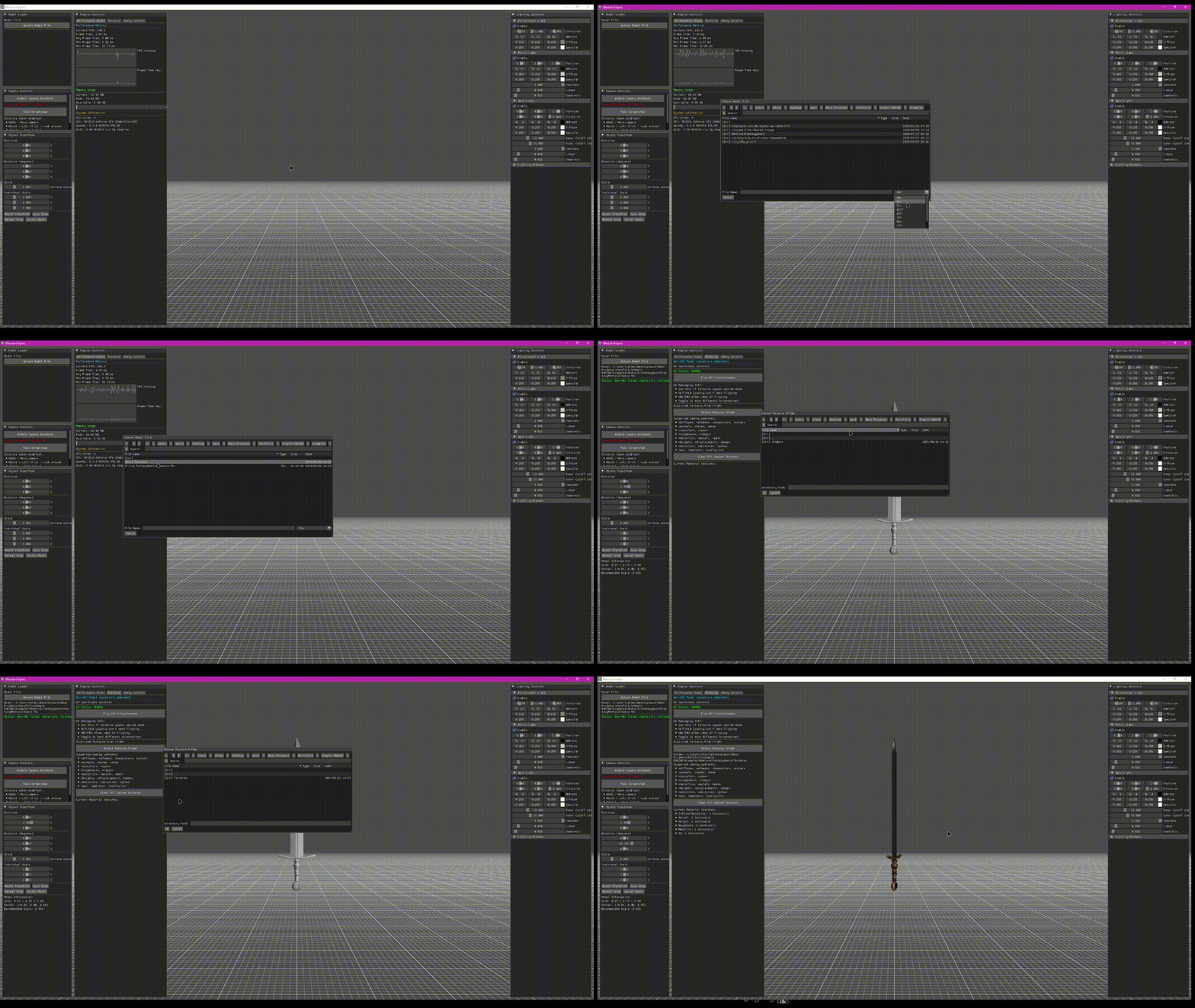
Interactive demonstration of the OpenGL Modular Engine showing model loading, real-time rendering, and UI controls
- Launch the application
- Load a model using "Select Model File" button
- Navigate using mouse (hold left-click) and WASD keys
- Transform the model using the UI sliders
- Adjust lighting in the right panel
- Take screenshots with F12 or the UI button
| Format | Extension | Features |
|---|---|---|
| Wavefront OBJ | .obj | MTL materials, Custom loader |
| GLTF | .gltf, .glb | PBR materials, Animations |
| FBX | .fbx | Complete scenes, Materials |
| Collada | .dae | XML-based, Materials |
| 3DS Max | .3ds | Legacy format support |
| STL | .stl | 3D printing models |
| PLY | .ply | Point clouds, Meshes |
| Key | Action |
|---|---|
| WASD | Camera movement (when enabled) |
| Mouse + Left Click | Look around |
| Mouse Scroll | Zoom in/out |
| F12 | Take screenshot |
| ESC | Exit application |
- Load 3D models from file
- Auto-detect MTL materials for OBJ files
- Progress tracking for large files
- Model information display
- Toggle camera movement
- Reset camera position
- Take screenshots
- Movement instructions
- Position, rotation, scale controls
- Uniform and individual scaling
- Auto-sizing and centering
- Model dimension display
- Real-time FPS monitoring
- Memory usage tracking
- GPU information
- Performance graphs
- Directional light settings
- Point light configuration
- Spot light parameters
- Lighting presets
- Window: GLFW window management and input handling
- Camera: 6DOF camera with smooth movement
- Model: 3D model representation with multi-format support
- Mesh: Individual mesh with vertices, indices, and materials
- Render: Core rendering functions and lighting updates
- UI: Complete ImGui interface with all panels
- Transform: 3D transformation matrices and operations
- Model-View-Projection transformations
- Normal matrix calculations
- Tangent space computation for normal mapping
- Multiple texture coordinate support
- Blinn-Phong lighting model
- PBR material properties
- Multi-texture sampling (Diffuse, Normal, Specular, etc.)
- Dynamic texture availability checking
- Metallic workflow support
- Infinite grid appearance
- Distance-based fading
- Axis highlighting (X=Red, Z=Blue)
- Multi-scale rendering
- Vertex Array Objects for efficient rendering
- Texture caching to avoid redundant loading
- Frustum culling ready architecture
- Memory pooling for large models
- Progressive loading with progress feedback
- Real-time FPS counter
- Frame time statistics (min/max/average)
- Memory usage tracking
- GPU information display
- Draw call counting
- Debug: Full debugging, slower performance
- Release: Optimized for performance
- RelWithDebInfo: Optimized with debug symbols
- Modify shader files in
shadersdirectory - Adjust lighting presets in
Lighting.h - Configure UI layout in
Ui.cpp - Add new file formats in model loaders
We welcome contributions from developers of all skill levels! Whether you're fixing bugs, adding new features, improving documentation, or suggesting enhancements, your help is appreciated.
- Fork the repository to your GitHub account
- Create a feature branch from the main branch (
git checkout -b feature/your-feature-name) - Make your changes and test them thoroughly
- Commit your changes with clear, descriptive messages
- Push to your fork (
git push origin feature/your-feature-name) - Submit a pull request with a detailed description of your changes
- LearnOpenGL - Excellent OpenGL tutorials
- Dear ImGui - Immediate mode GUI
- Assimp - Asset import library
- GLFW - Window and input management
- GLM - OpenGL mathematics
- STB - Single-file libraries