A staging repository for Joplin improvements. A repository with improvement for a Joplin project which author cannot merge to origin repo. Mostly around security concerns for server images. A following changes were done here:
- Docker image is run with node:node user(default user for official nodejs images). By default it's
1000:1000however it may be adjusted usingPUIDandPGIDargs. - It's possible to run contained with
-u UID:GIDparams. Please note it is not the same asPUID:PGIDargs and it is not recommended at all (see description below) - Images are build using Docker BuildX toolset, which means: 4.1. Caching mount points to speed up image build/rebuild process 4.2. It's possible to build multiplatform images (ARM images in TODO list)
- A few additional configuration properties. Mostly for better control of stored data (see description below)
- Docker images will be published only to ghcr.io/redrathnure/joplin repository
While original joplin-server images already are rootless, there are some problems here:
- It is not easy to specify UID:GID for internal
node:nodeuser. It's especially painful for configuration with shared/mounted volumes. - It is not possible to run container with custom UID:GUI (
-u UID:GIDcommand line args). Container is not able to start due to file permissions.
The new image accept PUID and PGID args to specify ids for the internal node:node user. All files will be created with required (for the host machine) permissions.
Container run all processes from specified PUID:GUIDE, otherwise predefined 1000:1000 are used.
While it's possible to run container with -u UID:GID command line args, it is not recommended and may lead to file permissions problems.
So a docker compose may be built with following snippet:
services:
  joplin:
    image: ghcr.io/redrathnure/joplin:3.3-beta
    ...
    environment:
      ...
	    - PUID=${UID}
	    - PGID=${GID}

	# user: "${UID}:${GID}" # Do NOT do this! Use PUID:PGID instead
Service tries to modify following container locations:
/data- default location for all data, log etc/data/pm2- files generated by PM2 runner. Mostly logs (yeah, file logs inside container...)/app/serversource code location AND default data location for service itself, means:- by default SQLite DB will be created here. Please use
SQLITE_DATABASEenv to select different place (e.g.SQLITE_DATABASE=/data/db.sqlite) - application logs... which seems to be redirected to PM2 ->
/data/pm2/logs - joplin logs and temp files redirected to
/data/logsand/data/tmpdirs - default location for records data if you use FS storage. It's better to configure it to
/data/storagelocation
- by default SQLite DB will be created here. Please use
If for some reason you need to store these files between container recreation, please use persistence volumes or host mounted volumes.
A new version uses Docker BuildX toolset to produce images. There are some additional command line arguments to customise produced images (e.g. specifying platform, taking image tag from git tag and so on). Please see yarn buildServerDocker .... --dryRun output and packages\tools\buildServerDocker.ts file for more details.
Unfortunately laurent22 from Joplin decided to kill all custom repositories from DockerHub, pehaps he has the special alternative understanding of open source... and do not spend a time to address security concerns (e.g. see history of the laurent22#11581 and related PRs).
Anyway, the custom images will be published to the ghcr.io/redrathnure/joplin repo only. You need just replace image: redrathnure/joplin or image: laurent22/joplin by image: ghcr.io/redrathnure/joplin in the compose files.
This repository applies changes on top of original code and release tags, this is why all custom images have -beta suffixes.
Available tags:
latest- latest published imagelatest-beta- latest pre release image. For now the same aslatestone.3-beta3.3-beta3.3.12-beta3.3.12-beta.13.g15da68da8where the13.g15da68da8part points to the git commit where images was built.*-alpine- Linux Alpine based images (smaller size but may have compatibility issues). (!) Have not tested yet!
Joplin server should be configured via image ENV args. Please note SQLite based configuration is not recommended and should be for development or evaluation purposes only.
| Parameter | Description | Example |
|---|---|---|
APP_BASE_URL |
This is the base public URL where the service will be running. | https://example.com/joplin, http://[hostname]:22300, http://joplin.example.com |
APP_PORT |
The local port on which the Docker container will listen. | 80, 433, 22300 |
DB_CLIENT |
Database client | pg, sqlite3 |
POSTGRES_HOST |
Postgres DB host | db |
POSTGRES_PORT |
Postgres DB port | 5432 |
POSTGRES_DATABASE |
Postgres DB database | joplin |
POSTGRES_USER |
Postgres DB user | joplin |
POSTGRES_PASSWORD |
Postgres DB password | generate unique secrete here |
SQLITE_DATABASE |
Location of local DB file | /data/db.sqlite |
PUID |
UID of internal node user |
1000 or result of id joplin -u |
PGID |
GID of internal node user |
1000 or result of id joplin -g |
LOGS_DIR |
location of joplin logs. By default it has /data/logs value |
/some/other/logs/dir |
TEMP_DIR |
location of joplin temp files. By default it has /data/temp value |
/some/other/tmp/dir |
Please note:
- APP_BASE_URL:
- If Joplin Server needs to be accessible over the internet, configure APP_BASE_URL as follows: https://example.com/joplin
- If Joplin Server does not need to be accessible over the internet, set the APP_BASE_URL to your server's hostname
- For Example: http://[hostname]:22300. The base URL can include the port
- APP_PORT:
- This would typically be mapped to port to 443 (TLS) with a reverse proxy
- If Joplin Server does not need to be accessible over the internet, the port can be mapped to 22300
- Please specify
PUID/PGIDvalues only if you need to override default ids of internalnode:nodeuser (e.g. to solve organise permissions for shared host volumes)
Please refer docker-compose.server.yml for more details.
- ✓
linux/arm64images - ☐
linux/armhfimages - ☐ container health check/readiness probes
- ✓ full separation data from code (
/appshould be read only, all logs, data files and other should be stored in/data) - ☐ clean up images (3+ GBytes size looks too match for this images). Perhaps try alpine images. Perhaps having 2 images: dev with full toolset and prod ready with only required files.
- ✓ more docker compose examples
- ☐ disabling file logging. Introduce option to run with stdout logging only
Hopefully one day all these changes will be part of the original project.





Joplin is a free, open source note taking and to-do application, which can handle a large number of notes organised into notebooks. The notes are searchable, can be copied, tagged and modified either from the applications directly or from your own text editor. The notes are in Markdown format.
Notes exported from Evernote can be imported into Joplin, including the formatted content (which is converted to Markdown), resources (images, attachments, etc.) and complete metadata (geolocation, updated time, created time, etc.). Plain Markdown files can also be imported.
Joplin is "offline first", which means you always have all your data on your phone or computer. This ensures that your notes are always accessible, whether you have an internet connection or not.
The notes can be securely synchronised using end-to-end encryption with various cloud services including Nextcloud, Dropbox, OneDrive and Joplin Cloud.
Full text search is available on all platforms to quickly find the information you need. The app can be customised using plugins and themes, and you can also easily create your own.
The application is available for Windows, Linux, macOS, Android and iOS. A Web Clipper, to save web pages and screenshots from your browser, is also available for Firefox and Chrome.
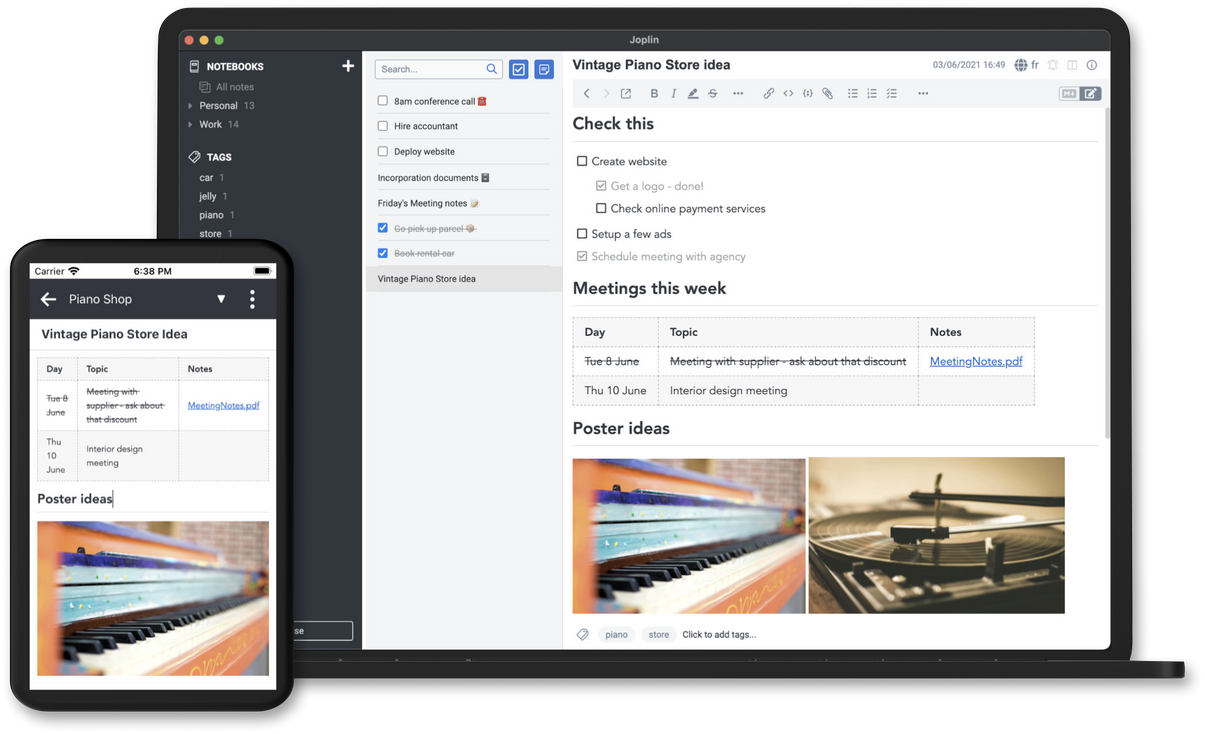
For more information about the applications, see the full Joplin documentation
Donations to Joplin support the development of the project. Developing quality applications mostly takes time, but there are also some expenses, such as digital certificates to sign the applications, app store fees, hosting, etc. Most of all, your donation will make it possible to keep up the current development standard.
Please see the donation page for information on how to support the development of Joplin.















 andypiper |
 avanderberg |
 chr15m |
 felixstorm |
 Galliver7 |
 GPrimola |
 Hegghammer |
 marcdw1289 |
 ugoertz |
| Name | Description |
|---|---|
| Support Forum | This is the main place for general discussion about Joplin, user support, software development questions, and to discuss new features. Also where the latest beta versions are released and discussed. |
| Patreon page | The latest news are often posted there |
| Bluesky feed | Follow us on Bluesky |
| Mastodon feed | Follow us on Mastodon |
| YouTube | Discover information and tutorials on how to use the apps |
| Discord server | Our chat server |
| Our LinkedIn page | |
| Lemmy Community | Also a good place to get help |
Please see the guide for information on how to contribute to the development of Joplin: https://github.com/laurent22/joplin/blob/dev/readme/dev/index.md
Fingerprint:
F820 F830 6DD0 05A1 02D1 8CD5 946A E9FA 5915 EF53
Public key: https://github.com/laurent22/joplin/raw/dev/Assets/keys/joplin-canary-signing-key.asc
Thank you to everyone who've contributed to Joplin's source code!