Hello,
I am surprised that no issue has been opened on this topic yet. I have been searching the internet for hours in vain for a straightforward solution to align regression coefficients in HTML tables to decimal places. In following image, the decimal points of the coefficients are not aligned.
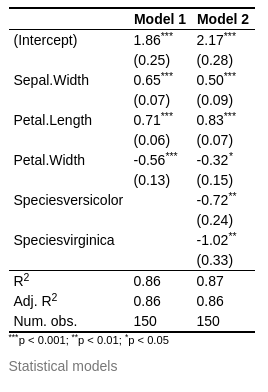
Maybe I have overlooked it, but i can't find an option to align decimal points. An option align='decimal' or similar would be great, it should actually be the default behavior though.
It would be great if you could have a look at this!
Cheers
Desired outcome: Aligned coefficients.
MWE:
---
output: html_document
date: '2022-02-22'
---
```{r, results='asis'}
fit1 <- lm(Sepal.Length ~ . - Species, iris)
fit2 <- lm(Sepal.Length ~ ., iris)
library(texreg)
htmlreg(list(fit1, fit2), star.symbol='*')
``` `
Hello,
I am surprised that no issue has been opened on this topic yet. I have been searching the internet for hours in vain for a straightforward solution to align regression coefficients in HTML tables to decimal places. In following image, the decimal points of the coefficients are not aligned.
Maybe I have overlooked it, but i can't find an option to align decimal points. An option
align='decimal'or similar would be great, it should actually be the default behavior though.It would be great if you could have a look at this!
Cheers
Desired outcome: Aligned coefficients.
MWE:
``` `