JavaScript는 동적으로 작동한다.
계산기도 동작한다.
<!DOCTYPE html>
< html >
< head >
< meta charset ="utf-8 ">
< title >
</ title >
</ head >
< body >
< h1 > JavaScript</ h1 >
< script >
document . write ( 'hello world' ) ;
document . write ( 1 + 1 ) ;
</ script >
</ body >
</ html > Lecture4~5_Event & Console
<!DOCTYPE html>
< html >
< head >
< meta charset ="utf-8 ">
< title >
</ title >
</ head >
< body >
< input type ="button " value ="hi " onclick ="alert('hi') " >
< input type ="text " onchange ="alert('changed') ">
< input type ="text " onkeydown ="alert('key down!') ">
</ body >
</ html > <!DOCTYPE html>
< html >
< head >
< meta charset ="utf-8 ">
< title >
</ title >
</ head >
< body >
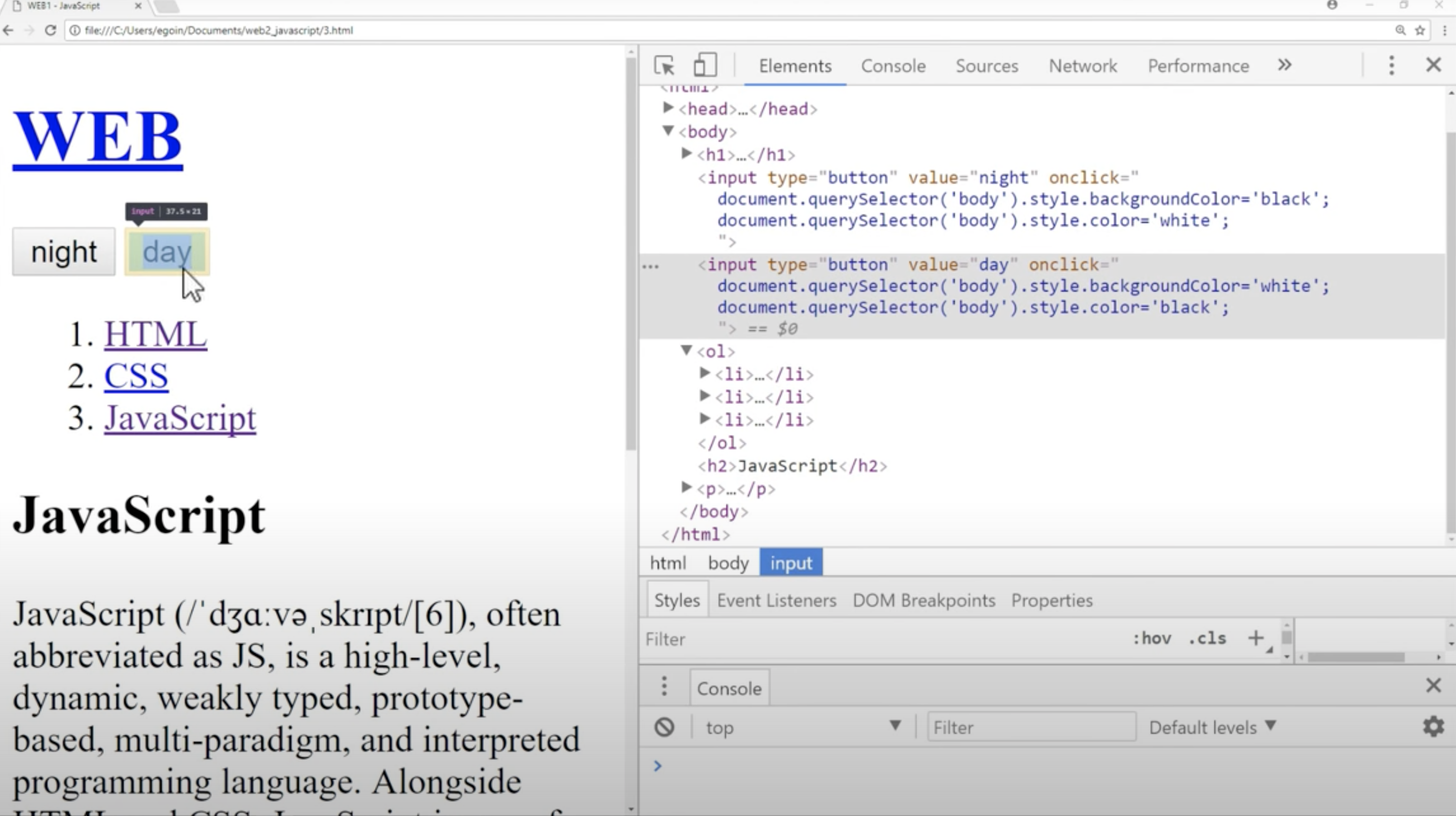
< input type ="button " value ="night " onclick =" document.querySelector('body').style.backgroundColor='black';
document.querySelector('body').style.color='white';
">
< input type ="button " value ="day " onclick =" document.querySelector('body').style.backgroundColor='white';
document.querySelector('body').style.color='black';
">
< h1 > JavaScript</ h1 >
</ body >
</ html > <!DOCTYPE html>
< html >
< head >
< meta charset ="utf-8 " />
< title > </ title >
</ head >
< body >
< input
id ="night_day "
type ="button "
value ="night "
onclick =" if(document.querySelector('#night_day').value ==='night') {
document.querySelector('body').style.backgroundColor = 'black';
document.querySelector('body').style.color = 'white';
document.querySelector('#night_day').value = 'day';
} else {
document.querySelector('body').style.backgroundColor = 'white';
document.querySelector('body').style.color = 'black';
document.querySelector('#night_day').value = 'night';
}
"
/>
< h1 > JavaScript</ h1 >
</ body >
</ html > <!DOCTYPE html>
< html >
< head >
< meta charset ="utf-8 " />
< title > </ title >
</ head >
< body >
< input
type ="button "
value ="night "
onclick =" var target = document.querySelector('body');
if(this.value ==='night') {
target.style.backgroundColor = 'black';
target.style.color = 'white';
this.value = 'day';
} else {
target.style.backgroundColor = 'white';
target.style.color = 'black';
this.value = 'night';
}
"
/>
< h1 > JavaScript</ h1 >
</ body >
</ html >