NAMES OF COLLABORATORS HERE

In this lab, we want you to design interaction with a speech-enabled device--something that listens and talks to you. This device can do anything but control lights (since we already did that in Lab 1). First, we want you first to storyboard what you imagine the conversational interaction to be like. Then, you will use wizarding techniques to elicit examples of what people might say, ask, or respond. We then want you to use the examples collected from at least two other people to inform the redesign of the device.
We will focus on audio as the main modality for interaction to start; these general techniques can be extended to video, haptics or other interactive mechanisms in the second part of the Lab.
Students who have not already received a web camera will receive their IMISES web cameras on Thursday at the beginning of lab. If you cannot make it to class on Thursday, please contact the TAs to ensure you get your web camera.
As always, pull updates from the class Interactive-Lab-Hub to both your Pi and your own GitHub repo. There are 2 ways you can do so:
**[recommended]**Option 1: On the Pi, cd to your Interactive-Lab-Hub, pull the updates from upstream (class lab-hub) and push the updates back to your own GitHub repo. You will need the personal access token for this.
pi@ixe00:~$ cd Interactive-Lab-Hub
pi@ixe00:~/Interactive-Lab-Hub $ git pull upstream Fall2022
pi@ixe00:~/Interactive-Lab-Hub $ git add .
pi@ixe00:~/Interactive-Lab-Hub $ git commit -m "get lab3 updates"
pi@ixe00:~/Interactive-Lab-Hub $ git push
Option 2: On your your own GitHub repo, create pull request to get updates from the class Interactive-Lab-Hub. After you have latest updates online, go on your Pi, cd to your Interactive-Lab-Hub and use git pull to get updates from your own GitHub repo.
In this part of lab, we are going to start peeking into the world of audio on your Pi!
We will be using the microphone and speaker on your webcamera. In the home directory of your Pi, there is a folder called text2speech containing several shell scripts. cd to the folder and list out all the files by ls:
pi@ixe00:~/text2speech $ ls
Download        festival_demo.sh  GoogleTTS_demo.sh  pico2text_demo.sh
espeak_demo.sh  flite_demo.sh     lookdave.wav
You can run these shell files by typing ./filename, for example, typing ./espeak_demo.sh and see what happens. Take some time to look at each script and see how it works. You can see a script by typing cat filename. For instance:
pi@ixe00:~/text2speech $ cat festival_demo.sh
#from: https://elinux.org/RPi_Text_to_Speech_(Speech_Synthesis)#Festival_Text_to_Speech

echo "Just what do you think you're doing, Dave?" | festival --tts
Now, you might wonder what exactly is a .sh file? Typically, a .sh file is a shell script which you can execute in a terminal. The example files we offer here are for you to figure out the ways to play with audio on your Pi!
You can also play audio files directly with aplay filename. Try typing aplay lookdave.wav.
**Write your own shell file to use your favorite of these TTS engines to have your Pi greet you by name.** (This shell file should be saved to your own repo for this lab.)
Bonus: If this topic is very exciting to you, you can try out this new TTS system we recently learned about: https://github.com/rhasspy/larynx
Now examine the speech2text folder. We are using a speech recognition engine, Vosk, which is made by researchers at Carnegie Mellon University. Vosk is amazing because it is an offline speech recognition engine; that is, all the processing for the speech recognition is happening onboard the Raspberry Pi.
In particular, look at test_words.py and make sure you understand how the vocab is defined.
Now, we need to find out where your webcam's audio device is connected to the Pi. Use arecord -l to get the card and device number:
pi@ixe00:~/speech2text $ arecord -l
**** List of CAPTURE Hardware Devices ****
card 1: Device [Usb Audio Device], device 0: USB Audio [USB Audio]
  Subdevices: 1/1
  Subdevice #0: subdevice #0
The example above shows a scenario where the audio device is at card 1, device 0. Now, use nano vosk_demo_mic.sh and change the hw parameter. In the case as shown above, change it to hw:1,0, which stands for card 1, device 0.
Now, look at which camera you have. Do you have the cylinder camera (likely the case if you received it when we first handed out kits), change the -r 16000 parameter to -r 44100. If you have the IMISES camera, check if your rate parameter says -r 16000. Save the file using Write Out and press enter.
Then try ./vosk_demo_mic.sh
**Write your own shell file that verbally asks for a numerical based input (such as a phone number, zipcode, number of pets, etc) and records the answer the respondent provides.**
In Lab 1, we served a webpage with flask. In this lab, you may find it useful to serve a webpage for the controller on a remote device. Here is a simple example of a webserver.
pi@ixe00:~/Interactive-Lab-Hub/Lab 3 $ python server.py
 * Serving Flask app "server" (lazy loading)
 * Environment: production
   WARNING: This is a development server. Do not use it in a production deployment.
   Use a production WSGI server instead.
 * Debug mode: on
 * Running on http://0.0.0.0:5000/ (Press CTRL+C to quit)
 * Restarting with stat
 * Debugger is active!
 * Debugger PIN: 162-573-883
From a remote browser on the same network, check to make sure your webserver is working by going to http://<YourPiIPAddress>:5000. You should be able to see "Hello World" on the webpage.
Storyboard and/or use a Verplank diagram to design a speech-enabled device. (Stuck? Make a device that talks for dogs. If that is too stupid, find an application that is better than that.)
**Post your storyboard and diagram here.**
Write out what you imagine the dialogue to be. Use cards, post-its, or whatever method helps you develop alternatives or group responses.
**Please describe and document your process.**
The users in using my device would be players in playing cards(poker cards) games. For example, players want to know if their cards in hand can have the greatest possibility in playing Texas holdem. Assume that the dealer is cheating with one of the player, he can secretly mentioned ice cream in his conversation randomly to trigger device to show either instruction to tell the player 'fold' or 'call' or continue to play, or all-in or etc. And the other way around works the same. Two players can secretly include his or her cards in their speech with secret codes represented. E.g. 'Charles' represent whichever king, and 'Charles and Camilla' means king of hearts and so on. I might need a dict or other to store this glossory.
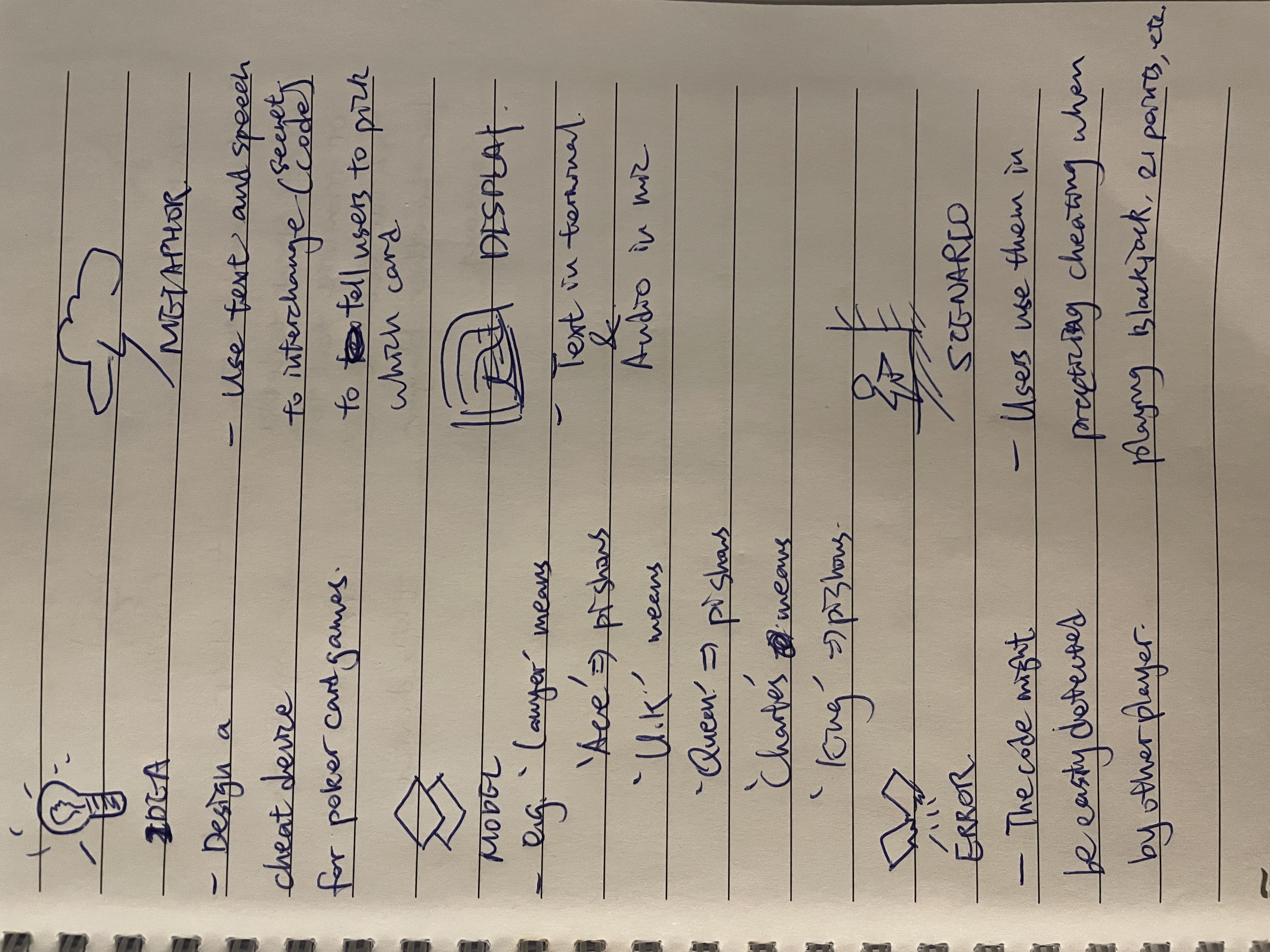
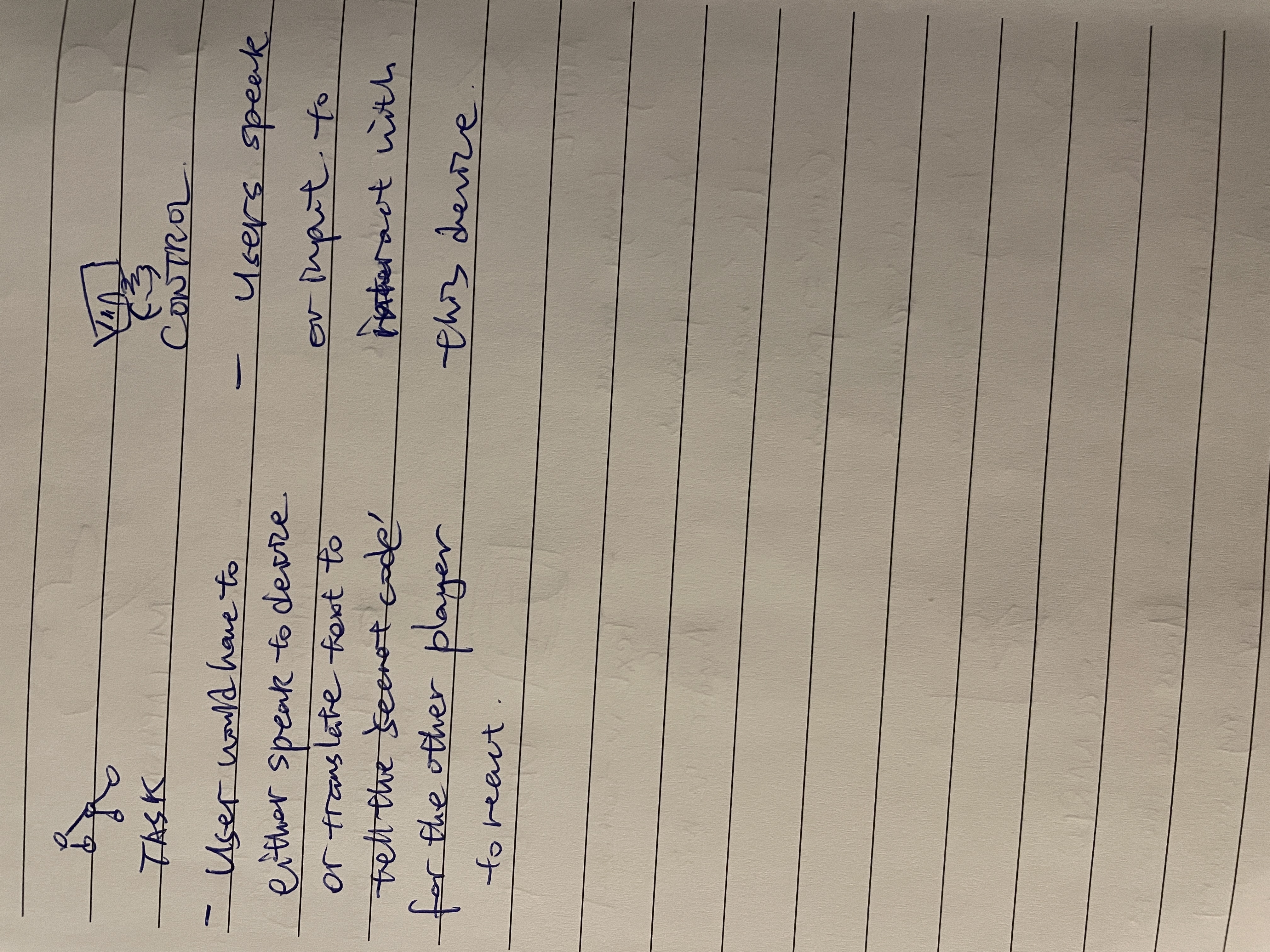
Find a partner, and without sharing the script with your partner try out the dialogue you've designed, where you (as the device designer) act as the device you are designing. Please record this interaction (for example, using Zoom's record feature).
Untitled.mp4
**Describe if the dialogue seemed different than what you imagined when it was acted out, and how.**
I feel like the dialogue is pretty much similar to what I thought, but I can transfer it to a more smoother approach. I am acting as pi and I'm not supposed to say my card out loud, but I need to act it out so I have to say this is king. And I can actually gather more people to play this again to make the scene look more real.
In the demo directory, you will find an example Wizard of Oz project. In that project, you can see how audio and sensor data is streamed from the Pi to a wizard controller that runs in the browser. You may use this demo code as a template. By running the app.py script, you can see how audio and sensor data (Adafruit MPU-6050 6-DoF Accel and Gyro Sensor) is streamed from the Pi to a wizard controller that runs in the browser http://<YouPiIPAddress>:5000. You can control what the system says from the controller as well!
**Describe if the dialogue seemed different than what you imagined, or when acted out, when it was wizarded, and how.**
For Part 2, you will redesign the interaction with the speech-enabled device using the data collected, as well as feedback from part 1.
Feedback from peer review:
- Alan Hsieh: I think the idea is really creative and the video is filmed well, It will be great to filmed the video longer because some people might not be sure about what the story means.
- Henry Wu: Heather presented a creative idea on the storyboard and showed it through the video. I think that it would be cool to tell users the card information via other signals such as light vibration, etc. Keep going on!
- Grace Nho: Maybe add a previous interaction to let user store the secret code like dictionary using the vocal detect thing.
- What are concrete things that could use improvement in the design of your device? For example: wording, timing, anticipation of misunderstandings...
My previous lab is kind of confusing and could easily cause misunderstanding. Grace provided me with constructive feedback that I should inlude a previous dialogue to store all the secret codes in a dict in .py file with voice interaction(like tell my pi what is what and then the text will show if I trigger the words by saying "ice cream" which means for example the dealer is holding a "king of hearts" on my program or pi screen, so players can cheat without getting caught)
- What are other modes of interaction beyond speech that you might also use to clarify how to interact?
I am thinking about using webcam to recognize and track motion changes, but I am not sure how to implement these for now. for example, like if I snap a finger once it means "fold", and clap hands means "call", and some other motion means another hint of poker games.
- Make a new storyboard, diagram and/or script based on these reflections.
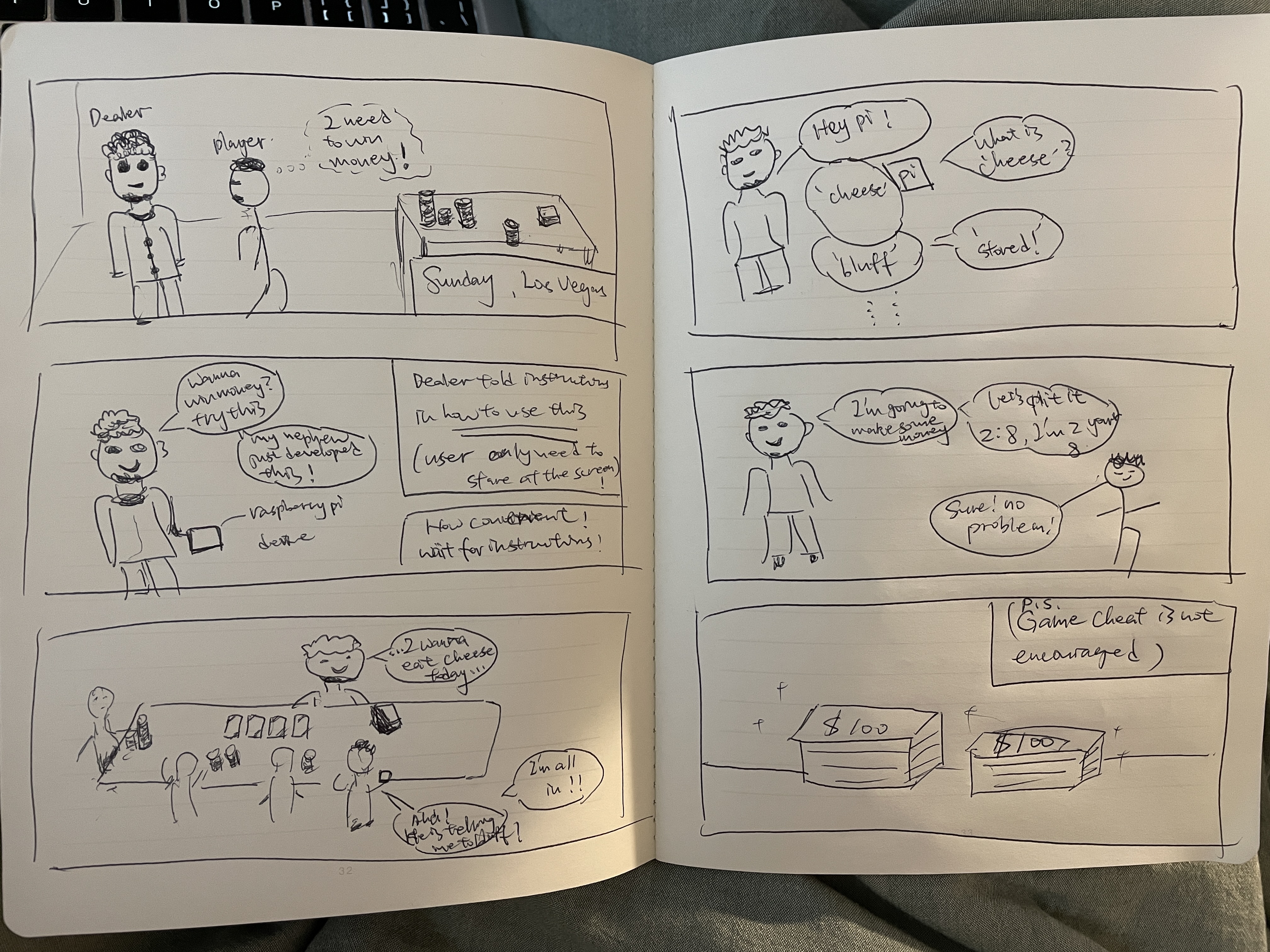
script with pi: dealer: "hey pi!" pi: "good morning!" dealer: "cheese!" pi: "what is cheese?" dealer: "bluff!" pi: "okay stored!" dealer: "ice cream!" pi: "what is ice cream?" dealer: "all in!" pi: "okay stored!" dealer: "moonpie!" pi: "what is moonpie?" dealer: "fold!" pi: "okay stored!" ......
The system should:
- use the Raspberry Pi
- use one or more sensors
- require participants to speak to it.
Document how the system works
First of all, talk to raspberry pi different codes to store them in file using the webcam microphone. For example, "ice cream" means dealer tells you better fold now "ice cream" --> "fold"; "cheese" means dealer tells you there is a chance you can bluff other players and not losing much money "cheese" --> "bluff";
Afterwards, whenever someone mentions the key(e.g. "cheese"), the system will show text in the output, showing "bluff" to tell the straightforward instruction of what to do in this game to win.
Include videos or screencaptures of both the system and the controller.
Untitled.1.mp4
Try to get at least two people to interact with your system. (Ideally, you would inform them that there is a wizard after the interaction, but we recognize that can be hard.)
Answer the following:
The system is rather simple and easy. And Apparently the main problem is that the pi cannot easily understand the trigger when I speak to it. Thus, I feel like I might need some more sensitive interactive device and better algorithm but currently I am not familiar with these for now.
The only thing is the microphone and the voice recognition is fairly hard to use. My program sometimes cannot that accurately catch what i was saying and display them directly. In general, I feel like speech-to-text is harder than text-to-speech.
What lessons can you take away from the WoZ interactions for designing a more autonomous version of the system?
i think the WoZ interaction is more autonomous and thus can be able to achieve more accurate and better device. I haven't tried to modify my own system with WoZ for now, but i think this is worth trying.
How could you use your system to create a dataset of interaction? What other sensing modalities would make sense to capture?
I guess my system is creating a dictionary of triggers and action. I can think of other sensing interactions would be capturing motion but i think this can be rather not spontaneous as motion can be too much and pi might not catch up the speed of human motion changes as we intend to have minor changes in our daily movements. Other than that, there can be many devices that can detect human or other biological data through humidity or temperature, and stroe these data.