- As we mentioned at the conclusion of the previous lesson module, the drive for extensibility in operating system services led to innovations in the internal structure of operating systems and dynamic loading of operating system modules in modern operating systems. And do not stop there. In this lesson, we will see how the concept of virtualization has taken the vision of extensibility to a whole new level. Namely, allowing the simultaneous co-existence of entire operating systems on top of the same hardware platform. Strap your seatbelts and get ready for an exciting ride. Before we look deep into the nuts and bolts of virtualization, let's cover some basics.
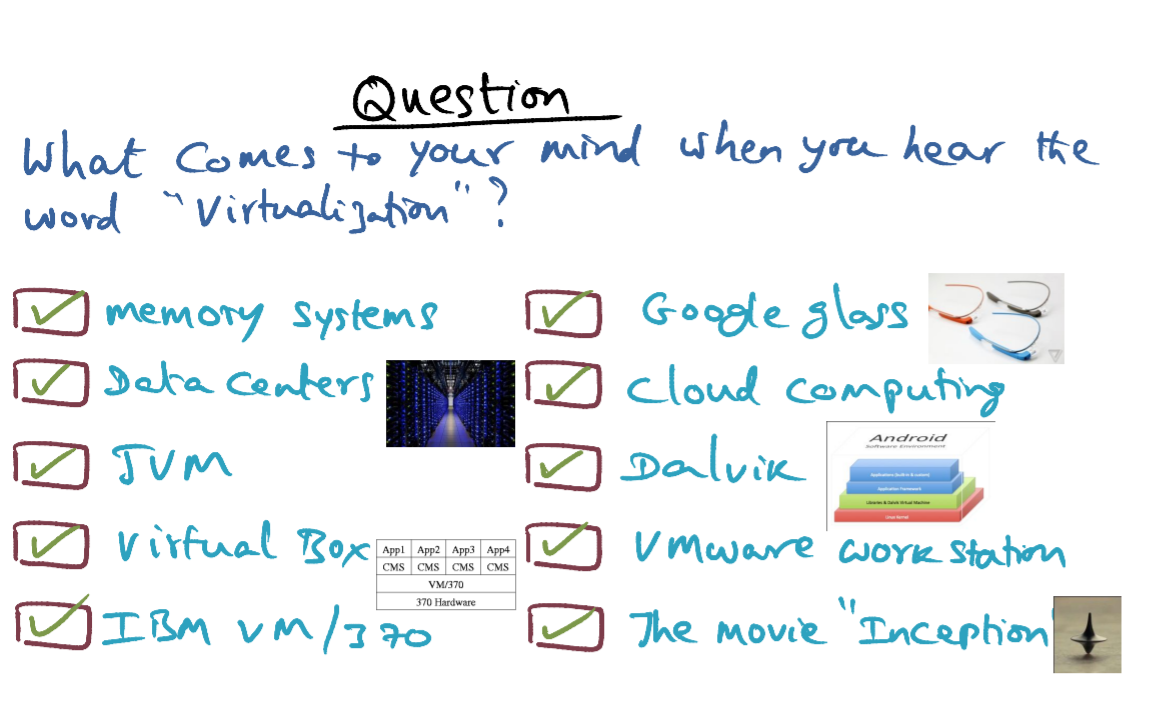
- You know what, if you picked all of them you're right on. We've heard the term virtualization in the context of virtual memory systems. Data centers today catering to cloud computing use virtualization technology. Java virtual machine. Virtual Box is something that you may be using in your laptop for instance. An IBM VM/370, was the mother of all virtualization in some sense, because way back in the 60s and the 70s, they pioneered this concept of virtualization. Google Glass, of course many of you may have heard the hype behind it, as well as the opportunities for marketing that this provides. Cloud computing, Dalvik Virtual Machine in the context of Android, VMware Workstation as an alternative to Virtual Box, and of course the movie, Inception, has a lot of virtualization themes in it.
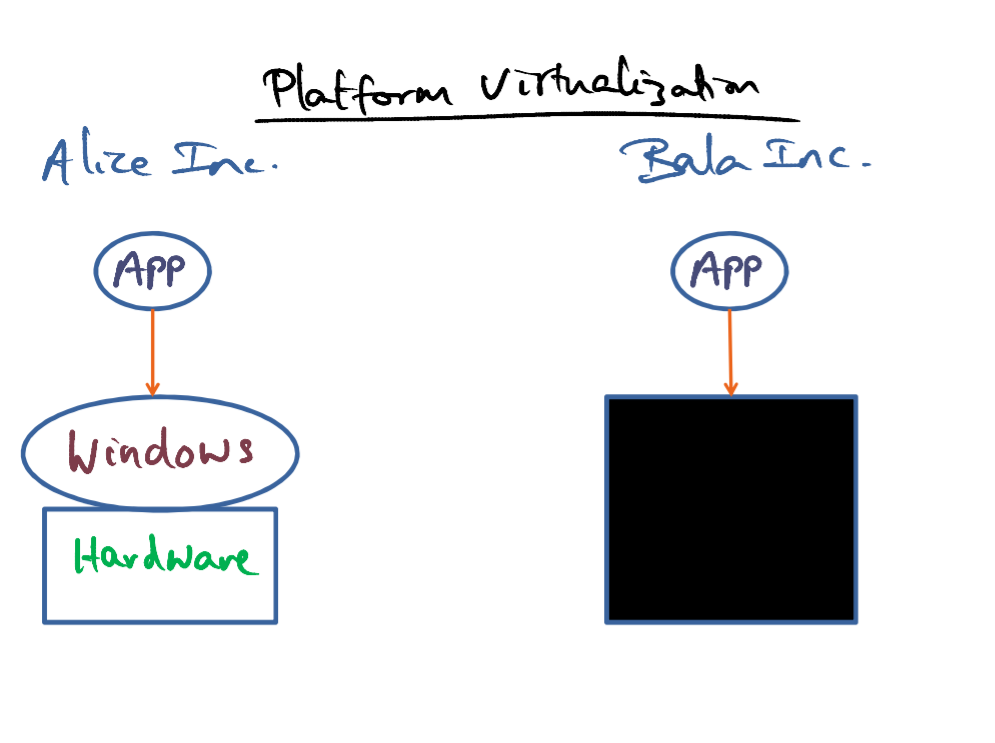
- The words virtual and virtualization are popular these days. From virtual worlds and virtual reality to applications level virtual machines like Dalvik or Java's virtual machine. What we are concerned with here are virtual platforms. And by platform we mean an operating system running on top of some hardware.
- Let's say Alice has her own company, Alice Inc. And she has some cool applications to run for productivity. And let's say that they're running on a Windows machine, on some server that the company maintains. Now, if cost were not an issue, then this will be the ideal situation for Alice Inc. The hope of virtualization is that we will be able to give a company perhaps not as well endured as Alice Inc., let's's say Bala Inc., almost the same experience that Alice Inc., gets at a fraction of the cost. So, instead of a real platform that Alice Inc. has, Bala Inc. gets a virtual platform. Now, in this diagram, what I've shown you is a black box to represent the virtual platform. Because, so far as Bala Inc., is concerned, they don't really care what goes on inside this black box. All they want is to make sure that the apps that they want to run can run on top of this virtual platform. In other words, as long as the platform affords the same capabilities and the same abstractions for running the applications that Bala Inc. is happy.
- Now, we however as aspiring operating system designers are very much interested in what goes on inside this black box. We want to know how we can give Bala Inc., the illusion of having his own platform without actually giving him one. And including all of the cost, the implementation and maintenance associated with implementing such a virtual platform.
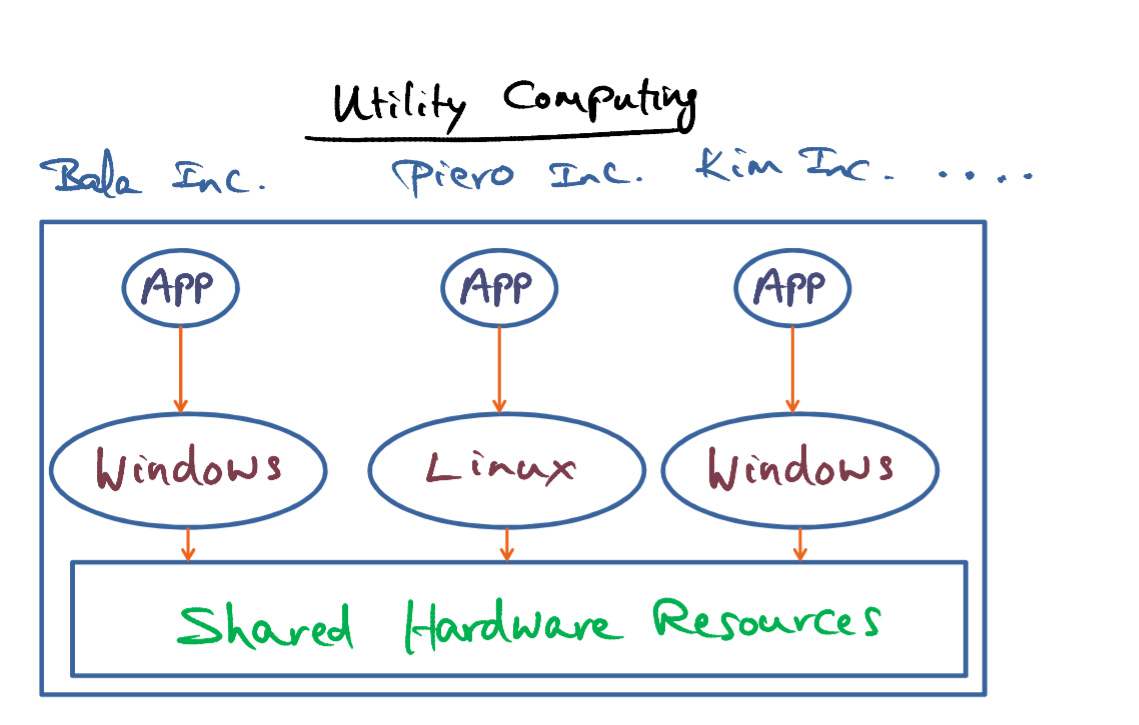
- Now if we peek inside the black box, however,we find that it is not just Bala who is using the resources in the virtual platform, but there is also Piero and there is also Kim, and possibly others who are also running their own applications, their own operating system on the same shared hardware resources. Why would we want to do this? Well, unless we are quite unlucky, the hope is that sharing hardware resources across several different user communities is going to result in making the cost of ownership and maintenance of the shared resources much cheaper. The fundamental intuition that makes sharing hardware resources across the diverse set of users is the fact that resource usage is typically very burst.
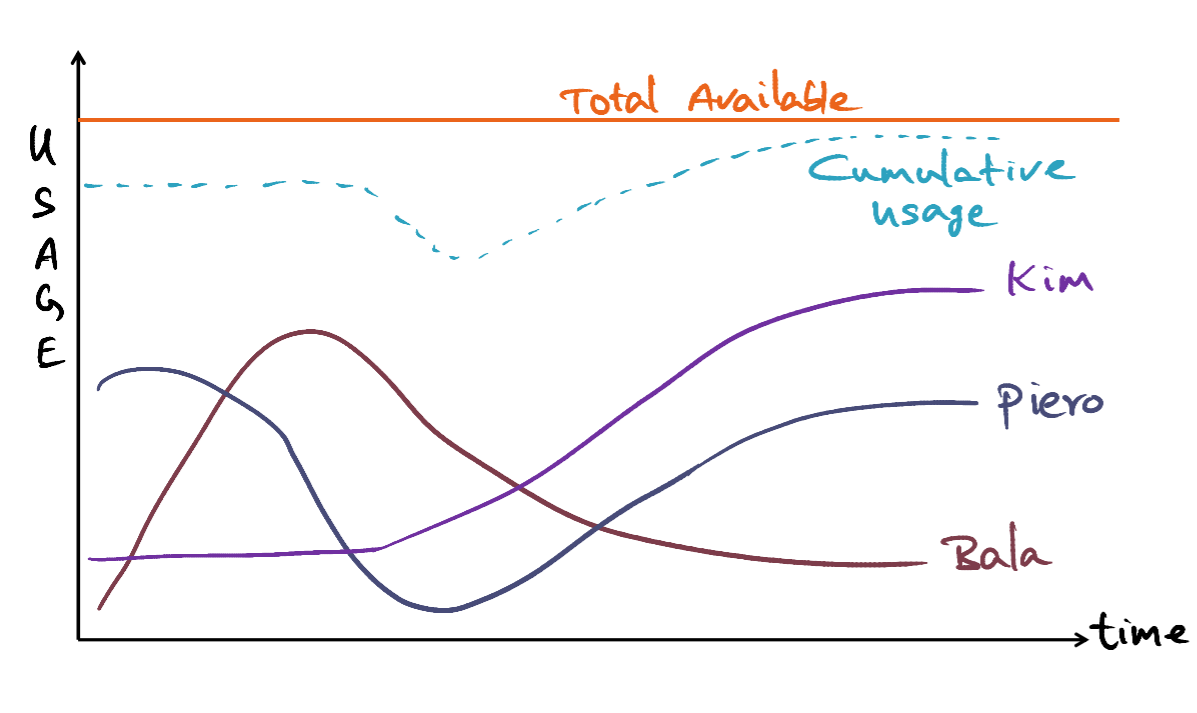
- If we were to draw, let's take one particular resource usage, for instance, memory. If we were to draw Bala's memory usage over time, it might look like this. And maybe Piero's need for memory over time may look like this. And Kim's like this, and so on. Now, adding all of these Dynamic needs of different user communities, we may see a cumulative usage pattern that might look like this. Now, let's consider Bala's cost. If he were to buy his own server, then he would have to buy as much as this, because that is the peak usage that he has and probably he'll want to do more than that just to be on the safe side.
- The virtual machine actually has a total available memory that's much more than the individual needs of any one of these guys, and each of these guys get to share the cost of the total resources among themselves. On a big enough scale, what this would mean is that each of these guys will have potentially access to a lot more resources than they can individually afford to pay for at a fraction of the cost, because both the cost of acquiring the resource as well as maintaining it and upgrading it and so on is borne collectively.
- And that in a nutshell is the whole behind utility computing. That is promoted by data centers worldwide, and this is how Amazon, Webservice, Microsoft, and so on they all provide resource on a shared basis to a wide clientele.
- Some of you may have already seen the connection to what we have seen in the previous lecture. Yes. Virtualization is the logical extension to the idea of extensibility or specialization of services that we've seen in the previous lesson, through the spin and exokernel papers. Only now, it is applied at a much larger granularity, namely an entire operating system. In other words, virtualization is extensibility applied at the granularity of an entire operating system as opposed to individual services within an operating system.
- Now returning to our look inside the black box, notice how we have multiple operating systems running on the same shared hardware resources. Now how is this possible? How are the operating systems protected from one another, and who decides who gets the resource and at what time? What we need then is an operating system of operating systems, something called a virtual machine manager or hypervisor.
- The terminology that you will often encounter is either VMM, which stands for virtual machine monitor, or hypervisor. And these operating systems that are running on top of the shared hardware resources are often referred to as virtual machines, or VM for short. We've always been using the term VM to mean virtual memory. You have to do a mind shift for this lesson module, VM means virtual machine. And each of these operating systems that run on top of the shared hardware resource, I'll often refer to them as either guest operating systems or virtual machines or VM for short. So watch out.
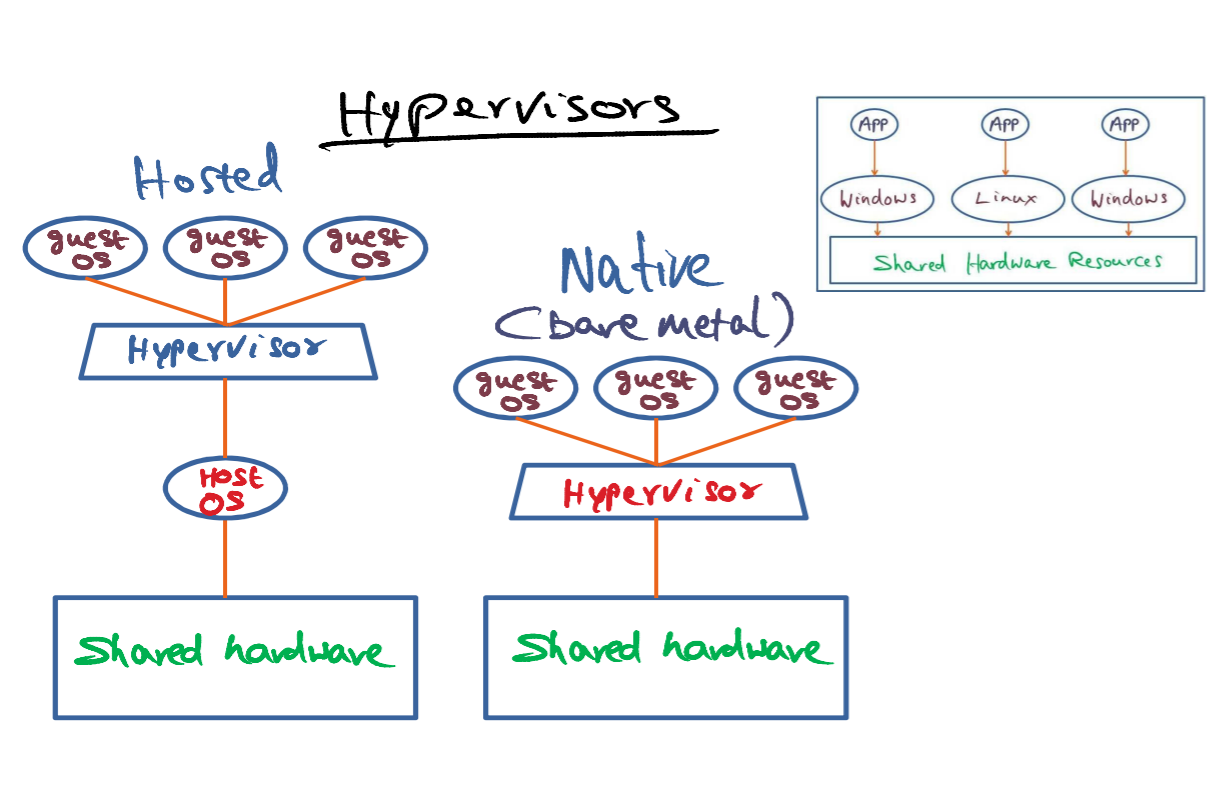
- Now, I should point out that there are two types of hypervisors.
- The first type is what is called a native hypervisor or bare metal, meaning that the hypervisor is running on top of the bare hardware. And that's why it's called a bare-metal hypervisor or a native hypervisor. And all of the operating systems that I'm showing you inside of the black box are running on top of this hypervisor. They're called the guest operating systems because they're the guest of the hypervisor running on the shared resource.
- The second type of hypervisor, what is called the hosted hypervisor. The hosted ones run on top of a host operating system and allows the users to emulate the functionality of other operating systems. So the hosted hypervisor is not running on top of the bare metal, but it is running as an application process on top of the host operating system. And the guest operating systems are clients of this hosted hypervisor. Some examples of hosted hypervisors include VMware, Workstation, and Virtual Box. Both of these terminologies you may have heard of. If you don't have access to a computer that's running Linux operating system in this course you're likely to be doing your course projects on a virtual box or a VMWare workstation that's available to run on Windows platform.
- For the purpose of this lesson today, however, we will be focusing on the bare metal hypervisors. These bare metal hypervisors interfere minimally with the normal operation of these guest operating systems on the shared resources in a spirit which is very similar to the extensible operating systems that we studied earlier, like the spin and exokernel and therefore the bare metal hypervisors, offer the best performance for the guest operating system on the shared resource.
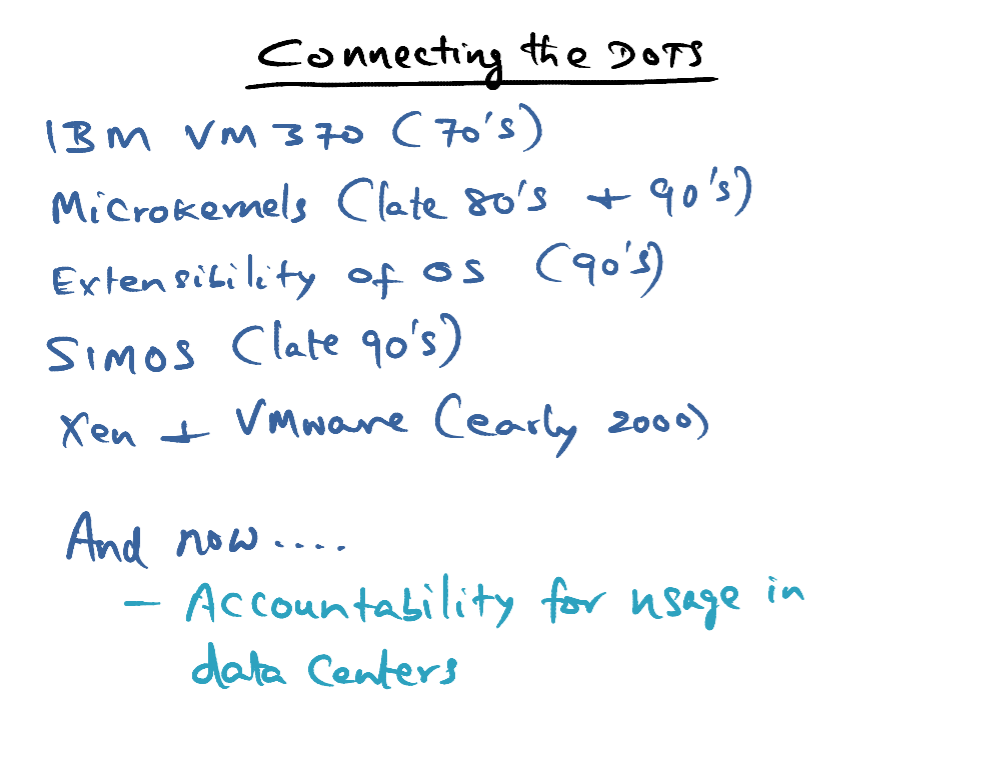
- If you're a student of history, you probably know that ideas come at some point of time and the practical use may come at a much later point of time. An excellent example of that is Boolean algebra, which was invented at the turn of the century as a pure mathematical exercise by George Boole. Now, Boolean algebra is the basis for pretty much anything and everything we do with computers. The concept of virtualization also had its beginning way back in time.
- It started with IBM VM 370 in the 60s and the early 70s. And the intent. And IBM VM370 was to give the illusion to every user on the computer as though the computer is theirs. That was the vision and it was also a vehicle for binary support for legacy applications that may run on older versions of IBM platforms.
- And then of course we had the microkernels that we have discussed in the earlier course module which surfaced in the 80s and early 90s.
- That in turn gave way to extensibility of operating systems in the 90s.
- The Stanford project SimOS in the late 90s, laid the basis for the modern resurgence of virtualization technology at the operating system level and in fact, was the basis for VMware.
- Even the specific ideas we're going to explore in this course module. Through Xen and VMware, are papers that date back to the early 2000s. They were proposed from the point of view of supporting application mobility, server consolidation, collocating, hosting facilities, distributed web services. These are all sort of the candidate applications for which Xen and VMware while positioning this virtualization technology.
- And now today, virtualization has taken off like anything. Why the big resurgence today? Well, companies want a share of everybody's pie. One of the things that has become very obvious, is the margin for device making companies in terms of profits, is very small. And everybody wants to get into providing services for end users. This is pioneered by IBM and others are following suit as well. So the attraction with virtualization technology is that companies can now provide resources with complete performance isolation and bill each individual user separately. And companies like Microsoft, Amazon, HP, you name it, everybody's in this game wanting to provide computing facilities through their data centers to a wide diversity of user communities. So that it's a win-win situation for both the users that do not want to maintain their own computing infrastructure and constantly upgrading them. And the companies like IBM that has a way of providing these resources on a rental basis, on a utility basis, to the user community. You can see the dots connecting up from the extensibility studies of the 90s like the spin and exokernel, to virtualization today, that is providing computational resources, much like we depend on utility companies to provide electricity and water.
- In other words, virtualization technology has made computing very much like the other utilities that we use to such as electricity and water and so on. And that's the reason why there's a huge resurgence in the user virtualization technology in all the data centers across the world.
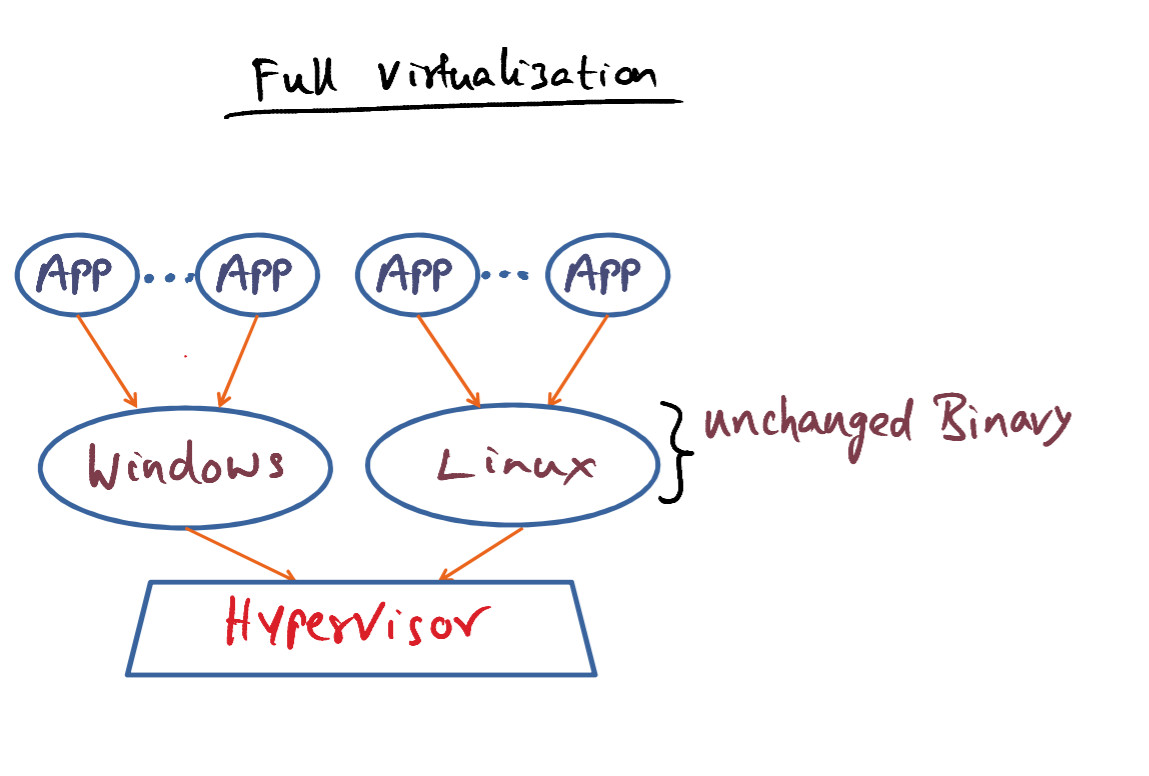
- One idea for this virtualization framework is what is called full virtualization. And in full virtualization the idea is to leave the operating system pretty much untouched.So you can run the unchanged binary of the operating system on top of the hypervisor. This is called full virtualization because the operating system is completely untouched. Nothing has been changed. Not even a single line of code is modified in these operating systems in order to run on the hypervisor simultaneously. But we have to be a little bit clever to get this to work, however.
- Operating systems running on top of the hypervisor are run as user-level processes. They're not running at the same level of privilege as a Linux operating system that is running on bare metal. But if the operating system code is unchanged, it doesn't know that it does not have the privilege for doing certain things that it would do normally on bare metal hardware. In other words, when the operating system executes some privileged instructions, meaning they have to be in a privileged mode or kernel mode to run on bare metal in order to execute those instructions. Those instructions will create a trap that goes into the hypervisor and the hypervisor will then emulate the intended functionality of the operating system. And this is what is called the trap and emulate strategy.
- Essentially, each operating system thinks it is running on bare metal. And therefore, it does exactly what it would have done on a bare-metal processor, meaning that it'll try to execute certain privileged instructions thinking it has the right privilege. But it does not have the right privilege, because it's run as a user-level process on top of the hypervisor. And therefore, when they try to do something that requires a high level of privilege than the user level, it will result in a trap into the hypervisor, and the hypervisor will then emulate the intended functionality of the particular operating system.
- There are some thorny issues with this trap and emulate strategy of full virtualization, and that is, in some architectures, some privilege instructions may fail silently. What that means is, you would think that the instruction actually succeeded, but it did not. And you may never know about it. And in order to get around this problem, in fully virtualized systems, the hypervisor will resort to a binary translation strategy, meaning it knows what are the things that might fail silently in the architecture and looks for those gotchas in each of these individual binaries of the unmodified guest operating systems. And through binary editing strategy, they will ensure that those instructions are dealt with careful. So that if those instructions fail silently, the hypervisor can catch it and take the appropriate action. And this was a problem in early instances of Intel architecture. Both Intel and AMD have since started adding virtualization support to the hardware, so that such problems don't exist any more. But in the early going, when virtualization technology was experimented with, in the late 90's and the early 2000s, this was a problem that virtualization technology had to overcome in order to make sure that you can run operating systems as unchanged binaries on a fully virtualized hypervisor. Full virtualization is the technology that is employed in the VMware system.
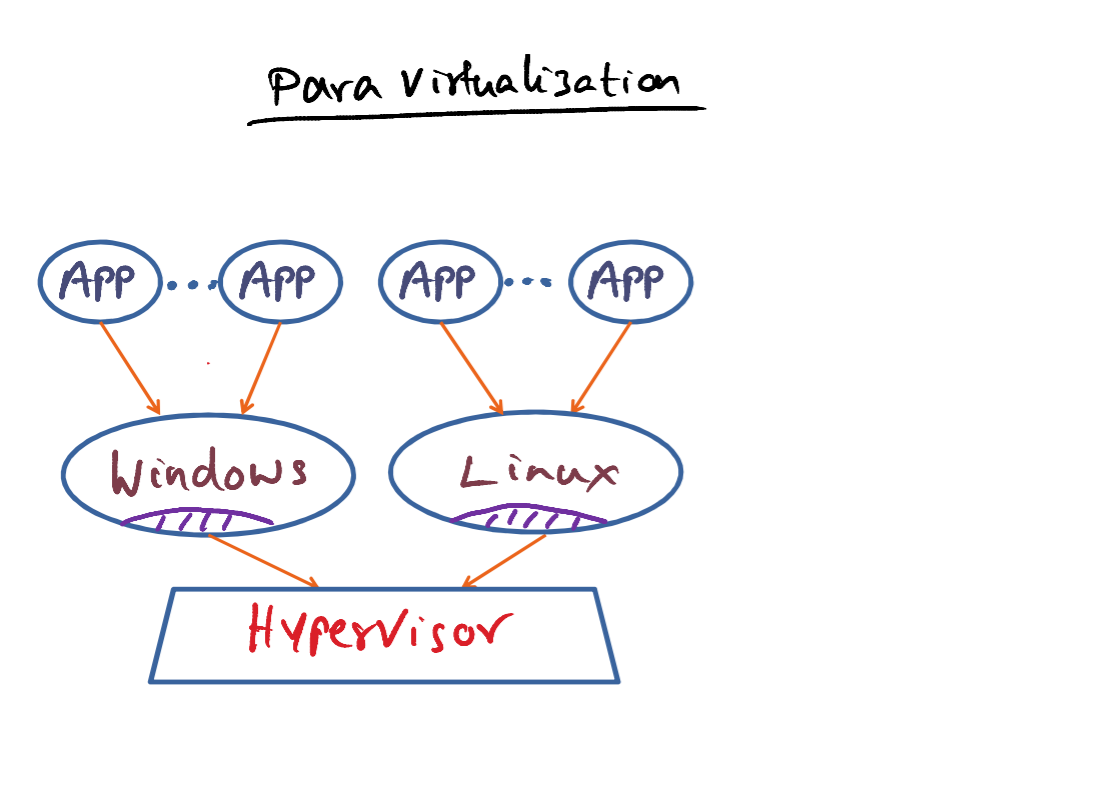
- Another approach to virtualization is to modify the source code of the guest operating system. If we can do that, not only we can avoid problematic instructions, as I mentioned earlier with full virtualization, but we can also include optimizations. For instance, letting the guest operating system, see real hardware resources, underneath the hypervisor, access to real hardware resources and also being able to employ tricks such as page coloring, exploiting the characteristics of the underlaying hardware. It is important to note, however, that so far as the applications are concerned, nothing is changed about the operating system because the interfaces that the applications see is exactly the interfaces provided by the operating system.
- If there is an application that is running on window, it sees the same API. If the application is running on top of Linux, it sees exactly the same API as it would if this Linux operating system was running on native hardware. In this sense, there's no change to the application's themselves. But, the operating system has to be modified in order to account for the fact that it is not running on bare metal, but it is running as a guest of the hypervisor. And this is why this technology is often referred to as Para Virtualization, meaning it is not fully virtualized, but a part of it is modified to account for being a guest of the hypervisor. The Xen product family uses this para virtualization approach. Now this brings up an interesting question. I said that, in order to do this para visualization we have to modify the operating system, but how big is this modification?
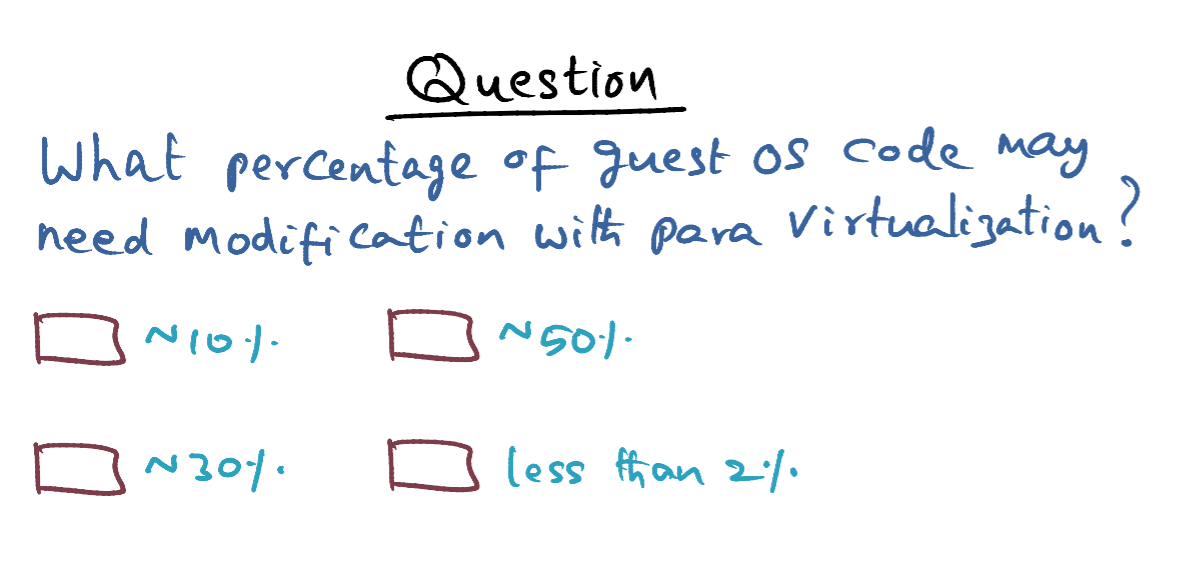
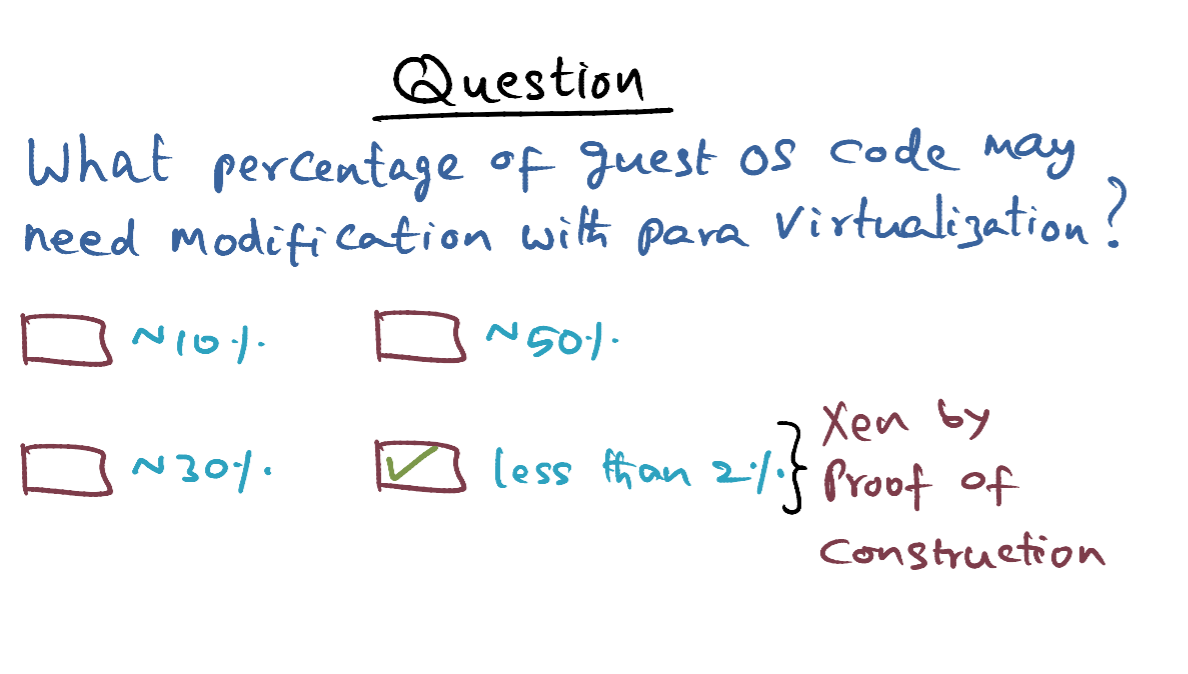
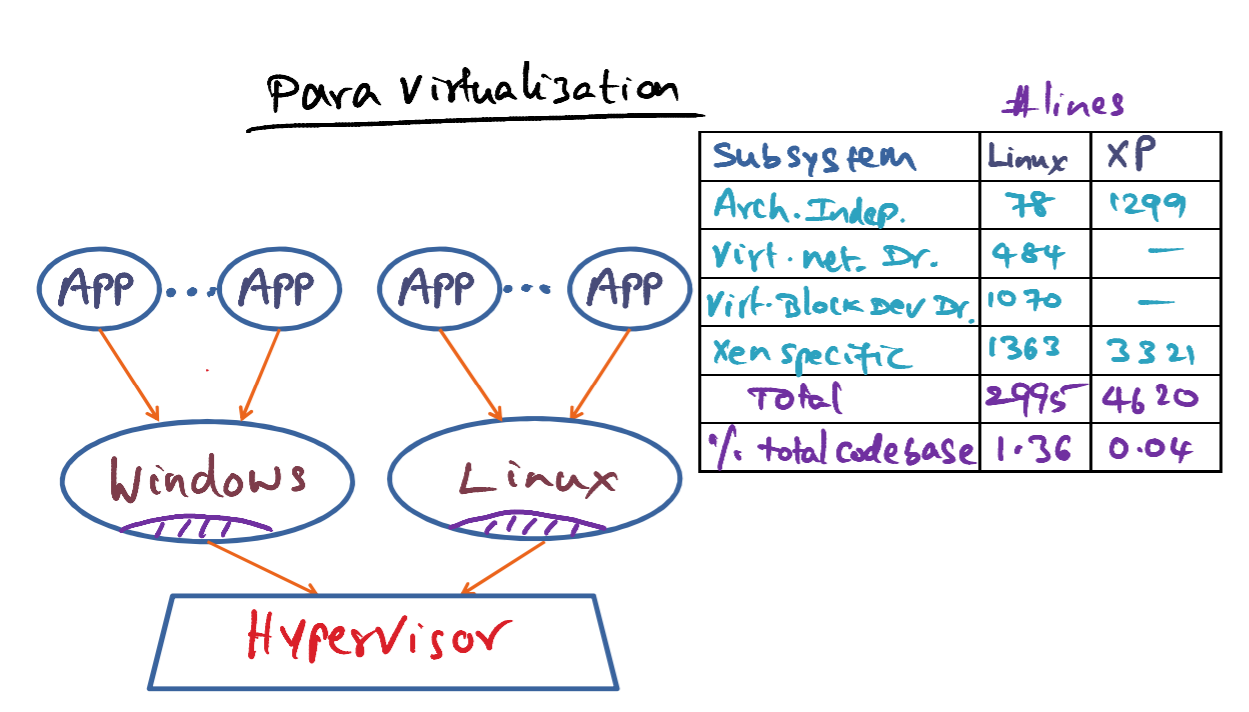
- This table is showing you the lines of code that the designers of Xen hypervisor had to change in the native operating systems. The two native operating systems that they implemented on top of Xen hypervisor are Linux and Windows XP.
- And you see that, in the case of Linux, for instance, the total amount of the original code base that had to be changed is just about 1%, 1.36%.
- And in the case of XP, it is miniscule, almost in the noise.
- So in other words, even though, in para virtualization we have to modify the operating system to run on top of the hypervisor, the amount of code change that has to be done in the operating system in order to make it run on top of the hypervisor can be bound to a very small percentage of the total code base of the original operating system, which is good news.
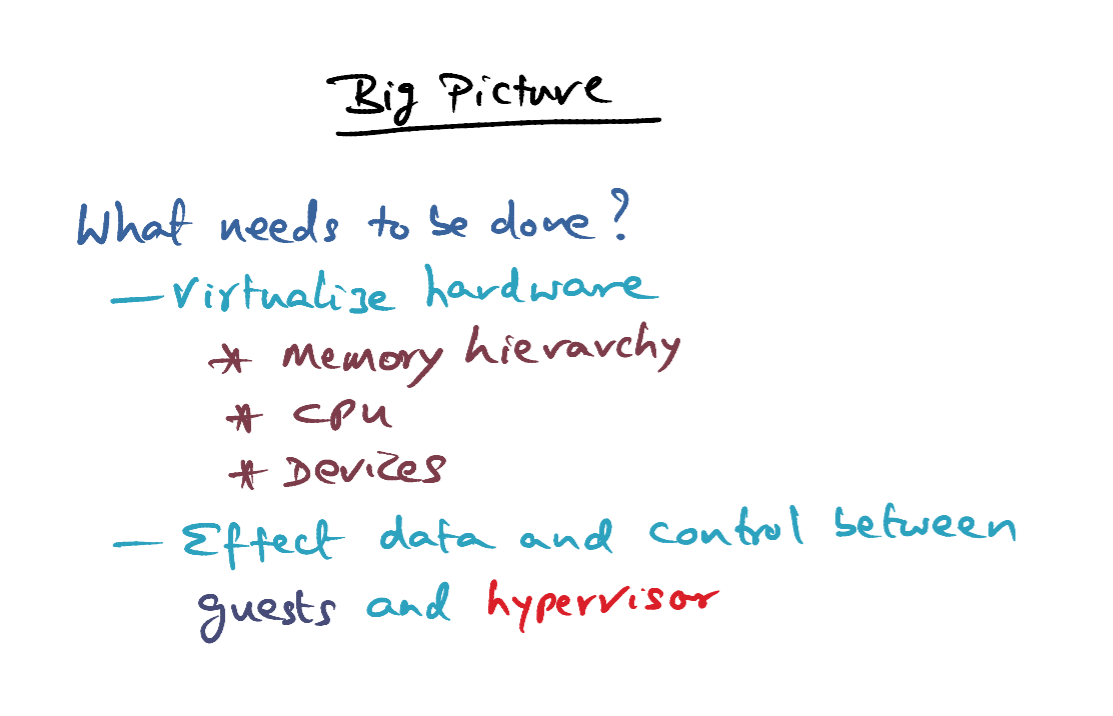
- So, what is the big picture with virtualization? In either of the two approaches that I mentioned, whether it is full virtualization or parel virtualization, we have to virtualize the hardware resources and make them available safely to the operating systems that are running on top of the hypervisor.
- And when we talk about hardware resources, we're talking about the memory hierarchy, the CPU, and the devices that are there in the hardware platform. How to virtualize them and make them available in a transparent manner for use by the operating systems that live above the hypervisor? And how do we affect data and control transfer between the guest operating systems and the hyper-visor? So these are all the questions that we will be digging deeper into in this course module. That wraps up the basic introduction to virtualization technology. And now it is time to roll up our sleeves and look deeper into the nuts and bolts of virtualizing the different hardware elements in the hypervisor.
- We will now dig deeper into what needs to be done in the systems software stack to support virtualization of the hardware resources for use by the many operating systems living on top of the hardware simultaneously. As you've seen in the earlier course module on operating system extensibility,the question boils down to how to be flexible while being performance conscious and safe.
- You'll see that a bulk of our discussion on virtualization centers around memory systems. The reason is quite simple, namely, memory hierarchy is crucial to performance. Even efficient handling of device virtualization is heavily reliant on how memory system is virtualized and made available to the operating systems running on top of the hypervisor. So let's start with techniques for virtualizing the memory management in a performance-conscious manner.
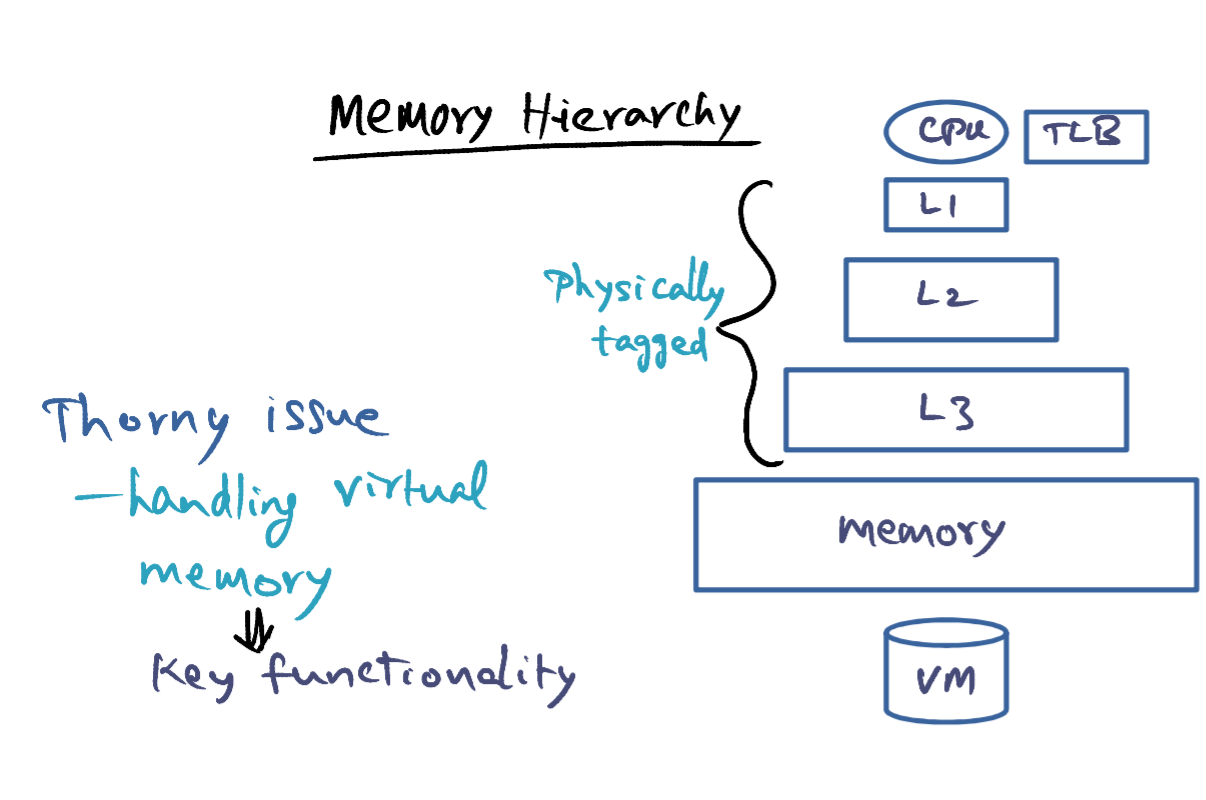
- I'm sure by now this picture is very familiar to you. Showing you the memory hierarchy going all the way from the CPU to the virtual memory on the disk. You have several levels of caches, of course, the TLB that holds address translations for you, virtual to physical, and you have the main memory and then the virtual memory on the disk. Now, caches are physically tagged and so you don't need to do anything special about them from the point of your virtualizing the memory hierarchy.
- The really thorny issue is handling virtual memory, namely the virtual address to the physical memory mapping, which is the key functionality of the memory management subsystem in any operating system.
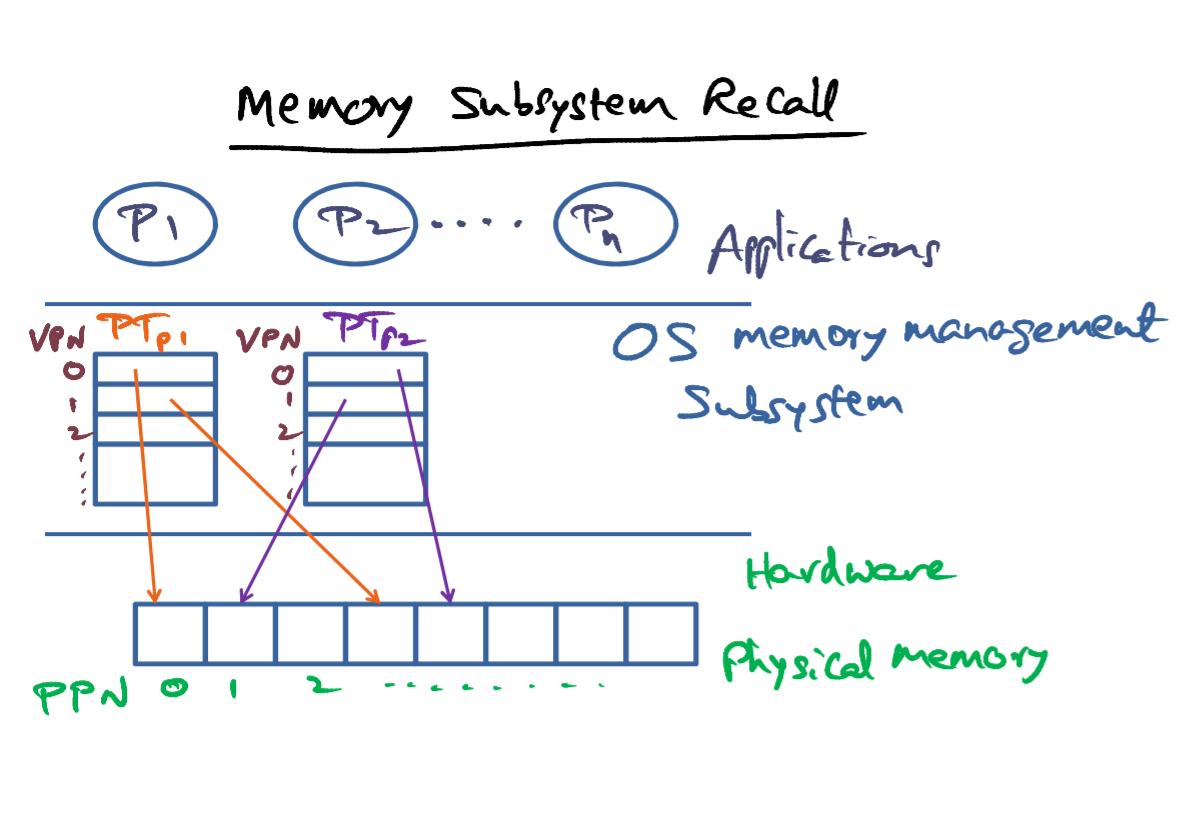
- Recall that in any modern operating system, each process is in it's own protection domain, and usually a separate hardware address space. The operating system maintains a page table on behalf of each of these processes. The page table is the operating system's data structure that holds the mapping between the virtual page numbers and the physical pages where those virtual pages are contained in the main memory of the hardware.
- The physical memory is contiguous starting from zero to whatever is the maximum limit of the hardware capabilities are. But the virtual address pace of a given processor is not contiguous in physical memory, but it is scattered all over the physical memory. And that's in some sense the advantage that you get with page based memory management, that a process notion of which virtual address being contiguous is not necessarily reflected in the physical mapping of those virtual pages to the physical pages in the main memory.
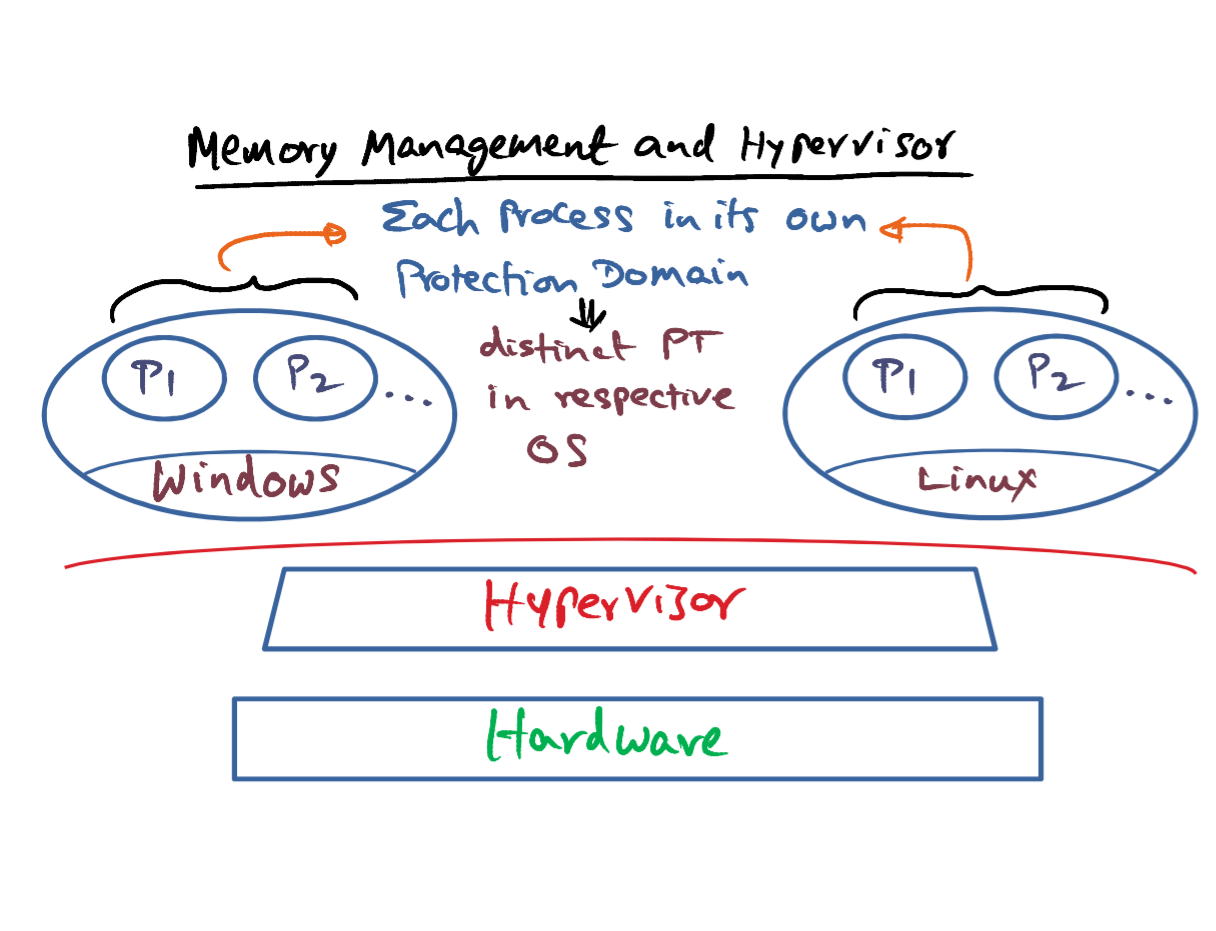
- In the virtualized setup, the hypervisor sits between the guest operating system and the hardware. So the picture gets a little bit complicated. Inside each one of these operating systems, they are user-level processes, and each process is in its own protection domain. What that means is that in each of these operating systems, there is a distinct page table that the operating system maintains on behalf of the processes that are running in that operating system, similarly in this case.
- Does the hypervisor know about the page tables maintained on behalf of the processes that are running in each one of these individual operating systems? The answer is no. Windows and Linux are simply protection domains distinct from one another so far as the hypervisor is concerned. The fact that each of Windows and Linux within them contain application of a processes is something that the hypervisor doesn't know about at all.
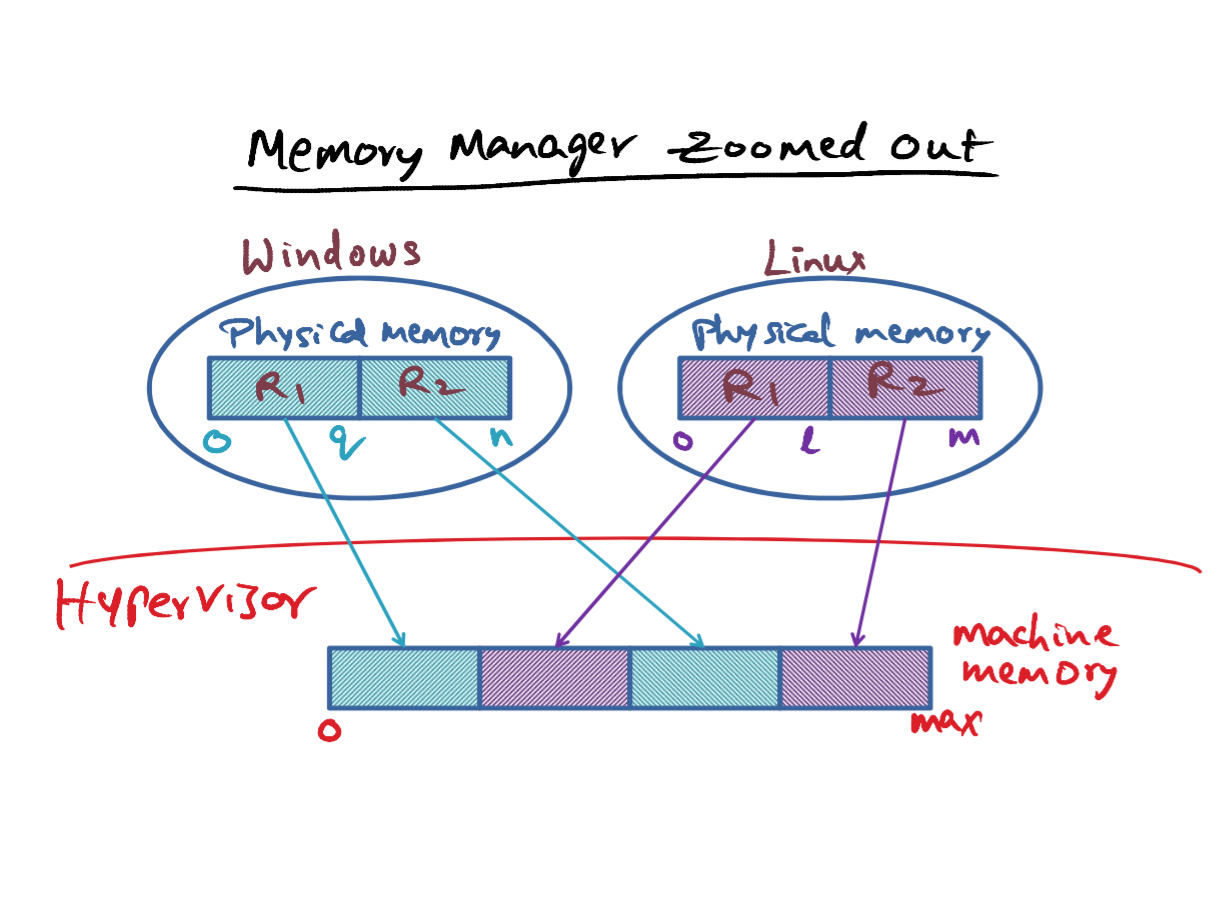
- So far as each one of these operating systems is concerned, in their native form, when they think about physical memory, they think of physical memory as contiguous.But, unfortunately, the real physical memory, we're going to call it machine memory from now on, is in the control of the hypervisor. Not in the control of any one operating system.
- So, the physical memory of each of these operating systems is itself an illusion. It's no longer contiguous in terms of the real machine memory that the hypervisor controls. So for instance, if you look at the physical memory that windows has, I've broken that down into 2 regions, R1 and R2. And R1 has, let's say, a number of pages 0 through Q, and R2 has a number of pages starting from Q plus 1 through N. So this is a physical memory. But if you look at this region R1, it's occupying a space in the machine memory, the real physical memory, which we call the machine memory controlled by the hypervisor over here. R2 is not contiguous with respect to R1 in the machine memory. It's been put over here. And come over to Linux, and it has its own physical memory, and we'll call that, region 1 and region 2 again. And it has a total capacity of M + 1 physical page frames, all of which zero through L are contiguous in the machine memory and L+1 through M are contiguous in machine memory, but, they're not contiguous with respect to the other region R1.
- Why would this happen? The hyperwaves is not being nasty to the operating system. After all, even if all of the N plus 1 pages of Windows, and N plus 1 pages of Linux would be contiguous in the machine memory, they cannot all start at 0 because the physical memory, the real physical memory, which we're calling machine memory, is the only thing that is contiguous. And that has to be partitioned between these two guys, and therefore, the starting point for the physical memory, the illusion of the physical memory, so far as a particular operating system, cannot be 0. Also, the memory requirements of operating systems are dynamic and bursting. When Windows started out initially with Q plus 1 pages, and later on it needed additional memory, then it's going to request the hypervisor and at that point, it may not be possible for the hypervisor to give another region, which is contiguous with the previous region that Windows already has. So these are the reasons why the physical memory of an operating system itself becomes an illusion, in terms of how it is actually contained in the machine memory.
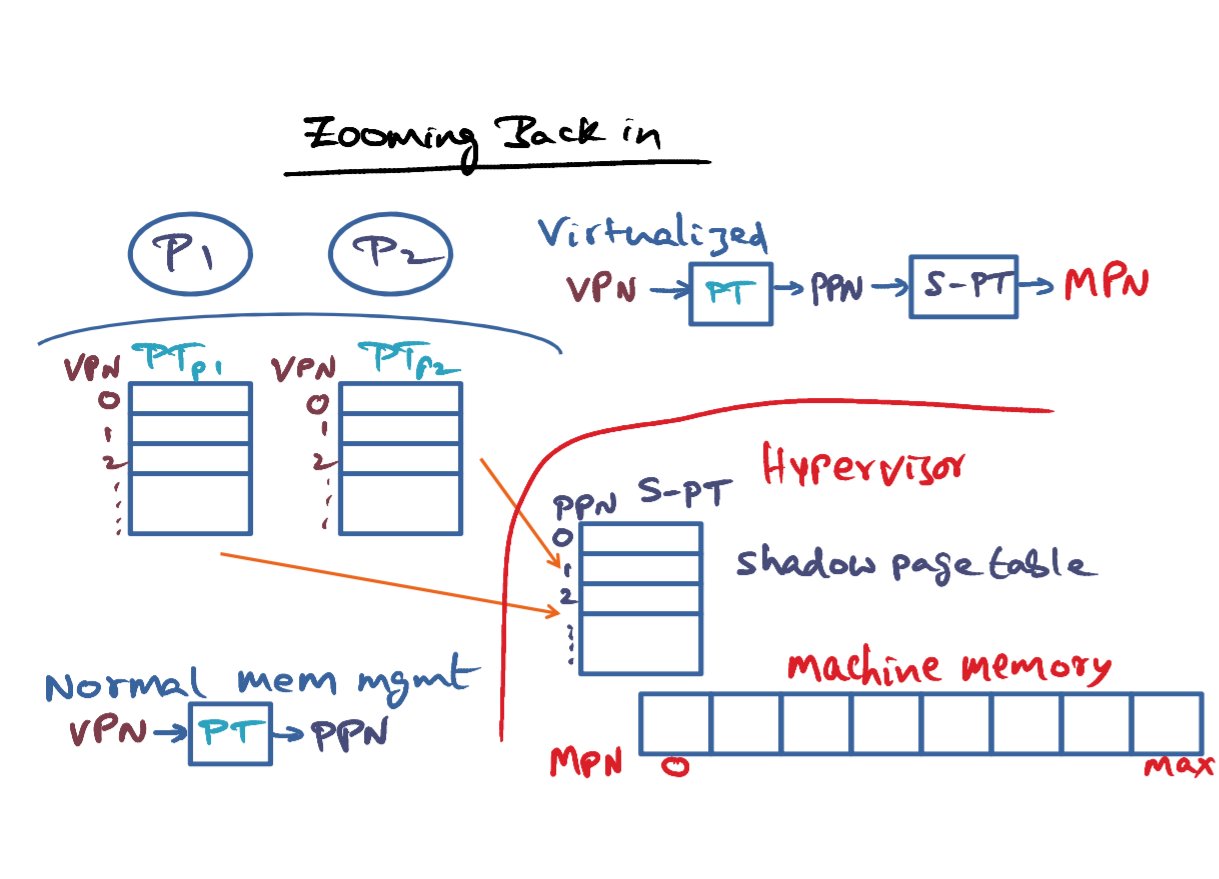
- Zooming back in to what is going on within a given operating system, we already know that the process address space for an application is an illusion in the sense that the virtual memory space of this process is contiguous, but in terms of physical memory they are not contiguous. And the page table data structure that the operating system maintains, on behalf of the processes, is the one that supports this illusion so far as this process is concerned. By mapping the virtual page number of the process, using the page table for this particular process into the physical page number, where a particular virtual page may be contained in physical memory. This is a setting in a non-virtualized operating system. So the page table serves as the broker to convert a virtual page number to a physical page number.
- In a virtualized setting, we have another level of indirection, that is this physical page number of the operating system has to be mapped to the machine memory or the machine page numbers. We'll call the pages in the machine memory, which is the real thing, as MPN, short for Machine Page Numbers. And this goes from zero through some max, which is the total memory capacity that you have in your hardware. This data structure, the page table, is a traditional page table, that gives a mapping between virtual page number and the physical page number. And this is a traditional page table. The mapping between the physical page number and the machine page number, that is PPN to MPN mapping, is kept in another page table, which is called shadow page table "S-PT".
- So now, in a virtualized setting, there's a two-step translation process to go from VPN to MPN. The page table maintained by the guest operating system is the one that translates VPN to PPN, and then there is this additional page table called a shadow page table that converts the PPN to MPN. That brings up an interesting question.
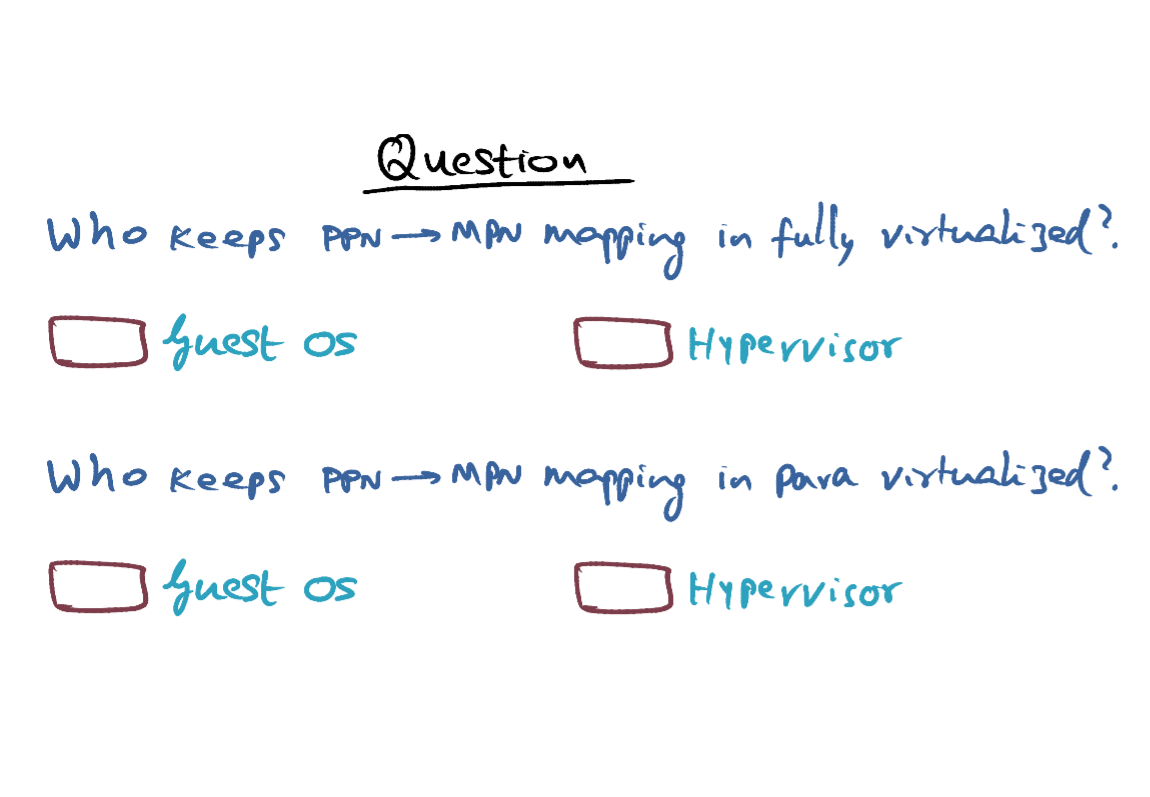
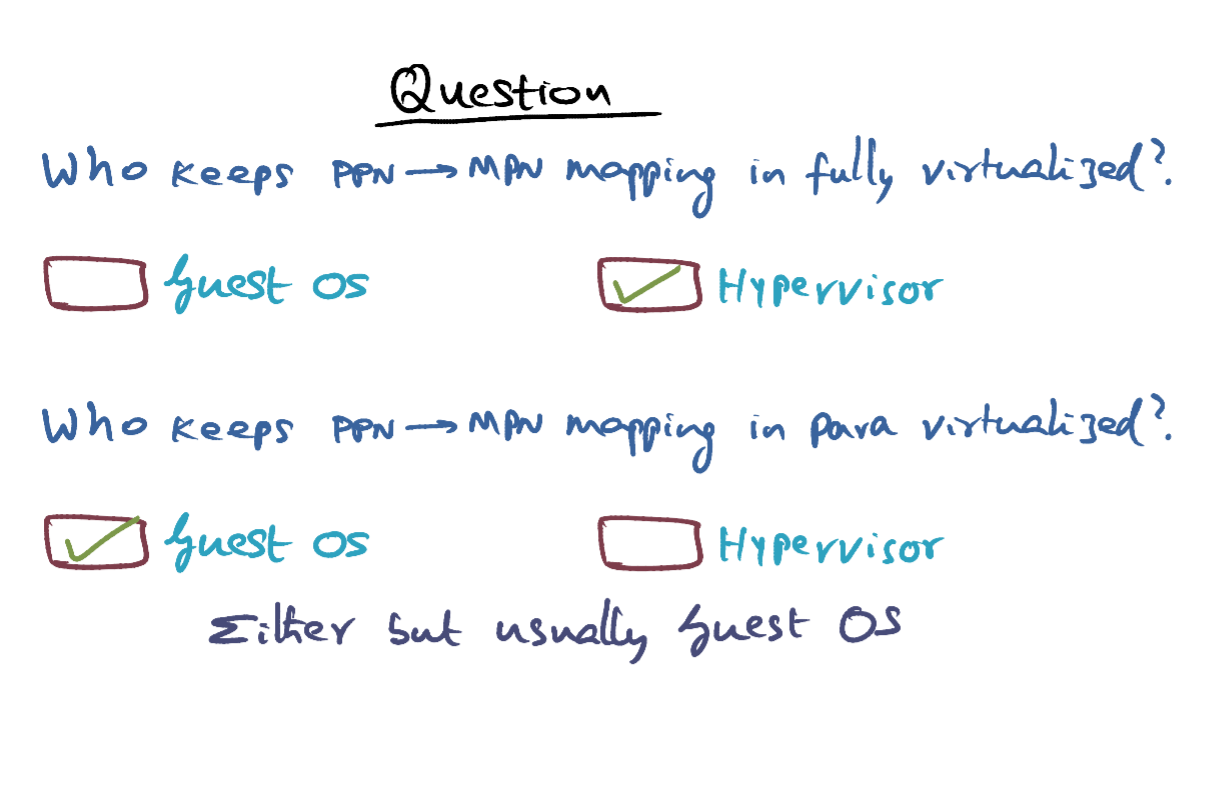
- In the case of a fully virtualized hypoviser, the guest operating system has no knowledge of machine pages. It thinks that it's physical memory is contiguous because it is thinking that it is running on bare metal, nothing has been changed in the operating system to run on top of a hypervisor in a fully virtualized setting. And therefore, it is the responsibility of the hypervisor to maintain the PPN to MPN mapping.
- In a para virtualized setting, on the other hand, the guest operating system knows that it is not running on bare metal. It knows that there's a hypervisor in between it and the real hardware. And it knows, therefore, that its physical memory is going to be fragmented in the machine memory. So the mapping PPN to MPN can be kept in either the guest OS or the Hypervisor. But, usually, it is kept in the guest operating system. We'll talk more about that later on.
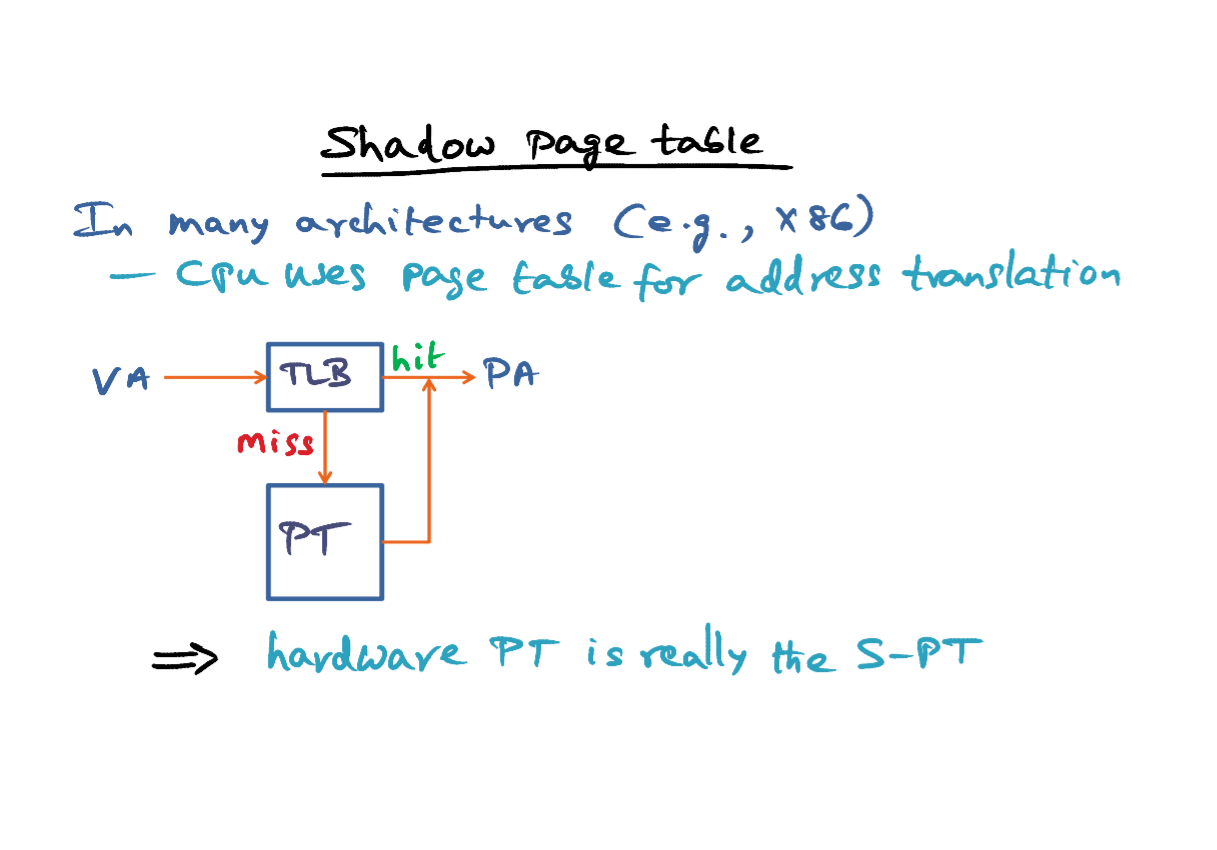
- Let's understand what exactly this shadow page table is and what it is.
- In many architectures, for example, Intel's X86 family, the CPU uses the page table for address translation. What that means is presented with the virtual address, The CPU gets to what? It first looks up the TLB to see if there is a match for the virtual page number contained in this virtual address. If there is a match, it's a hit and it can translate this virtual address to the physical address. If it is a miss, CPU knows word in memory the page table data structure is kept by the operating system. And therefore what it does, it goes to the page table, which is in main memory, and retrieves the specific entry which will give it the translation from the virtual page number to the physical page number. And once it gets that, It'll stash it in the TLB, as well, and be able to generate the physical address that is specified by this particular virtual address. So that's the way the CPU does the translation in many architectures. So in other words, both the TLB and the page table are data structures that the architecture uses for address translation. Page table is also a data structure that is set by the operating system for enabling the processor to do this translation. So in other words, the hardware page table is really the Shadow page table in the virtualized setting, if the architecture is going to use the page table for address translation.
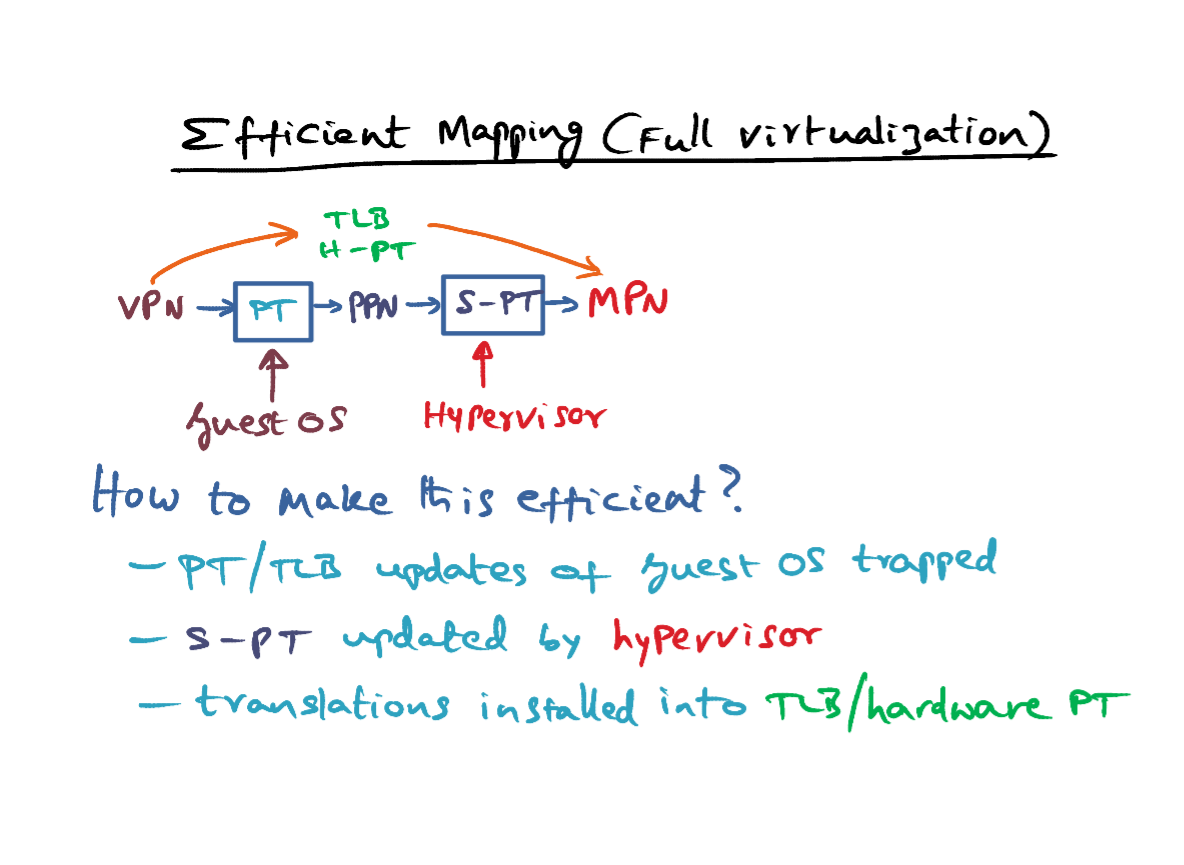
- As I mentioned in a fully virtualized setting, the guest operating system has no idea about machine pages. It thinks that the physical page number that it is generating, is the real thing. But it is not. And therefore, there is two levels of indirection, one level of indirection going from virtual page to physical page, that's an illusion. Then the hypervisor has to take this physical page and using the shadow page table, convert it into the machine page. And as I said, the shadow page table may be the real hardware page table that the CPU uses as well. So this is the data structure that is maintained by the hypervisor to translate the PPN to MPN.
- So, how to make this efficient? Because on every memory access of a process of the guest operating system, the virtual address has to be converted to a machine address. So in other words, we want to avoid the one level of indirection that's happening because the virtual page number has to be converted to a physical page number by the guest operating system, and then it has to be looked up in the shadow table by the hypervisor to generate the machine page number.So we would like to make this process more efficient because it's happening on every memory access by getting rid of one level of indirection, that is, this translation by the guest operating system.
- Remember that, the guest operating system is the one that establishes this mapping in the first place between a virtual page number and a physical page number. By creating an entry in the page table for the process that is generating this virtual address in the first place. And updating the page table is a privileged instruction. So, when the guest operating system tries to update the page table or what it thinks is the page table, it'll result in a trap. Any time the guest operating system tries to update this page table to establish a mapping between VPN and PPN, there'll be a trap.
- And this trap is called by the hypervisor. And what the hypervisor is going to do is, it's basically going to say, oh, this particular VPN corresponds to a specific entry in the shadow page table. So the update that guest OS is making to it's page table data structure, which it thinks is the real thing. It's not the real thing. The hypervisor is updating the same mapping by saying" well, this particular VPN is going to this machine page number, that's the one that we're going to put as the entry here."
- So as a result, what we have done is, even though there is a solution, the real translations, that is a mapping between VPN and MPN, is remembered in the shadow page table, which may be the hardware page table if the processor is using the page table for its address translation or it could be the TLB. In either case, the hypervisor is going to install the translation from VPN to MPN into the TLB and the hardware page table.
- So now we basically bypassed the guest operating system's page table in order to to the translation because every time a process generates a virtual address. We are not going through the guest operating system to do the translation, but so long as the translation has already been installed in the TLB and the hardware page table. The hypervisor without the intervention of the guest operating system can translate the virtual page number of a user level process running on top of the guest operating system directly to the machine based number using the TLB and the hardware page table.
- So this is a trick to make address translation efficient, because it's extremely crucial that on every memory access we don't go through the guest top operating system to do the address translation, it's just not acceptable. And this is the trick that is used in VMware ESX server that is implemented on top of Intel hardware.
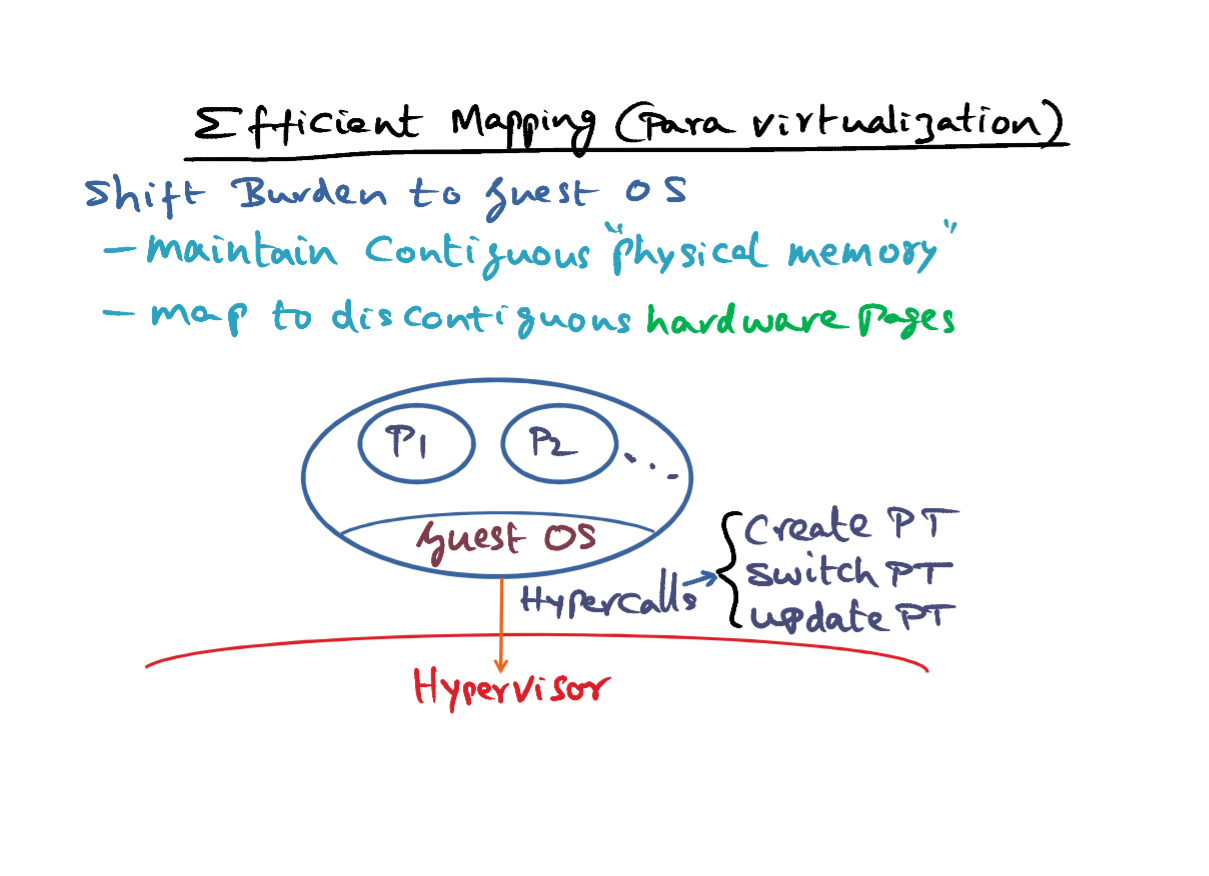
- In a para virtualized setting, on the other hand, the operating system knows that its physical memory is not contiguous. And there for this burden of efficient mapping can be shifted into the guest operating system itself.
- So now the guest operating system is going to maintain contiguous physical memory to make it simpler in terms of all the other subsystems to do that. But it is also going to know that its notion of physical memory, is not the same as machine memory, and so it will map the discontiguous physical memory to real hardware pages. So that burden of doing the PPN to MPN mapping can be pushed into the guest operating system in a very virtualized setting.
- So on an architecture like Intel, where the page table is a data structure of the operating system. And it is also used by the hardware to do the address translation. The responsibility of allocating and managing the hardware page table data structure can be shifted into the guest operating system. In a fully virtualized setting, it's not possible to do that because the operating system in a fully virtualized setting is unaware of the fact that it is not running on bare metal. But in a para virtualized setting, since it is possible to do that, it is more efficient to push this efficient mapping handling into the guest operating system.
- For example, in Xen which is a para virtualized hypervisor, it provides a set of Hypercalls for the guest operating system to tell the Hypervisor about changes to the hardware page table. So, for instance, there is a call that says create page table and this allows a guest operating system to allocate and initialize a page frame that it has previously acquired a real page frame that it is previously acquired from the hypervisor as a hardware resource. It can target that physical page frame as a page table data structure. Recall that each guest operating system, would have gotten a bunch of physical memory from the hypervisor at the beginning of establishing its foot print on the hypervisor. And so it can use one of those real physical memories to host a page table data structure on behalf of a new process that it launches now. So anytime a new process starts up in the guest operating system, the guest operating system will make a hypercall to Xen saying "Please create a page table for me, and this is the page frame that I'm giving you to use as the page table". So, when the guest operating system has to operate this particular process which got launched, then it can make another hypercall to the hypervisor saying "please switch to page table, and here is the location of the page table". The hypervisor doesn't know about all these processes. All it understands is that there's a hypercall that says change the page table from whatever it used to be to this new page table. And that essentially results in this guest operating system switching the address space of the currently running process on the the bare hardware on the bare metal to P1 by this switch page table hypercall. Xen will do that appropriate thing, of setting the hardware register, of the processor to point to this page table data structure in response to this hypercall from the guest operating system. If the process P1 one were to page fault at some point of time, the page fault would be handled by the guest operating system. We'll talk about how it does that later on. But once it handles that page fault for P1 and says, "oh, this particular virtual page of this process is now going to correspond to a physical frame that I own. I'm going to tell the hypervisor that the mapping in the page table has to be set for this translation that I just established for the faulted page for this process". So there's another hypercall that's available for updating a given page table data structure. And using this the guest operating system can deal with modifications to the base table data structure.
- All the things that an operating system would have to do in a normal setting on bare metal, you have to be able to do in the setting where you have the hypervisor sitting between the real hardware and the guest operating system. And the three things that are required to be done in the conflicts of memory management in a Para Virtualized setting, is being able to create a brand new hardware address space for a newly launched process which involves creating a page table. That's a hypercall that's available. When you do a context switch, you want to switch the page table. That's a hypercall that's available when you do a context switch in the guest operating system from P1 to P2, the guest can tell the hypervisor that the page table to use from now on is such and so. That's the way the guest can do a contact switch from one process to another. And, thirdly, since not all of the address space or the memory footprint of a process would be physical memory, if the currently running process were to incur at page fault, that has to be handled by the guest operating system. In handling that, it establishes a mapping between the messy virtual page for this process and the physical frame in which the contents of the page is now contained. That mapping has been put into the page table for this particular process. Again that's something that only the hypervisor can do, because it is a privileged operation happening inside the hardware. And for that purpose, the hypervisor provides a hyper call that allows a guest operating system to update the base table data structure. So at the outset I said that handling virtual memory is a thorny issue. Doing the mapping from virtual to physical on every memory access, with all the intervention of the guest operating system is the key to good performance. And it can be done both in fully virtualized and para virtualized setting by the tricks that we talked about just now.
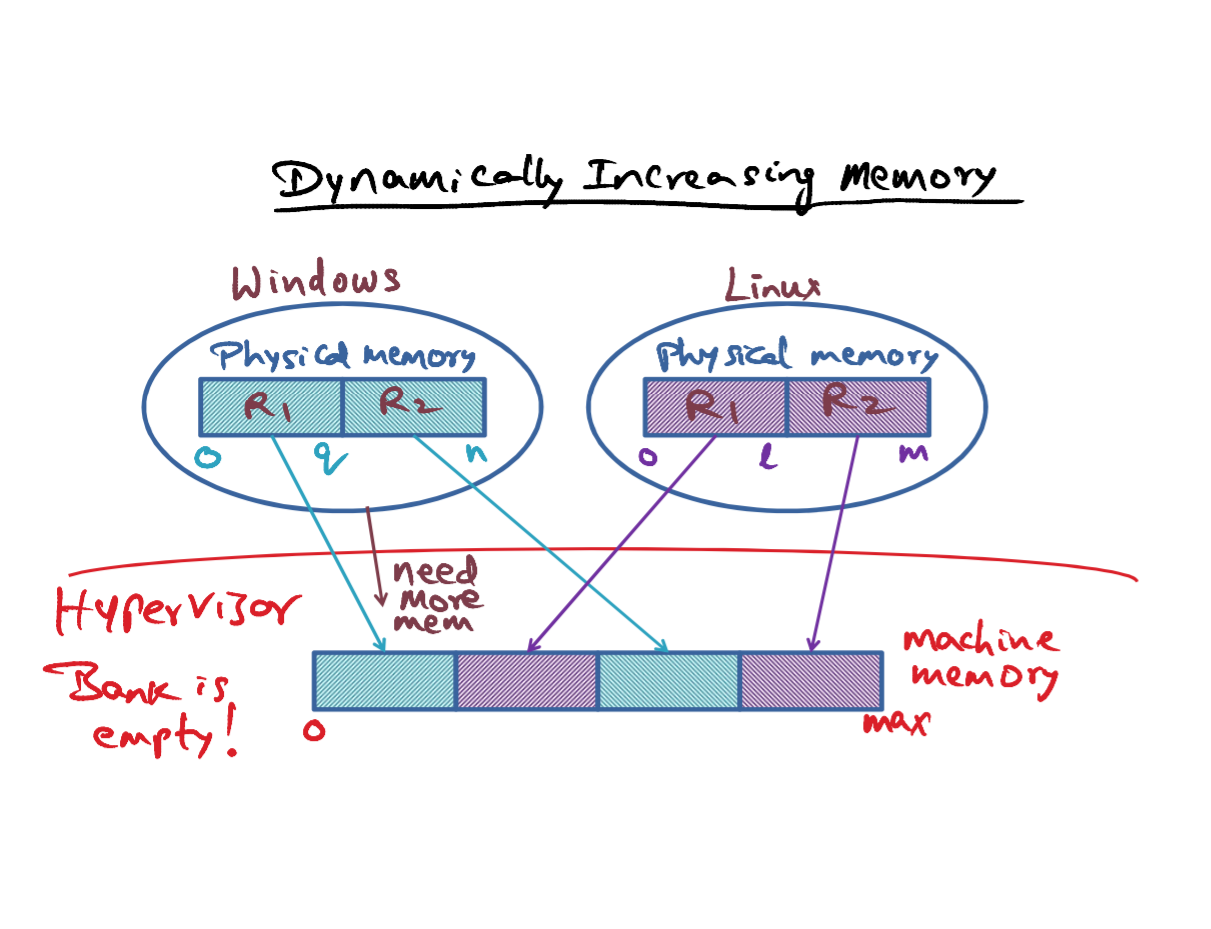
- The next thing we are going to talk about is how can we dynamically increase the amount of physical memory, that's available to a particular operating system running on top of the hypervisor? As I mentioned, memory requirements tend to be bursty, and therefore. The hypervisor has to be able to allocate real physical memory or machine memory on demand to the requesting guest operating systems on top of it. Let's look at this picture here. Let's assume that this is the total amount of machine memory that's available to the hypervisor. And the hypervisor has divvied up the available machine memory among these two operating systems. So the house, meaning the hypervisor, has no spare memory at all. It is completely divided up and given to these two guys.
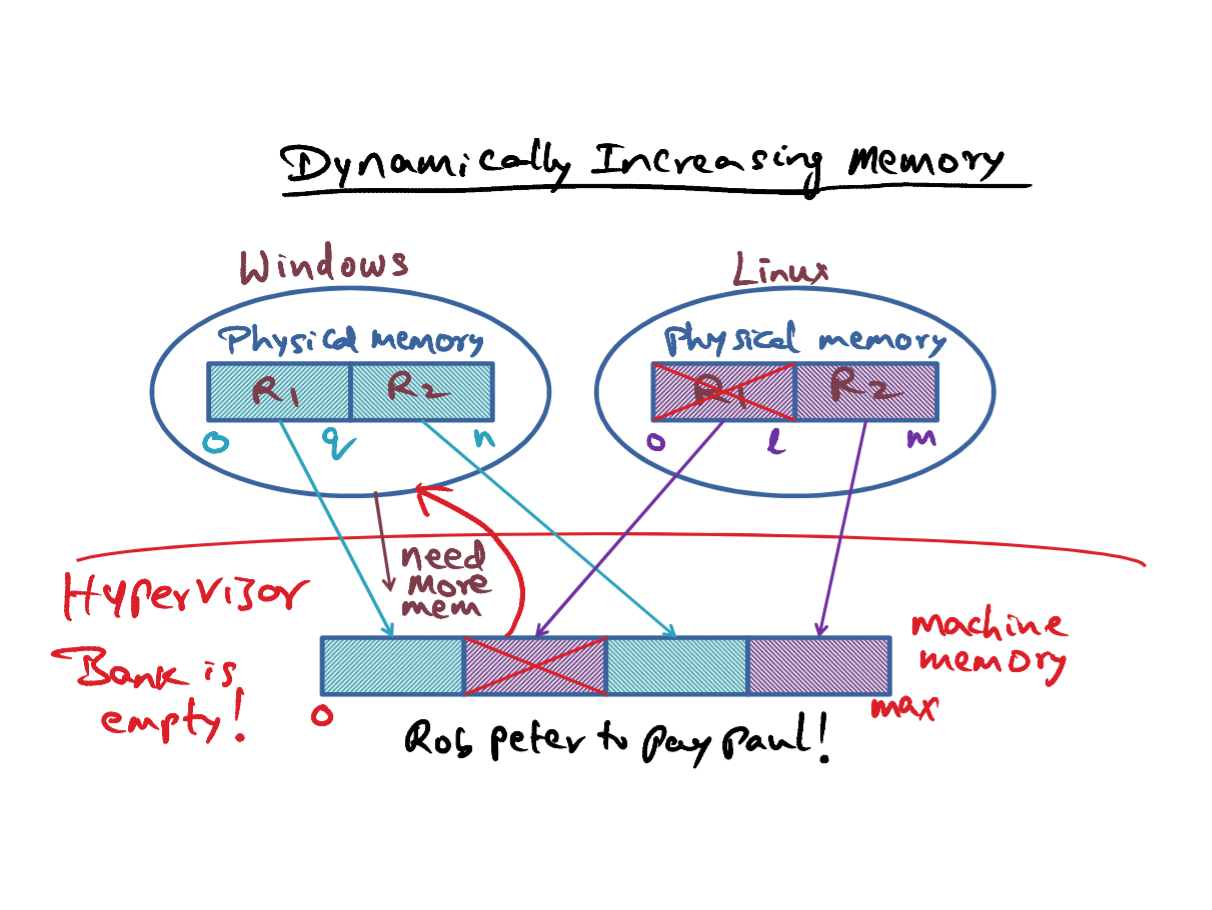
- What if the windows operating system experiences a burst in memory usage, and therefore it is requiring more memory from the hypervizor. It may happen because of some resource hungry application that had been started up in windows, maybe a video streaming application, that is gobbling up a lot of physical memory, and therefore windows needs more memory and comes to the hypervizor asking for additional hardware resources. But unfortunately, the bank is empty. What the hypervisor could do is recognize that "maybe this operating system (Linux) doesn't need all of the physical resources I allocated it. So I'm going to grab back, a portion of the physical memory that Linux has. And once I get back this portion of physical memory that I previously allocated to Linux, I can then give it to Windows to satisfy its sudden hunger for more memory". Well, this principle of robbing Peter to pay Paul can lead to unexpected and anomalous behavior of applications running on the guest operating system.
- A standard approach would be to coach one of the guest operating system, in this case perhaps Linux, to give up some of its physical memory voluntarily to satsify the needs of a peer that is currently experiencing memory pressure.
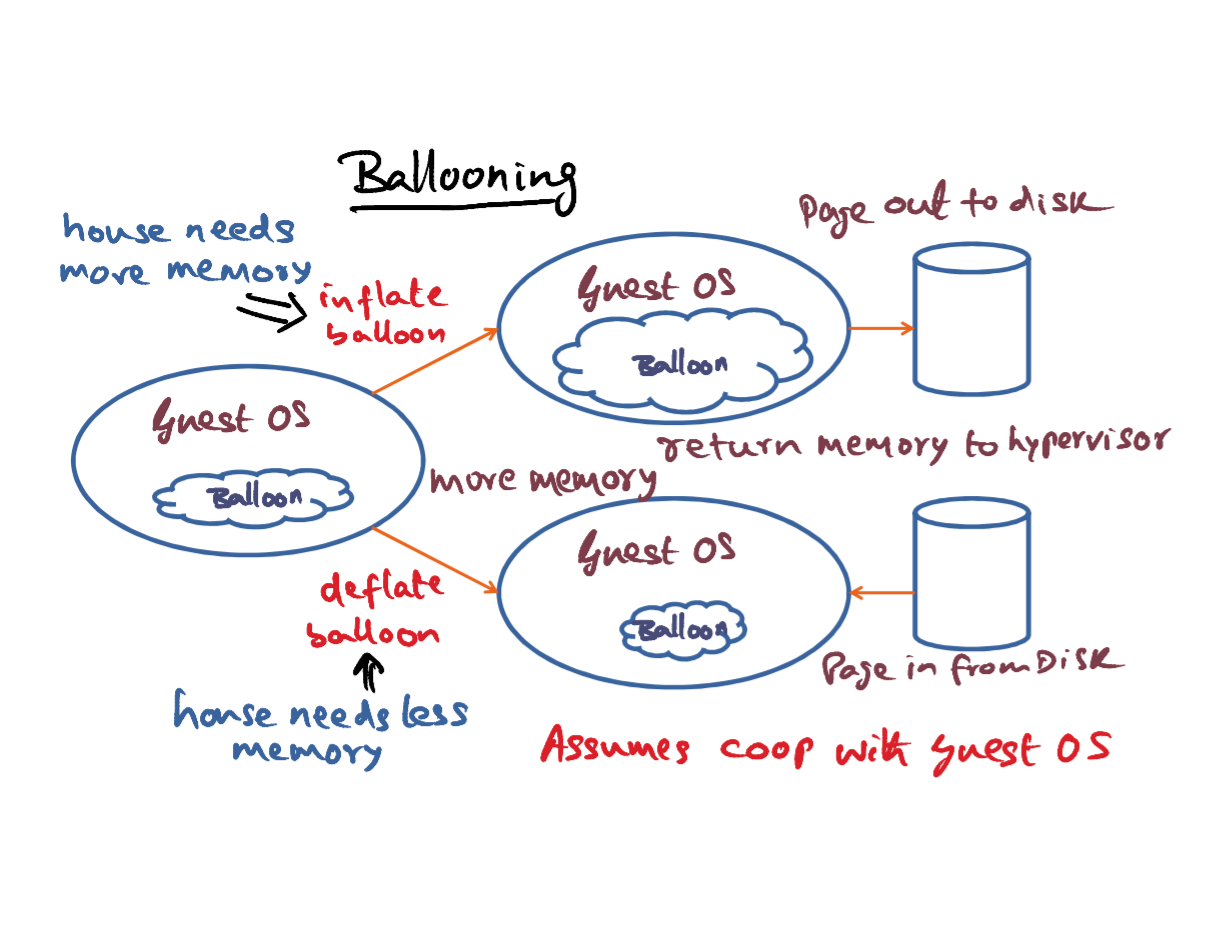
- That's the idea behind a technique that I'm going to describe to you called ballooning. The idea is to have a special device driver installed in every guest operating system. So even if it is a fully virtualized setting, since device drivers can be installed on the fly with the cooperation of the guest operating system. The hypervisor can install the device driver which is called a balloon in the operating system. And this balloon device driver is the key for managing memory pressures that maybe experienced by a virtual machine or a desktop operating system in a virtualized setting.
- Let's say that the house needs more memory suddenly. And this may be a result of another guest operating system, saying that it needs more memory. So what the hypervisor would do, is it'll contact one of the guest operating system that currently is not actively using all of its memory, let's say. And talk to this balloon driver that it has installed through a private channel that exists between the hypervisor and the balloon driver. So this is something that only the hypervisor knows about because this is a special device driver that the hypervisor has installed. It knows how to get to this device driver and tell it to do something. And in this case, what the hypervisor is going to do is tell this balloon device driver to inflate. What that means is that this balloon device driver is going to make requests to the guest operating system saying "I need more memory. I need more memory, I need more memory". And the guest operating system will of course, give this balloon driver the memory that it is requesting. And since the amount of physical memory that's available to the guest operating system is finite. If one process, in this case, the balloon driver, is making requests from the guest saying give me more memory. Guest has to necessarily make room for that by paging out to the disk unwanted pages from the total memory footprint of all the processes that are currently running in this guest operating system. And once it is done the swapping out of pages, and perhaps even entire processes out onto the disc. That's the way it can make room for the request that is coming from this balloon driver. Now, once the balloon driver has gotten all this extra memory out of this guest operating system. It can return those physical memories. The real physical memory, or the machine memory, back to the hypervisor. So we started with this house needing more machine memory. And the way the house got that more machine memory is by contacting its balloon driver installed in one of the guest operating systems that is not actively using all of its resources, asking the balloon to inflate and inflating the balloon is essentially meaning that we are acquiring more memory from the guest operating system. So, you can see visually that the footprint of the balloon goes up because of the inflation. That means, it's got a bigger memory footprint. And all of this memory footprint has extra resources that it can simply return to the hypervisor. It's not going to use it. It just wants to get it so that it can return it to the hypervisor. So that's this path here.
- So the opposite of what I've just described is a situation where the house needs less memory. Or, in other words, it has more memory to give away to guest operating system. So maybe it is this guest that requested more memory in the first place, And in that case, it wants the guest to get to the memory that it wanted. And the way it can do that is as follows. Once again the hypovisor through it's private channel will contact the balloon driver and tell the balloon driver to deflate the balloon. By deflate what is being instructed to the balloon driver is to contract its memory footprint. So, if it contracts its memory footprint by deflating, it is actually releasing memory into the guest operations. So, available physical memory in the guest operating system is going to increase, because of the fact that the balloon is deflating and giving out the memory that is currently sitting on. So now the guest operating system has more memory to play with. That's the effect of the balloon deflating is that the guest operating system has more memory. Which means that it can page in from the disk, the working set of processes that are executing on this guest operating system. So that those processes can have more memory resources than they've been able to because of the balloon occupying a lot of the memory.
- So this technique of ballooning assumes cooperation with the guest operating system. So that based on the need of the hour the hypervisor can work with the guest operating system implicitly without the guest really knowing about it, because it is all happening through the balloon driver that has been installed. By the hypervisor in each of the guest operating systems. And this technique of ballooning is applicable to both fully virtualized and para-virtualized environments to ease the over commitment of memory by the hypervisor to the guests. I mean, it's sort like airline reservations. You always notice that in airline reservation, the airlines tend to sell more seats than what they have with the hope that someone is not going to show up. That's the same sort of thing that is being done here that there is a finite amount of physical resources available with the hypervisor. And it is doling it out to all the guest operating systems. And what it wants to do is, it wants to be able to reacquire some of those resources to satisfy the needs of another guest operating system that is experiencing a memory pressure at any point of time.
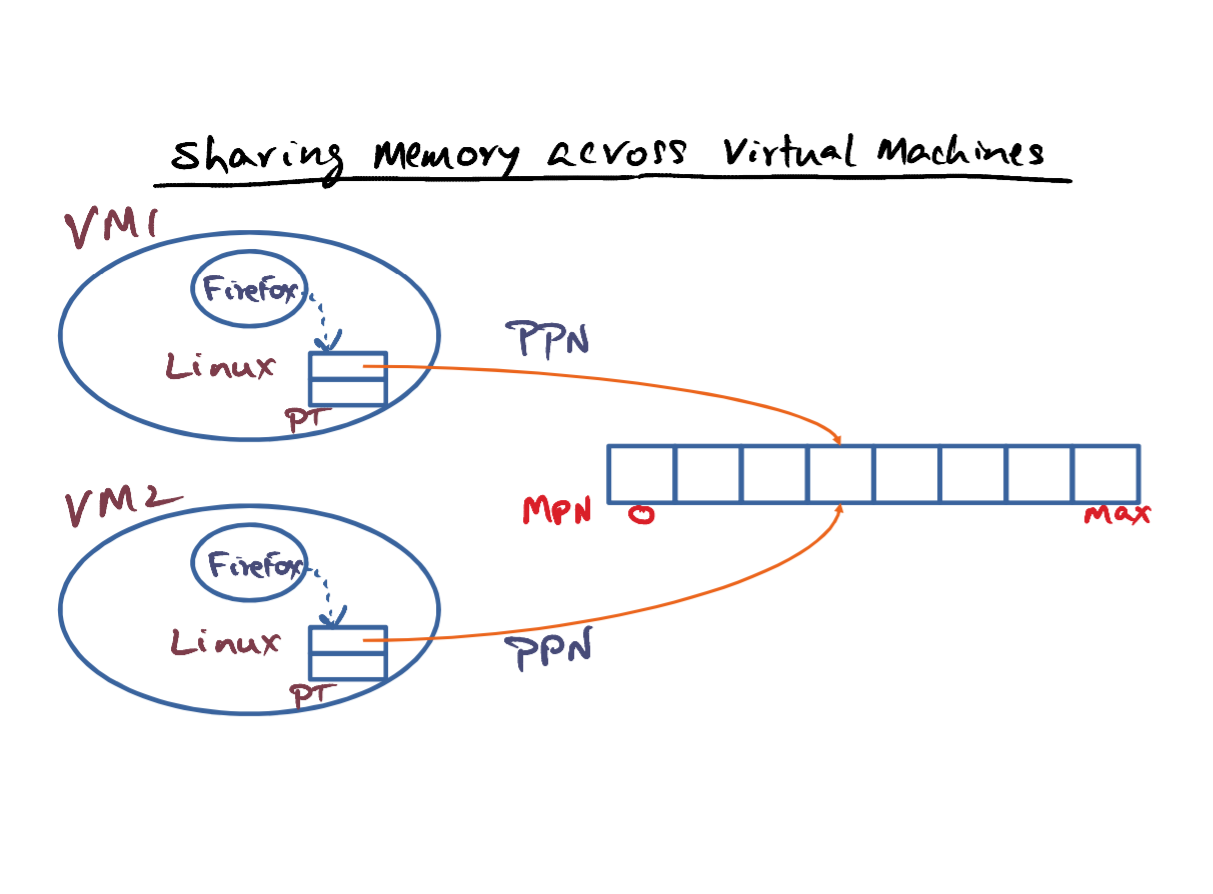
- Memory is a precious resource. You don't want to waste it. You want protection for the virtual machines from one another. But at the same time if there's an opportunity to share memory so that the available physical resource can be maximally utilized you want to be able to do that. So the question is can we share memory across virtual machines without affecting the integrity of these machines? Because protection is important, but without affecting the protection, can we actually enhance the utility of the available physical memory in the hyperviser? And the answer is yes.
- You may have one instance of Linux contained in a virtual machine, maybe hosted by me. And maybe you have the same Linux hosted in another virtual machine, virtual machine number two. And in both of our virtual machines, the memory footprint of the operating system is exactly the same. And even the applications that run on it are going to be exactly the same, in terms of the contents. Because of the same operating system, it is just that we have two different instances. And let's say that we have Firefox running on this VM, and similarly this Firefox running on this VM. This copy of Linux is going to have a page table, unique for this particular Firefox instance. Similarly, this instance of Linux is going to have a piece-table deal structure unique for this instance of Firefox and if all things are equal, in terms of versions and so on, then a particular virtual page of, the Firefox instance running here and the Firefox instance running here is going to have the same content, whether we are talking about this VM or this VM. And so there is an opportunity to make both of those page table entires to point to the same machine page. If we can do that, then we are avoiding duplication. We're not comprimising safety, but we're avoiding duplication. This is particularly true for the core pages. The core pages are immutable. So, the core pages for this Firefox instance and this Firefox instance could actually share the same page in physical memory. And if it does that you're using the resources taht much more effectively in a virtualized setting.
- One way of doing the sharing is by a cooperation between the virtual machines and the hypervisor. In other words the guest OS has hooks that allows the hypervisor to mark pages, copy on write, and have the PPNs point to exactly the same machine page. And this way if a page is going to be written into by the operating system, it'll result in a fault and we can make a copy of the page that is currently being shared across two different virtual machines. That is one way of doing it. That is, with the cooperation between the hypervisor, and the virtual machines. So that we can, with their connivance, share machine pages across virtual machines, but mark the entries in the individual page tables as copy on write, meaning that, so long as they reach here, perfectly fine. The minute any one of these guys wants to write into a particular page, at that point, you make a copy of it and make these two instances point to different machine pages, so that is one way of doing it.
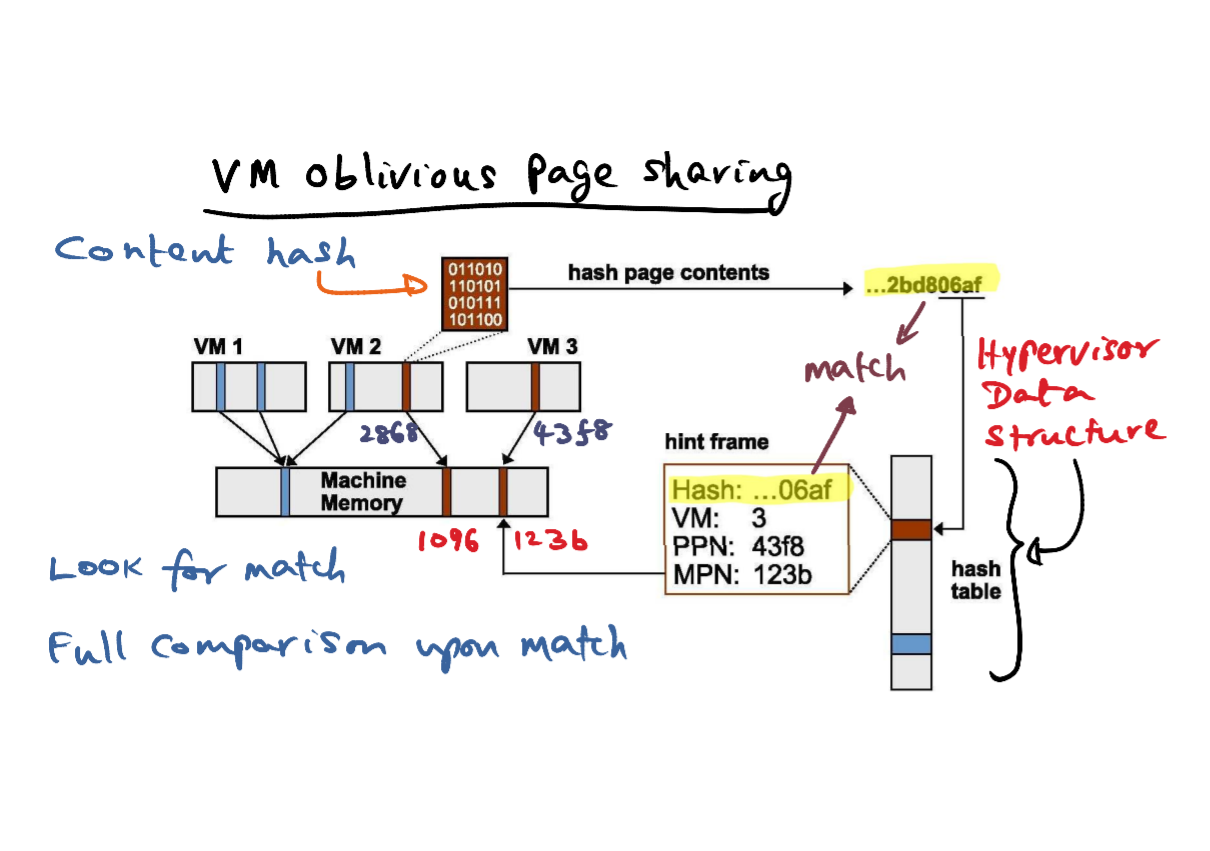
- An alternative is to achieve the same effect, but completely oblivious to the guest operating system, and this is used in VMware ESX server. The idea is to use content-based sharing. And in order to support that, VMware has a data structure which is a hash table kept in the hypervisor. And this hash table data structure contains a content hash of the machine pages. So, for instance, this entry is saying that. For virtual machine number three. For it's physical page which is at this address 43f8 there is a machine page that hosts this physical page number of VM3 and that's contained in machine page number 123b and the content hash that is if you hash the contents of this memory page, you get a signature. That signature is the content hash. That content hash is stored in this data structure. Now let's see how this data structure is used for doing VM-oblivious page sharing in the ESX Server. We want to know if there is some page in VM2 which is content wise the same as this page contained in VM3. In particular we want to know if this physical page number; PPN 2868 of VM 2, which is mapped to this machine page,1096 is content-wise the same as this guy. So how do we find that out? What we do is we take the contents of this machine page 1096. Create a content hash. So that's the content hash that you're going to generate, a particular algorithm that the hypervisor is going to run to create a content hash. So we create a content hash for this page 1096, that corresponds to PPN 2868 of VM 2. Now we take this content hash and look through hypervisor's data structure to see if there is a match between this content hash that I created for this page and any page currently in the machine memory. Well we have a match. We have a match between the content hash for this page and the content hash of the page comtained in VM 3, 43f8, which is mapped to MPN 123b. So now we've got this match, can we know that this page and this page are exactly the same? Well, we cannot. It's only a hint at this point that this pages content hash is the same as this because this content hash for 123b was taken at some point of time. And we created this data structure to represent this as a hint frame, which has a particular content hash. Now, VM3 could have been using this page actively and modified it, and if it has modified it, then this content hash that we have in this data structure may no longer be valid. And therefore, even though we've got a match, it's only a hint, not an absolute. It's only a hint. So once we have a match, then we want to do a full comparison between these two guys. Make sure that these two guys are exactly the same, full comparison upon match.
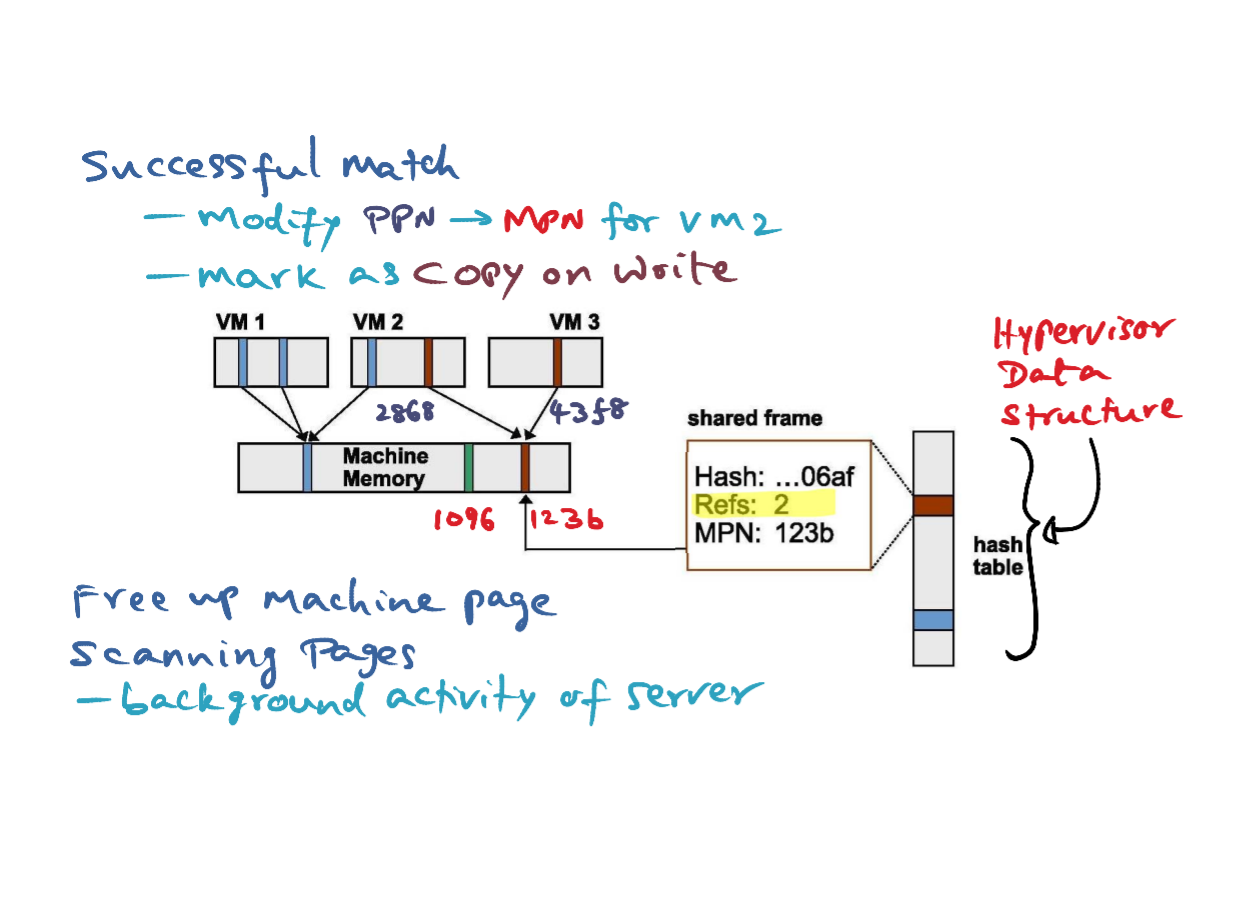
- If the content hash of 1096 and 123b are exactly the same, then we can modify the PPN to MPN mapping in VM2 for the page 2868, which used to point to 1096, we can now make it, point to 123b because they both are exactly the same content. And once we have done that, then we increment the reference count to this hash table entry to 2, indicating that there are 2 different virtual machines that map to the same machine page 123b. And we're also going to remember that these two mappings between PPN 2868 to 123b, 43f8 to 123b are copy on write entries, indicating that they can share this page, so long as these 2 virtual machines are reading it. But if any one of them tries to write it, at that point for the integrity of the system, you have to make a copy of this page and change the mappings for those PPNs to go to different MPNs, that's the reason that we want to do this copy on write. And now, we can free-up page number 1096. So there is one more page frame that's available for the house, in terms of allocation. because all of these things that I mentioned just now are fairly labor-intensive operations. So you don't want to do this when there is active usage of the system. So, scanning the pages, that is, going through all of a virtual machine's pages to see if pages that are contained in a virtual machine may already be present in the machine memory reflecting the contents of some of the virtual machine. That kind of scanning you want to do it as a background activity of the server when it is lightly loaded. Looking for such matches and mapping the virtual machines to share the same machine page and freeing up machine memory for allocation by the hypervisor.
- And the important thing that you have to notice is that, as opposed to the earlier mechanism that I mentioned where I said that with the coalignment of the guest operating system, the hypervisor can get into the page table data structures inside the guest operating systems. No such thing here. It is completely done oblivious to the guest operating systems and therefore, there is no change that needs to be made to the guest operating systems. In order to do the sharing in an oblivious way. And this technique is applicable to both fully virtualized as well as the para virtualized environments. Because basically, all that we are saying is that, let's go through the memory contents of a virtual machine, and see if the memory contents of the virtual machine, any particular page frames can be shared with other virtual machines, and if so, let's do that. And free up some memory. That's the idea can be applied to both fully virtualized and para virtualized settings.
- Up to now, we talked about mechanisms for virtualizing the memory resource. In particular for dealing with dynamic memory pressure and sharing machine pages across VM's. A higher level issue is the policies we have to use for allocating and reclaiming memory from the domains to which we've allocated them in the first place. Ultimately, the goal of virtualization is maximizing the utilization of the resources. Memory is a precious resource.
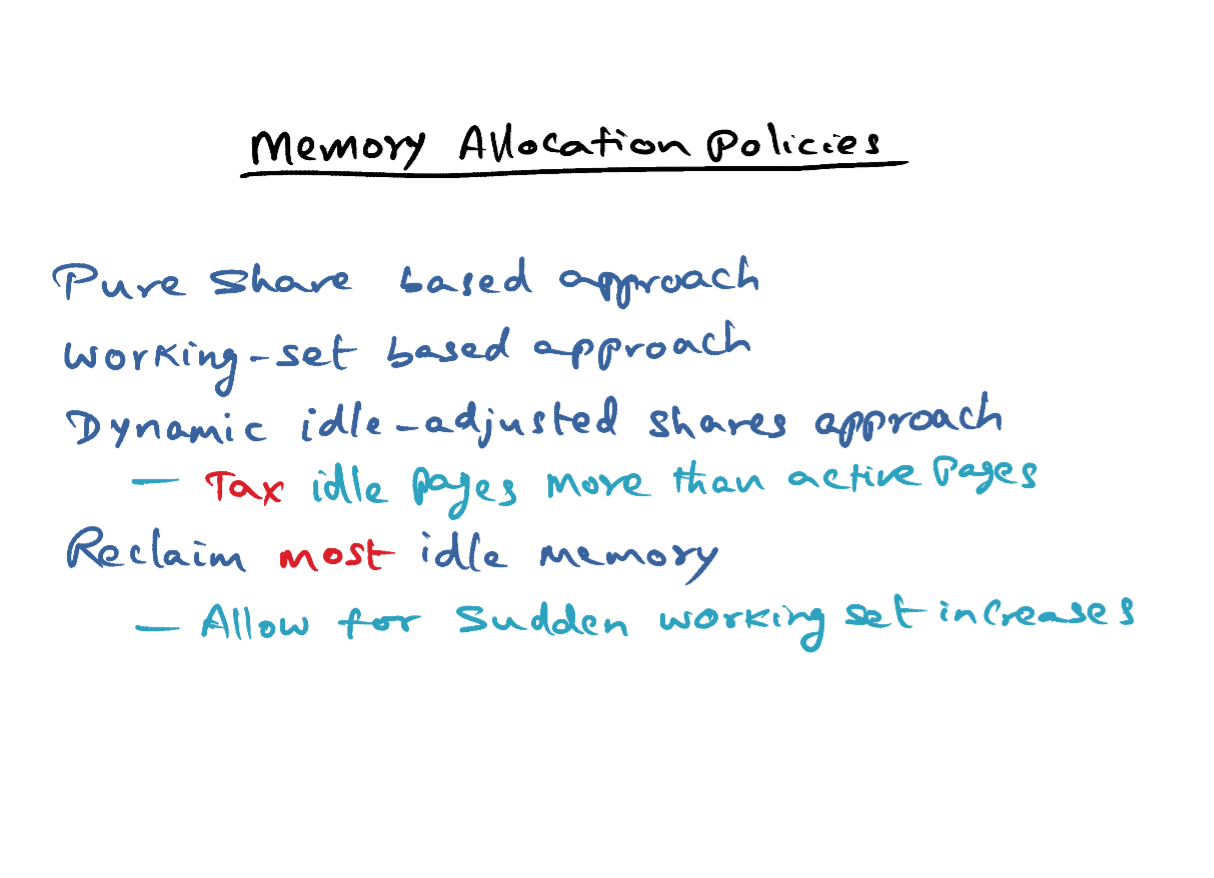
- Virtualized environments may use different policies for memory allocation.
- One can be a pure share based policy. The idea here is, you pay less, you get less. That's the idea. So if you have a service level agreement with the data center, then the data center gives you a certain amount of resources based on, the more of dollars you put on a table. So that is a pure share based approach. The problem with a share based approach, is of course the fact that it could lead to hoarding. If a virtual machine gets a bunch of resources and it's not really using it, it's just wasting it.
- Now, the desired behavior is if the working-set of a virtual machine goes up, you give it more memory. If it's working-set shrinks, get back the memory so that you can give it to somebody else. So working-set-based approach would be the saner approach.
- But at the same time, if I paid money, I need my resources. So, one thing that can be done is sort of put these two ideas together in implementing a dynamic idle-adjusted shares approach. In other words, you're going to tax the guys that are hoarders, so you tax the idle pages more than active pages. If I've given you a bunch of resources, if you're actively using it, more power to you. But if you're hoarding it, I'm going to tax you. I'm going to take away the resources that I gave you. And you may not even notice it because you're not using it anyway. So that's the idea in this dynamic idle-adjusted shares approach. And now what is this tax? Well, we could make the tax rate 0%, that is plutocracy, meaning you paid for it, you got it, you can sit on it, I'm not going to tax you, that's one approach. Or, I could make the tax 100%, meaning that if you've got some resources and you're not using it, I'm going to take all of it away. So that's the wealth redistribution. Sort of a socialistic policy, use it or lose it. And in other words, if you make the tax 100%, we are ignoring shares altogether. Now something in between is probably the best way to do it, so for instance if you use a tax rate of 50% or 75% saying if you have idle pages, then the tax rate is 50%, there's a 50% chance I'll take it away. And that's what is being done in the VMware ESX server today in terms of how to allocate memory to the domains that need it. You are going to use share based approach, but if you're not actively using it, we're going to take it away from you. And of course we'll give it back to you if you start using it, and that's the reason why you don't want to make the tax 100%, but have it somewhat smaller. So by having a tax rate that is not quite 100% but maybe 50% or 75%, we can reclaim most of the idle memory from the VM's that are not actively using it.
- But at the same time, since we're not taxing idle pages 100%, it allows for sudden working set increases that might be experienced by a particular domain. Suddenly, a domain starts needing more memory, at that point it may still have some reserves in terms of the idle pages that I did not take away from that particular domain. So the key point is that you don't want to tax at 100% because this allows for sudden working set increases that may be there, in a virtual machine that happens to be idle for some time, but suddenly work picks up.
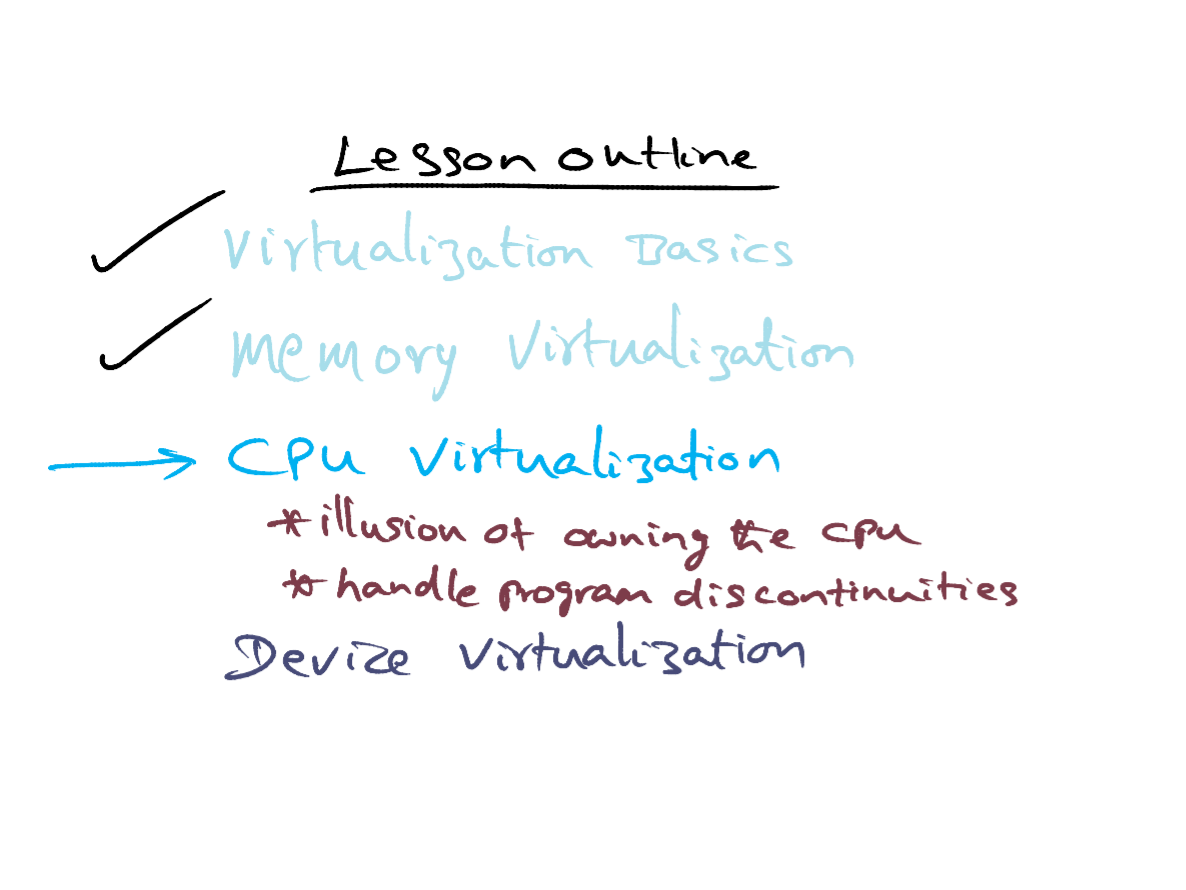
- As we said at the outset of this course module, virtualizing the memory subsystem in a safe and performance conscious manner is the key to the success of virtualization. What remains to be virtualized are the CPU and the devices. That's what we'll talk about next. Memory virtualization is sort of under the covers. When it comes to the CPU and the devices, the interference among the virtual machines living on top of the hypervisor becomes much more explicit. The challenge in virtualizing the CPU and the devices is giving the illusion to the guest operating systems living on top, that they own the resources. Protected and handed to them by the hypervisor, on a need basis.
- There are two parts to CPU virtualization, we want to give the illusion to each guest operating system, that it owns the CPU, that is; it does not even know the existence of other guests on top the same CPU If you think about it, this is not very far removed from the concerns of a time shared operating system, which has to give the illusion to each running process that that process is the only one running on the processor. The main difference in the virtual setting is that this illusion is being provided by the hypervisor at the granularity of an entire operating system. That's the first part. The second part is we want the hyperviser to field events arising due to the execution of a process that belongs to a parent guest operating system, in particular during the execution of a process on the processor. There are going to be discontinuities that occur. And those program discontinuities, have to be fielded by the hypoviser, and passed to right guest operating system.
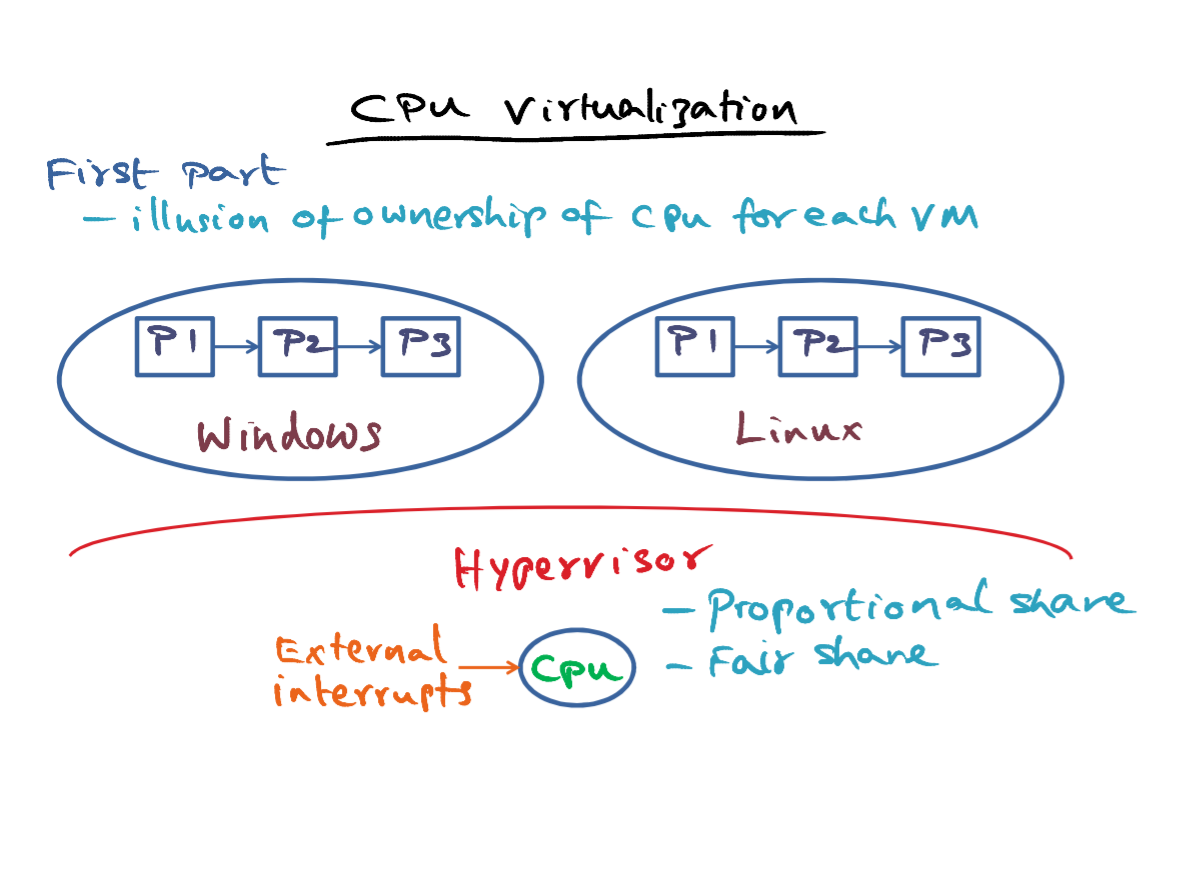
- To keep things simple, let's assume that there's a single CPU. Each guest operating system is already multiplexing the processes that it is currently hosting on the CPU in a non-virtualized setting also. So each operating system has a ready que of processes, that can be scheduled on the CPU, but there is this hypervisor that is sitting in between a guest operating system. It's already queued and the CPU.
- The first part of what the hypervisor has to do is to give an illusion of ownership of the CPU for each of the virtual machines, so that each virtual machine can schedule the processes that it currently has in it's very queue on the CPU. So, if you look at it from the hypervisor's point of view, it has to have a precise way of accounting the time that a particular VM uses on the CPU. From the point of view of billing the different customers, that is the key thing that hypervisor is worried about that it gave the CPU for a certain amount of time to this VM, certain amount of time to that VM and so on. Now for the time that has been allocated for instance this virtual machine. How this virtual machine is using the CPU time, what processes is scheduling on the CPU? The hypervisor doesn't care about that. So commensurate with borderware is a scheduling policy enforced in a particular guest operating system. That guest operating system is free to schedule its pool of processes on the CPU for the time that has been given to it by the hypervisor.
- Now, similar to the policy that we discussed for memory allocation. One straightforward way to share the CPU among the guest operating systems, is to give a share of the CPU. A proportional share of the CPU for each guest operating system, demonstrates with the service agreement, that this virtual machine has with the hypervisor. This is called a proportional share scheduler and it is used in the VMware ESX server.
- Another approach is to use a fair share scheduler,which is going to give a fair share of the CPU for each of the guest operating systems. An equal share to each of the guest operating systems running on top of the hypervisor. Most of these strategies, proportion, share scheduler, or a fair share scheduler are straightforward conceptual mechanisms. And you can learn more about them from the assigned readings for this course.
- In either of these cases, the hypervisor has to account for the time used on the CPU on behalf of a different guest during the allocated time for a particular guest. And this can happen for instance if there is an external interrupt that is feeded by the CPU that is intended for this VM while a process that belongs to this VM is going to be executing on the CPU. So this is accounting that the hypervisor would keep to make sure that. Any time that was stolen away from a particular VM in order to service an external interrupt that did not belong to this VM, it'll get rewarded for later on by the accounting procedure in the Hypervisor. We have discussed this issue already in the concept of operating system extensibility, specifically when we discussed the approach to extensibility. So, it's not new problem. It is just that this problem occurs in the hypervisor setting also.
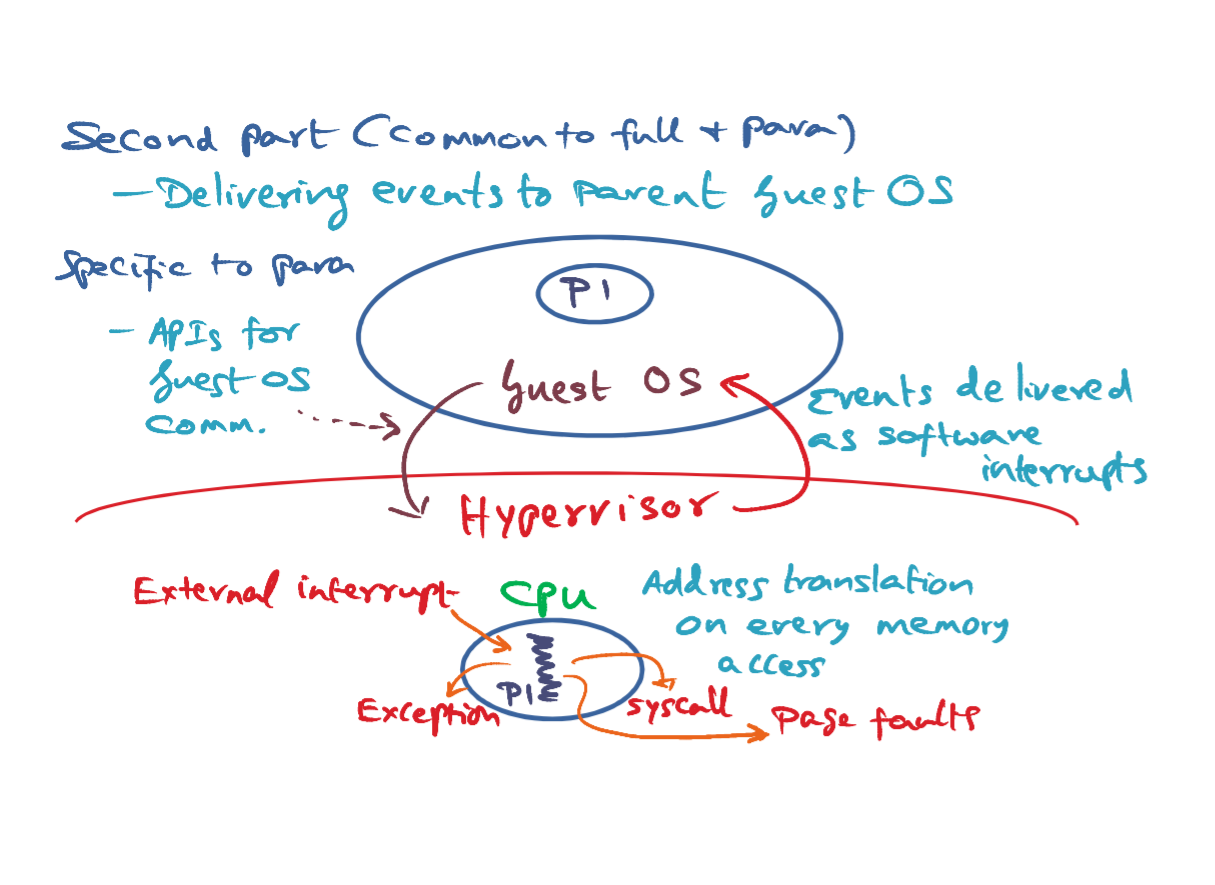
- The second part of CPU virtualization, which is common to both full and para-virtualized environments, is being able to deliver events to the parent guest operating system. And these events are events that are generated by a process that belongs to the guest operating system, currently executing On the CPU. Let's see what is happening to this process, when it is executing on the CPU. Once this process has been scheduled on the CPU, during its normal program execution, everything should be happening on hardware speed, what is that mean? Well. The process is going to generate virtual addresses that has to be translated to machine page addresses. And we talked at length about how the hypervisor can ensure that the virtual address translation to the machine page address can be done at hardware speeds by clever tricks in the hypervisor and or the guest operating system. In a fully virtualized environment, the hypervisor is responsible for ensuring that the virtual address gets translated directly to the machine address withuot the intervention of the guest operating system. And para-virtualized environment once again with cooperation between the guest and the hypervisor, we can ensure that the page table that is used for translating virtual address to physical addresses is something that had been installed. On behalf of the guest operating system, by the hypervisor so that the translation can happen at hardware speeds. And is the most crucial part of ensuring good performance for the currently executing, process in a virtualized environment. All address translations. I dealt with. That's why I kept harping on the fact that virtual memory, managing the virtual memory, is the thorny issue in a virtualized setting. So we know that this is in good hands, we know how to handle that. Let's look at other things that can happen to this process during the course of its execution. One thing that this process may do. Is execute a system call. For instance, it might want to open a file. And that's really a call into the guest operating system. That's something that this process may do. Another thing that can happen to this process is that it can incur a page fault. Not all of. The virtual address piece of the process is going to be in the machine memory. And therefore if some virtual page cannot be translated, then it's going to result in a page fault. Or the process may throw an exception. For instance, it might do something silly like divide by zero which can result in an exception And lastly, though no fault of this process, there could be an external interrupt when this process is executing. So these are the kind of discontinuities, these are called program discontinuities, that is, affecting the normal execution of this process. And the first three things that I mentioned, syscall, page fault, and exceptions, are due to this process in some shape or form. But the fourth one, the external interrupt is something that is happening asynchronously and unbeknownst to what this process intended to do while running on the processor. And all of these continuities have to be passed up, by the hypervisor to the guest operating system.
- So the common issue to both full and para virtualized environment, is that all such program disk continuities for the currently running process have to be passed up to the parent guest operating system by the hypervisor. Whether it is a para virtualized or a fully virtualized operating system. Nothing special needs to be done in the guest operating system for fielding these events from the hypervisor. because all of these events are going to be packaged as software interrupts by the hypervisor and delivered to the guest operating system. Any operating system knows how to handle interrupts. So all the hypervisor has to do is to package these events as software interrupts, and pass it up to the guest operating system. There are some quirks of the architecture that may get in the way and the hypervisor may have to deal with that. Recall that syscalls and page faults and exceptions. Or all things that need to be handled by the guest operating system. So it probably has entry points in it, for leading with all these kinds of program list continuities. Now some of the things that the guest operating system may have to do to deal with these. Program discontinuities may require the guest operating system to have privileged access to the CPU. That is, certain instructions of the processor can only be executed in the kernel mode, or the privileged mode. But recall that the guest operating system itself is not running in the privileged mode. It is above the red line, which means it has no more privilege than a normal user-level process. This is a problem, especially in a fully virtualized environment. Because the fully virtualized environment, the guest operating system has no knowledge that it does not have the privileges. So when it tries to execute some instruction, that can be executed only in publish mode, the expectation is that. It'll trap, get in the hypervisor, and the hypervisor will then do the work that the fully virtualized guest operating system was intending to do. But here is where the quirks of the architecture come into play. Because unfortunately, some privileged instructions fail silently in some architectures when they're executed at the user level. And this is a problem for the fully virtualized environment where the binary is unchanged. In the para virtualized environment, because we know that the para virtualized guest is not running on bare metal, we know that it does not have the same privilege as the hypervisor. And therefore, we can collaboratively make sure that anything that the guest has to do in privileged mode. It can take the help of the hypervisor to do it. But in a fully virtualized setting, the guest has no knowledge. So the only mechanism that will save the day, is if the guest tries to execute a privileged instruction, it'll trap into the hypervisor, and the hypervisor can do the necessary thing.
- However, because some instructions when executed at the user level. Even though they are privileged instructions. They don't trap, but fail silently and that can be a problem. This happens in older versions of Access Architecture for privilege instructions, executed in user mode. Therefore, the hypervisor has to be intimately aware of the quirks of the hardware, and ensure that there is workaround such quirks. Specifically, in a fully virtualized setting, the hypervisor has to look at the unchanged binary of the operating system, and look for Places where these quarks may surface and do binary rewriting in order to catch those instructions when and if they're executed on the CPU. Having said that, I should mention that. Newer versions of Intel's architecture and AMD architecture for the x86 constructions have included virtualization support so that these kinds of problems don't occur.
- As a result of servicing the events that are delivered with a hypervisor, the guest may have to do certain things. Which may result in communication back to the hypervisor. In the case of a Fully Virtualized environment, communication from the guest to the hypervisor is always implicit via traps. For example, as a result of page fault servicing, the guest may try to install a new entry into the page table. When it tries to do that, that's a trap that will come in to the hypervisor and the hypervisor will take the appropriate action. In a Para Virtualized environment the communication from the guest to the hypervisor is explicit, so that API's that the hypervisor supports for the guest OS to communicate back to the hypervisor. What maybe reasons for that? Well. We talked about memory management done by the guest operating system in para virtualized environment such as Xen where the guest operating system may have to tell the hypervisor, here is a page table entry. Please install it in the page table for me. So that is the kind of communication that may have to come back from the guest operating system down to the hypevisor.
- That completes discussion of issues that the hypervisor has to deal with for virtualizing the CPU. The next issue is virtualizing devices. Here again, we want to give the illusion to the guest that they own the I/O devices.
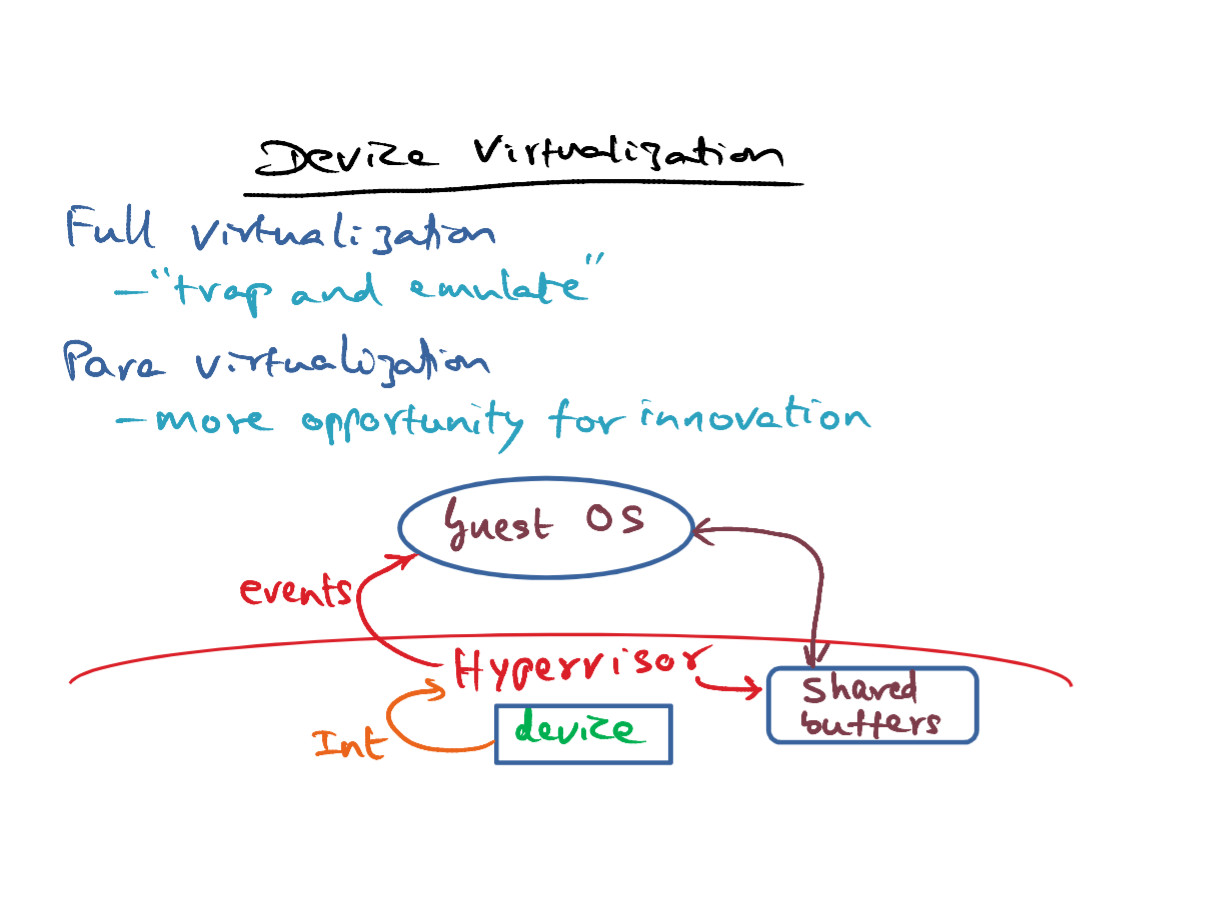
- In the case of full virtualization, the operating system thinks that it owns all the devices already. And the way devices are virtualized is the familiar trap and emulate technique. That is for the devices that the operating system thinks it owns when it tries to make any access to those devices, it's going to result in a trap into the hyperviser, and the hyperviser will emulate the functionality that the Operating System intends for that particular device. In this sense, there is not much scope for innovation in the way devices are virtualized in a fully virtualized environment. A lots of details of course, that the hyperviser has to worry about, once the guest traps into the hypervisor to ensure the legality of the I/O operation and also whether the guest is allowed to make those I/O operations and so on, but nothing fundamental conceptually is there in terms of device virtualization in a fully virtualized environment.
- Para virtualized setting is much more interesting. The IO devices seen by the guest operating system are exactly the ones that are available to the hypervisor. That is, the set of hardware devices That are available in the platform are exactly the one that the para virtualized guest operating system is going to be able to manipulate. This gives an opportunity for innovating the interaction between the guest operating system and the hypervisor, in particular ways in which we can make Device virtualization more efficient when we have this para virtualized environment. So for one thing, it is possible for the hypervisor to come up with clean and simple device abstractions that can be used by the para virtualized operating system. Further, through APIs, it becomes possible For the hypervisor to expose shared buffers to the guest operating system. So that efficiently data can be passed between the guest operating system and the hypervisor and to the devices without incurring the overhead of copying multiple times data from one address space into another. And similarly, there can be innovations in the way event delivery happens between the hypervisor and the guest operating system. So, in order to do device virtualization, we have to worry about two things. One is how to transfer control back and forth between the hypervisor and the guest. Because devices being hardware entities, they need manipulation by the hypervisor in a privileged state. And there is a data transfer that needs to be done because the hypervisor is in a different protection domain compared to the guest operating system. So these are two things that one has to worry about in device virtualization and we'll see how both control transfer and data transfer at accomplished in both the fully virtualized and the para virtualized settings.
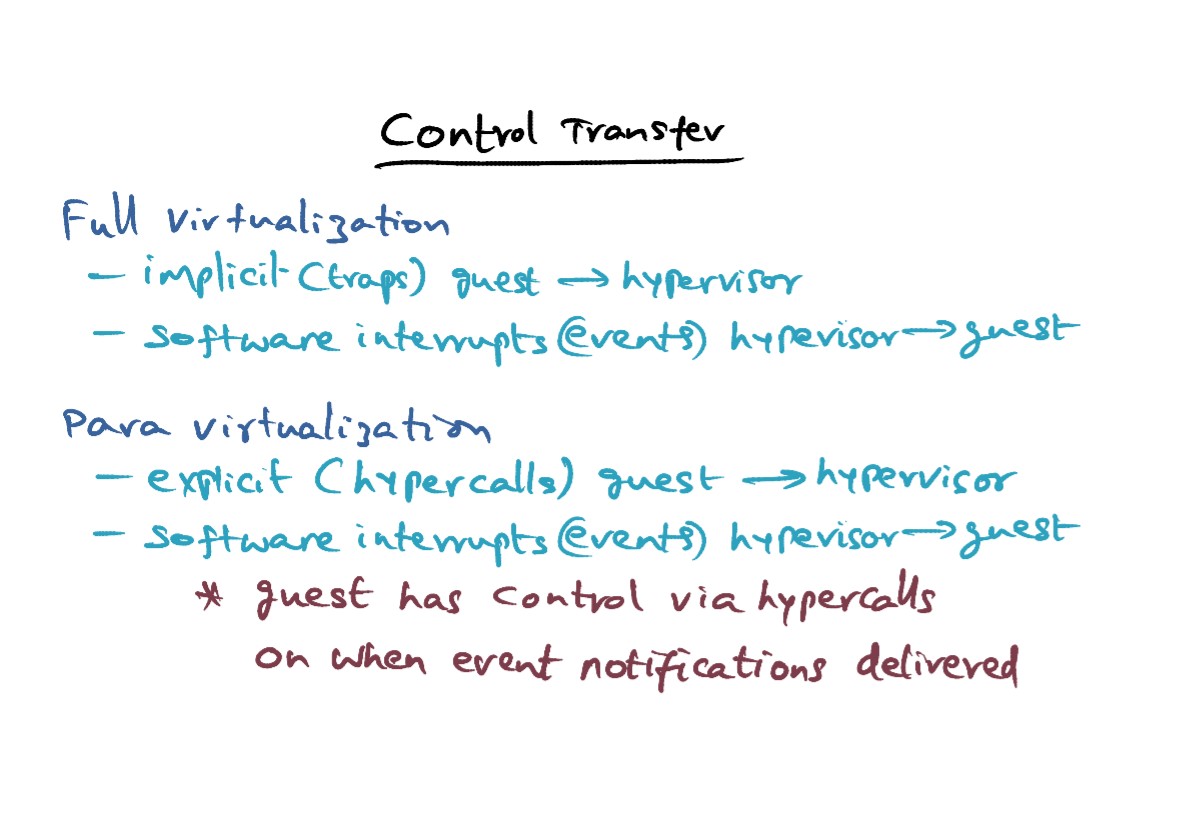
- So control transfer in a fully virtualized setting happens implicitly from the guest to the hypervisor. How? When the guest operating system executes any privileged instruction. Because it thinks it can do it, it'll result in a trap and hypervisor will catch it. And then do the appropriate thing. That's how control is transferred from the guest to the hypervisor implicitly. And in the other direction, control transfer happens as we already mentioned, via software interrupts or events, from the hypervisor to the guest.
- In a para virtualized setting, the control transfer happens explicitly via hypercalls from the guest into the hypervisor. I gave the you the example of page table updates that the guest operating system may want to communicate to the hypervisor through the API calls. When it executes the API call corresponding to that, that results in control transfer from the guest into the hypervisor. And similar to the full virtualization case In para virtualization, in the other direction, that is, going from the hypervisor to the guest, it is done through software interrupts. So that's how control transfer is handled in both the fully virtualized and paravirtualized environments.
- The additional facility that you have in a para virtualized environment is the fact that the guest has control via hypercalls on when event notifications need to be delivered. In the case of full virtualization, since the operating system is unaware of the existence of the hypervisor, events are going to be delivered as and when they occur by the hypervisor to the guest. But in a para virtualization. The guest, via hypercalls, can indicate to the hypervisor that "leave me alone don't send me any event notifications now" or it can say "now is a good time to send me event notifications". So that level of control exists in a para virtualized environment, which doesn't exist in a full virtualized environment. So this is sort of similar to an operating system disabling interrupts. That's exactly the same facility that's available in a para virtualized environment at the granularity of the operating system. The operating system can say that "I don't want any event notifications. I'll come ask you when I need some event notifications".
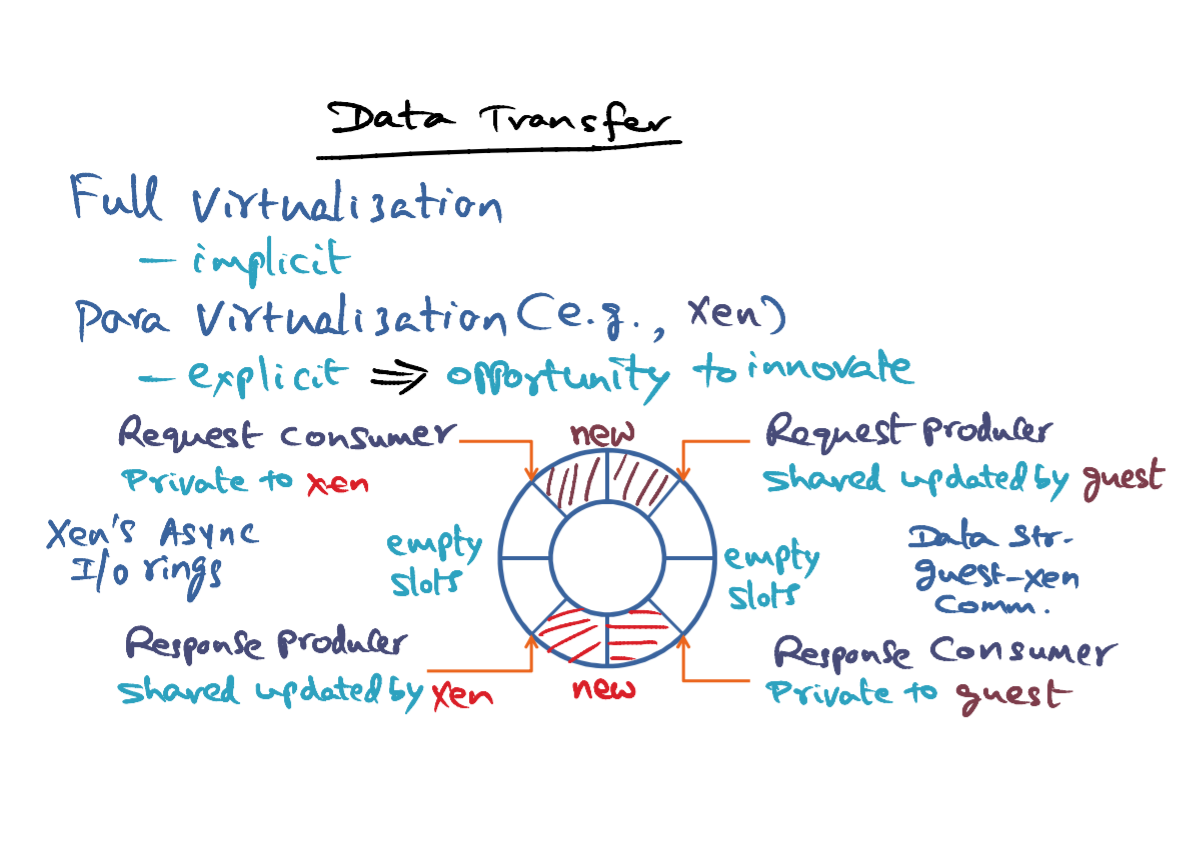
- How about data transfer? Well once again, when you think about full virtualization, data transfer is implicit. Any data movement that has to happen between the hypervisor and the fully virtualized outputting system happens implicitly. In a para virtualized setting, for example in Xen, there's an opportunity again, to innovate because you can be explicit about the data movement from the guest operating system into the hypervisor, and vice-versa.
- There are two aspects to resource management and accountability when it comes to data transfer. The first is the CPU time. So when an interrupt comes in, for instance, from a device, the hypervisor has to demultiplex the data that is coming from the device to the domains very quickly upon an interrupt. And that is CPU time involved in making such copies. And the hypervisor has to account for the computation time from managing the buffers on behalf of the virtualized operating system above it. The CPU time accountability is crucial from the point of your billing and data centers, and therefore hypervisors pay a lot of attention to how CPU time is accounted for and charged to the appropriate virtual machines. The second aspect of a data transfer is how the memory buffers are managed. There is a space issue. The first is a time issue - CPU time issue. The second is a space issue. Meaning, how are the memory buffers allocated? And how are they managed, either by the guest operating system or by the hypervisor? As I said in the context, full virtualization is available to scope for innovation. But in the context of Para Virtualization, there's a lot of scope for innovation in the way memory buffers are handled between the guest operating system and the hypervisor.
- Specifically, looking at Xen as an instance of para virtualization. Let's look at the opportunities for innovation in the guest OS to Xen communication. Xen provides asynchronous I/O rings, which is basically a data structure that is shared between the guest and the Xen for communication. Any number of these data structures, that is any number of these I/O rings can be allocated for handling all the device I/O needs of a particular guest domain. The I/O ring itself is just a set of descriptors. What you see here, they're all descriptors that are available in this data structure. And it's a ring data structure, that's why it's called I/O ring. And we'll talk about how it is used in a minute. The idea is, requests from the guest can be placed in this I/O ring by populating these descriptors. Every descriptor is a unique I/O request coming from the guest operating system. So every request is going to have a unique ID associated with that particular request coming from the guest operating system. And recall, what I said earlier that is the I/O ring is specific to a guest. So every guest can declare a set of I/O rings as data structures for its communication with Xen. Now, in responding to the request from the guest, Xen after it completes processing the request, it'll place a response back in the same I/O ring in one of these descriptors, and that this pointer's going to have the same unique ID that was used to communicate the request in the first place. So, it's sort of a symmetric relationship between the guest and Xen, in terms of request and response for things that the guest wants Xen to get done on its behalf. And for Xen to communicate back to the guest that has completed what was requested of them.
- So the guest is the producer of requests. So it has a pointer into this data structure that says, where it has to place the next request. So, this is a pointer that is manipulated, meaning modified by the guest, but it is readable by Xen. So there's only one guy that can modify, that is a guest. But Xen can look at this pointer. It's a shared pointer in that sense. For example, the guest operating system may have placed new requests, and that's why it has moved its pointer to here, indicating that it has placed new requests. This is the next empty spot, where it can place new requests, after these two requests.
- The consumer for the request produced by the guest operating system is Xen. And it is processing requests in the order in which they've been produced by the guest operating system. And therefore, it has the pointer into this I/O ring data structure, saying where exactly it is presently servicing requests from this guest operating system. So right now, the pointer is pointing here indicating that Xen is yet to process these two requests that have been queued by the producer meaning the guest operating system into this I/O ring data structure. So this pointer that the request consumer has is private to Xen. It is just telling Xen, where it is in processing requests from the producer. And the difference between these two pointers is telling how many requests are outstanding so far as Xen is concerned in terms of processing. Request emanating from the guest.
- Similar to request production, Xen is going to be the guy that is offering responses back to the guest operating system. So Xen is the response producer. So it's going to have a pointer, where it can place new responses. So once again, this pointer is a shared pointer updated by Xen but can be read by the guest. So these are two new responses that Xen has placed in the I/O Ring in response to the request that it has already been processed, but these responses have not yet been picked up by the request producer. The guest operating system has a pointer that says where it is in this I/O ring data structure, in terms of picking up the responses coming from Xen. Xen has produced these two new responses as a result of processing some prior requests from the guest operating system, but the guest operating system is yet to process this request. So this pointer is private to the guest operating system that is telling it, where it is in processing responses coming back from Xen. The difference between this pointer and this pointer is the number of Responses that are yet to be picked up by the guest operating system. Just to recap, the difference between these two pointers (on the top of the chart) is the number of requests that are yet to be processed by Xen. And the difference between these two pointers (bottom in the chart) is the number of responses that are yet to be picked up by the guest. And these slots are the empty slots, into which new requests can be placed by the request producers. The request producer moves like this. And the response, taker moves like this. And, the response producer moves like this. And the request consumer moves like this. And these are the empty slots into which Xen can place additional responses as it processes more requests from the guest operating system.
- That's the idea behind this higher ring data structure. Very powerful extraction that allows the guest to place requests asynchronously, and for Xen to place responses asynchronously into the data structure. As I mentioned already, the guests can identify the request for which a particular response is intended, because the id is associated with the response is going to be the same as the ID that was associated with the request in the first place. The other thing that, we should remember is that these are just descriptors of the requests and responses. Any data that has to be passed from the guest to Xen will just be a pointer from these descriptors to a machine page that the guest owns, so that Xen can pick up the data directly from that machine page without any copy. Similarly, if the responses given by Xen are going to have data associated with them, that will again be a pointer from the descriptive data structure to the machine page that contains the data that Xen wants to pass up to the guest. In other words, this asynchronous I/O ring is a powerful mechanism, both for efficient communication between the guest and Xen. And for also avoiding copying overhead between the para-virtualized guest operating system and Xen, which is the virtualization layer. We will look at two specific examples of how these I/O rings are used for guest and Xen communication.
- More about I/O rings from OH - I/O ring is a data structure for communication between hypervisor and specific guest OS. Manipulating I/O ring data structure doesn't require mutual exclusion between guest OS and hypervisor. In request producer/consumer case, there is one writter and one reader.
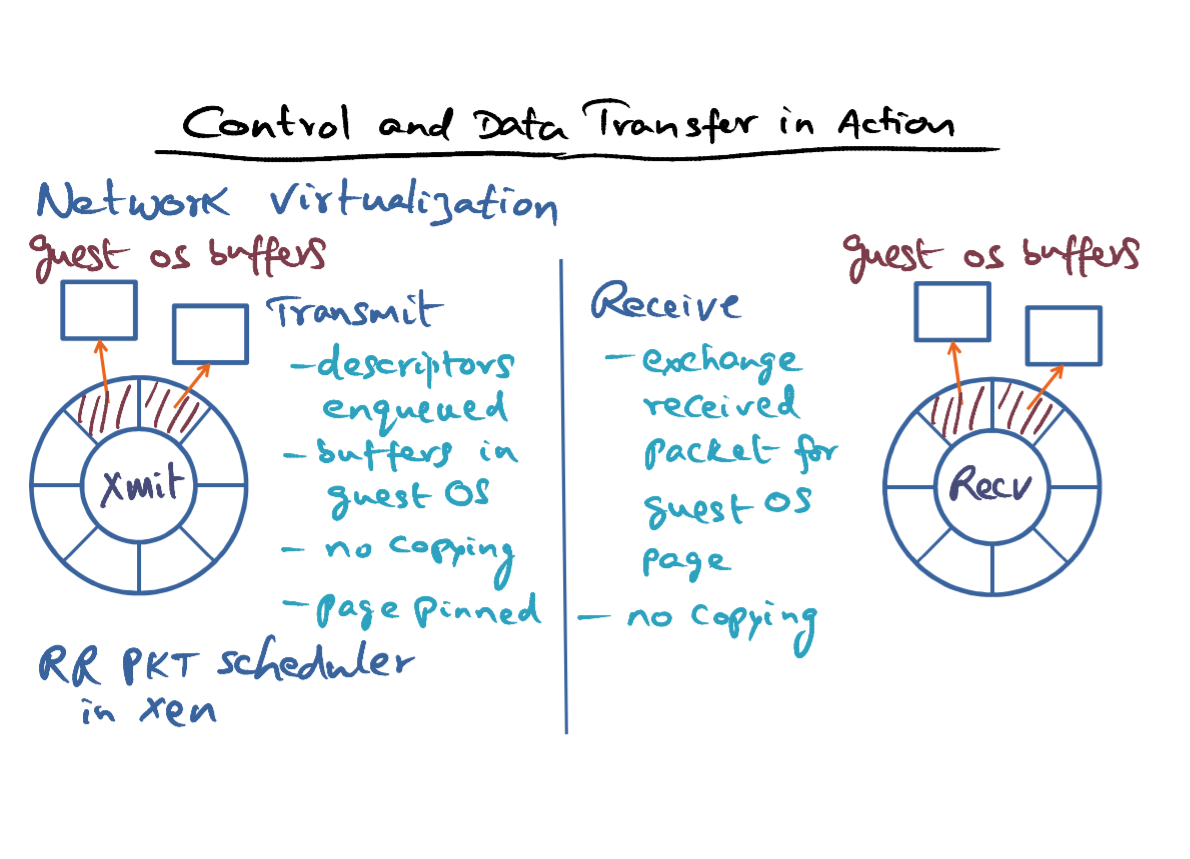
- The first example that we'll look at is how control and data transfer is affected in Xen for a network virtualization. Each guest has two I/O rings, one for transmission and one for reception. If the guest wants to transmit packets, it enqueues descriptors in the transmit I/O ring. And placing these descriptors in this I/O ring is via hypercalls that Xen provide for desktop systems. The packets that need to be transmitted are not copies into Xen, but the buffers that contain these packets are in the guest operating system buffers. And what the guest does is it embeds pointers to these buffers in the descriptors that have been enqueued for transmission by hypervisor. So in other words, there's no copying of the package themselves from the guest operating system buffers into Xen. Because the pointers to the guest operating system buffers have been embedded in these descriptors. And for the duration of the transmission, the pages associated with these network packets are pinned so that Xen can complete the transmission of the packets. Now, this is showing interaction of one guest operating system with Xen. Of course, more than one VM may want to transmit. And what Xen does is it adopts its own round robin packet scheduler,in order to transmit packets from different virtual machines.
- Receiving packets from the network and passing it to the appropriate domain works exactly similar to what I described for transmission except in the opposite direction. What Xen does when it receives a network packet intended for a particular guest, it exchanges the received packet for one of the guest operating system page that has been already provided to Xen as the holding place for incoming packets. In other words, in order to make things efficient, what a guest operating system will do is pre-allocate network buffers which are pages owned by the guest operating system. So when a package comes in, Xen can directly put the network package into the buffer that is owned by the guest operating system. And enqueue a descriptor for that particular guest operating system. So once again, we can avoid copying in the direction of going from Xen to the guest operating system. So one of the cute tricks that Xen also plays, is that when it receives a packet into a machine page, then it can simply exchange that machine page with some other page that belongs to the guest operating system. And there again, it is another trick to avoid copying. Either the guest can pre-allocate a buffer, in which case Xen can directly put that packet into the pre-allocated buffer. Or if Xen receives a packet into a machine page, it can simply swap that machine page for a page that the guest already owns. So those are two different techinques for avoiding copying altogether in the reverse direction as well.
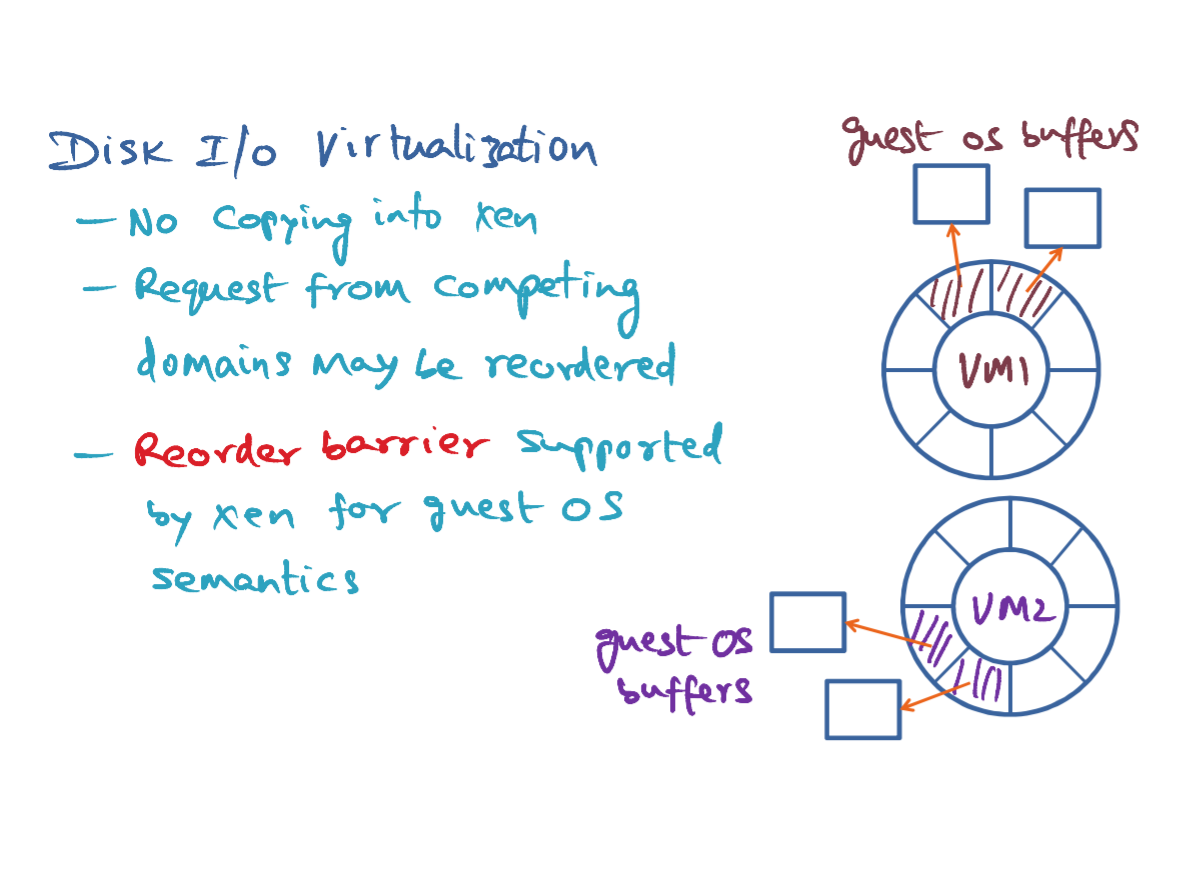
- Disk I/O virtualization works quite similarly. Every VM has an I/O ring which is dedicated for disk I/O. This is an I/O ring associated with VM1. This is an I/O ring associated with VM2. Similar to network virtualization. Here the communication between the guest operating system and Xen strives to avoid copying altogether. No copying into Xen, because what we're doing is we are enqueuing descriptors for the disk I/O that we want to get done with pointers to the guest operating system buffers, where the data is already contained and the transfer has to go into the disk, or a placeholder for the data to come into from the disk. And the philosophy being asynchronous I/O, enqueuing these descriptors into these I/O ring by the guest operating system happens asynchronously with respect to Xen enqueuing responses back for prior requests coming from this VM. Since Xen is in charge of the actual devices, in particular, in this case, the disk subsystem. It may reorder requests from competing domains in order to make the I/O throughput efficient.
- But there may be situations where such a request reordering may be inappropriate from the semantics of the I/O operation. And therefore, Xen also provides a reorder barrier for guest operating systems to enforce that do this operations in exactly the order in which I've given them. Such a reorder barrier for instance may be necessary for higher level semantics such as write ahead, logging, and things like that. So that completes discussion of all the subsystems that need to be virtualized, whether it is by a Fully virtualized environment or a Para virtualized environment. Next, we will talk about usage and billing.
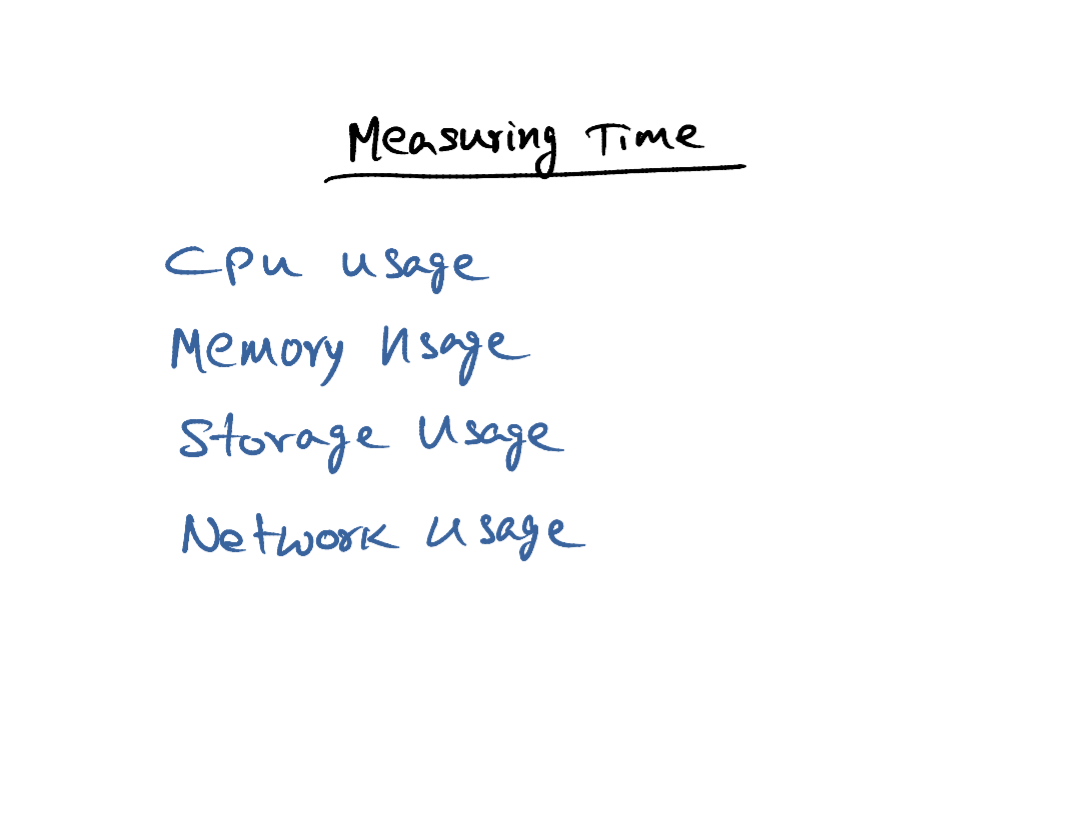
- The whole tenant of utility computing is that, resources are being shared by several potential clients. And we've gotta have a mechanism for billing them, so it's extremely important that we have good ways of measuring the usage of every one of these resources, whether the CPU, memory, storage, or network. And virtualized environments have mechanisms for recording both the time and the space usage of the resources that it possesses, so that it can accurately bill the users of the resources.
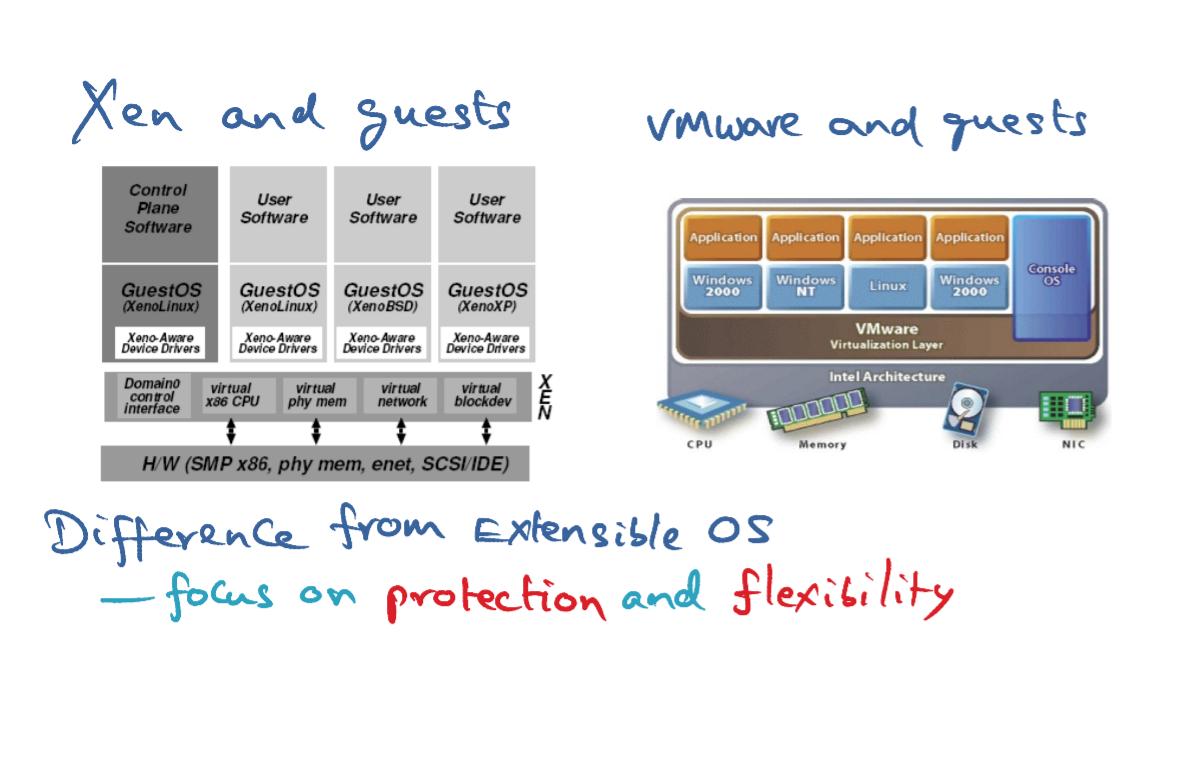
- I want to conclude this course module with a couple of pictures. One showing Xen and guests supported on top of it. And this is from the original paper which shows what are all the resources available. And how they are virtualized and how guest operating systems may sit on top of it. With a similar picture for VMware. As you know, Xen is a para virtualized environment. VMware is a fully virtualized environment. And there's a picture showing how VMware allows different guests to sit on top of its virtualization layer. The main difference of virtualization technology from extensible operating system that we have seen in the earlier course module is, in the case of virtualization technology whether we are talking about para virtualization - Xen. A full virtualization - VMware. The focus is on protection and flexibility. Performance is important, but we are focusing on protection and flexibility and making sure that we are sharing the resources not at the granularity of individual applications that may run on top of the hardware, but at the granularity of entire operating systems that is running on top of the virtualization layer.
- In closing, we covered a lot of ground on operating system structuring. We saw how the vision of extensible services, which had its roots in the HYDRA operating system, and the visualization technology for hardware that started with IBM VM/370. How all culminated in the virtualization technology of today that has now become mainstream. Data centers around the world are powered by this technology. All the major IT giants of the day from chip makers to box makers to service providers are all in this game. Processor chips from both Intel and AMD have started incorporating virtualization support and hardware that makes it easier to implement the hypervisor, especially for overcoming architectural quarks that we discussed in the context of VM were like full virtualization. Even Xen, which started out with para virtualization, has newer version that exploit such architectural features of the processor architectures to run unmodified operating systems on top of Xen, a technique that they call hardware-assisted virtualization.