This is a quick guide on how to develop and contribute to this project
Make sure you can run these commands and install them if not present.
- Python 3.10 or higher
- pip3 (packaged as python3-pip)
- Go to https://discordapp.com/developers/applications (log in if needed)
- Create an application (name doesn't matter)
- Click "Bot" it the left sidebar
- Create a bot
- The bot's name will be what users see in servers
- Changing the bot's name changes the BotToken
- Make note of the token on this page (later refered to as BotToken)
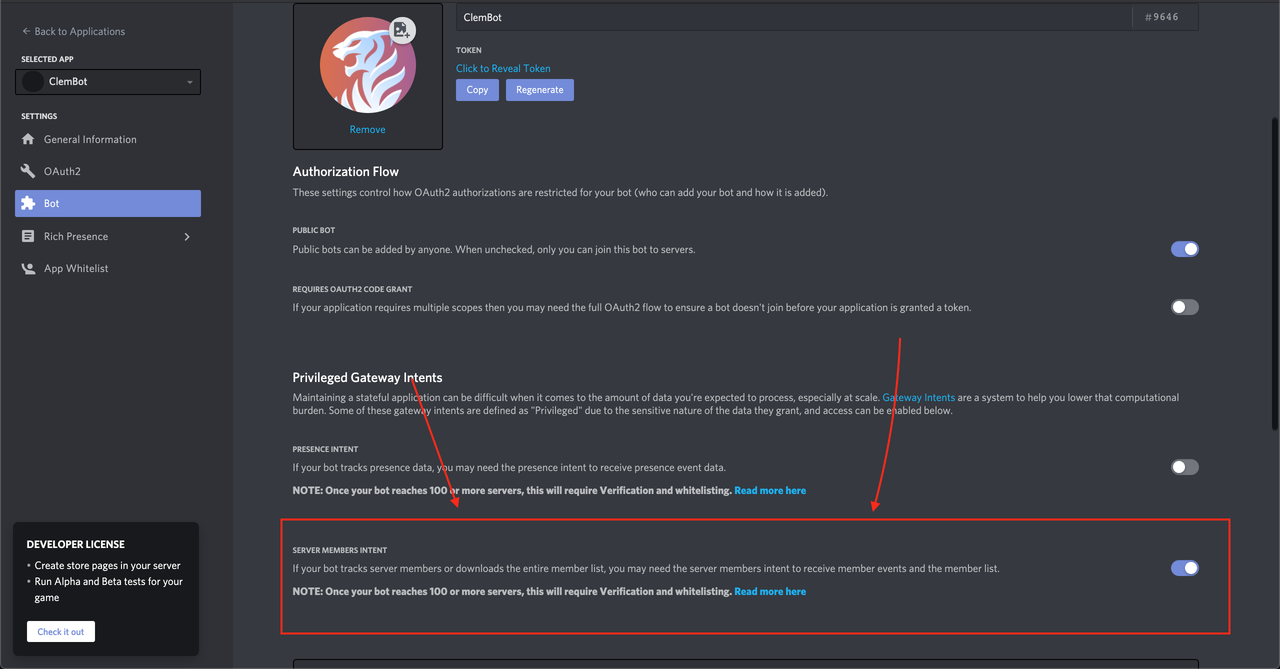
- Enable Discord member intents
Click here to join the server ping @Jayy#6249 for permissions to add bots
- Click "OAuth2" in the left sidebar and click "URL Generator"
- In the "scopes" section, check
botandapplications.commands - In the "bot permissions" section, check the following boxes
- Copy the link from the "scopes" section and open in a new tab/window
- Select the test server to add the bot to

- Fork this repo
git cloneyour fork to wherever you want to work on this bot- Copy
BotSecrets.json.templateand rename that copy toBotSecrets.json - Copy/paste the token from the Discord page into the
BotTokenempty string - Set a custom bot prefix that will invoke your commands
- Copy
BotSecrets.json.templateand rename that copy toBotSecrets.json - Copy/paste the token from the Discord page into the
BotTokenempty string - Copy and paste the channel Ids of the channels in the test server that you want to use for Connection Status updates and Error Logging into the
ErrorLogChannelIdsandStartupLogChannelIds. If you dont want this. Leave the field as an empty brackets, [] - Set a custom bot prefix in the
BotPrefixfield that will invoke your commands
BotToken:(Required) Your discord bots api access tokenBotPrefix:(Required) Your discord bots prefix that it will default to responding tooStartupLogChannelIds:(Optional) The ID of the channel for the bot to send startup events tooErrorLogChannelIds:(Optional) The ID of the channel for the bot to send error events too (recommended if you are doing work with services)GifMeToken:(Optional) GifMe api tokenMerriamKey:(Optional) Merriam api tokenWeatherKey:(Optional) Weather forecast api tokenGeocodeKey:(Optional) Geocode weather service api tokenAzureTranslateKey:(Optional) Azure translation api tokenClassArchiveCategoryIds:(Optional) Discord category IDs for class archival. Required for/classcommand.ClassNotifsChannelId:(Optional) Discord channel ID for class notifications. Required for/classcommand.
Installing Poetry:
pip3 install poetry windows: py -m pip install poetry
Tell Poetry to put the venv in the project folder
poetry config virtualenvs.in-project true
Installing dependencies with Poetry:
poetry install
You can then test-run the bot with the command:
poetry run python3 -m bot windows: poetry run py -m bot
when you are in the directory SockBot/
The bot should show up in the test server and respond to commands (test with <your_prefix>hello)