Summary
Add a theme system to the player UI — multiple selectable visual themes, switchable from Settings → Display, persisted to NVS, applied on boot. The current look stays as the untouched default; new themes are added alongside it.
Design mockups
Theme A — "Ambient" (theme-02.png)
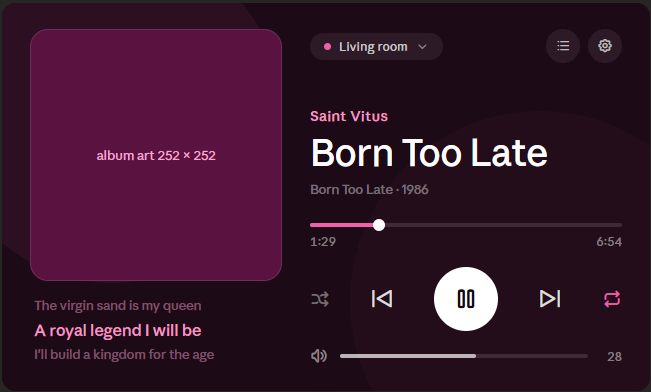
- Refined version of the current layout.
- Background tinted from the album art's ambient/dominant colour (deep purple-pink for pink art, etc.) instead of the static dark grey.
- Left: rounded, tinted album art. Right: pink artist, large white title, album · year, progress bar, transport row, volume slider.
- Synced lyrics bottom-left with the current line highlighted.
Theme B — "Immersive" (theme-03.png)
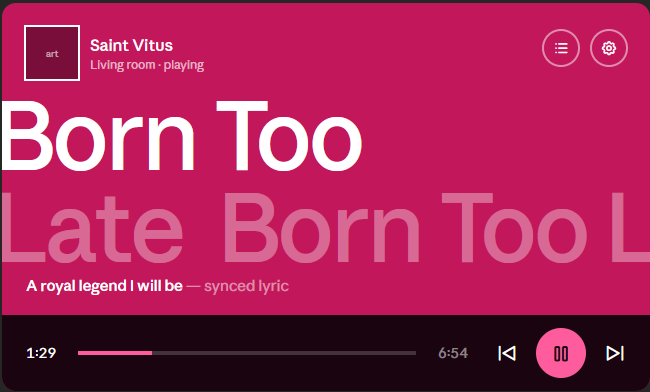
- A different, lyrics-forward layout (not just recolouring).
- Solid saturated ambient colour fills the whole screen (derived from album art).
- Compact header: small art thumbnail + artist + "Living room · playing"; settings/queue top-right.
- Oversized title typography spanning the screen.
- Large translucent background lyric text + highlighted current synced lyric.
- Minimal bottom bar: progress + transport (pink play/pause).
Requirements
- Data-driven / extensible — adding a new theme should be a minimal change (one registry entry), not a rewrite. The settings list and the render logic iterate the registry. (An earlier quick attempt was reverted specifically for not being extensible — this is the key requirement.)
- Selectable in Settings (Display), choice saved to NVS, applied on boot (clamp invalid/stale index).
- Ambient colour derived from album art — machinery already exists (
dominant_color, setBackgroundColor(), g_ambient_bright, blur bg).
- Keep the current theme as the default, unchanged.
- Themes can differ in background treatment AND layout (Theme B is a distinct layout, so themes may need to select different screen builders, not just a colour palette).
Open questions
- Theme B's big-typography + background-lyrics layout — feasibility/perf on the P4 (PPA is currently disabled; all rendering is software).
- Naming for the themes in the settings list.
References
- Mockup sources:
theme/theme-02.png, theme/theme-03.png (committed on branch theme-mockups).
Summary
Add a theme system to the player UI — multiple selectable visual themes, switchable from Settings → Display, persisted to NVS, applied on boot. The current look stays as the untouched default; new themes are added alongside it.
Design mockups
Theme A — "Ambient" (
theme-02.png)Theme B — "Immersive" (
theme-03.png)Requirements
dominant_color,setBackgroundColor(),g_ambient_bright, blur bg).Open questions
References
theme/theme-02.png,theme/theme-03.png(committed on branchtheme-mockups).