Issue Details
|
|
| Source Issue ID |
87526 |
| Checkpoint |
1.3 Adaptable › Lists (1.3.1.f) |
| Impact |
Serious |
| Standards |
wcag2a, wcag2aa, wcag21a, wcag21aa, wcag22a, wcag22aa |
| Test Area |
Side navigation |
| Test Case Name |
AP Trust Registry (Demo) |
| URL |
https://demo.aptrust.org/dashboard |
| Environment |
Production |
| Platform |
Windows |
| Assistive Technology |
JAWS |
| Method |
Manual |
| Digital Asset Type |
Desktop Web |
| Release |
4.2026 |
| Product |
Website |
| Date Reported |
05/05/26 at 8:58 am |
| Unit Type |
Component |
| Issue Type |
Accessibility |
| Reported By |
a3caccess+@gmail.com |
Description
The list or list item is not marked up properly.
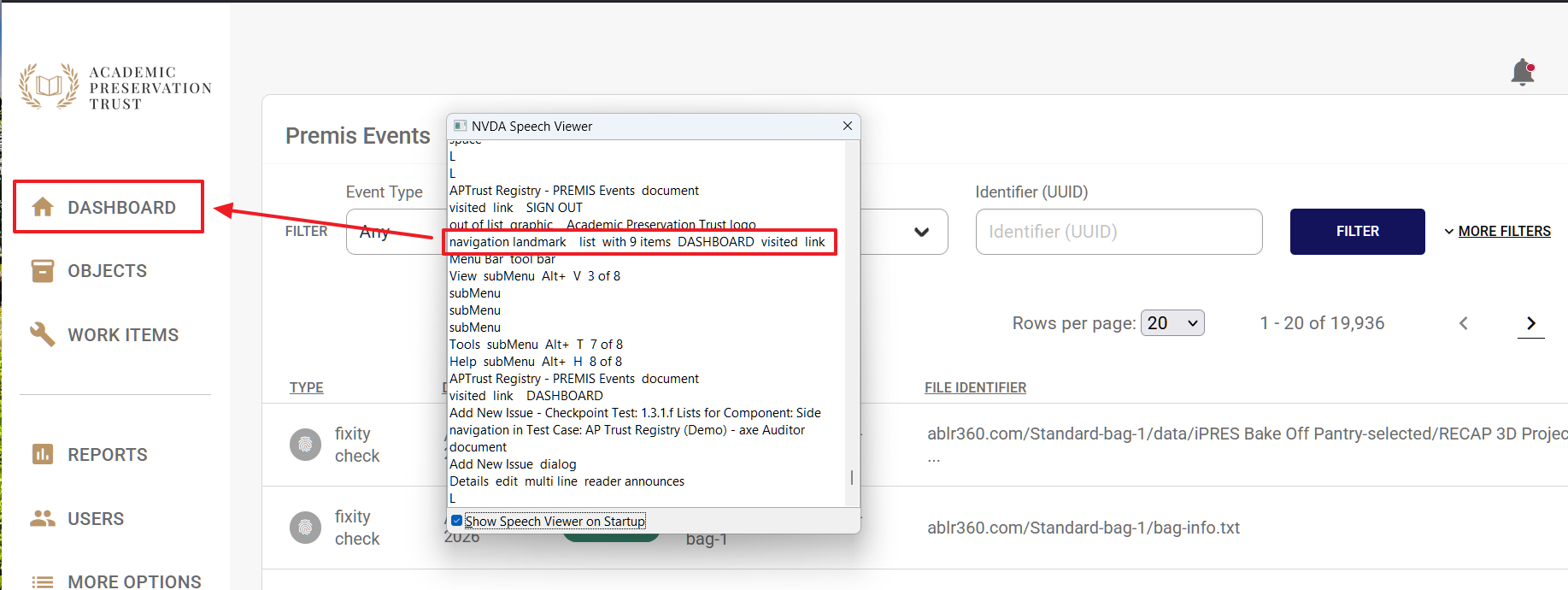
The horizontal lines in the sidebar are marked up as list items. The screen reader announces "List with 9 items" when there are only 7 items.
Recommendation
Rule :
Lists MUST be constructed using the appropriate semantic markup.
How To Fix:
In the sidebar navigation's unordered list, there are several
elements being announced as list items. To prevent them from being announced, apply role="presentation" to the specific
elements containing the
elements.
Reference:
W3C-WAI tutorial: https://www.w3.org/WAI/tutorials/page-structure/content/#lists
Background:
People who can see are able to look at a list and get a sense that it is a list, how large it is, and its structure - whether there are multiple lists, nested lists, etc. People who are blind do not have this ability if the list is not marked with semantic list markup. Lists must be marked semantically in a way that correctly identifies the list structure and type: unordered, ordered, or definition/description. When list markup is correctly applied, screen readers are able to notify users when they come to a list and tell them how many items are in a list.
Source Code
Screenshots
Issue Details
Description
The list or list item is not marked up properly.
The horizontal lines in the sidebar are marked up as list items. The screen reader announces "List with 9 items" when there are only 7 items.
Recommendation
Rule :
Lists MUST be constructed using the appropriate semantic markup.
How To Fix:
In the sidebar navigation's unordered list, there are several
elements being announced as list items. To prevent them from being announced, apply role="presentation" to the specific
elements.
Reference:
W3C-WAI tutorial: https://www.w3.org/WAI/tutorials/page-structure/content/#lists
Background:
People who can see are able to look at a list and get a sense that it is a list, how large it is, and its structure - whether there are multiple lists, nested lists, etc. People who are blind do not have this ability if the list is not marked with semantic list markup. Lists must be marked semantically in a way that correctly identifies the list structure and type: unordered, ordered, or definition/description. When list markup is correctly applied, screen readers are able to notify users when they come to a list and tell them how many items are in a list.
Source Code
Screenshots