Issue Details
|
|
| Source Issue ID |
87528 |
| Checkpoint |
1.4 Distinguishable › Reflow (1.4.10.a) |
| Impact |
Serious |
| Standards |
wcag2a, wcag2aa, wcag21a, wcag21aa, wcag22a, wcag22aa |
| Test Area |
Footer |
| Test Case Name |
AP Trust Registry (Demo) |
| URL |
https://demo.aptrust.org/dashboard |
| Environment |
Production |
| Platform |
Windows |
| Assistive Technology |
JAWS |
| Method |
Manual |
| Digital Asset Type |
Desktop Web |
| Release |
4.2026 |
| Product |
Website |
| Date Reported |
05/05/26 at 9:54 am |
| Unit Type |
Component |
| Issue Type |
Accessibility |
| Reported By |
a3caccess+@gmail.com |
Description
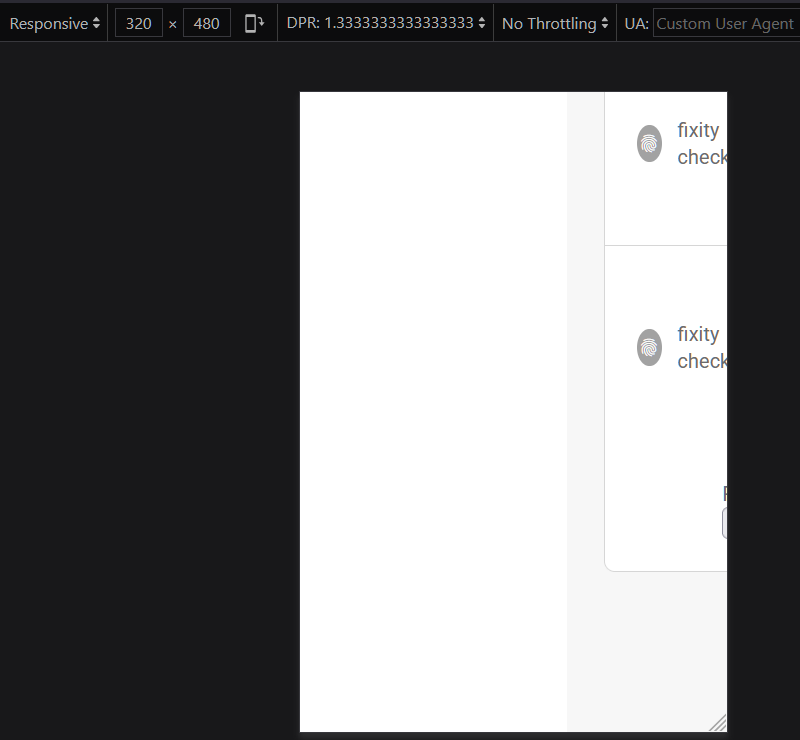
Content does not reflow to fit horizontally within the viewport when the page is adjusted to an equivalent width of 320px.
Global: When in mobile mode (portrait and landscape), the user has to scroll to see the entire page.
Recommendation
Rule :
The content MUST be viewable without scrolling horizontally when the viewport is set to 320 pixel width equivalent.
How To Fix:
Fix this issue by using ANY of the following techniques:
- Use CSS techniques such as media queries, grids, or flexbox to reflow content down to 320px width.
- Provide options within the content to switch to a layout that does not require the user to scroll horizontally to read a line of text.
Reference:
WCAG Understanding document:
https://www.w3.org/WAI/WCAG21/Understanding/reflow
Background:
People with low vision often read content on a desktop computer by scaling content using the browser zoom - up to 400%. When zooming content creates the need to scroll in the direction of reading in order to reveal lines that are cut off by the viewport, it significantly increases the effort required to read text and sometimes causes content hidden off-screen with no way to scroll or pan to it. When content is created so that it reflows at screen widths down to 320px, users can view a web page in a 1280px width browser screen and zoom the content to 400% (320px) without having to scroll side to side to read and without losing access to content.
Source Code
Screenshots
Issue Details
Description
Content does not reflow to fit horizontally within the viewport when the page is adjusted to an equivalent width of 320px.
Global: When in mobile mode (portrait and landscape), the user has to scroll to see the entire page.
Recommendation
Rule :
The content MUST be viewable without scrolling horizontally when the viewport is set to 320 pixel width equivalent.
How To Fix:
Fix this issue by using ANY of the following techniques:
Reference:
WCAG Understanding document:
https://www.w3.org/WAI/WCAG21/Understanding/reflow
Background:
People with low vision often read content on a desktop computer by scaling content using the browser zoom - up to 400%. When zooming content creates the need to scroll in the direction of reading in order to reveal lines that are cut off by the viewport, it significantly increases the effort required to read text and sometimes causes content hidden off-screen with no way to scroll or pan to it. When content is created so that it reflows at screen widths down to 320px, users can view a web page in a 1280px width browser screen and zoom the content to 400% (320px) without having to scroll side to side to read and without losing access to content.
Source Code
Screenshots