Issue Details
|
|
| Source Issue ID |
87718 |
| Checkpoint |
4.1 Compatible › Status Messages (4.1.3.a) |
| Impact |
Serious |
| Standards |
wcag2a, wcag2aa, wcag21a, wcag21aa, wcag22a, wcag22aa |
| Test Area |
06 Alerts |
| Test Case Name |
AP Trust Registry (Demo) |
| URL |
https://demo.aptrust.org/alerts |
| Environment |
Production |
| Platform |
Windows |
| Assistive Technology |
JAWS |
| Method |
Manual |
| Digital Asset Type |
Desktop Web |
| Release |
4.2026 |
| Product |
Website |
| Date Reported |
05/11/26 at 11:45 am |
| Unit Type |
Page |
| Issue Type |
Accessibility |
| Reported By |
a3caccess+@gmail.com |
Description
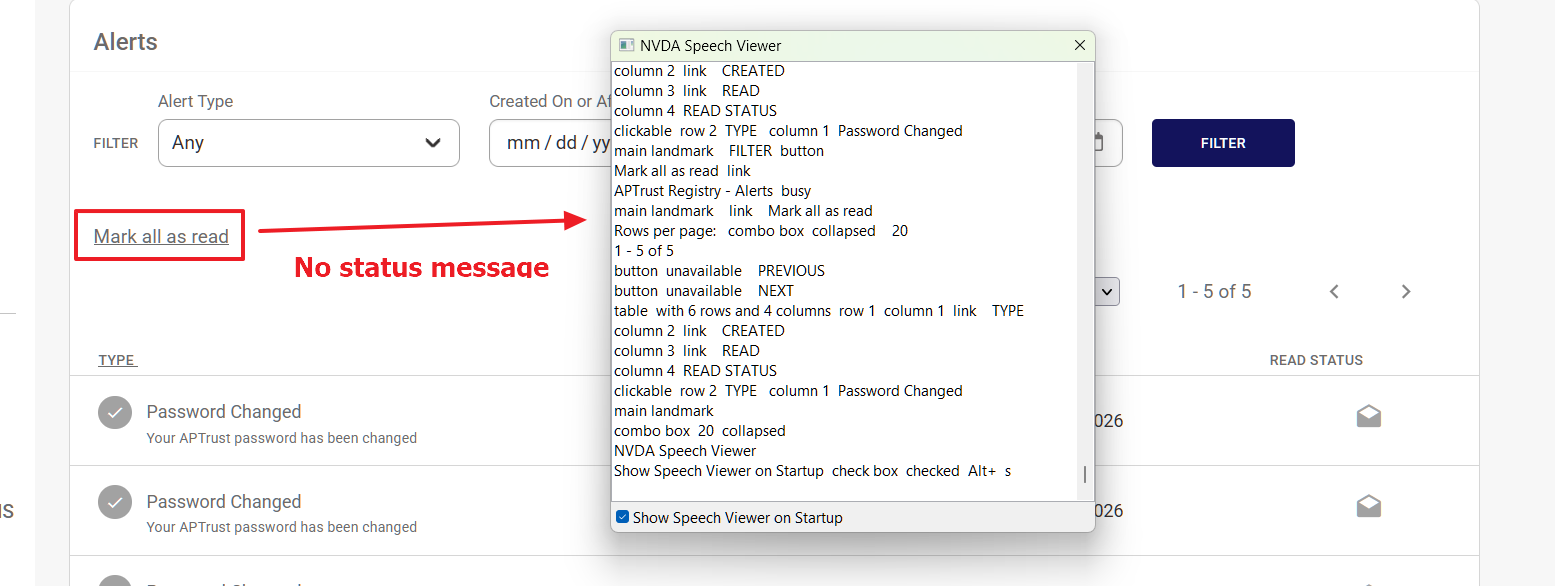
Status message is not automatically announced by the screen reader.
When the Mark All As Read link is activated, there is no indication that anything changed.
Recommendation
Rule :
Status messages MUST be programmatically determined through role or properties such that they can be presented to the user by assistive technologies without receiving focus.
How To Fix:
Create a visible confirmation message and then use an ARIA live region so screen readers can automatically announce the status message content.
Your form was successfully submitted
Please correct the errors below to continue
Reference:
ARIA Live regions: https://developer.mozilla.org/en-US/docs/Web/Accessibility/ARIA/ARIA_Live_Regions
Accessible Toasts: https://www.scottohara.me/blog/2019/07/08/a-toast-to-a11y-toasts.html
WCAG Understanding document: https://www.w3.org/WAI/WCAG21/Understanding/status-messages
Background:
When a status message is added to a webpage, screen reader users will likely not know about the message if focus is not moved to the message. Often it is not desirable to interrupt a user's workflow to move focus to a status message, so people who are blind must be alerted programmatically to the presence of the status message. When a programmatic means of identifying the presence of status messages is used, assistive technologies such as screen readers are able to alert users to the presence of the message.
NOTE: Status messages are defined as a change in content that is not a change of context (i.e. moving focus to a message) that provides information to the user on: 1) the success or results of an action ("Your form was successfully submitted"), 2) the loading state of an application ("processing your data request"), 3) the progress of a process ("50% complete"), or 4) the existence of errors ("Please correct the errors below to continue").
Source Code
<a href="javascript:document.forms['alertsMarkAllAsRead'].submit()" class="is-underlined is-grey-dark">Mark all as read</a>
Screenshots
Issue Details
Description
Status message is not automatically announced by the screen reader.
When the Mark All As Read link is activated, there is no indication that anything changed.
Recommendation
Rule :
Status messages MUST be programmatically determined through role or properties such that they can be presented to the user by assistive technologies without receiving focus.
How To Fix:
Create a visible confirmation message and then use an ARIA live region so screen readers can automatically announce the status message content.
Reference:
ARIA Live regions: https://developer.mozilla.org/en-US/docs/Web/Accessibility/ARIA/ARIA_Live_Regions
Accessible Toasts: https://www.scottohara.me/blog/2019/07/08/a-toast-to-a11y-toasts.html
WCAG Understanding document: https://www.w3.org/WAI/WCAG21/Understanding/status-messages
Background:
When a status message is added to a webpage, screen reader users will likely not know about the message if focus is not moved to the message. Often it is not desirable to interrupt a user's workflow to move focus to a status message, so people who are blind must be alerted programmatically to the presence of the status message. When a programmatic means of identifying the presence of status messages is used, assistive technologies such as screen readers are able to alert users to the presence of the message.
NOTE: Status messages are defined as a change in content that is not a change of context (i.e. moving focus to a message) that provides information to the user on: 1) the success or results of an action ("Your form was successfully submitted"), 2) the loading state of an application ("processing your data request"), 3) the progress of a process ("50% complete"), or 4) the existence of errors ("Please correct the errors below to continue").
Source Code
Screenshots