Issue Details
|
|
| Source Issue ID |
87843 |
| Checkpoint |
4.1 Compatible › Name, Role, Value (4.1.2.a) |
| Impact |
Critical |
| Standards |
wcag2a, wcag2aa, wcag21a, wcag21aa, wcag22a, wcag22aa |
| Test Area |
07 Help - About Dialog |
| URL |
https://aptrust.org/documentation-page/dart-digital-archivists-resource-tool/ |
| Environment |
Production |
| Platform |
Windows |
| Assistive Technology |
JAWS |
| Method |
Manual |
| Digital Asset Type |
Desktop Web |
| Release |
4.2026 |
| Date Reported |
05/13/26 at 10:28 am |
| Issue Status |
Open |
| Unit Type |
Page |
| Issue Type |
Accessibility |
| Reported By |
kim.casey@ablr360.com |
Description
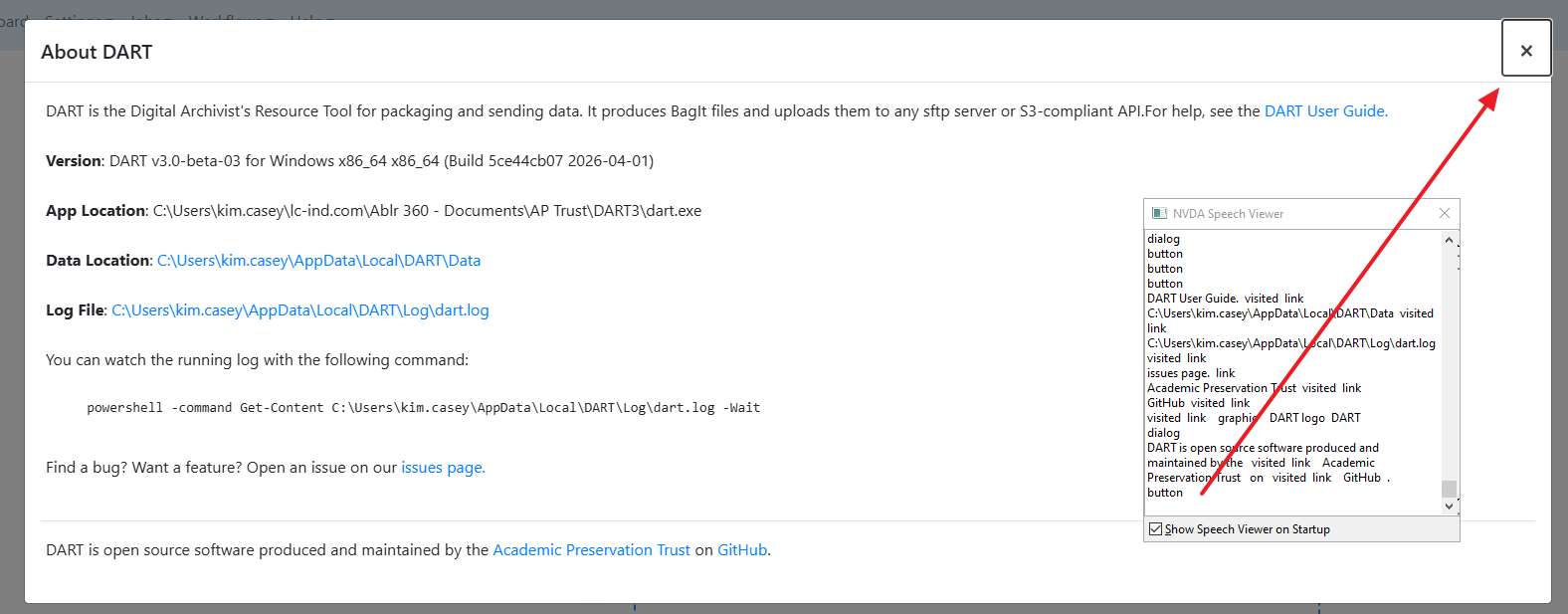
The button is missing an accessible name/label. As a result its functionality or purpose is not conveyed to screen reader users.
In the About DART dialog, the close button is not labeled.
Recommendation
Rule :
The name, role, value, states, and properties of user interface components MUST be programmatically determinable by assistive technologies.
How To Fix:
Fix this issue by using any of the following techniques:
- Use the innertext of the or role="button" element
Apply now!
Apply now!
- Use a non-empty aria-label attribute on the or role="button" element.
Reference:
W3C ARIA Recommendation: https://www.w3.org/TR/wai-aria-1.1/#aria-label
Background:
Buttons must have discernible text that describes the button's function or action for screen reader and other assistive technology users.
Screenshots
Issue Details
Description
The button is missing an accessible name/label. As a result its functionality or purpose is not conveyed to screen reader users.
In the About DART dialog, the close button is not labeled.
Recommendation
Rule :
The name, role, value, states, and properties of user interface components MUST be programmatically determinable by assistive technologies.
How To Fix:
Fix this issue by using any of the following techniques:
Apply now!
Apply now!
Reference:
W3C ARIA Recommendation: https://www.w3.org/TR/wai-aria-1.1/#aria-label
Background:
Buttons must have discernible text that describes the button's function or action for screen reader and other assistive technology users.
Screenshots