Issue Details
|
|
| Source Issue ID |
87513 |
| Checkpoint |
1.3 Adaptable › Headings (1.3.1.e) |
| Impact |
Serious |
| Standards |
wcag2a, wcag2aa, wcag21a, wcag21aa, wcag22a, wcag22aa |
| Test Area |
06 Dashboard |
| URL |
https://aptrust.org/documentation-page/dart-digital-archivists-resource-tool/ |
| Environment |
Production |
| Platform |
Windows |
| Assistive Technology |
JAWS |
| Method |
Manual |
| Digital Asset Type |
Desktop Web |
| Release |
4.2026 |
| Date Reported |
05/04/26 at 8:04 am |
| Issue Status |
Open |
| Unit Type |
Page |
| Issue Type |
Accessibility |
| Reported By |
kim.casey@ablr360.com |
Description
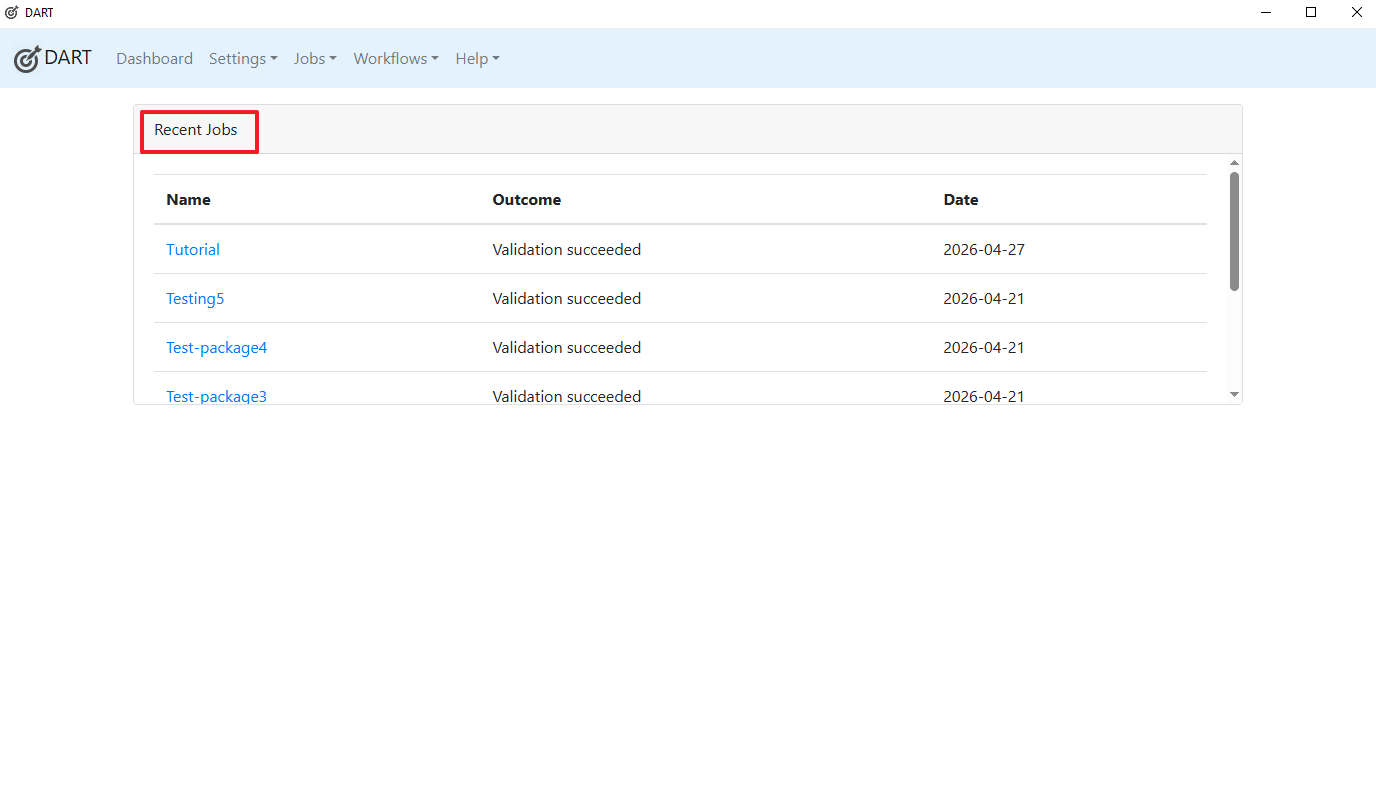
Text appears and functions like a section heading but is not marked up as such.
Recent Jobs should be coded as a heading.
Recommendation
Rule :
Text that acts as a heading visually or structurally MUST be designated as a true heading in the markup.
How To Fix:
Fix this issue by using ONE of the following techniques:
- Use
to
elements to mark text as a heading. Note: Using real HTML headings (
,
, etc.) is preferable when creating new markup.
Types of Web Accessibility Laws
Civil Rights Laws
Procurement Laws
Industry-Specific Laws
- When retrofitting legacy markup, using the role="heading" attribute, combined with the aria-level attribute, can be a useful way to add heading semantics to markup without the risk of breaking any styles that might be attached to the legacy markup. The aria-level attribute value is heading level desired.
Types of Web Accessibility Laws
Reference:
W3C-WAI tutorial: https://www.w3.org/WAI/tutorials/page-structure/headings/
Background:
People who can see are able to quickly scan a page for headings and subheadings to understand the content and structure of a page. People who are blind do not have this ability if heading text is not marked in a way that screen readers can understand. Heading text and hierarchy must be identified semantically with heading markup. When heading markup is correctly applied, screen readers are able to: communicate that text is a heading and its level, provide a heading outline to users, and allow users to navigate directly from heading to heading.
Screenshots
Issue Details
Description
Text appears and functions like a section heading but is not marked up as such.
Recent Jobs should be coded as a heading.
Recommendation
Rule :
Text that acts as a heading visually or structurally MUST be designated as a true heading in the markup.
How To Fix:
Fix this issue by using ONE of the following techniques:
to
elements to mark text as a heading. Note: Using real HTML headings (
,
, etc.) is preferable when creating new markup.
Types of Web Accessibility Laws
Civil Rights Laws
Procurement Laws
Industry-Specific Laws
Reference:
W3C-WAI tutorial: https://www.w3.org/WAI/tutorials/page-structure/headings/
Background:
People who can see are able to quickly scan a page for headings and subheadings to understand the content and structure of a page. People who are blind do not have this ability if heading text is not marked in a way that screen readers can understand. Heading text and hierarchy must be identified semantically with heading markup. When heading markup is correctly applied, screen readers are able to: communicate that text is a heading and its level, provide a heading outline to users, and allow users to navigate directly from heading to heading.
Screenshots